
Best VPNs for Android in 2026: App Tests and Rankings
Updated 1 September 2026- Tested for app stability, reconnection, leaks & mobile speed
- Compared Always-on VPN, split tunneling & Android usability
- Checked official Play Store listings and security-review badges

Quick answer
Surfshark is our best VPN for Android in 2026
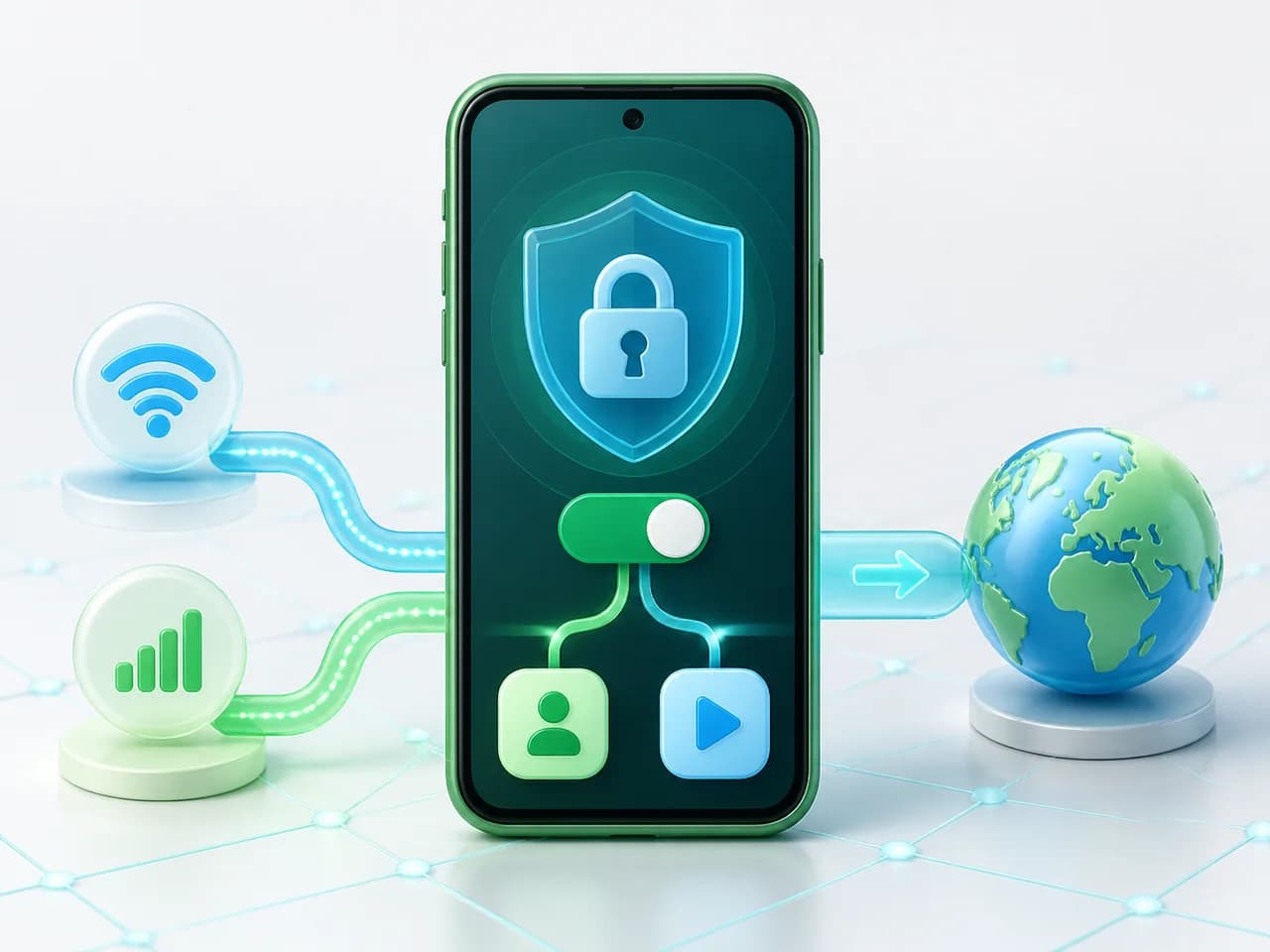
Surfshark is our best VPN for Android in 2026. It ranks first for its easy Android app, unlimited device allowance, strong mobile performance and useful Android-specific controls. NordVPN is second for security and performance, Proton VPN is the best privacy and free-tier choice, and ExpressVPN is the simplest premium alternative. Mullvad is a credible privacy-focused Android option, but it is not included in our scored table because we do not currently maintain a full VPNRank review for it.
- Surfshark: Best overall Android VPN
- NordVPN: Best security and performance
- Proton VPN: Best privacy and free tier
- ExpressVPN: Simplest premium Android app
- IPVanish: Strong multi-device alternative

Surfshark Unlimited device connections at a budget-friendly price. Includes ad blocker and strong privacy tools. Great value for money.
Surfshark Unlimited device connections at a budget-friendly price. Includes ad blocker and strong privacy tools. Great value for money.

NordVPN Excellent speeds with one of the largest server networks. Strong security features and easy-to-use apps. 24/7 live chat support.
NordVPN Excellent speeds with one of the largest server networks. Strong security features and easy-to-use apps. 24/7 live chat support.

Proton VPN Swiss-based VPN with strong privacy focus. Audited no-logs policy and open-source apps. Great for privacy-conscious users.
Proton VPN Swiss-based VPN with strong privacy focus. Audited no-logs policy and open-source apps. Great for privacy-conscious users.

ExpressVPN Ultra fast & secure. Great for privacy, downloads, and everyday browsing on all your devices. 24/7 live chat support.
ExpressVPN Ultra fast & secure. Great for privacy, downloads, and everyday browsing on all your devices. 24/7 live chat support.

IPVanish Fast speeds with unlimited device connections. Strong no-logs privacy and 24/7 live chat support. Great for families.

IPVanish Fast speeds with unlimited device connections. Strong no-logs privacy and 24/7 live chat support. Great for families.

Private Internet Access High-speed VPN with a large server network and advanced security settings. Ad blocker included and 24/7 live chat support.
Private Internet Access High-speed VPN with a large server network and advanced security settings. Ad blocker included and 24/7 live chat support.

CyberGhost Fast speeds and strong privacy tools. Simple apps, automatic WiFi protection, and 24/7 live chat support.
CyberGhost Fast speeds and strong privacy tools. Simple apps, automatic WiFi protection, and 24/7 live chat support.

TotalVPN Affordable VPN with strong privacy and reliable speeds. Easy-to-use apps for all major devices. No-logs policy.
TotalVPN Affordable VPN with strong privacy and reliable speeds. Easy-to-use apps for all major devices. No-logs policy.
Rankings are based on our independent testing methodology. Each guide applies the criteria described on that page, including relevant performance, privacy, product features, and value data. We may earn affiliate commissions from links on this page, which helps fund our testing — this does not influence our rankings.
2026 Rankings At a Glance
| # | VPN | Android score | Lowest long-term price | Money-back | Key strength |
|---|---|---|---|---|---|
| 1 | Surfshark | 9.8/10 | $1.78/mo | 30 days | 3,200+ servers in 100 countries |
| 2 | NordVPN | 9.6/10 | $3.09/mo | 30 days | 7,400+ servers in 118 countries |
| 3 | Proton VPN | 9.4/10 | $2.99/mo | 30 days | 15,000+ servers in 120+ countries |
| 4 | ExpressVPN | 9.2/10 | $2.79/mo | 30 days | 3,000+ servers in 105 countries |
| 5 | IPVanish | 8.9/10 | $2.19/mo | 30 days | 3,200+ servers in 112+ countries |
| 6 | Private Internet Access | 8.7/10 | $1.75/mo | 30 days | Servers in 91 countries |
| 7 | CyberGhost | 8.5/10 | $2.03/mo | 45 days | Servers in 100 countries |
| 8 | TotalVPN | 8.3/10 | $1.59/mo | 30 days | Servers in 50+ countries |
Scores follow our testing methodology. Prices reflect the current long-term promotional rate, billed upfront; term length varies by provider.
Why You Need a VPN on Android
An Android VPN encrypts network traffic between your phone and the VPN endpoint, hides your public IP address from sites and adds protection on networks you do not control. It does not stop every form of app tracking, so permissions, account settings and the developer behind the app still matter.
Encrypt All Mobile Traffic
A VPN encrypts traffic routed through its Android tunnel and replaces your public IP address with the VPN endpoint. Your ISP can still see that a VPN connection exists, but not the destinations carried inside the encrypted tunnel.
Stay Safe on Public WiFi
Coffee shops, airports, and hotel networks are prime targets for man-in-the-middle attacks. A VPN creates a secure tunnel that makes your data unreadable to anyone on the same network — even if the WiFi itself is compromised.
Fast Enough for HD & 4K Video
A nearby server and a modern mobile protocol can keep enough throughput for HD and 4K video. Performance still depends on the phone, WiFi or cellular signal, endpoint load and distance, so we compare stability as well as peak speed.
Stop ISP & App Tracking
A VPN limits what the local network and ISP can infer from destination traffic and hides your public IP from apps and websites. It cannot stop tracking tied to an account, advertising ID, cookies, GPS permission or data entered directly into an app.
What to Look for in an Android VPN
Not all VPN apps perform equally on Android. Here are the key factors we test when ranking VPNs for Android devices:
App Quality & Usability
The best Android VPN apps offer a clean, intuitive interface with one-tap connection. Look for apps with 4.0+ Google Play ratings and regular updates. NordVPN and Surfshark both maintain 4.5+ stars with millions of downloads.
Battery & Data Efficiency
Protocol choice affects reconnection time, processing overhead and battery use. WireGuard-based options are a sensible Android default, but signal quality, background activity and the provider's implementation can matter more than protocol size alone.
Split Tunneling
Android split tunneling lets you choose which apps route through the VPN. This is crucial for banking apps that may block VPN connections, or for conserving battery when full encryption isn't needed.
Kill Switch & Leak Protection
Android's built-in "Always-on VPN" setting works with all top providers to ensure your connection is always protected. Combined with the VPN's own kill switch, this prevents any data from leaking if the connection drops.
How to Set Up a VPN on Android (Step by Step)
Getting a VPN running on an Android phone or tablet takes about three minutes and needs zero technical skill. The short walkthrough below shows the whole process — install, connect, verify it is working, and the two settings worth turning on — and the written steps repeat it so you can follow along.
How do I set up a VPN on my Android phone?
Setting up a VPN on Android is four quick steps: install the official app, allow the one-time VPN permission, tap connect, and confirm the key icon appears in your status bar. The whole thing takes a couple of minutes and needs no technical knowledge.
- Open the Play Store, search your VPN provider's name, and install the official app — check the developer name matches the company.
- Open the app and sign in. When Android asks permission to set up a VPN connection, tap OK — this popup is completely normal.
- Tap the connect button. Pick the nearest server for the fastest everyday speed, or your home country to reach your own content while travelling.
- Swipe down and check for the small key icon in your status bar — that confirms you are protected.
💡 Turn on two settings once and forget them: always-on VPN (auto-connect) so public Wi-Fi never catches you unprotected, and the kill switch (block connections without VPN), which stops all traffic the instant the VPN drops.
Is a free VPN for Android safe?
Unknown free Android VPNs can rely on advertising, trackers or unclear data practices, so check the publisher, permissions, Data safety declaration and independent review badge before installing one. Our safe free choice is Proton VPN Free: no data cap, no ads and an open-source Android app. If you need more countries or stronger streaming support, compare the paid picks and use their refund window to test the app on your own phone.
The Play Store listing answers three questions the app description never will
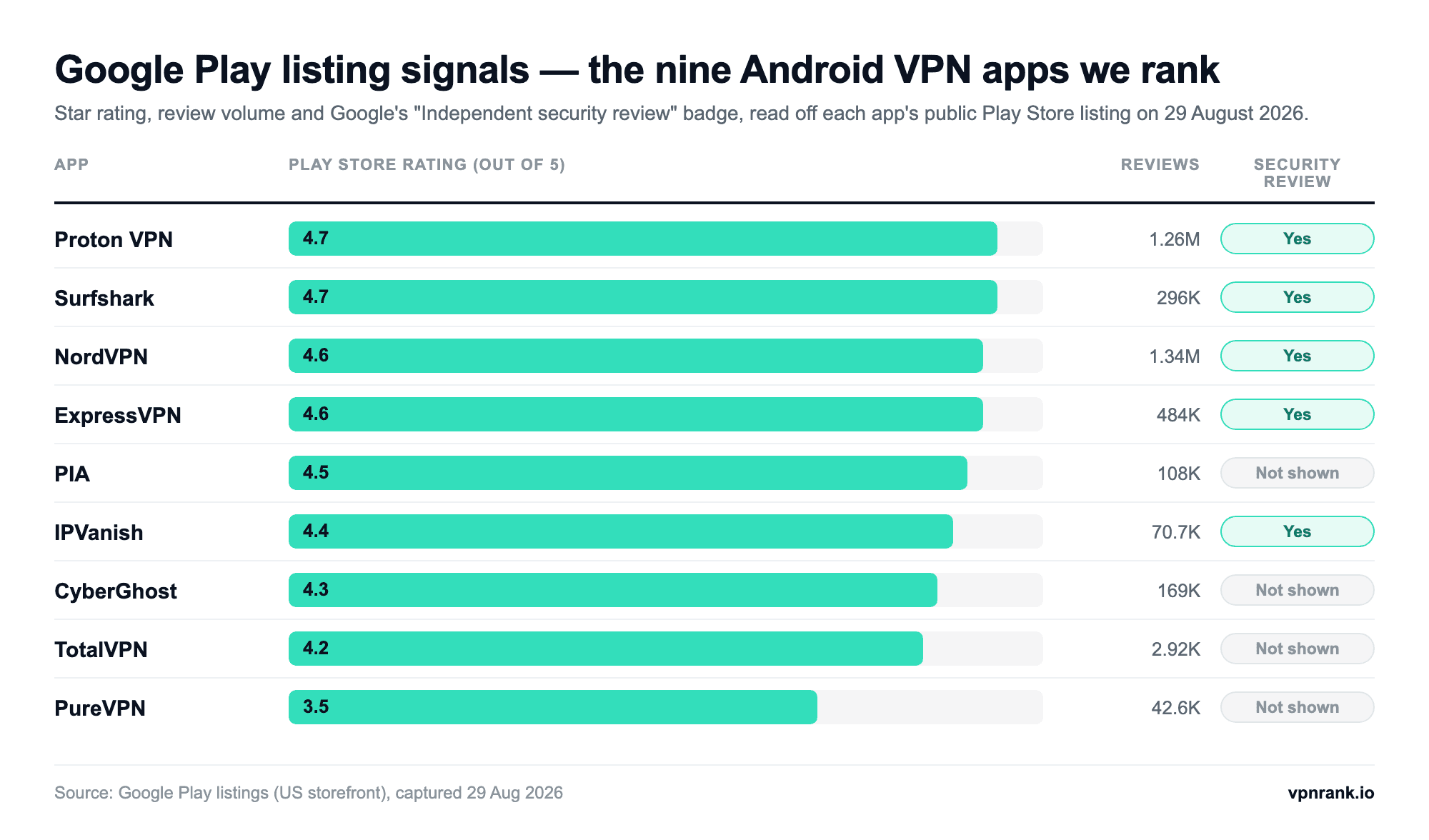
Before any review matters, the listing itself carries four facts you can check in ten seconds: the star average, how many reviews stand behind it, how recently the developer shipped a build, and whether Google shows an Independent security review badge in the Data safety panel. We read all four off the public Play Store listings of the nine apps we rank on 29 August 2026 — no interpretation, just what Google displays.
| App | Rating (reviews) | Installs | App last updated | Independent security review | What the row doesn’t prove |
|---|---|---|---|---|---|
| Proton VPN | 4.7 (1.26M) | 100M+ | 24 Aug 2026 | Shown | A 4.7 across 1.26M reviews says the app is stable and widely used. It says nothing about server speed where you live. |
| Surfshark | 4.7 (296K) | 10M+ | 21 Aug 2026 | Shown | Play ratings mix billing complaints with technical ones — a high average is satisfaction, not a leak test. |
| NordVPN | 4.6 (1.34M) | 100M+ | 21 Aug 2026 | Shown | The largest review count in the set; review volume tracks marketing reach at least as closely as app quality. |
| ExpressVPN | 4.6 (484K) | 100M+ | 28 Aug 2026 | Shown | An update dated the day before we looked shows an active release cadence, not that the change was security work. |
| PIA | 4.5 (108K) | 10M+ | 19 Aug 2026 | Not shown | No badge is not a failed review — the badge only appears if the developer commissioned and passed a paid lab assessment. |
| IPVanish | 4.4 (70.7K) | 10M+ | 15 Jul 2026 | Shown | It carries the badge and still declares data sharing in the same panel; the two fields answer different questions. |
| CyberGhost | 4.3 (169K) | 10M+ | 18 Aug 2026 | Not shown | “10M+” is a coarse Play bucket — anything between 10M and 49.9M installs lands in it. |
| TotalVPN | 4.2 (2.92K) | 100K+ | 27 Apr 2026 | Not shown | A sample roughly 450x smaller than NordVPN’s, so this average moves on far fewer opinions. |
| PureVPN | 3.5 (42.6K) | 5M+ | 21 Aug 2026 | Not shown | The lowest average here is reviewer sentiment, not a measured privacy failure. |
- →Rating and review count: the average is only as meaningful as the sample under it — treat anything below ~50,000 reviews as a thin signal.
- →Installs: Google publishes buckets (100K+, 5M+, 10M+, 100M+), never an exact number, and the bucket counts lifetime installs rather than active users.
- →Last updated: a date within the last few weeks tells you the app is still being maintained against new Android releases. The oldest build in our set is four months old.
- →Independent security review: a Data safety badge, not a star rating — it appears only after an authorised lab has assessed the app.
That last badge is worth understanding because it is the only field on the page that a developer cannot simply type in. It comes from the App Defense Alliance’s Mobile Application Security Assessment, which offers two tiers: AL1, a self-assessment with an APK scan and questionnaire, and AL2, described by the programme as “a comprehensive lab evaluation with static and dynamic analysis”. Only AL2 earns the Play badge, the assessment is carried out by labs Google has authorised, and the certification lasts one year before the developer has to re-certify. Google rolled the badge out to VPN apps first, on the grounds that they handle unusually sensitive traffic.
Practical rule: read the Data safety panel before the marketing pageEverything a VPN says about itself is marketing until something outside the company confirms it. On Android, two fields qualify: the Independent security review badge (a paid, annual, third-party lab assessment) and the publisher entity Google prints under “About the developer”. Five of the nine apps we rank show the badge; four do not.
The company that publishes the app is not always the company in the marketing
Every Play listing ends with an About the developer block: the registered entity behind the app, plus the postal address it gave Google. For VPNs this is unusually interesting, because the entity that publishes the Android app is frequently not the brand name on the website, and the address is frequently not the jurisdiction the marketing emphasises. None of that is a scandal — international companies split legal entities routinely — but it is a fact you can check yourself, which is more than most privacy claims offer.
| App | Publisher entity on the listing | Address given to Google | Declares sharing data with third parties | What this doesn’t prove |
|---|---|---|---|---|
| NordVPN | nordvpn S.A. | Amsterdam, Netherlands | No data shared | A Dutch contact address is a corporate detail — it is not a statement about where any logs would sit. |
| ExpressVPN | Expressco Services, LLC | Greenwood Village, Colorado, US | No data shared | The publishing entity’s country does not tell you which country processes your VPN traffic. |
| Surfshark | Surfshark B.V. | Amsterdam, Netherlands | No data shared | Sharing declarations are self-reported and the developer can update them at any time. |
| Proton VPN | Proton AG | Plan-les-Ouates, Switzerland | No data shared | The Swiss address is verifiable; the no-logs policy itself is a company claim Google does not audit. |
| CyberGhost | CYBERGHOST S.R.L. | Bucharest, Romania | No data shared | An EU-registered publisher affects the entity’s obligations, not automatically the servers you connect through. |
| PIA | PIA Private Internet Access, Inc | Denver, Colorado, US | No data shared | “No data shared” covers the categories Google asks about, not everything a network operator can observe. |
| IPVanish | IPVANISH, INC. | Winter Park, Florida, US | Personal info, app info and performance, device or other IDs | Declared sharing refers to app and account data — it is not a statement about browsing traffic. |
| PureVPN | GZT ASSOCIATES LIMITED | Nicosia, Cyprus | No data shared (declares collecting Location) | Google’s Location category covers coarse app-permission location; it is not evidence of tracking. |
| TotalVPN | TOTAL SECURITY LIMITED | Fareham, United Kingdom | Personal info, app info and performance | The smallest publisher footprint in the set; a UK address says nothing about who owns the servers. |
⚠️ The Data safety panel is declared by the developer, not measured by Google, and it describes the data the app handles — account details, crash logs, device identifiers — rather than the traffic inside the tunnel. Read it as a statement a company has put on the record and can be held to, not as an audit result.
Android’s kill switch is a system setting, not something you buy
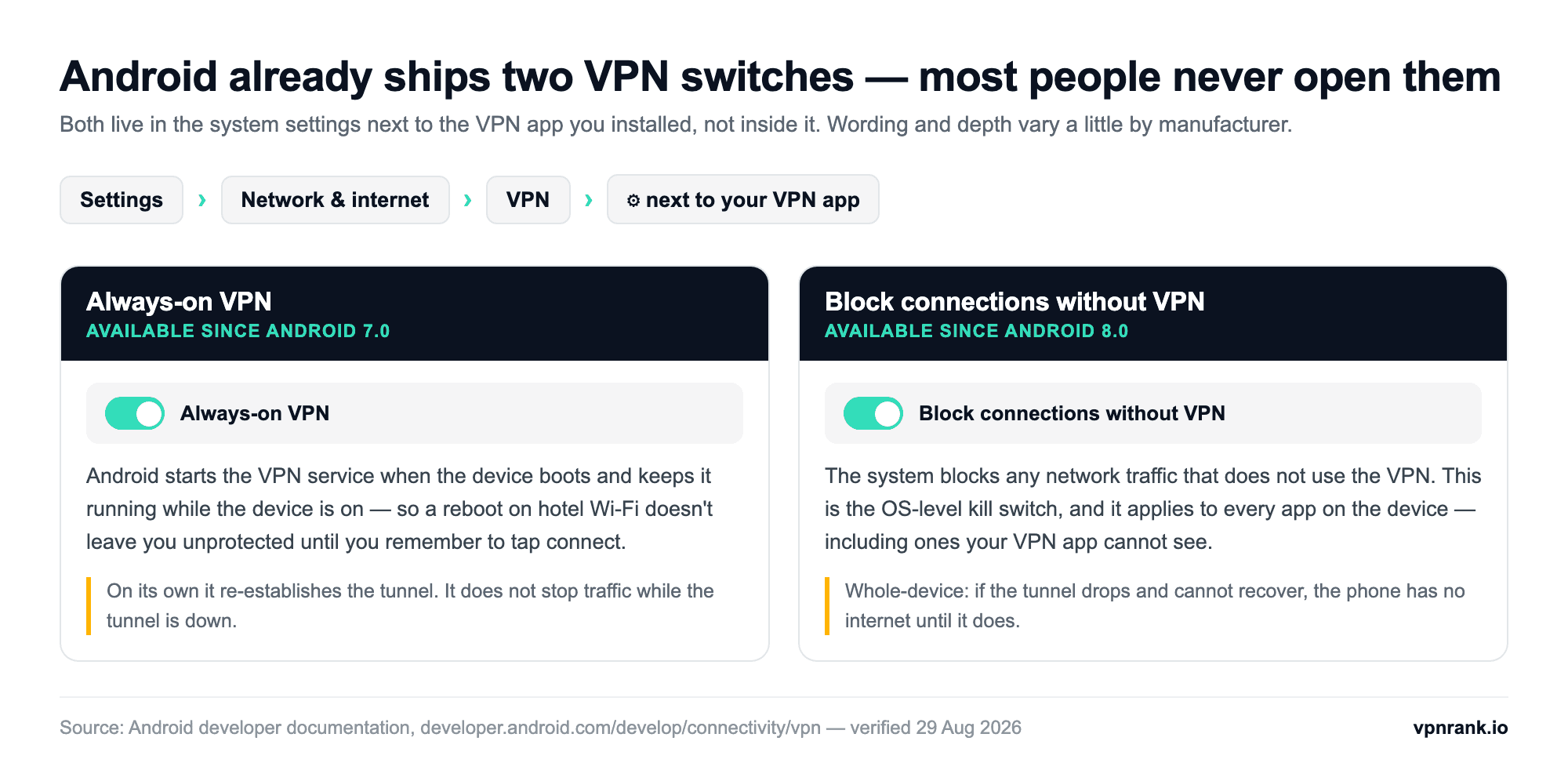
Android has shipped its own always-on VPN behaviour since Android 7.0, and the traffic-blocking switch that turns it into a real kill switch since Android 8.0. Both live in the operating system, next to the VPN app you installed rather than inside it, and they work with any app that uses Android’s VPN service. Turning them on once is the single highest-value thing most people can do to an Android VPN, and it costs nothing.
- Install and sign in to your VPN app first, and connect once — Android shows a one-time connection request dialog asking you to confirm you trust the app. The settings below stay greyed out until you have done this.
- Open Settings › Network & internet › VPN. On Samsung devices the path is Settings › Connections › More connection settings › VPN.
- Tap the gear icon next to your VPN app’s name — not the app name itself, which just connects it.
- Turn on Always-on VPN, then turn on Block connections without VPN.
- Reboot the phone and check the key icon reappears in the status bar without you opening anything.
- →Always-on VPN: Android starts the VPN service when the device boots and keeps it running while the device is on. On its own it re-establishes the tunnel — it does not stop traffic while the tunnel is down.
- →Block connections without VPN: the system blocks any network traffic that does not use the VPN. This is the whole-device kill switch, and it covers apps your VPN app has no visibility into.
- →Per-app routing: Android lets a VPN app filter which installed apps use the tunnel, through either an allowed list or a disallowed list — but, per the platform documentation, not both at once. That is why VPN apps offer split tunnelling one way round or the other, never as a free-form mix.
- →The connection request dialog: the permission popup you see before a VPN connects for the first time is mandated by Android, not by the provider. An app that never shows it is not using Android’s VPN service.
💡 The trade-off worth knowing before you flip the second switch: with Block connections without VPN on, a tunnel that drops and cannot recover leaves the phone with no internet at all until it does. That is the behaviour you want on public Wi-Fi and the behaviour you may not want mid-navigation in a dead zone. Our kill switch explainer covers when to leave it on, and split tunnelling covers excluding an app — usually a banking app that refuses to load through a VPN.
Sideloading an APK swaps Google’s checks for the vendor’s
Most of the providers we rank publish a direct APK download for people who cannot reach the Play Store — a common situation in heavily filtered countries. It is a legitimate distribution route, but it removes a layer: an app that ships through Play is bound by Google’s VpnService policy, which restricts the API to apps whose core functionality is a VPN (plus a short list of exemptions such as parental controls, enterprise management and security tools), requires developers to document their use of VpnService in the listing, requires that data is encrypted from the device to the VPN tunnel endpoint, and forbids redirecting or manipulating traffic from other apps for monetisation.
- →Download only from the provider’s own domain: APK mirror sites re-host binaries that nobody re-verifies, which is the easiest place in the chain to swap a build.
- →Check the developer name, not the app name: the entity in the table above is what the real app publishes under. A clone copies the icon and the title, not the registered publisher.
- →Treat a missing privacy policy link as disqualifying: Play requires one; a sideloaded build with no policy page has skipped the only paperwork anyone was checking.
- →Be suspicious of permissions that have nothing to do with a tunnel: contacts, SMS and accessibility services are not needed to route traffic.
- →Prefer an updated build: sideloaded apps do not auto-update, so a route you take once for install becomes a route you have to remember to repeat.
If the reason you are looking at APKs is cost rather than access, the honest answer is that the free Android market is where the risk concentrates — we cover what is and is not safe on our free VPN for Android page, and the same app on a TV box behaves differently again, which is the subject of our Android TV guide. If you also carry an iPhone or a tablet, the cross-device picture is on our mobile VPN page, and the step-by-step install walkthrough lives in how to set up a VPN on Android.
How to Set Up a VPN on Android
Choose a VPN provider
Pick a provider from the comparison above based on your Android priorities, such as overall usability, privacy, free access or simplicity. Check the current refund terms before subscribing.
Download from Google Play
Search for your VPN in the Google Play Store and install the official app. Avoid third-party APKs for security.
Sign in and select a protocol
Open the app, log in with your credentials, and go to Settings. Select WireGuard or the VPN’s proprietary protocol for the best speed and battery life.
Connect to a server
Tap the connect button or choose a specific server location. For the fastest speeds, select a server close to your physical location.
Verify your connection
Visit a site like ipleak.net to confirm your real IP address is hidden and no DNS leaks are present.
How We Test VPNs for Android
Our Android ranking combines hands-on app checks with connection stability, leak protection, reconnection behavior and current Play Store disclosures. Desktop throughput is used only as supporting context, not as a substitute for testing the Android app.
Speed on Mobile Networks
We run speed tests on both WiFi and 4G/5G cellular connections across 30+ server locations, measuring the real-world impact on download speed, upload speed, and latency.
App Stability
We monitor for crashes, connection drops, and reconnection times over 7-day testing periods. The best Android VPNs maintain stable connections even when switching between WiFi and mobile data.
Battery Drain
We compare battery behavior over extended use while keeping the device, network conditions and screen activity consistent. Results are treated as comparative because radio signal and background apps can materially change phone-level battery measurements.
Privacy Verification
Every VPN is tested for DNS, WebRTC, and IPv6 leaks specifically on Android. We also verify that the kill switch activates correctly when connectivity changes.
The current Android test cycle was completed on 25 August 2026. Play Store listing data was separately re-verified on 29 August 2026.
Frequently Asked Questions
What are the best VPNs for Android in 2026?
Surfshark is our best VPN for Android in 2026, followed by NordVPN, Proton VPN, ExpressVPN and IPVanish. Surfshark is the best overall balance of Android usability, performance, unlimited devices and value. NordVPN is our security and performance pick, Proton VPN leads for privacy and its free tier, and ExpressVPN is the simplest premium option.
Do I need a VPN on Android?
An Android VPN is useful on public WiFi, when you want to hide destination traffic from the local network, or when you do not want sites to see your home IP address. It is not a complete privacy tool: signed-in apps, cookies, advertising IDs and location permission can still identify or track you.
Which VPN protocol is best for Android?
WireGuard or a provider's audited WireGuard-based protocol is the best starting point for most Android users because it reconnects quickly when a phone moves between WiFi and mobile data. OpenVPN remains a useful fallback on networks where the default protocol has trouble connecting.
Will a VPN slow down my Android phone?
Usually by some amount. Encryption and the extra route add overhead, while server distance, cellular signal and endpoint load determine how noticeable it is. Use a nearby endpoint and a WireGuard-based protocol, then compare without the VPN if a mobile connection feels slow.
Can I use a free VPN on Android?
Yes, but avoid unknown, ad-supported Play Store VPNs whose ownership and data practices are unclear. Proton VPN Free is our safest free Android choice because it has no ads or data cap and its Android app is open source. Its free locations and streaming capabilities are more limited than the paid plan.
Does Android have a built-in VPN?
Android includes system VPN controls, including Always-on VPN and, since Android 8.0, Block connections without VPN. The second setting acts as a system-level kill switch. You still need either a VPN provider's app or a manually configured supported VPN profile to supply the servers and service.
How do I set up a VPN on Android?
Download the provider's official app from Google Play, verify the developer name, sign in and tap Connect. Android will show a one-time VPN connection request. After connecting once, open the system VPN settings and enable Always-on VPN; enable Block connections without VPN if you want the system-level kill switch.
What is Always-on VPN on Android?
Always-on VPN is a setting built into Android itself, available since Android 7.0. It tells the system to start your VPN service when the phone boots and keep it running while the device is on, so a restart never leaves you unprotected. It sits in Settings > Network & internet > VPN, behind the gear icon next to your VPN app. A second switch, Block connections without VPN, was added in Android 8.0 and blocks any traffic that is not going through the tunnel — that one is the operating system’s own kill switch, and it applies to every app on the device.
Should I install a VPN from the Play Store or download the APK?
Use the Play Store unless you cannot reach it. Apps distributed through Play are bound by Google’s VpnService policy, which limits the API to apps whose core function is a VPN, requires the use of VpnService to be documented in the listing, requires encryption from the device to the tunnel endpoint, and forbids redirecting traffic from other apps for monetisation. A sideloaded APK skips those checks, does not auto-update, and is only as trustworthy as the domain you downloaded it from — so if you do need one, take it from the provider’s own site and never from an APK mirror.
What does the “Independent security review” badge on Google Play mean?
It means an authorised third-party lab assessed the app under the App Defense Alliance’s Mobile Application Security Assessment at level AL2 — a lab evaluation with static and dynamic analysis, as opposed to the AL1 self-assessment, which earns no badge. The certification lasts one year before the developer must re-certify, and Google introduced it for VPN apps first. Of the nine Android VPN apps we rank, five showed the badge on their Play listing when we checked on 29 August 2026: Proton VPN, Surfshark, NordVPN, ExpressVPN and IPVanish. A missing badge is not a failed review — it usually means the developer has not commissioned the assessment.
Sources & Further Reading
- Surfshark: Android VPN features and app guidance
- NordVPN: Mobile and Android VPN features
- Proton VPN: Official Android app
- Proton VPN: Free Android plan details
- Mullvad: Official Android app
- Android Developers — VPN service, always-on VPN and per-app routing
- Google Play Console Help — Understanding Google Play’s VpnService policy
- App Defense Alliance — MASA assurance levels and the Play “Independent security review” badge
- Google Play — public app listings for the nine VPN apps ranked here (ratings, installs, Data safety, About the developer), read 29 Aug 2026