Does a VPN Slow Down Your Internet? The Real Numbers — and 9 Fixes That Actually Work
Every VPN costs some speed — usually far less than people fear. Here is exactly where the loss comes from, what 2026 testing shows is normal, and nine fixes ranked by how much speed they win back.

vpnrank.io is reader-supported: we may earn a commission if you buy through links in this article. This never affects our rankings.

Yes, a VPN slows your internet, and how much depends on your line speed and the route. In our Q3 2026 benchmark (25 Aug 2026), on a 1 Gbps fiber line the 8 VPNs we benchmark delivered 415–478 Mbps (42–48% of the line, where the VPN server becomes the ceiling); on 200–300 Mbps home lines with a nearby server the providers we test in-region kept 80–93%; long or filtered routes using obfuscation kept 55–65%.
That's why you'll see very different percentages quoted for the same question. The familiar "5–20% slower" rule of thumb only describes ordinary home lines with a nearby server: our in-region results on 200–300 Mbps lines lost 7–20%, and in an independent study, TheBestVPN.com's 2026 test of 30 VPNs on a ~250 Mbps baseline (January–February 2026), the average loss was 20.67%, the best provider lost 6.26% and half kept their loss under 15%. On gigabit fiber the percentage looks far worse because the VPN, not your plan, sets the limit. On slower or distant routes, much of the loss is recoverable with the nine changes below.
How much a VPN slows your internet depends on your line: the 2026 numbers
Two datasets answer this question well, and they measure different things. Ours is a quarterly benchmark on a wired 1 Gbps fiber line in the US East, plus in-region measurements on local lines. The external one, from TheBestVPN.com, tested 30 providers on a ~250 Mbps connection against servers in five regions. Read side by side, they show that the percentage you lose is mostly a function of how fast your line is and how far and how filtered the route is.
| Connection and route | Source | Speed kept | Speed lost |
|---|---|---|---|
| 1 Gbps wired fiber (US East), nearby server, 8 VPNs | vpnrank.io Q3 2026 benchmark, 25 Aug 2026 | 415–478 Mbps (42–48%) | 52–58%: the VPN server is the ceiling |
| 200–300 Mbps local fiber, nearby server (Mexico City, São Paulo, Jakarta, Istanbul, Buenos Aires) | vpnrank.io Q3 2026, in-region tests | 80–93% | 7–20% |
| Long-haul or filtered routes with obfuscation (Bangkok to London or New York; Dubai, Riyadh, Shanghai, Tehran through national filtering) | vpnrank.io Q3 2026, in-region tests | 55–65% | 35–45% |
| ~250 Mbps baseline, 30 providers, servers in five regions, Jan–Feb 2026 | TheBestVPN.com (external study, updated 22 Apr 2026) | 79.33% on average | 20.67% on average (best 6.26%, worst 62.77%; half under 15%) |
How much download speed a VPN keeps, by line speed and route. Our figures: average of multiple runs at different times of day on each provider's recommended protocol; in-region rows cover ExpressVPN and NordVPN (plus Surfshark in Dubai and Riyadh). External figures as published by TheBestVPN.com.
Half of the 30 VPNs TheBestVPN.com tested in early 2026 lost less than 15% of baseline speed. Provider choice and route decide whether you ever notice the VPN at all.
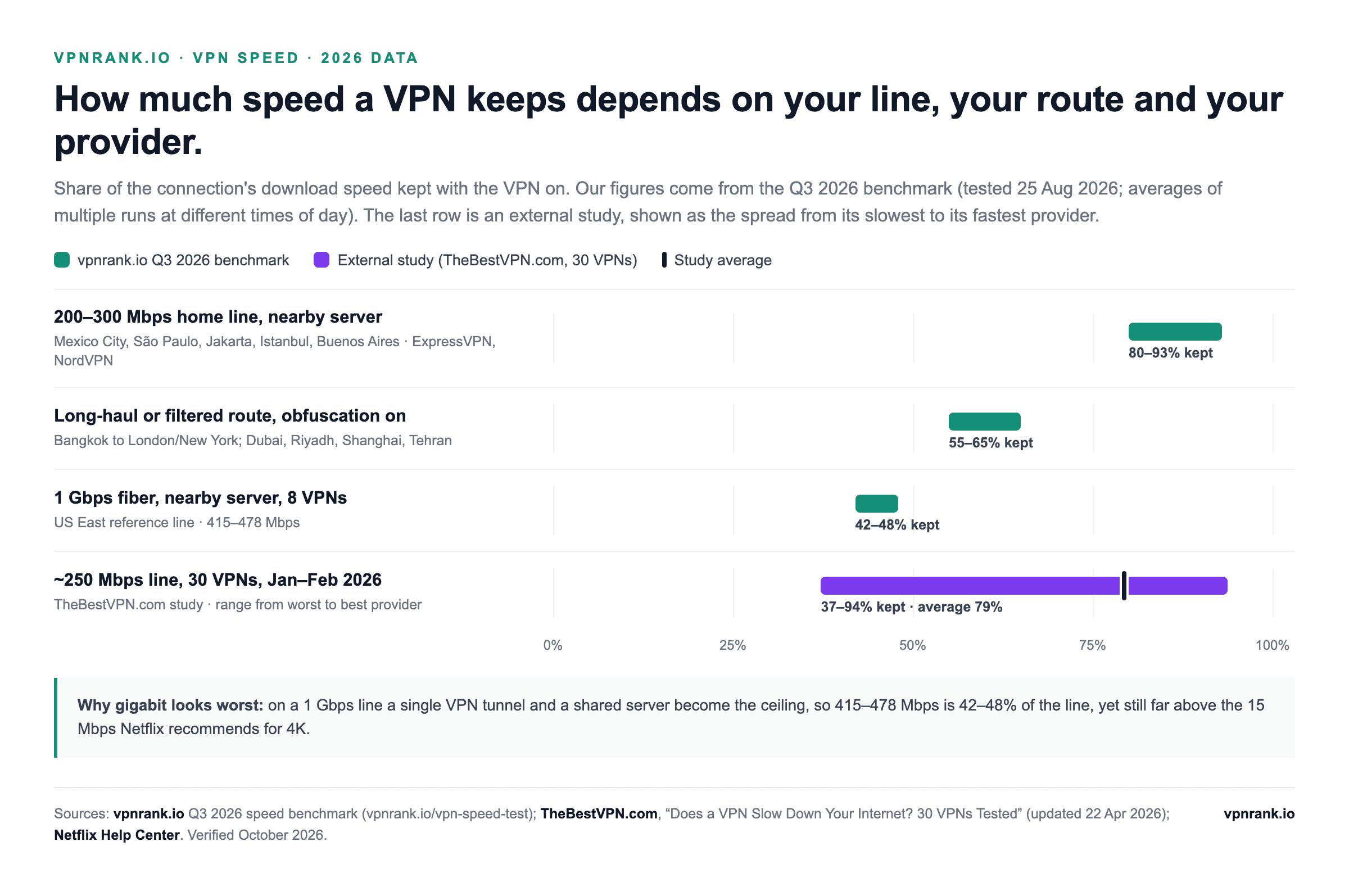
Our gigabit result looks like a huge percentage loss on paper, but it exposes something important about fast plans: a single consumer VPN tunnel rarely delivers full line speed. In the Q3 2026 run, ExpressVPN's Lightway topped the table at 478 Mbps, with IPVanish (468 Mbps) and NordVPN (462 Mbps) within 4% of it, and the one provider measured on OpenVPN-UDP, TotalVPN, came last at 415 Mbps. The full provider-by-provider table lives on our VPN speed test results page. If your plan is 300 Mbps or less, the gigabit row barely applies to you: expect something close to the 80–93% we measured on those lines.
The practical takeaway: beyond the provider you pick, how much a VPN slows you down comes down to four measurable variables, namely encryption overhead, the distance to the server, how busy that server is, and which protocol carries your traffic. Every one of them is at least partly under your control, which is why the fixes later in this guide genuinely work.
A VPN slows your connection in four places: encryption, distance, server load and protocol
A VPN adds work at every stage of a connection. Your device encrypts each packet, the packet detours to the VPN server before reaching its real destination, the server decrypts and forwards it, and the whole process runs in reverse for every reply. Four factors decide how expensive that detour is.
Encryption overhead
Every byte you send is wrapped in AES-256 or ChaCha20 encryption before it leaves your device. On any laptop, phone or desktop made in the past decade this is nearly free: modern CPUs accelerate AES in hardware, so the delay per packet is tiny. Encryption becomes a real bottleneck only on weak hardware, such as a budget router running the VPN for the whole household, an old NAS box or a cheap streaming stick, which can max out its processor long before it fills the line. There is also a small fixed tax on every packet. The tunnel adds its own headers, which is why WireGuard's standard setup tool, wg-quick, sets the tunnel's maximum packet size (MTU) 80 bytes below the connection it runs over. If packets grow past your network's limit they get fragmented, a problem the MTU fix below deals with.
Server distance
Distance is physics, and no app setting overrides it. Light in optical fiber travels at roughly two-thirds of its speed in a vacuum, so every additional 1,000 km to a VPN server adds about 10 ms of round-trip time before routing hops add more. High latency doesn't cut raw bandwidth directly, but TCP transfers slow down as round-trip time grows, and it's latency, not bandwidth, that makes browsing and gaming feel sluggish. Our long-haul measurements show the combined effect: routes from Bangkok to London or New York exits kept 56–59% of a 500 Mbps line, while nearby servers on 200–300 Mbps local lines kept 80–93%.
Server load
A VPN server is a shared computer with a finite network link that everyone connected to it splits. Proton VPN, for example, says all its servers deliver at least 1 Gbps and its paid plans add 10 Gbps servers. During the evening peak a popular location fills up, and a congested server will underperform a quiet one even in the same city. Most good apps show a load percentage or pick the emptiest server automatically, and that information is worth using.
Protocol
The protocol is the rulebook that builds and maintains the encrypted tunnel, and the gap between old and new is large. The WireGuard project's own benchmark measured WireGuard at 1,011 Mbps, the line rate of gigabit Ethernet, without maxing out the CPU, while OpenVPN maxed out the CPU at 258 Mbps on the same hardware. The project itself calls those numbers old (they were run on Linux 4.6), but says OpenVPN still "remains extremely slow" by comparison. OpenVPN over TCP is the slowest common setup of all, because running TCP inside TCP makes two layers of error correction fight each other. Providers' own protocols sit at the fast end: NordVPN says NordLynx is built on WireGuard, and ExpressVPN's Lightway is a separate protocol built on the wolfSSL library. In our Q3 2026 benchmark, the seven providers on WireGuard, NordLynx or Lightway all finished ahead of the one on OpenVPN-UDP.
The fifth factor nobody blames: your own setup
A surprising share of "slow VPN" complaints have nothing to do with the VPN. A weak Wi-Fi link, a device throttling under heat, a browser stuffed with extensions, or a cloud backup quietly filling the uplink all lower the starting point the VPN works from. Because the VPN's cost is proportional, a crippled baseline makes the tunnel look worse than it is, which is why the measurement routine below starts with the VPN switched off.
What counts as normal VPN speed loss in 2026, by line type
Before you troubleshoot anything, know what normal looks like; plenty of people spend an evening chasing a 12% loss that is simply the cost of the tunnel. These reference points come from our Q3 2026 benchmark and the external 2026 study named above, and assume a paid provider on a modern device.
- Home lines up to about 300 Mbps, nearby server: expect to keep roughly 80–93% (our in-region tests), in line with the external study, where half of 30 providers stayed under 15% loss on a ~250 Mbps line.
- Gigabit fiber: expect hundreds of megabits rather than the full gigabit. Our 8 VPNs delivered 415–478 Mbps on a 1 Gbps line, because a single tunnel and a shared server set the limit, whatever your ISP plan says.
- Long-haul or filtered routes with obfuscation: keeping 55–65% is normal. Distance and the disguise layer both cost speed, and neither can be fully tuned away.
- Ping: plan for about 10 ms of extra round trip per 1,000 km between you and the server, plus the time the server itself takes. A server in your own city adds little; one on another continent adds a lot.
- Free VPNs: there's no single figure, because free tiers differ more than paid ones. Many cap data or speed. Proton VPN's free plan says it has no data or speed limits but covers one device, with its 10 Gbps servers reserved for paid plans; our free VPN guide explains which limits actually matter.
Upload speed deserves its own test. Our benchmark publishes download figures, so if you livestream or move large files to the cloud, measure upload with and without the VPN yourself before you pick a provider.
Context matters more than percentages. Netflix recommends 15 Mbps for 4K (UHD) video, 5 Mbps for 1080p and 3 Mbps for 720p, and competitive gaming cares far more about ping than bandwidth. If your VPN leaves you 200 Mbps of a 400 Mbps line, you've technically lost half your speed and will notice nothing, unless you move very large files every day.
On gigabit fibre, the VPN server becomes the ceiling, not your plan
Fibre is where VPN speed loss looks most dramatic and matters least. On our 1 Gbps line in the US East, the fastest of the 8 VPNs we benchmark reached 478 Mbps and the slowest 415 Mbps, so every one kept 42–48% of the line. The bottleneck at that point is the tunnel and the shared server, not your connection. Even so, 415 Mbps is many times what a 4K stream needs. If your fibre plan is 200–300 Mbps, the tunnel is no longer the limit: on those lines, the providers we test in-region kept 80–93% with a nearby server. Gigabit users who need every megabit for large downloads should use split tunneling (fix 3) to keep those transfers outside the VPN.
How to measure your VPN's real cost in ten minutes
Fixing a slow VPN without measuring first is guesswork. A proper before-and-after test takes ten minutes, isolates the variable that's actually hurting you, and stops you from "fixing" things that were never broken. It follows the same logic as our benchmark, which averages several runs at different times of day.
- 1Establish a clean baseline. Disconnect the VPN, close bandwidth-hungry apps (cloud backups, game launchers, streaming), and run three tests on Speedtest.net or fast.com. Record download, upload and ping, then average the three runs.
- 2Connect to your VPN's recommended nearby server and repeat the same three tests against the same test server. Averaging matters, because single runs can swing noticeably on their own.
- 3Calculate your loss: (baseline minus VPN speed) divided by baseline, times 100. Compare the result with the reference points above to see whether you have a real problem or normal overhead.
- 4Change one variable at a time (server first, then protocol, then network) and retest after each change. If you change three things at once, you'll never know which one worked.
- 5Test at the time of day the problem occurs. Networks are busiest in the evening, so a 2 pm test says little about your 9 pm buffering.
Two habits worth stealing from lab testing. First, watch ping and jitter, not just the big download number: a connection showing 300 Mbps with 90 ms of ping and heavy jitter will feel worse for calls, gaming and browsing than a steady 150 Mbps line with 20 ms ping. Second, if you use an iPhone or Mac with iCloud Private Relay on, Apple notes that speed tests which open several connections at once can show lower results, so turn it off while you measure.
Why a VPN slows your internet and how to fix it: nine fixes, ranked by impact
These fixes are ordered by the improvement they deliver for most people, starting with the variables our benchmark shows matter most: route and protocol. Work down the list and retest after each change. For most users, the first two alone recover most of the lost speed.
1. Connect to a closer, emptier server
Server choice is the biggest lever you have. In our Q3 2026 measurements, nearby servers on 200–300 Mbps lines kept 80–93% of the line, while long-haul or filtered routes kept 55–65%. Moving from an intercontinental server to one in your own or a neighbouring country is often the single biggest gain, and the latency improvement is larger still. If your app's recommended pick feels slow, it may simply be overloaded: try two or three specific cities near you and keep the winner. When you genuinely need a distant country, pick the city in that country closest to you.
2. Switch to WireGuard, NordLynx or Lightway
If your app still runs OpenVPN or IKEv2, changing one setting can be the biggest single speed gain on a fast line: in the WireGuard project's benchmark, OpenVPN maxed out the CPU at 258 Mbps while WireGuard reached gigabit line rate. In the app's protocol setting, choose WireGuard (Surfshark, Proton VPN, CyberGhost, PIA and IPVanish all offer it), NordLynx (NordVPN's WireGuard-based protocol) or Lightway (ExpressVPN's own protocol). These modern designs also reconnect faster on mobile. Leave automatic protocol selection on only if it actually picks one of them; some apps quietly fall back to OpenVPN over TCP on a restrictive network and stay there long after the restriction has gone.
3. Use split tunneling for traffic that doesn't need protection
Split tunneling routes only the apps you choose through the VPN, while everything else uses your normal connection at full speed. Send your browser and download client through the tunnel, but exclude game downloads, cloud backup clients and system updates that gain nothing from encryption: they'll run at line speed and leave tunnel capacity for the traffic that matters. Most major apps support it on Windows and Android; on iOS it's patchier because of platform restrictions. The caveat: excluded traffic isn't encrypted and shows your real IP address, so never exclude anything you specifically wanted private.
4. Plug in, or at least fix your Wi-Fi
Wi-Fi is the hidden bottleneck behind many slow-VPN complaints. If your wireless link delivers only 90 Mbps of a 300 Mbps plan, the VPN's percentage cost stacks on top of an already-crippled connection. An Ethernet cable removes the wireless variable and usually steadies ping too. If wiring is impossible, use the 5 GHz or 6 GHz band rather than the crowded 2.4 GHz one, move closer to the router and retest. A speed test with the VPN off, over Wi-Fi and then over a cable, tells you at once whether the radio rather than the VPN is the problem.
5. Tune ports, transport and MTU
Three deeper settings can rescue a connection that stalls or crawls. First, prefer UDP over TCP wherever you have the choice; TCP mode is a compatibility fallback, not a performance option. Second, if your ISP or workplace network shapes VPN traffic, try a different port: port 443 is the port registered for HTTPS, so a tunnel on it looks like ordinary web traffic and often avoids the shaping. Third, check the MTU, the maximum packet size. Tunnel headers shrink the usable payload, and oversized packets get fragmented or silently dropped; the classic symptom is a fast speed test but stalling downloads and half-loading pages. WireGuard's wg-quick subtracts 80 bytes from the route's MTU, so a standard 1,500-byte line gives 1,420. On PPPoE broadband, where RFC 2516 caps the MTU at 1,492, the same rule gives 1,412. To find your own ceiling, ping with the don't-fragment flag at increasing packet sizes and keep the largest size that gets through.
6. Turn off heavyweight features you're not using
Every extra security layer costs throughput. Double VPN or multi-hop sends your traffic through two servers, adding a second detour and a second round of encryption. Obfuscated or stealth modes wrap the tunnel in a disguise layer; our filtered routes that needed obfuscation kept 55–65% of the line, so only use them on networks that actively block VPNs. Ad, tracker and malware filtering (Threat Protection, CleanWeb, NetShield and similar) inspects traffic as it passes and can shave off a little more on slower hardware. Keep the kill switch on, since it doesn't slow the tunnel, but switch the exotic modes off unless you have a concrete reason to run them.
7. Restart, reconnect, update
Unglamorous, and disproportionately effective. Disconnecting and reconnecting usually lands you on a different physical server in the same location, an instant fix if you've been parked on a congested machine for days. Rebooting your router clears bloated connection tables that slow long-running links, and rebooting your device stops background processes quietly eating bandwidth. Finally, update the VPN app: providers ship performance improvements constantly, and a two-year-old client may predate your provider's move to a modern protocol.
8. Upgrade the weakest link in the chain
Sometimes the honest fix costs money. If you run the VPN on your router to cover every device at once, the router's processor is very often the cap, whatever your line speed; our VPN router guide lists models built to handle it. If you're on a free tier, speed and data limits may be part of the deal, so check what the provider states before you blame the network. And if your base connection is under 50 Mbps, no VPN tweak will make it feel fast; at that point the ISP plan is the bottleneck worth upgrading.
9. Ride the off-peak hours
Home broadband congests on a predictable daily curve. The FCC's Measuring Broadband America program defines the peak period as weeknights from 7 pm to 11 pm local time, and its twelfth fixed-broadband report found ISPs' delivered-to-advertised speed ratio lowest in that four-hour block. Popular VPN servers fill up in the same evening hours. Two ways to use that: schedule heavy transfers (cloud restores, game libraries, large uploads) for overnight, when both your ISP and the VPN server are quiet; or connect to a server in a time zone where it's currently the middle of the night, which can sometimes beat a crowded local server even after the distance penalty.
Tired of tuning? Some providers simply keep more of your speed than others. See which VPNs kept the most of a gigabit line in our latest benchmark and ranking.
See our top-ranked VPNs →When a VPN actually makes your internet faster
It sounds like marketing, but there are two situations where adding a VPN can increase your measured speed. Both come down to the same principle: your ISP doesn't always give your traffic the best treatment available, and an encrypted tunnel stops it from playing favourites.
The first is throttling. Some ISPs slow specific kinds of traffic, such as video streaming, torrents or game downloads, once they identify them, especially on congested networks or after a monthly data threshold. A VPN encrypts everything into a stream the ISP can't classify, so it can't apply the brake selectively. If Netflix crawls at 8 pm while a plain speed test shows full bandwidth, throttling is a prime suspect; our streaming VPN guide covers which providers handle sustained high-bitrate video best.
The second is routing. Your ISP's default path to a distant server isn't always the fastest one available, particularly at peak times or toward less common destinations. Large VPN providers buy their own transit and peering, and occasionally the path through their network beats your ISP's default; gamers sometimes see lower ping to a specific game server through a well-placed VPN endpoint for exactly this reason. It's the exception rather than the rule, but it takes five minutes to test.
Slow speeds, or something more serious? Two quick health checks
Occasionally a slow VPN is a symptom of misconfiguration rather than distance or load, and the same misconfigurations that hurt performance can quietly undermine the privacy you installed the VPN for. Two checks are worth running whenever performance changes unexpectedly.
- Run a DNS leak test. If your DNS lookups escape the tunnel to a slow or distant resolver, every page load lags even when raw bandwidth looks fine, and your ISP still sees every site you visit. Our DNS leak explainer covers how to test for and fix it in about two minutes, and our VPN test checks your visible address.
- Check your browser for WebRTC leaks. A WebRTC leak won't slow you down, but it can reveal your real IP address while you believe you're protected; our WebRTC leak test rules it out in seconds.
And if every server, every protocol and every network still leaves you well below the reference points above on a paid plan, the problem may simply be the provider. Speed differences between VPNs are measurable, so compare yours with the field on our speed test results page and in our current VPN ranking before you renew.
Every source behind this guide was re-read in October 2026
- vpnrank.io VPN speed test results — our Q3 2026 benchmark, tested 25 Aug 2026 (1 Gbps US East reference line and in-region measurements)
- TheBestVPN.com — Does a VPN Slow Down Your Internet? 30 VPNs Tested (2026) (external study; last updated 22 Apr 2026)
- WireGuard — Performance (1,011 Mbps vs 258 Mbps for OpenVPN; the project notes the benchmarks are old)
- WireGuard tools — wg-quick source (tunnel MTU set 80 bytes below the route MTU)
- RFC 2516 — PPP over Ethernet (PPPoE) (PPP MTU no greater than 1,492)
- IANA — Service Name and Transport Protocol Port Number Registry (port 443 registered for https)
- NordVPN — NordLynx protocol and ExpressVPN — Lightway
- Proton VPN — free VPN plan (no data or speed limits, one device; servers of at least 1 Gbps)
- Netflix Help Center — Internet connection speed recommendations
- FCC — Measuring Fixed Broadband, Twelfth Report (peak period 7–11 pm local time)
- Apple Support — About iCloud Private Relay (effect on speed tests)
Frequently asked questions
How much speed loss is normal with a VPN?
It depends on your line. In our Q3 2026 benchmark, on 200–300 Mbps home lines with a nearby server, the providers we test in-region kept 80–93% of the speed; on a 1 Gbps fiber line the 8 VPNs we benchmark delivered 415–478 Mbps (42–48%); long or filtered routes with obfuscation kept 55–65%. An external 2026 study of 30 VPNs on a ~250 Mbps line found an average loss of 20.67%, with half under 15%.
Does a VPN slow down fibre or gigabit internet more?
In percentage terms, yes. On a 1 Gbps fiber line the 8 VPNs in our Q3 2026 benchmark delivered 415–478 Mbps, or 42–48% of the line, because a single VPN tunnel and a shared server become the ceiling. That's still far more than any stream needs. On 200–300 Mbps fibre plans the VPN is rarely the limit: with a nearby server, the providers we test kept 80–93%.
Why does a VPN slow down my internet, and how do I fix it?
Four things cost speed: encrypting every packet, the detour to the VPN server (about 10 ms of extra round trip per 1,000 km), a busy shared server, and an old protocol. The fixes that recover the most are connecting to a closer, emptier server and switching to WireGuard, NordLynx or Lightway; then split tunneling, a wired connection, UDP instead of TCP, and the right MTU.
Which VPN protocol is fastest in 2026?
Modern protocols: WireGuard, NordLynx (NordVPN's WireGuard-based protocol) and Lightway (ExpressVPN's own protocol). In the WireGuard project's benchmark, WireGuard reached gigabit line rate (1,011 Mbps) while OpenVPN maxed out the CPU at 258 Mbps; the project says those numbers are old but OpenVPN is still much slower. In our Q3 2026 benchmark, all seven providers on those protocols beat the one on OpenVPN-UDP.
Does a VPN increase ping for gaming?
Yes, almost always. Encryption adds very little; the detour to the server adds about 10 ms of round trip per 1,000 km, plus the server's own processing. For competitive play, connect to a VPN server in the same city or region as the game server. Occasionally a VPN lowers ping by routing around a congested ISP path, but treat that as a bonus, not an expectation.
Why is my VPN suddenly slower than usual?
The usual suspects: you've been assigned a congested server (reconnect to fix it), the app quietly fell back to a slower protocol such as OpenVPN over TCP on a restrictive network, evening congestion on your ISP or the server, or an update changed your settings. Run a baseline test without the VPN first, because sudden slowdowns are often the ISP, not the tunnel.
Do free VPNs slow internet more than paid ones?
Often, but not always, because free tiers differ widely. Many cap data or speed, or share a small set of servers among many users. Proton VPN's free plan, for example, says it has no data or speed limits but allows one device, and keeps its 10 Gbps servers for paid plans. Check what a free plan states about limits before assuming it will be slow or fast.
Can my ISP throttle or slow my VPN connection?
Some ISPs deprioritize or shape traffic they identify as VPN, though it's uncommon on major home broadband networks. If you suspect it, switch the VPN to port 443, the port registered for HTTPS, so the tunnel looks like ordinary web traffic, or turn on your provider's obfuscated mode. Conversely, a VPN stops your ISP throttling specific activities like streaming, because it can no longer see what the traffic is.
Does a VPN slow down Wi-Fi more than a wired connection?
The VPN's own overhead is the same, but weak Wi-Fi lowers your starting point, so the combined result feels much slower. If your wireless link caps at 90 Mbps on a 300 Mbps plan, the VPN's percentage loss stacks on top of that. Test wired against wireless with the VPN off; if the gap is large, fix the Wi-Fi before blaming the VPN.
The best VPNs of 2026, ranked
Now you know how — here are the VPNs we recommend, independently tested and ranked for speed, streaming, privacy and value. Any of them works for everything in this guide.

ExpressVPN Ultra fast & secure. Great for privacy, downloads, and everyday browsing on all your devices. 24/7 live chat support.
ExpressVPN Ultra fast & secure. Great for privacy, downloads, and everyday browsing on all your devices. 24/7 live chat support.

IPVanish Fast speeds with unlimited device connections. Strong no-logs privacy and 24/7 live chat support. Great for families.

IPVanish Fast speeds with unlimited device connections. Strong no-logs privacy and 24/7 live chat support. Great for families.

NordVPN Excellent speeds with one of the largest server networks. Strong security features and easy-to-use apps. 24/7 live chat support.
NordVPN Excellent speeds with one of the largest server networks. Strong security features and easy-to-use apps. 24/7 live chat support.

Proton VPN Swiss-based VPN with strong privacy focus. Audited no-logs policy and open-source apps. Great for privacy-conscious users.
Proton VPN Swiss-based VPN with strong privacy focus. Audited no-logs policy and open-source apps. Great for privacy-conscious users.

CyberGhost Fast speeds and strong privacy tools. Simple apps, automatic WiFi protection, and 24/7 live chat support.
CyberGhost Fast speeds and strong privacy tools. Simple apps, automatic WiFi protection, and 24/7 live chat support.

TotalVPN Affordable VPN with strong privacy and reliable speeds. Easy-to-use apps for all major devices. No-logs policy.
TotalVPN Affordable VPN with strong privacy and reliable speeds. Easy-to-use apps for all major devices. No-logs policy.

Private Internet Access High-speed VPN with a large server network and advanced security settings. Ad blocker included and 24/7 live chat support.
Private Internet Access High-speed VPN with a large server network and advanced security settings. Ad blocker included and 24/7 live chat support.

Surfshark Unlimited device connections at a budget-friendly price. Includes ad blocker and strong privacy tools. Great value for money.
Surfshark Unlimited device connections at a budget-friendly price. Includes ad blocker and strong privacy tools. Great value for money.
Rankings are based on our independent testing methodology. Each guide applies the criteria described on that page, including relevant performance, privacy, product features, and value data. We may earn affiliate commissions from links on this page, which helps fund our testing — this does not influence our rankings.