How to Watch Paramount+ From Abroad in 2026
Your account doesn't travel with you — but with the right setup it can. A plain-English guide to Paramount+'s regional libraries, the VPN method, and fixing proxy errors.

vpnrank.io is reader-supported: we may earn a commission if you buy through links in this article. This never affects our rankings.

To watch Paramount+ from abroad, keep using your existing home account: install a reputable VPN, connect to a server back in your home country, clear the app's cache or cookies, then reopen Paramount+ so it reads your home IP address. Your library, sports, and account all load exactly as they do at home.
What Paramount+ actually is, and why it looks different abroad
Paramount+ is a single brand wearing very different outfits depending on where you open it. In the United States it is a sports-and-CBS powerhouse; in the UK and Australia it leans on Showtime dramas and Paramount films; in Latin America it is a football destination. The catalogue you paid for is tied to the country you signed up in, not to you.
That is the crux of the travel problem. Streaming rights are sold territory by territory, so Paramount licenses a show or a match for one country and not another. When you land in a new country, Paramount+ reads your IP address, decides you are 'in' that market, and quietly swaps your catalogue, or blocks the app outright if the service does not operate there at all. Nothing is wrong with your account; the platform is simply obeying the map.
As of 2026, Paramount+ operates as a standalone service in the United States, Canada, Mexico, the UK, Ireland, Australia, France, Germany, Austria, Switzerland, Italy, and across much of Latin America (Brazil, Argentina, Chile, Colombia and more). In many other European markets the same content lives under the SkyShowtime brand instead. So a Paramount+ subscriber from Germany visiting Spain will not find a Paramount+ app to log into at all.
Asia is the gap on that map, and it widened this year. Paramount+ closed its Japanese service on 31 March 2026, a little over two years after opening it, so a subscriber landing in Tokyo has no local Paramount+ to fall back on. South Korea went the other way but ends up in the same place for a traveller: the content returned in November 2025 as a hub inside Coupang Play rather than as a Paramount+ app, and a foreign account cannot sign into it. In both countries the only route to your own library is a connection back to your home country.
The SkyShowtime overlap matters more than it sounds. Across much of central and eastern Europe, the Nordics, Portugal, Spain and the Netherlands, Paramount's shows are bundled into SkyShowtime rather than a Paramount+ app, which means a Paramount+ subscriber landing in Madrid or Amsterdam cannot simply download Paramount+ and sign in. Their account does not exist on that store, and even the web player will not recognise their credentials. This is the scenario where a VPN back to the home country is not a convenience but the only route in.
What's on Paramount+ by region
The single biggest reason travellers get frustrated is assuming Paramount+ is one global library. It is not. Understanding what belongs to which region tells you exactly which home server you need to connect to, and whether the show you are chasing even exists on the version of Paramount+ you can reach.
United States: sports and CBS-first
The US service is the sports flagship. It carries NFL on CBS, and crucially it holds exclusive English-language streaming rights to every UEFA Champions League match through the 2029-30 season, alongside Serie A and other football. On the scripted side it is the home of the Star Trek universe, including Strange New Worlds, and the ever-expanding Yellowstone family of spin-offs. If you are American and travelling, this is almost always the catalogue you want to reach.
UK and Ireland: Showtime, films and select sport
In the UK and Ireland, Paramount+ launched in 2022 and is available both as a standalone app and as an add-on channel through Amazon Prime Video. The appeal here is the Showtime drama library, Paramount's film slate, and originals like the various Yellowstone prequels. British subscribers travelling in Europe or the US will find their home catalogue and pricing only by connecting back to a UK server.
Canada and Mexico: North American variants
Canada and Mexico each run their own Paramount+ storefront with pricing and catalogues distinct from the US. Canada is notable because Paramount+ holds full UEFA club-competition rights there for the 2027-2031 cycle, so Canadian football fans will increasingly treat it as their Champions League home. For a traveller, the practical takeaway is the same as everywhere else: a Canadian account only shows its full library when you connect to a Canadian server.
Australia and Latin America
Australia's Paramount+ carries a mix of Showtime content, films, and some local and A-League football. In Latin America, Paramount+ has leaned hard into sport, streaming the FIFA World Cup 2026 across the region and holding rights to part of the UEFA club-competition schedule for the 2027-2031 cycle. Each of these is a distinct catalogue tied to a distinct set of servers.
Australia is a useful illustration of how narrow these rights can be. Its Paramount+ leans on Showtime series and films rather than blockbuster live sport, so an Australian traveller is usually reconnecting home for dramas, not matches. Latin America is the mirror image: sport is the whole point, which is why the region's rights calendar, from the World Cup through the next Champions League cycle, is the thing subscribers there watch most closely.
A note on the Champions League
This one trips people up constantly. Paramount+ is the exclusive English-language Champions League home in the United States, but not in the UK (where the competition currently sits with TNT Sports and Amazon Prime Video) or Australia (Stan Sport). So if you are chasing a specific match, first confirm which country's rights cover it, then connect to that country. Our sports streaming hub and the dedicated World Cup 2026 guide map out who broadcasts what, where.
The Champions League map changes in 2027 — and Paramount+ is the reason
For the coming season nothing moves. Through 2026-27, Paramount+ is the exclusive English-language Champions League home in the United States, British and Irish viewers watch on TNT Sports with Amazon Prime Video taking first pick of Tuesday nights, and Australians watch on Stan Sport. The season after that, the picture inverts. Paramount has won the UK and Ireland rights from 2027-28 through 2030-31, in a deal reported at well in excess of the £1bn TNT Sports currently pays, and it takes the majority of matches. Prime Video keeps its Tuesday game through the same cycle, while the Europa League and Conference League went to Sky Sports rather than to Paramount.
| Market | 2026-27 season | From 2027-28 | Home country to connect to |
|---|---|---|---|
| United States | Paramount+, exclusive English-language rights (through 2029-30) | Paramount+ | United States |
| UK & Ireland | TNT Sports, plus Prime Video's first pick on Tuesdays; TNT carries the 2027 final | Paramount+ takes the majority; Prime Video keeps Tuesdays through 2030-31 | United Kingdom |
| Australia | Stan Sport (every match); Nine shows the final free-to-air | Stan Sport's current deal runs to 2027 | Australia |
Rights tables verified August 2026 against the broadcasters' own listings and the trade reporting of the 2027-31 UK deal. For a traveller this is a two-step change, and the second step is the interesting one. Today a British subscriber chasing a Champions League night from a hotel abroad needs a UK server plus a TNT Sports or Prime Video login, and their Paramount+ account is irrelevant to the match. From August 2027 the same person needs a UK server plus their Paramount+ account, exactly as an American does now. If you keep a VPN mainly for football, note that the country you connect to is not changing — the app you open is. Our Champions League VPN guide tracks that switchover, and the wider sports streaming hub maps who holds what.
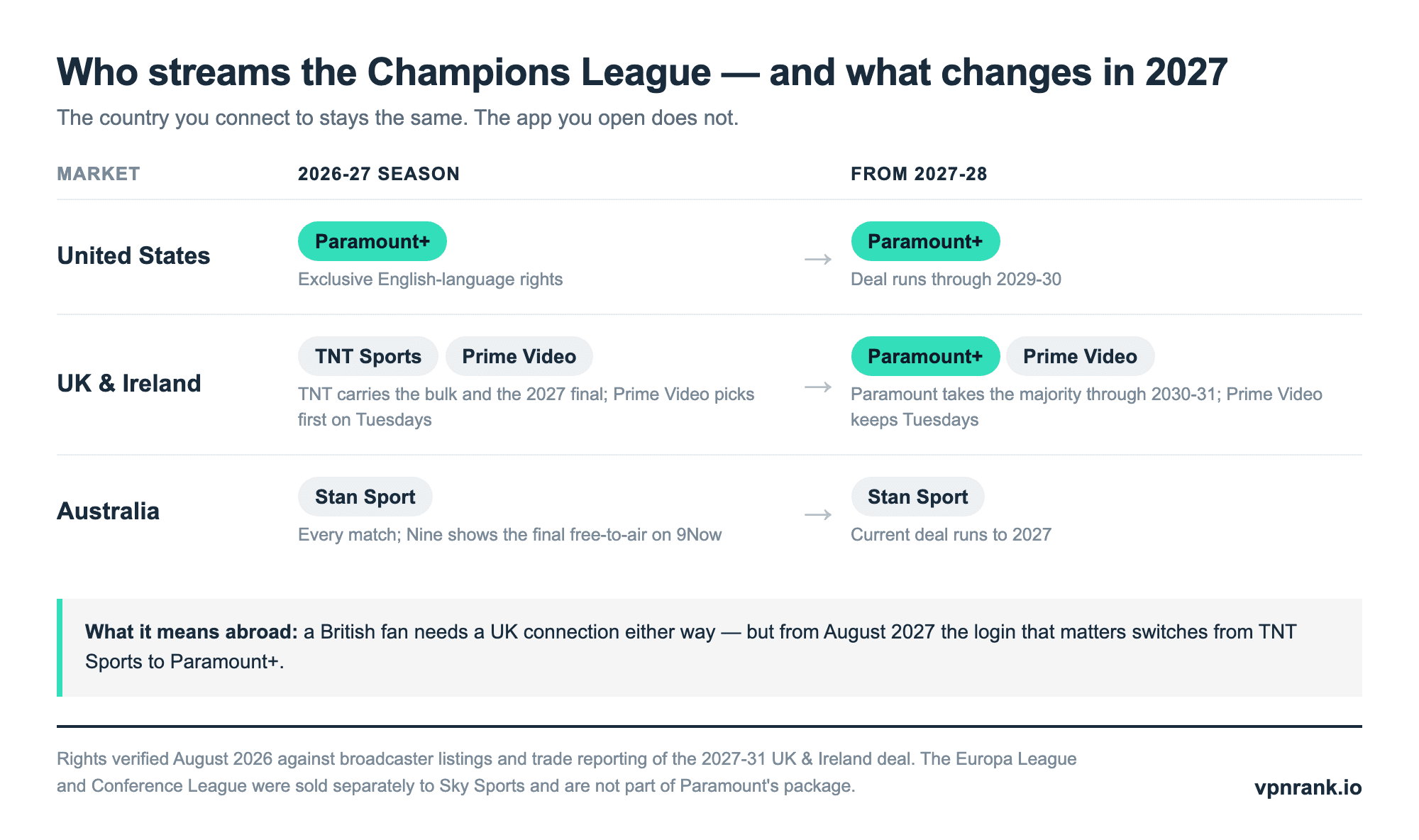
One detail worth keeping if you are Australian and travelling: the Nine Network shows the final free-to-air on 9Now, which is a genuinely free feed rather than a subscription tier, so the single biggest match of the season is the one where a home connection matters most and costs least. Everywhere else on that table, the match sits behind a paid account you already hold — which is precisely the continuity problem a VPN solves.
Where Paramount+ operates — and what it costs
Because your billing country is fixed at signup, the price you pay travels with you even when the catalogue does not — so it is worth seeing the whole map in one place. The past year has been busy: the US took a $1 rise on both tiers on 15 January 2026 (and phased out free trials), Mexico's prices went up on February 24, Brazil's in February, Australia's rose across every tier, and the UK and Ireland are mid-increase as you read this — covered in detail just below. UK and Irish figures re-verified 17 August 2026; the other markets were verified in July 2026 against each region's signup pages. Treat the local-currency columns as the real ones, because only the dollar column goes stale on its own: those conversions use exchange rates read on 17 August 2026 (£1 = $1.35, €1 = $1.16, C$1 = $0.72, A$1 = $0.71, MXN 1 = $0.059, R$1 = $0.19).
| Country / region | Paramount+ available? | Entry plan (local) | Top plan (local) | Top plan approx. USD |
|---|---|---|---|---|
| United States | Yes | Essential $8.99 (ads) | Premium $13.99 | $13.99 |
| UK & Ireland | Yes | Basic £5.99 (ads) | Premium £12.99 | ≈$17.59 |
| Canada | Yes | Basic C$7.99 (ads) | Premium C$15.99 | ≈$11.53 |
| Australia | Yes | Basic with Ads A$7.99 | Premium A$17.99 | ≈$12.74 |
| Germany & Austria | Yes | Basis €5.99 (ads) | Premium €12.99 | ≈$15.03 |
| France | Yes | Standard €7.99 | Premium €10.99 | ≈$12.72 |
| Italy | Yes | Standard €8.99 | Premium €13.99 | ≈$16.19 |
| Mexico | Yes | Standard MXN 149 | Premium MXN 199 | ≈$11.69 |
| Brazil | Yes | Standard R$34.90 | Premium R$44.90 | ≈$8.66 |
| Spain, Netherlands, Nordics, Central & Eastern Europe | Not as Paramount+ | — | Content lives inside SkyShowtime instead | — |
A few things stand out. Brazil is comfortably the cheapest full Paramount+ in the table even after its February 2026 rise — its top tier converts to under two-thirds of the US Premium price, and to roughly half the new British one. Britain and Ireland have just taken the opposite title: at £12.99 their Premium plan is now the most expensive top tier in the table in dollar terms, overtaking Italy, which held that spot until this month. France is the odd one out structurally: it has no ad-supported tier at all, so its entry price is higher but every French subscriber streams ad-free. And that last row matters most for travellers: across the SkyShowtime markets there is no Paramount+ app to sign into, which is exactly the full-block scenario described below — a VPN back to your home country is the only route to your own account from Madrid, Amsterdam, Stockholm or Warsaw.
The UK and Ireland increase landing on 27 August 2026
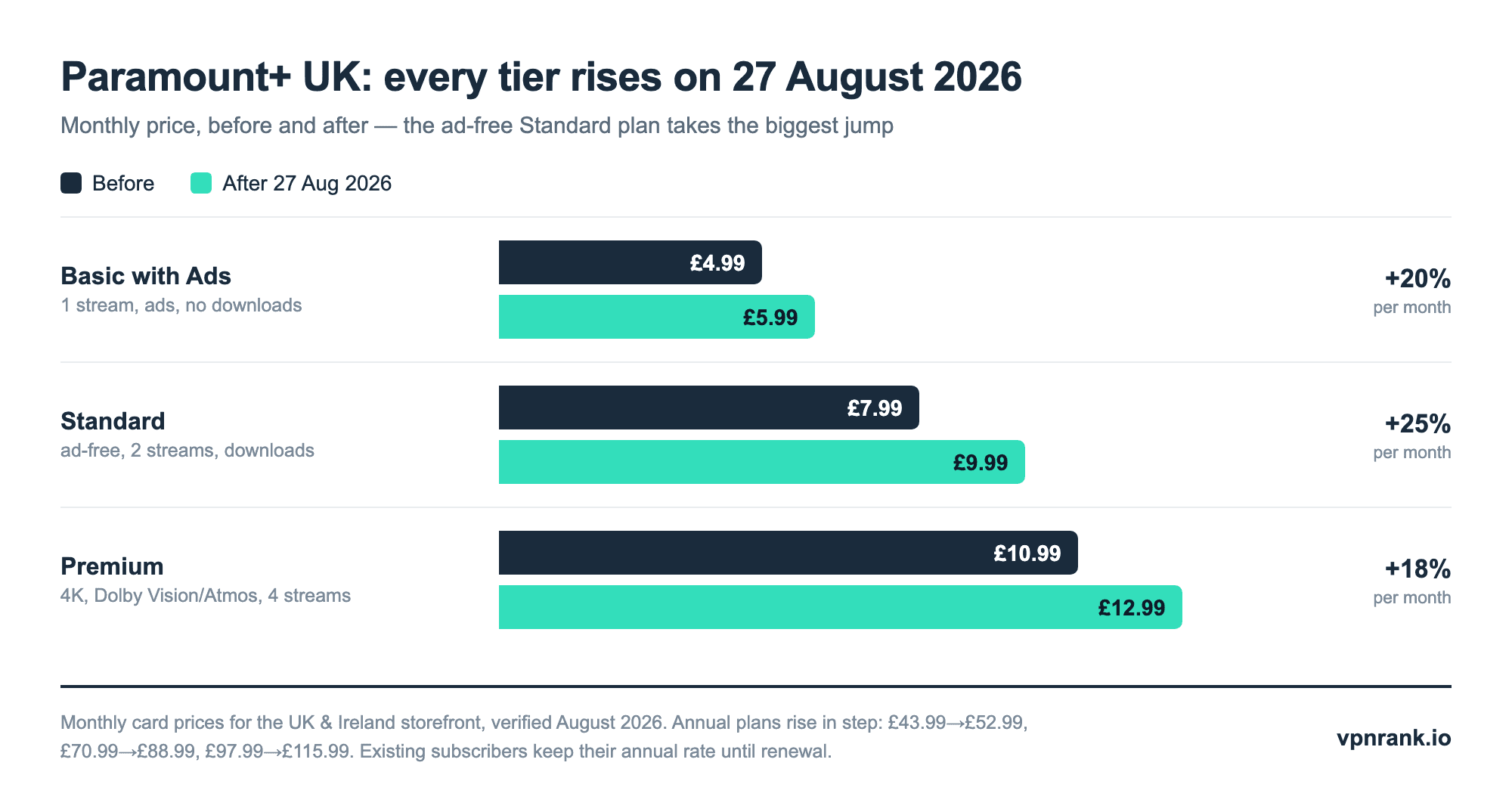
If your Paramount+ account is British or Irish, this is the date to know this month. Every UK tier is going up, and the change is arriving in two waves: the higher prices are already what new subscribers are quoted, while existing subscribers — including everyone billed through Three, which resells Paramount+ alongside its mobile plans — move onto them from 27 August 2026.
| UK & Ireland plan | Ads? | Monthly before | Monthly after | Annual before | Annual after |
|---|---|---|---|---|---|
| Basic with Ads | Yes | £4.99 | £5.99 | £43.99 | £52.99 |
| Standard (ad-free, downloads) | No | £7.99 | £9.99 | £70.99 | £88.99 |
| Premium (4K, Dolby Vision/Atmos) | No | £10.99 | £12.99 | £97.99 | £115.99 |
Verified 17 August 2026 against UK trade coverage of the change, which reports the new prices as already live on new signups. The proportions matter more than the pounds. Basic rises 20% and Premium 18%, but the middle tier takes the heaviest hit at almost exactly 25% on both the monthly and the annual plan — and Standard is the tier most travellers are on, because it is the cheapest plan that removes ads and allows offline downloads, which are the two things that make a long-haul flight bearable. The one lever you have is the annual plan: annual subscribers keep their existing rate until renewal, so switching before your billing date fixes the old price for another year.
Paying without a local card: gift cards and app-store billing
One practical wrinkle for anyone maintaining a home-country subscription from abroad — or setting one up for a relative — is payment. Paramount+ ties billing to the payment method, but there are two clean routes that do not require a local credit card. The first is gift cards: in the US, Paramount+ sells them in $25, $50 and $100 denominations, they never expire, and they are stocked by Walmart, Best Buy, GameStop and Amazon as well as digital-delivery resellers that email you a code. The catch is that gift cards only redeem against subscriptions started directly on the Paramount+ website — if your subscription is billed through Apple, Google, Amazon or Roku, the code is useless. The second route is that app-store billing itself: subscribing through your existing Apple or Google account keeps payment inside a store you already have set up, sidestepping the card-country question entirely. Pick one route and stay in it; mixing the two is the most common way people end up with a code they cannot redeem.
Watching your home subscription while travelling
Here is the most important legal and practical point: watching Paramount+ abroad is not the same thing as pirating it. You are already paying for the service. The goal when travelling is simply continuity, keeping access to the account and catalogue you already subscribe to, rather than being handed a different country's version or a blank error screen.
When you travel, three things can happen to your Paramount+ experience, and it helps to know which one you are dealing with:
- Catalogue swap: You are in a country where Paramount+ exists, so the app works, but the shows are different. Your US sports or Star Trek episodes vanish because the local library replaces them.
- Full block: You are in a country where Paramount+ does not operate (or operates only as SkyShowtime). The app refuses to play, or you cannot log in at all.
- Proxy error: You reach for a VPN to fix the above, and Paramount+ detects it and throws a 'disable your VPN or proxy' message. We cover the fix for this further down.
The clean solution to all three is to make the app believe you never left home. That is exactly what a VPN does: it routes your connection through a server in your home country, so Paramount+ reads a home IP address and serves you your normal account. If you want the full ranked list of which services hold up best against streaming detection, see our best VPNs for streaming guide, which we keep current rather than duplicating here.
The step-by-step VPN method
The mechanics are genuinely simple, and the whole thing takes about five minutes the first time. The order matters more than people expect, because Paramount+ caches your location aggressively. Do these steps in sequence and you avoid most of the errors that send people to support forums.
- 1Choose and install a streaming-capable VPN. Not every VPN defeats Paramount's detection; you want one with a track record against streaming blocks and servers in your home country. Install it on the same device you will watch on.
- 2Connect to a server in your home country. If your subscription is American, pick a US city; if it is British, pick a UK server. Choosing the right country is what determines the catalogue you get.
- 3Clear the Paramount+ app cache, or your browser's cookies. This is the step everyone skips. Paramount+ stores your last-known location, so even with the VPN on it may still 'remember' where you really are until you wipe that data.
- 4Fully close and reopen Paramount+. Force-quit the app or restart the browser tab so it re-reads your IP from scratch.
- 5Log in and play. Your home library, sport, and recommendations should load normally. If you hit a proxy error, don't panic, the next section fixes it.
One more thing worth setting up before you fly: test the whole chain at home. Connect your VPN to a home-country server while you are still in your home country, confirm Paramount+ plays, and note which specific server worked. It sounds redundant, but troubleshooting a proxy error from a hotel on patchy Wi-Fi is far harder than confirming a known-good server in advance and simply reconnecting to it once you land.
On a phone or laptop this is straightforward. On a smart TV, games console, or streaming stick, the app often won't accept a VPN directly, so you either install the VPN on your home router or run it from a laptop and share the connection. Our VPN router guide and Android TV guide walk through both of those setups. Here is the device-by-device picture:
| Device | Runs Paramount+? | Takes a VPN app directly? | Best route abroad |
|---|---|---|---|
| iPhone / iPad (iOS 14+) | Yes | Yes | VPN app on the device |
| Android phone / tablet | Yes | Yes | VPN app on the device |
| Laptop (browser) | Yes | Yes | VPN app on the computer |
| Apple TV (tvOS 16+) | Yes | Yes (tvOS VPN apps) | Native VPN app, or router |
| Amazon Fire TV | Yes | Yes | VPN app on the stick |
| Android TV / Google TV (incl. Sony, Hisense, Nvidia Shield) | Yes | Yes | VPN app on the TV |
| Roku | Yes | No | VPN on the router, or a laptop hotspot |
| Samsung smart TV (2017+) | Yes | No | VPN on the router, or smart DNS |
| PlayStation / Xbox | Yes | No | VPN on the router, or a laptop hotspot |
| Chromecast | Cast from a phone | No (the Chromecast fetches the stream itself) | VPN on the router |
Want a VPN that reliably loads Paramount+ from abroad without constant proxy errors? ExpressVPN runs a large, regularly refreshed server network across the US, UK and beyond, so you can find a working home-country IP fast.
See our top-ranked VPNs →Troubleshooting the 'disable your VPN or proxy' error
Paramount+ maintains a blacklist of IP addresses it associates with VPNs and data centres. When your connection lands on a flagged IP, you get the classic message: 'It looks like you're using a VPN or proxy, which prevents playing your video.' This does not mean VPNs 'don't work', it means that specific server got flagged. The fixes are quick and escalate in order.
It helps to understand what Paramount+ actually inspects, because it explains why the order of the steps matters. The service checks your public IP address first, then cross-references signals such as your device's timezone, your DNS resolver's apparent location, and any cached location the app stored on a previous session. If any of those disagree with your VPN's country, you either get the wrong catalogue or a proxy warning. That is why simply switching the VPN on is not enough; you have to clear the stale signals too.
- 1Switch to a different server in the same country. The single most effective fix. A fresh IP that hasn't been flagged usually loads instantly. Most quality VPNs have dozens of home-country locations to cycle through.
- 2Clear cache and cookies again. A stale location cookie can trigger a mismatch between your cookie's country and your VPN's country, which itself looks suspicious. Wipe browsing data and retry.
- 3Disable IPv6 and check for leaks. If your device leaks your real IP outside the VPN tunnel, Paramount+ sees two conflicting locations. Confirm you are protected with our DNS leak and WebRTC leak explainers, and turn on your VPN's kill switch.
- 4Try the app instead of the browser (or vice versa). Detection sometimes differs between platforms; the native app and the web player don't always fail together.
- 5Restart the router or flush DNS. On stubborn cases, an old DNS record pointing to your real region can persist. A router restart or a DNS flush clears it.
If none of that works, the server you're on is likely comprehensively blocked, switch VPN provider rather than fighting it. This is precisely why server-network size and detection-resistance are the two things we weight most heavily when ranking VPNs. You can pressure-test whichever service you pick against real playback speeds using our VPN speed test, since buffering, not just access, is what ruins a football match abroad.
What the Warner Bros. Discovery merger means for your account
The largest change coming to Paramount+ is not a price or a rights deal — it is the app itself. Paramount Skydance is buying Warner Bros. Discovery, the owner of HBO Max. WBD shareholders approved the $31-a-share offer on 24 April 2026, and on 12 June 2026 the US Justice Department's Antitrust Division closed its investigation without challenging the deal, concluding it was not likely to harm competition in streaming video, linear television or film distribution. It is not a formality yet: several state attorneys general have said their own investigations remain open, and reviews in Europe and the UK are still live.
Nothing about your subscription changes today. Paramount+ and HBO Max remain separate apps, separate payments and separate country footprints, and the two services operate in different sets of countries — which is exactly why a merged service would redraw the availability map rather than simply add to it. If you subscribe to both, our guide to watching HBO Max from abroad covers the other half of that footprint. The travel advice through the transition is deliberately boring: keep the subscription you have, keep a VPN that reaches your home country, and re-check what is in your library after any apps are combined rather than in anticipation of it. Nothing announced so far changes the mechanics on this page — geo-restriction is a licensing structure, not a corporate one, and it survives mergers intact.
Is a subscription plus a VPN worth it?
For a two-week holiday, arguably you can just wait. For anyone who travels often, works abroad, studies overseas, or simply doesn't want their Champions League run interrupted by a licensing map, keeping your home Paramount+ reachable is worth the small monthly cost of a VPN, which pays for itself across every service you use, not just this one.
There is also a hidden saving people forget. Paying for a second, local subscription in the country you are visiting almost never gives you the shows you actually want, since that local catalogue is exactly the one you are trying to escape. A VPN sidesteps the temptation to double-subscribe, and because it works across every geo-locked service you own, its cost is spread thin rather than charged against Paramount+ alone.
Paramount+ pricing itself is modest: in the US it is $8.99/month for the ad-supported Essential tier and $13.99 for Premium with Showtime (both nudged up $1 on 15 January 2026, with annual plans at $89.99 and $139.99), while the UK now runs £5.99 to £12.99 across its three tiers after the August 2026 increase. A VPN is a separate, smaller add-on that unlocks not just Paramount+ but Netflix, HBO Max, BBC iPlayer and Peacock from wherever you are. Compare running costs on our VPN price index before you commit.
If you're not yet sure whether the show or match you want even needs a VPN from where you're headed, our can I watch checker and the broader best VPN overview are the fastest way to sanity-check it before you travel.
Keep reading
Frequently asked questions
Is it legal to watch Paramount+ abroad with a VPN?
Using a VPN is legal in most countries, and watching a service you already pay for is not piracy. That said, using a VPN to access geo-restricted content can conflict with Paramount+'s terms of service, so it is a terms question rather than a criminal one. Keep to your own paid account and you are simply preserving access you already bought.
Why does Paramount+ show different shows when I travel?
Streaming rights are licensed country by country, so Paramount can only offer a given show or match where it holds the rights. When you travel, the app reads your IP address, decides you are in a new market, and serves that country's catalogue instead of your home one, even though your account and payment are unchanged.
Which country has the Champions League on Paramount+?
As of 2026, Paramount+ holds exclusive English-language Champions League streaming rights only in the United States, through the 2029-30 season. In the UK and Ireland the competition sits with TNT Sports and Amazon Prime Video for the 2026-27 season, and in Australia it is on Stan Sport. That changes in 2027: Paramount has won the UK and Ireland rights from 2027-28 through 2030-31 and will carry the majority of matches, with Prime Video keeping its Tuesday first pick. So today you connect to a US server with a US account; from August 2027 a UK account and a UK server will work too.
Are Paramount+ prices going up in the UK?
Yes. All three UK and Ireland tiers are rising: Basic with Ads from £4.99 to £5.99, Standard from £7.99 to £9.99, and Premium from £10.99 to £12.99 a month, with annual plans moving from £43.99, £70.99 and £97.99 to £52.99, £88.99 and £115.99. The new prices are already what new subscribers pay, and existing subscribers — including those billed through Three — move across from 27 August 2026. Annual subscribers keep their current rate until the plan renews.
Are Paramount+ and HBO Max merging into one app?
That is the stated direction, but it has not happened yet. Paramount Skydance's acquisition of Warner Bros. Discovery, HBO Max's owner, was approved by WBD shareholders in April 2026 and cleared by the US Justice Department's Antitrust Division on 12 June 2026, though state and international reviews are still open. Until the deal closes, Paramount+ and HBO Max remain separate apps with separate subscriptions and different country footprints, so nothing about your login, catalogue or VPN setup changes today.
How do I fix the 'disable your VPN or proxy' error on Paramount+?
First switch to a different server in the same country, which gives you a fresh, un-flagged IP and fixes it most of the time. If that fails, clear the app's cache and cookies, confirm you have no DNS or WebRTC leaks, and enable your kill switch. As a last resort, try the app instead of the browser, or switch VPN provider.
Can I use a free VPN for Paramount+?
Rarely well. Free VPNs have small server pools that Paramount+ has usually already blacklisted, tight data caps that a single match will blow through, and slow speeds that cause constant buffering. They are also weaker on privacy. For occasional, low-stakes use they can work; for reliable streaming, a proven paid service is far less frustrating. See our free VPN guide for the honest trade-offs.
Will a VPN slow down my Paramount+ stream?
A little overhead is normal because your traffic takes a longer route, but with a fast VPN and a nearby home-country server the drop is usually small enough that HD and even 4K play smoothly. Choosing a lightly loaded server and a modern protocol minimises it. Run a quick speed test on your chosen server before a big match to be sure.
Does Paramount+ work on smart TVs and consoles with a VPN?
Not directly, since most TVs, consoles and streaming sticks won't run a VPN app. The workaround is to install the VPN on your home router, so every device on the network is covered, or to run the VPN on a laptop and share that connection to the TV. Our router and Android TV guides cover both setups step by step.
The best VPNs of 2026, ranked
Now you know how — here are the VPNs we recommend, independently tested and ranked for speed, streaming, privacy and value. Any of them works for everything in this guide.

ExpressVPN Ultra fast & secure. Great for privacy, downloads, and everyday browsing on all your devices. 24/7 live chat support.
ExpressVPN Ultra fast & secure. Great for privacy, downloads, and everyday browsing on all your devices. 24/7 live chat support.

IPVanish Fast speeds with unlimited device connections. Strong no-logs privacy and 24/7 live chat support. Great for families.

IPVanish Fast speeds with unlimited device connections. Strong no-logs privacy and 24/7 live chat support. Great for families.

NordVPN Excellent speeds with one of the largest server networks. Strong security features and easy-to-use apps. 24/7 live chat support.
NordVPN Excellent speeds with one of the largest server networks. Strong security features and easy-to-use apps. 24/7 live chat support.

Proton VPN Swiss-based VPN with strong privacy focus. Audited no-logs policy and open-source apps. Great for privacy-conscious users.
Proton VPN Swiss-based VPN with strong privacy focus. Audited no-logs policy and open-source apps. Great for privacy-conscious users.

CyberGhost Fast speeds and strong privacy tools. Simple apps, automatic WiFi protection, and 24/7 live chat support.
CyberGhost Fast speeds and strong privacy tools. Simple apps, automatic WiFi protection, and 24/7 live chat support.

TotalVPN Affordable VPN with strong privacy and reliable speeds. Easy-to-use apps for all major devices. No-logs policy.
TotalVPN Affordable VPN with strong privacy and reliable speeds. Easy-to-use apps for all major devices. No-logs policy.

Private Internet Access High-speed VPN with a large server network and advanced security settings. Ad blocker included and 24/7 live chat support.
Private Internet Access High-speed VPN with a large server network and advanced security settings. Ad blocker included and 24/7 live chat support.

Surfshark Unlimited device connections at a budget-friendly price. Includes ad blocker and strong privacy tools. Great value for money.
Surfshark Unlimited device connections at a budget-friendly price. Includes ad blocker and strong privacy tools. Great value for money.
Rankings are based on our independent testing methodology. Each guide applies the criteria described on that page, including relevant performance, privacy, product features, and value data. We may earn affiliate commissions from links on this page, which helps fund our testing — this does not influence our rankings.