
How to Watch Peacock From Outside the US: A Complete 2026 Guide
Peacock streams only to devices inside the US and five territories. What it shows abroad, what its terms say about VPNs, the August 2026 prices and what is on it this season.

vpnrank.io is reader-supported: we may earn a commission if you buy through links in this article. This never affects our rankings.

As of October 2026, Peacock streams only to devices that are physically in the United States or one of five US territories. Anywhere else it shows “Unavailable In Your Region”, and its Terms of Service forbid concealing your location to get around that. There is no travel exception: a US subscriber on holiday in Europe sees the same block as someone who never had an account. A VPN gives your device a US IP address, but Peacock checks location at sign-up and at playback, and most VPN providers' own help pages now tell you to connect to the country you are actually in.
Peacock checks where your device is, at sign-up and again at playback
Peacock ties every stream to the physical location of the device. Its Terms of Service, updated 3 December 2025, say Peacock “may use different technologies and methods to verify your location at the time you sign up for a subscription and/or attempt to access Content”. The terms do not limit those checks to the IP address, so changing one signal does not guarantee Peacock sees a US location.
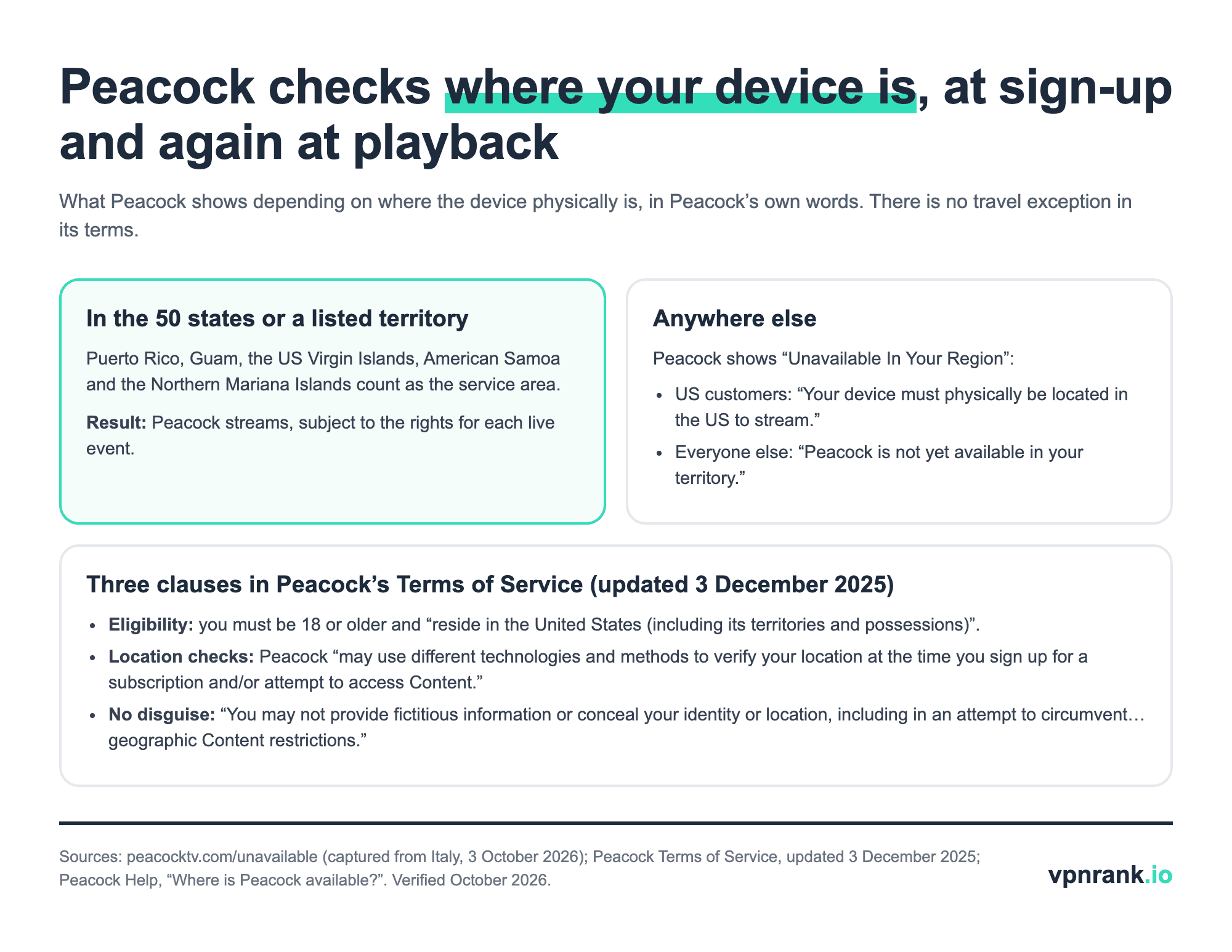
Opened from outside the service area, peacocktv.com redirects to a page headed “Unavailable In Your Region” with two lines. For US customers: “Your device must physically be located in the US to stream.” For everyone else: “Peacock is not yet available in your territory.” The first line is the one that answers the most common question about holidays abroad. Having a paid US account does not change it, because the rule is about where the device is, not who is paying.
The reason is licensing. Peacock's terms say that “accessing Content from locations where we do not have rights … or where we do not make the Peacock Service available is prohibited.” NBCUniversal buys sports and film rights for the US market; outside it, the same matches and films are usually licensed to someone else, which is why the block is enforced at the stream rather than only at the account.
Five US territories count as the US for Peacock; Europe and the UK do not
Peacock's help article on availability lists the service area as the United States plus American Samoa, Guam, the Northern Mariana Islands, Puerto Rico and the US Virgin Islands. A trip to San Juan or Guam therefore works like a trip to Ohio. A trip to London, Copenhagen or Athens does not: no European country is in the list, and the international line on the error page applies.
Inside the territories, live sport can still behave differently from the mainland. Peacock's terms warn that features “may be limited by location or may not function without access to reliable location information”, and each live event carries its own rights. If one match will not play in Guam while on-demand shows do, that rights limit is the likely reason, not a fault in the app.
Outside the US, Peacock is simply not sold, so there is no local version to switch to. For live sport the practical route abroad is the local rights holder in the country you are visiting. Our Premier League guide and NBA guide list who carries those competitions country by country.
Peacock's terms forbid disguising your location, and most VPN providers now say the same
Peacock's Terms of Service contain the clause that settles the VPN question: “You may not provide fictitious information or conceal your identity or location, including in an attempt to circumvent limits associated with Promotions or geographic Content restrictions.” Connecting through a US server from abroad conceals your location. The usual consequence is a blocked stream, but the terms also allow Peacock to act on the account.
The VPN providers' own help pages have moved in the same direction. The table records what each provider in our database says about Peacock or about streaming in general, read on 3 October 2026.
| Provider | What its own help or Peacock page says | Where | What this doesn't tell you |
|---|---|---|---|
| PIA | “Connect to a server location that matches the country where you are currently located”, to comply with the platform's Terms of Use | Streaming help article | No Peacock-specific article |
| CyberGhost | Same instruction: connect to a server location matching the country where you are currently located | Streaming troubleshooting article | Its Linux app still lists a “PeacockTV US” streaming profile |
| Proton VPN | Connecting to a server near your home region “helps ensure you see the content intended for your existing account” | Peacock page | Optimised streaming needs a paid plan |
| ExpressVPN | Using a VPN with Peacock is legal, “though you should always follow Peacock's terms of service and local laws” | Peacock page | Does not say which server location to choose abroad |
| NordVPN | Lists Peacock TV among the services its SmartDNS supports; streaming fix: “connect to a different server in the same country” | SmartDNS and streaming help | SmartDNS does not encrypt traffic |
| Surfshark | No Peacock page; general streaming fix: reconnect to a different city or server in the same country | Streaming troubleshooting article | Nothing Peacock-specific |
| IPVanish | No Peacock page | Help centre search | Nothing Peacock-specific |
| PureVPN | The only one that still says to connect to a US server to reach Peacock anywhere | Peacock page, updated 1 October 2026 | Silent on Peacock's terms |
What VPN providers' own pages say about Peacock or streaming location, read 3 October 2026. TotalVPN's Peacock URL redirected to its homepage and published nothing readable. Sources linked in the text. Verified October 2026.
Read together, the table and Peacock's terms point the same way. Four providers tell you to match your real location or to follow Peacock's terms, NordVPN lists Peacock only among its SmartDNS services, two publish nothing Peacock-specific, and PureVPN alone still advertises the US-server route. None of them can change the residency rule in Peacock's terms, which a VPN does not touch at all.
Practical rule:Peacock follows the device, not the account. If the device is outside the US and its five territories, the honest options are downloads you made at home, the local broadcaster where you are, or waiting until you are back.
Signing up from outside the US runs into the residency rule, not just the card
Peacock's terms make residence a condition of the account: you must be 18 or older and “reside in the United States (including its territories and possessions)”. That is why the payment question is secondary. Even a payment method Peacock accepts does not make a non-resident eligible, and the terms forbid “fictitious information”, which rules out the old advice to add a borrowed US address or phone number.
For residents, Peacock's payment help lists credit cards (Visa, Mastercard, Discover, American Express), debit cards, PayPal and in-app purchase on supported devices. Its US gift-card page says a gift card can pay for any Peacock plan and is added from the Account page; the cards can be bought with a credit or debit card, PayPal or Google Pay. Someone abroad can buy a gift card for a US resident, but a gift card does not change who may hold the account.
Peacock also checks location at the moment of sign-up, so a new subscription started from abroad is exactly the case its terms describe. If you are moving to the US, start the subscription after you arrive.
Peacock's 2026-27 sport is Sunday Night Football, the Premier League and the NBA
Most people who look for Peacock abroad are after live sport, and the rights shifted again in 2025 and 2026. The table lists what Peacock carries this season according to NBCUniversal's own releases, and where each property also airs in the US. It replaces older figures on this page, including a Premier League match count and a channel list that the current releases do not support.
| Property | Season or dates | On Peacock | Also on (US) | What this doesn't tell you |
|---|---|---|---|---|
| NFL Sunday Night Football | 2026 season, from 9 Sep 2026 into the playoffs | All 18 Sunday Night Football games, the Kickoff game, Thanksgiving night, the Mexico City game and NBC's playoff games | NBC | Out-of-market Sunday afternoon games are not on Peacock |
| NFL Week 17 | Saturday 2 Jan 2027 | A 4:30pm ET game, plus a primetime Peacock-exclusive game | NBC (afternoon game) | Teams were not announced in the release |
| Premier League | 2026-27, from 21 Aug 2026; NBCU rights run to 2027-28 | Peacock-exclusive matches, replays of NBC and Peacock matches, Multiview | NBC, USA Network; Spanish on Telemundo and Universo | All 380 matches are on NBCU platforms, not all on Peacock |
| NBA | 2025-26 season | About 50 exclusive games, including Peacock NBA Monday | NBC | The 2026-27 schedule was not yet confirmed |
| MLB | 2026 season (ended) | MLB Sunday Leadoff, an 18-game slate broadcast mainly on Peacock | NBC (Sunday Night Baseball, Wild Card games) | Not weekly-exclusive, as this page used to say |
| WWE premium live events | Since 20 Sep 2025 | No longer on Peacock | ESPN | Peacock's WWE library was not checked |
Live sport on Peacock in the 2026-27 season. Sources: NBC Sports and NBCUniversal press releases, Premier League, MLB.com and WWE corporate news. Verified October 2026.
Two corrections stand out. MLB Sunday Leadoff is not a weekly Peacock exclusive: under the deal that began in 2026 it is an 18-game set of early-afternoon games “broadcast mainly on Peacock”, and the 2026 regular season is over. WWE's premium live events left Peacock for ESPN on 20 September 2025, so anyone subscribing for WrestleMania needs ESPN. For the football season itself, our NFL 2026 season guide lists the full broadcast schedule.
Peacock's prices rose on 18 August 2026, by $1 to $3 a month
Peacock raised all three plans on 18 August 2026 for new and returning subscribers. Peacock Select went from $7.99 to $8.99 a month, Premium (with ads) from $10.99 to $12.99, and Premium Plus (no ads) from $16.99 to $19.99. Existing monthly subscribers moved to the new price at their first bill on or after 17 September 2026.
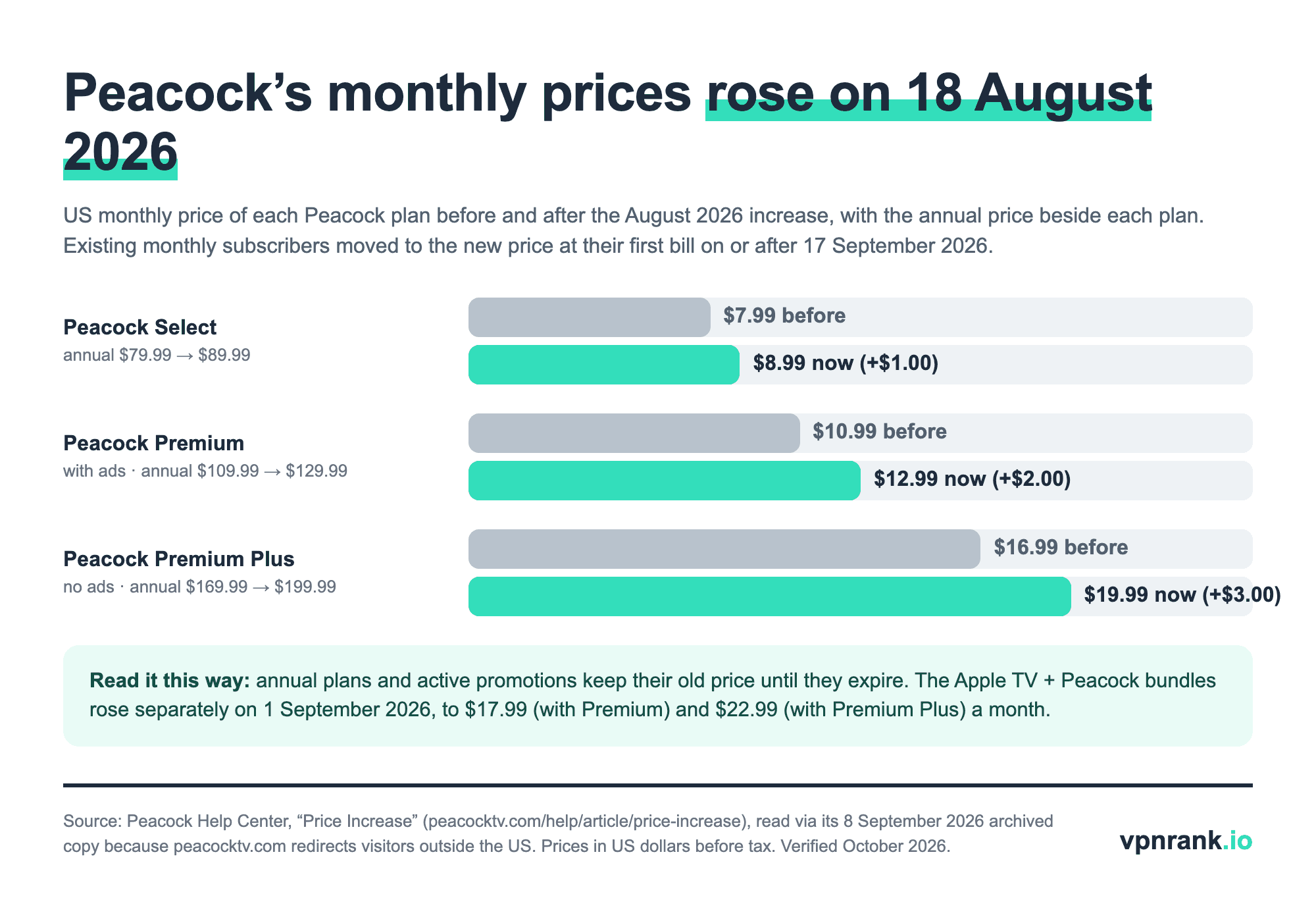
Annual plans rose too: Select to $89.99, Premium to $129.99 and Premium Plus to $199.99 a year. Peacock says annual subscribers and anyone on an active promotion keep their current price until the plan or offer expires. The Apple TV and Peacock bundles rose separately on 1 September 2026, to $17.99 a month with Premium and $22.99 with Premium Plus. These are US prices; Peacock sells no plan outside the US and its territories.
A VPN is still worth having on the trip, for hotel and airport Wi-Fi
The honest use of a VPN for a US Peacock subscriber abroad is the same as for any traveller: encrypting your traffic on hotel, airport and café networks you do not control. Connected to a server in the country you are in, it keeps the rest of your browsing private without contradicting Peacock's terms. It will not make Peacock play there.
Back home in the US, Peacock and a VPN can coexist. ExpressVPN's Peacock page notes that servers closest to your physical location often deliver better performance, which is also the server choice that keeps your location consistent with your account. If Peacock refuses to play inside the US while a VPN is on, the server is usually the cause. You can check which country websites currently see with our what is my IP tool, and our guide to public Wi-Fi risks explains what a VPN actually protects on a hotel network.
When Peacock says it is unavailable inside the US, check the location it sees
The “Unavailable In Your Region” page also appears to people who are inside the US, because Peacock judges the location it detects rather than the one you know. The common causes are few and each has a direct fix. Work through them in order, symptom first.
- 1A VPN is connected to a server outside the US. Disconnect, or choose a US server near you, then restart the Peacock app.
- 2You are in a US territory and one live event will not play. On-demand titles working while a match does not points to that event's rights. Peacock's terms say some features may be limited by location.
- 3Peacock asks you to sign in again after you travelled. Sign in from inside the US; Peacock checks location at sign-in and playback, so a new session started abroad will hit the same block.
- 4Your bill changed in September. That is the price rise taking effect at your first billing date on or after 17 September 2026, not an error.
For other services, the same pattern holds: the platform follows the device, and the account country decides the catalogue. Our guide to Prime Video abroad covers the case where a service does offer travellers a reduced catalogue, and our Peacock VPN page covers using a VPN with Peacock inside the US.
Frequently asked questions
Can I watch Peacock outside the US with a VPN?
A VPN can give your device a US IP address, but Peacock's Terms of Service forbid concealing your location to get around geographic restrictions, and Peacock says it may verify location at sign-up and at playback by more than one method. PIA, CyberGhost and Proton VPN now tell users to connect to the country they are in or near their home region. Expect blocks, and accept the risk to the account if you try.
Does Peacock work when I'm on vacation abroad?
No. Peacock's error page for US customers says: “Your device must physically be located in the US to stream.” There is no travel allowance in its terms, unlike some services that offer travellers a reduced catalogue. Puerto Rico, Guam, the US Virgin Islands, American Samoa and the Northern Mariana Islands count as the service area, so trips there work normally.
Can I subscribe to Peacock from outside the US?
Not within the rules. Peacock's terms require subscribers to be 18 or older and to reside in the United States or its territories, and Peacock checks location when you sign up. It accepts credit and debit cards, PayPal, in-app purchase and gift cards, but a payment method that works does not make a non-resident eligible.
Can you watch Peacock in Europe or the UK?
No. Peacock is not sold anywhere in Europe, including the UK, and visitors there see its message that Peacock “is not yet available in your territory”. The live sport Peacock carries in the US, such as the Premier League and the NBA, is licensed to other broadcasters in European countries, so the local rights holder is the way to watch it there.
Is the Premier League on Peacock?
Yes, in the US. NBCUniversal holds all 380 Premier League matches each season through 2027-28, spread across NBC, USA Network and Peacock, with Spanish-language coverage on Telemundo and Universo. Peacock has its own exclusive matches, replays and Multiview for 2026-27. NBCUniversal's current release gives no total for Peacock-exclusive matches, so this page no longer quotes one.
Is using a VPN with Peacock legal?
Using a VPN is legal in most countries, and ExpressVPN's Peacock page says so while adding that you should follow Peacock's terms of service and local laws. With Peacock the issue is contractual: its terms prohibit concealing your location, so the realistic consequence is a blocked stream or action on the account. A few countries restrict VPN use itself, so check the law where you are.
The best VPNs of 2026, ranked
Now you know how — here are the VPNs we recommend, independently tested and ranked for speed, streaming, privacy and value. Any of them works for everything in this guide.

ExpressVPN Ultra fast & secure. Great for privacy, downloads, and everyday browsing on all your devices. 24/7 live chat support.
ExpressVPN Ultra fast & secure. Great for privacy, downloads, and everyday browsing on all your devices. 24/7 live chat support.

IPVanish Fast speeds with unlimited device connections. Strong no-logs privacy and 24/7 live chat support. Great for families.

IPVanish Fast speeds with unlimited device connections. Strong no-logs privacy and 24/7 live chat support. Great for families.

NordVPN Excellent speeds with one of the largest server networks. Strong security features and easy-to-use apps. 24/7 live chat support.
NordVPN Excellent speeds with one of the largest server networks. Strong security features and easy-to-use apps. 24/7 live chat support.

Proton VPN Swiss-based VPN with strong privacy focus. Audited no-logs policy and open-source apps. Great for privacy-conscious users.
Proton VPN Swiss-based VPN with strong privacy focus. Audited no-logs policy and open-source apps. Great for privacy-conscious users.

CyberGhost Fast speeds and strong privacy tools. Simple apps, automatic WiFi protection, and 24/7 live chat support.
CyberGhost Fast speeds and strong privacy tools. Simple apps, automatic WiFi protection, and 24/7 live chat support.

TotalVPN Affordable VPN with strong privacy and reliable speeds. Easy-to-use apps for all major devices. No-logs policy.
TotalVPN Affordable VPN with strong privacy and reliable speeds. Easy-to-use apps for all major devices. No-logs policy.

Private Internet Access High-speed VPN with a large server network and advanced security settings. Ad blocker included and 24/7 live chat support.
Private Internet Access High-speed VPN with a large server network and advanced security settings. Ad blocker included and 24/7 live chat support.

Surfshark Unlimited device connections at a budget-friendly price. Includes ad blocker and strong privacy tools. Great value for money.
Surfshark Unlimited device connections at a budget-friendly price. Includes ad blocker and strong privacy tools. Great value for money.
Rankings are based on our independent testing methodology. Each guide applies the criteria described on that page, including relevant performance, privacy, product features, and value data. We may earn affiliate commissions from links on this page, which helps fund our testing — this does not influence our rankings.
Related articles

Streaming
How to Watch Amazon Prime Video From Abroad Without Losing Your Home Library

Streaming
How to Watch HBO Max From Abroad in 2026: Every Country, Every Price, Every Fix

Streaming
How to Watch ITVX From Abroad: Why It's UK-Only and What Actually Works

Privacy & Security
Is Public Wi-Fi Actually Dangerous? The Real Risks, Explained