
How to Watch Amazon Prime Video From Abroad Without Losing Your Home Library
Why the catalog shrinks the moment you cross a border, what "Watch While Abroad" actually gives you, and how travelers keep their home shows playing

vpnrank.io is reader-supported: we may earn a commission if you buy through links in this article. This never affects our rankings.

As of September 2026, Amazon Prime Video lets you stream only a selection of included titles outside your home country, plus anything you bought, rented or downloaded, and its Terms of Use say you "may not use any technology or technique to obscure or disguise your location". EU residents travelling inside the EU are the exception: they keep their home catalogue by law. Everything below comes from Amazon's own help pages, read on 29 September 2026, so you can check each rule before a trip.
Outside your home country, Prime Video shows a selection of titles, not your library
Prime Video decides what you are entitled to from your account's home country and what you can press play on from where you are. Amazon's help page for travellers says members "are able to stream selected Prime Video titles while outside of their home country" and that "the selection of titles you're able to stream on Prime Video may change". It does not publish how large that selection is in any country.
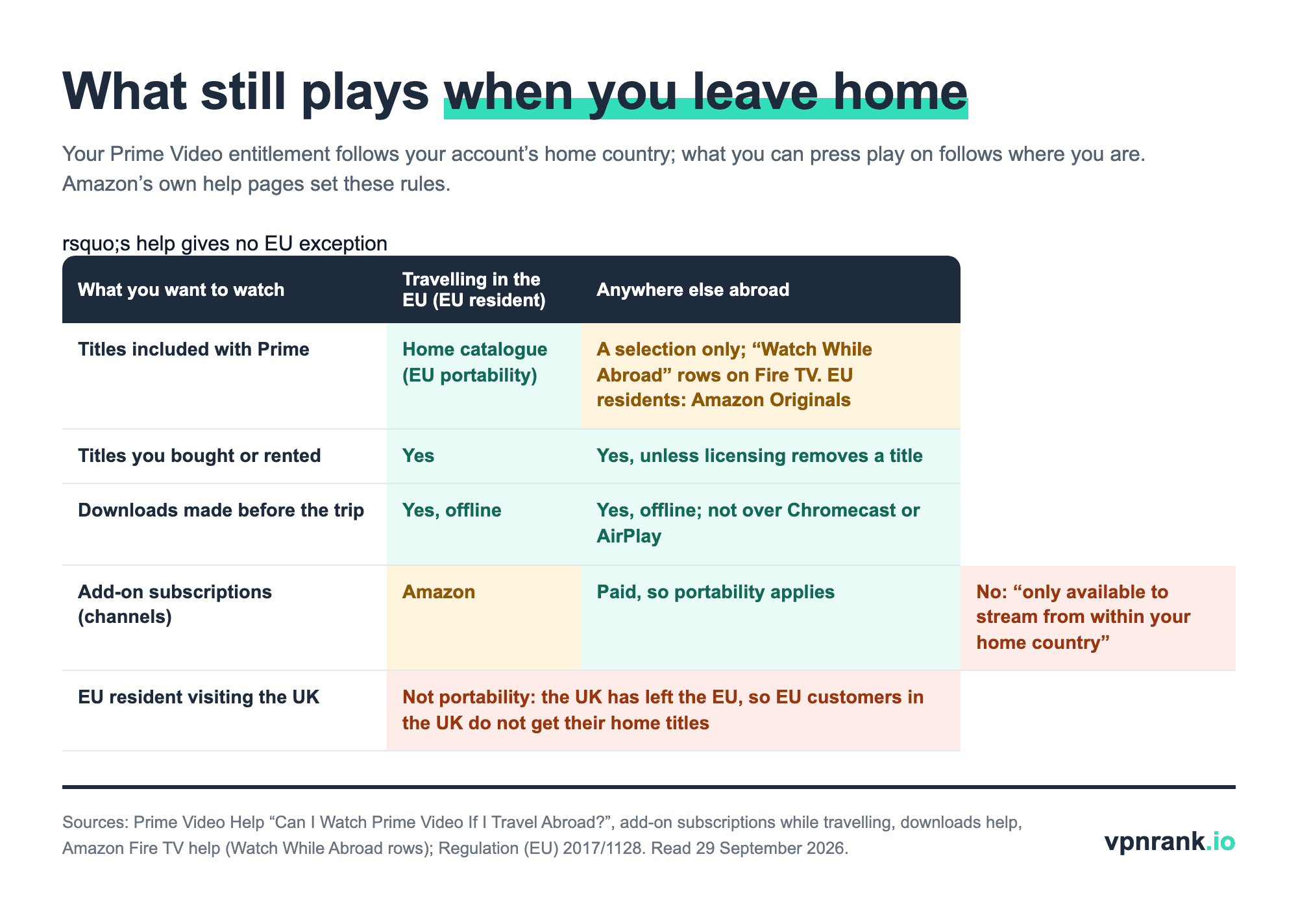
The reason is licensing: Amazon's Terms of Use say content "will vary over time and by location" because of restrictions imposed by content providers. On a Fire TV, Amazon makes the abroad selection easy to find: the Movies and TV Shows menus "change automatically to include Watch While Abroad rows", listing the Prime titles you can watch while travelling without changing any account settings. Our can I watch it abroad tool checks other services the same way.
Inside the EU your home catalogue travels with you, but the UK no longer counts
If you live in an EU country and travel to another, Prime Video must give you your home catalogue. Regulation (EU) 2017/1128, applied since 1 April 2018, requires paid services to let a subscriber "temporarily present" in another member state use the service "in the same manner as in the Member State of residence". Outside the EU, Amazon says EU residents "have access to stream and download Amazon Originals titles".
- EU resident visiting the UK: no portability. Amazon's help says that as the United Kingdom has left the EU, customers from the EU travelling there "will not have access to the same titles as they do when watching Prime Video in their home country".
- UK resident visiting France, Spain or Italy: the regulation protects residents of EU countries, so a UK account abroad falls under the general travel rule: a selection of titles, plus purchases and downloads.
- EU resident moving abroad for good: portability covers temporary stays only. A move means changing your account country, with the purchase caveat below.
Downloading before you leave is the official way to take specific titles abroad
Amazon's own answer for travellers is to download: "If you have a compatible device, you're able to download titles before you travel in order to watch offline anywhere in the world." The limits are on the device and the account rather than the country, so check them at home, on your home Wi-Fi, the night before you fly.
- 1Use a device that can download. Amazon lists a Fire tablet or the Prime Video app for iOS, Android, macOS, or Windows 10 and 11. Fire TV sticks and web browsers are not on the list.
- 2Download while you are still at home, where your full home catalogue is available.
- 3Mind the account cap. In the US, standard Prime allows up to 50 downloaded titles (up from 25) and Prime Video Ultra up to 100, shared across profiles; Amazon says sub-limits per title, device and provider may apply.
- 4Rentals run on a clock. A rented title stays in your library for 30 days; once you press play you have at least 48 hours to finish it.
- 5Watch on the device itself. Amazon does not permit playback of downloads over Chromecast or AirPlay; a supported device can reach a hotel TV with the right cable adaptor.
Purchases and rentals travel with you; add-on subscriptions stay at home
Titles you paid for individually travel with your account: Amazon's help says that, in addition to the abroad selection, "only titles that you've purchased or rented may be streamed while you're traveling outside of your country of residence". Purchased titles can still become unavailable for licensing reasons. Add-on subscriptions, the paid channels Amazon used to call Prime Video Channels, are the opposite: they "are only available to stream from within your home country".
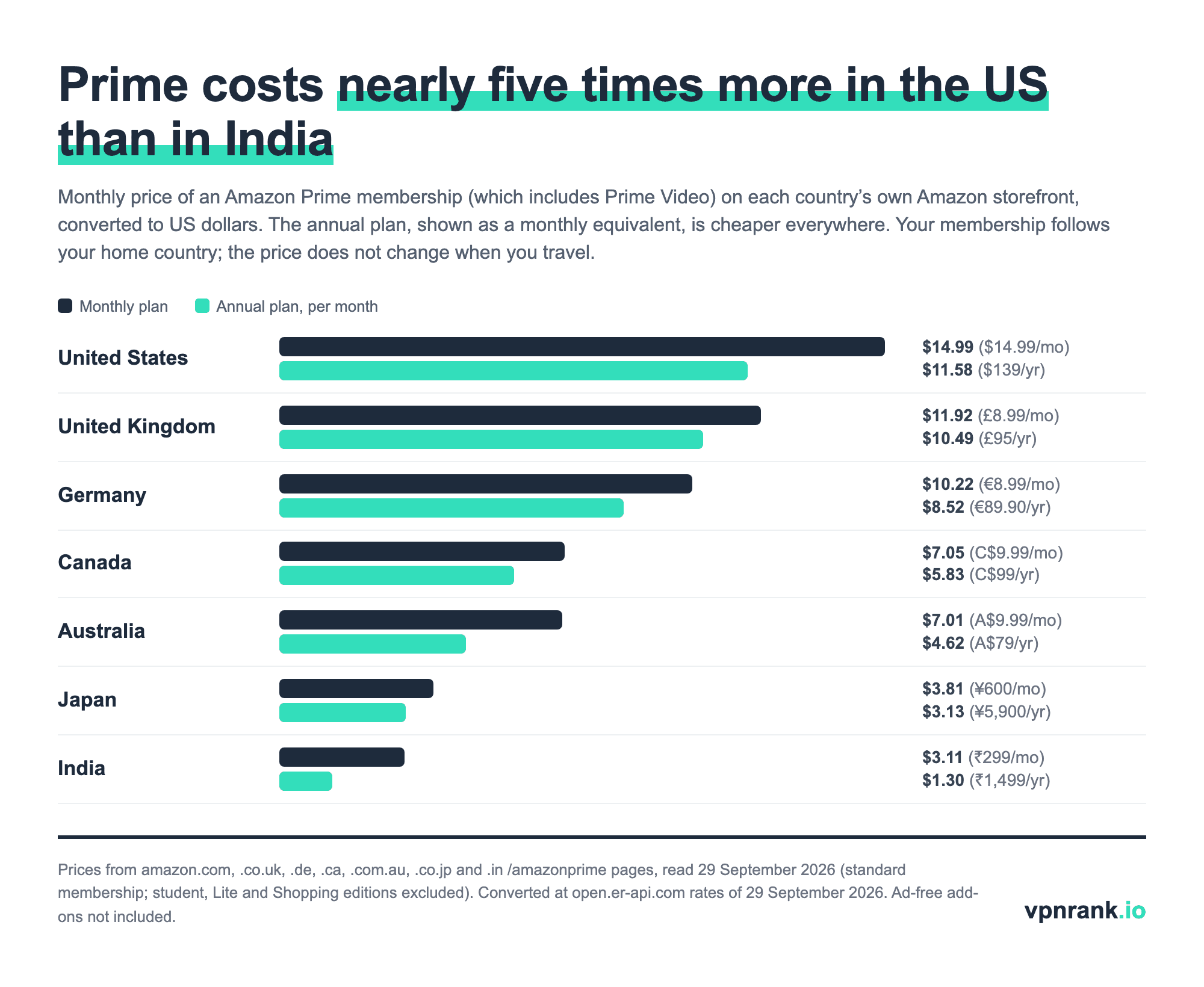
A price tag you see abroad is not a travel surcharge. Prime Video marks content that needs an extra purchase with a yellow shopping-bag icon; those are rent-or-buy titles in the catalogue you are browsing, and your Prime membership keeps billing at your home-country price wherever you are.
| Country | Prime price on the local Amazon store | Ads in Prime Video | Live sport on Prime Video, 2026/27 | What this doesn't tell you |
|---|---|---|---|---|
| United States | $14.99/month or $139/year | Yes; Prime Video Ultra removes them for $4.99/month or $45.99/year (annual Prime members), and is the only US plan with 4K | Thursday Night Football (17 games from 17 September); NBA on Prime from 23 October 2026 | Live sport can carry ads even on Ultra |
| United Kingdom | £8.99/month or £95/year | Yes; Ad Free is a monthly add-on | UEFA Champions League top-pick Tuesday match, rights renewed to 2030/31 | UK Ad Free price not printed on Amazon's help pages |
| Germany | €8.99/month or €89.90/year | Yes; Ad Free is a monthly add-on | Champions League Tuesday top match; switches to Wednesday from 2027/28 | Ad Free price not printed on Amazon's help pages |
| Canada | C$9.99/month or C$99/year | Yes, since 2024 | NHL Wednesday Night Hockey from 30 September 2026, 12-year deal | Ad-free price not verified |
| Australia | A$9.99/month or A$79/year | Yes, since 2024 | All ICC men's and women's cricket events, 2024-2027 | Ad-free price not verified |
| India | ₹299/month or ₹1,499/year (Prime Lite ₹799/year) | Yes, since June 2025; live sport keeps ads | Not verified | Prime Lite is 1 device, HD 720p, with ads |
| Japan | ¥600/month or ¥5,900/year | Yes (Ad Free help page exists) | Not verified | Ad-free price not verified |
Prices from each country's own Amazon /amazonprime page, ads and sport from Amazon's regional press sites (aboutamazon.com, .co.uk, .de, .ca, .com.au, .in) and Amazon MGM Studios press, read 29 September 2026. Verified September 2026.
The sport column matters for travellers because rights are sold country by country. A US member who watches Thursday Night Football at home is not entitled to it in London, where Prime Video's live football is a Champions League Tuesday match, and a Canadian member's NHL games are a Canadian right. Our sports streaming guide covers who holds each competition where.
Amazon's terms forbid disguising your location, and the VPN providers now say the same
Prime Video's Terms of Use, last updated 26 August 2026, are explicit: "Amazon will use technologies to verify your geographic location. You may not use any technology or technique to obscure or disguise your location." Several VPN providers now echo that on their own Prime Video help pages, which changes what a VPN is useful for when you travel.
- ExpressVPN: "To comply with the Amazon Prime Video Terms of Use and ExpressVPN Terms of Service, you should connect to a server location that matches the country where you are currently located." CyberGhost and Private Internet Access publish the same instruction.
- NordVPN: says Amazon generally does not allow changing the library region, which "is set based on the billing address you provided when you first subscribed".
- IPVanish: recommends split tunnelling so the Prime Video app bypasses the VPN and plays "based on your current location" while other apps stay protected; it is not available on the newest Fire TV Sticks (4K Select 2025, HD 2026).
So the honest use of a VPN with Prime Video abroad is privacy on hotel, airport and café Wi-Fi, connected to a server in the country you are in, or with Prime Video excluded through split tunnelling. That keeps the rest of your traffic encrypted on a network you don't control without contradicting Amazon's terms. What a VPN cannot do inside those rules is bring your home catalogue with you; downloads, purchases and EU portability are the routes Amazon allows.
If you watch on a Fire TV Stick, check the model first. Amazon has started shipping sticks with Vega OS, which replaces the Android-based Fire OS: ExpressVPN, NordVPN, Surfshark, Proton VPN and IPVanish list Vega OS apps (some with features still missing), while PIA says its app is not compatible with Vega OS yet. Our Fire TV VPN guide keeps the device list current.
Changing your Amazon account country cuts off your purchases and rentals
Changing your Amazon account country is the step people take when they move or study abroad, and it carries a cost. Amazon's Fire TV help says that after the change you "will no longer be able to access any of your Prime Video purchases or rentals"; purchases come back if you switch the country back, rentals do not. Amazon adds that this does not apply to people who are travelling and have not changed their country of residence or Prime subscription country.
Where Amazon Prime is not sold, Prime Video is offered as a standalone subscription on primevideo.com, which Amazon says is available "in over 200 countries and territories". If you are staying somewhere for months rather than weeks, a local membership can be cheaper than your home one: the chart above shows how far Prime prices diverge.
When Prime Video won't play abroad, Amazon's own fixes come first
Amazon's help page "Issues While Playing Prime Video Titles" is the page its VPN error links to (amazon.com/pv-vpn). Work through it in order; most failures abroad are the selection rules above rather than a fault.
- 1A title from home is missing: it is not in the abroad selection. Check the Watch While Abroad rows, or download it next time before you leave.
- 2A VPN or proxy error appears: Amazon's first step is "Deactivate any VPN or proxy servers." If you see it without a VPN, a hotel or office network may route traffic through a proxy; try mobile data.
- 3Playback fails on any title: fully close the app, set the device's date and time to automatic, and unplug the device and router for at least 60 seconds.
- 4"Too many streams": Amazon says you can stream the same title to only two devices at a time; stop it on another device.
- 5Nothing loads on hotel Wi-Fi: Amazon's network help suggests checking whether DNS traffic (port 53) is blocked; switch networks or ask the hotel.
- 6The phone app shows the wrong country: IPVanish and NordVPN both say Prime Video can use a device's location services, so check the app's location permission.
Practical rule:Before a trip, download the specific episodes you care about on your home Wi-Fi, and let the abroad selection, your purchases and, inside the EU, portability cover the rest. Use a VPN on the trip for hotel Wi-Fi privacy, connected where you are, not to fake being at home.
For other services the rules differ: see our guides to HBO Max abroad and BBC iPlayer abroad, the streaming VPN overview, and our travel VPN ranking for hotel and airport networks. Live VPN prices are in the VPN Price Index.
Frequently asked questions
Can I watch Prime Video abroad without a VPN?
Yes. Prime Video works in over 200 countries and territories. Outside your home country you can stream a selection of included titles, anything you bought or rented, and titles you downloaded before leaving. EU residents travelling inside the EU keep their full home catalogue under EU portability rules. Add-on subscriptions are the exception: Amazon says they stream only from your home country.
Does it cost extra to watch Prime Video abroad?
No. Your membership keeps billing at your home-country price and Amazon charges no travel fee. Titles with a price or a yellow shopping-bag icon are rent-or-buy titles in the catalogue you are browsing, not a surcharge for being abroad. Ad-free options such as the US Prime Video Ultra ($4.99 a month) are separate add-ons you choose.
Can a UK Prime member watch Prime Video on holiday in France?
Yes, but with the traveller's selection, not the UK catalogue. EU portability rules protect residents of EU countries, and the UK is no longer in the EU, so a UK account in France gets the titles available abroad, plus purchases, rentals and downloads made at home. The reverse also applies: EU customers visiting the UK do not get their home titles.
Can I watch live sport on Prime Video when I travel?
Only the sport sold in the country you are in, and not through add-on subscriptions, which stay in your home country. Prime Video's rights are national: Thursday Night Football and the NBA in the US, a Tuesday Champions League match in the UK and Germany, Wednesday NHL games in Canada, ICC cricket in Australia. A US member in London cannot watch Thursday Night Football on Prime Video.
Why does Prime Video say I'm using a VPN when I'm not?
Some networks route traffic through a proxy that Prime Video treats like a VPN, which is common on hotel, office and campus Wi-Fi. Amazon's first fix is to deactivate any VPN or proxy; if you have none, switch to mobile data or another network, and check that no browser extension or security app is proxying your traffic.
How many Prime Video titles can I download before a trip?
In the US, up to 50 titles on standard Prime and up to 100 with Prime Video Ultra, counted across all profiles, with possible per-title and per-device limits. Amazon's help does not print the caps for other countries. Downloads need a Fire tablet or the Prime Video app on iOS, Android, macOS or Windows 10 and 11; Fire TV sticks and browsers cannot download.
Does Prime Video have ads in every country?
Ads are the default in the US, UK, Germany, Canada, Australia, India and Japan, among others. The US replaced its ad-free option with Prime Video Ultra ($4.99 a month or $45.99 a year for annual Prime members), which also adds 4K. The UK, Germany and Japan sell Prime Video Ad Free as a monthly add-on. Live sport can still carry ads on ad-free plans.
The best VPNs of 2026, ranked
Now you know how — here are the VPNs we recommend, independently tested and ranked for speed, streaming, privacy and value. Any of them works for everything in this guide.

ExpressVPN Ultra fast & secure. Great for privacy, downloads, and everyday browsing on all your devices. 24/7 live chat support.
ExpressVPN Ultra fast & secure. Great for privacy, downloads, and everyday browsing on all your devices. 24/7 live chat support.

IPVanish Fast speeds with unlimited device connections. Strong no-logs privacy and 24/7 live chat support. Great for families.

IPVanish Fast speeds with unlimited device connections. Strong no-logs privacy and 24/7 live chat support. Great for families.

NordVPN Excellent speeds with one of the largest server networks. Strong security features and easy-to-use apps. 24/7 live chat support.
NordVPN Excellent speeds with one of the largest server networks. Strong security features and easy-to-use apps. 24/7 live chat support.

Proton VPN Swiss-based VPN with strong privacy focus. Audited no-logs policy and open-source apps. Great for privacy-conscious users.
Proton VPN Swiss-based VPN with strong privacy focus. Audited no-logs policy and open-source apps. Great for privacy-conscious users.

CyberGhost Fast speeds and strong privacy tools. Simple apps, automatic WiFi protection, and 24/7 live chat support.
CyberGhost Fast speeds and strong privacy tools. Simple apps, automatic WiFi protection, and 24/7 live chat support.

TotalVPN Affordable VPN with strong privacy and reliable speeds. Easy-to-use apps for all major devices. No-logs policy.
TotalVPN Affordable VPN with strong privacy and reliable speeds. Easy-to-use apps for all major devices. No-logs policy.

Private Internet Access High-speed VPN with a large server network and advanced security settings. Ad blocker included and 24/7 live chat support.
Private Internet Access High-speed VPN with a large server network and advanced security settings. Ad blocker included and 24/7 live chat support.

Surfshark Unlimited device connections at a budget-friendly price. Includes ad blocker and strong privacy tools. Great value for money.
Surfshark Unlimited device connections at a budget-friendly price. Includes ad blocker and strong privacy tools. Great value for money.
Rankings are based on our independent testing methodology. Each guide applies the criteria described on that page, including relevant performance, privacy, product features, and value data. We may earn affiliate commissions from links on this page, which helps fund our testing — this does not influence our rankings.
Related articles

Streaming
How to Watch HBO Max From Abroad in 2026: Every Country, Every Price, Every Fix
How-To Guides
How to Watch BBC iPlayer From Abroad: The Complete 2026 Guide

Streaming
Disney+ Catalogs by Country: Why Your Library Looks Nothing Like America's
Privacy & Security
Is Public Wi-Fi Actually Dangerous? The Real Risks, Explained

Streaming
How to Watch Peacock From Outside the US: A Complete 2026 Guide