How-To
How to Change Country on Google Play
Google's own menu path on Android and in a browser, the 90-day rule, what happens to your balance and Play Points, and why a VPN does not move the store.

The short answer
To change country on Google Play, open the Play Store app, tap the profile icon, then Settings, General, Account and device preferences, Country and profiles, and pick the new country. As of October 2026, Google allows it only while you are physically in that country, with a payment method from it, and no more than once every 90 days. Your Play balance stays with the old country and Play Points are lost. A VPN does not change your Play country: the store checks your presence and payment profile, not only your IP address.
- Be in the new country, with a card or other payment method issued there.
- Play Store app: profile icon, Settings, General, Account and device preferences, Country and profiles. On iPhone or a computer, use play.google.com, profile icon, Settings, Country and profiles.
- Tap the new country and add the local payment method when asked.
- Allow up to 48 hours for the store to update.
vpnrank.io is reader-supported: we may earn a commission if you buy through links on this page. This never affects our picks.
Google Play changes country from one menu: Country and profiles
Google Play keeps a country for every account, and that country decides which apps, games, books and prices the store shows. Google's help article “How to change your Google Play country”, read on 5 October 2026, lists one route on Android and one in a web browser. Both end in the same menu, Country and profiles, and both ask for a payment method from the new country.
On an Android phone or tablet
- 1Open the Google Play Store app.
- 2Tap the profile icon at the top right.
- 3Tap Settings, then General, then Account and device preferences, then Country and profiles.
- 4Tap the country where you want to add an account. If no new country appears, see the troubleshooting section below.
- 5Follow the on-screen instructions to add a payment method for that country.
On a computer, an iPhone or any other non-Android device
- 1Go to play.google.com in a browser and sign in with the same Google Account.
- 2Click the profile icon at the top right.
- 3Open Settings and scroll down to Country and profiles.
- 4Choose the new country and add a payment method from it.
Google says the profile “can take up to 48 hours to update”, so the store may keep showing the old catalogue for a while. Once an account has more than one country profile, the same menu also switches between them: tap the name of the country you want, and the store moves back without adding anything new. There is no Google Play app for iPhone; Google's help page has only an Android tab and a Computer tab, and the Computer tab covers iPhone through the browser.
Google allows a change only every 90 days, from inside the new country, with a local card
Google sets three conditions before Country and profiles offers a new country. You must be in that country. You need a payment method from it. And you must wait at least 90 days after first setting your Play country, and 90 days between every later change, with “additional restrictions” possible in some cases. Many guides still say once a year; Google's current page says 90 days.
- Presence: “To set up a new country or region, you must be in that location”. Google does not say on this page how it decides where you are.
- Payment: the new country needs a payment method from that country. Google Pay keeps one payments profile per country, and its legal country cannot be edited: you create a new profile instead.
- Frequency: at least 90 days after the first country, and at least 90 days between each later change.
- Family groups: “If you're a member of a Google Family group, you can't change your Google Play country or region.” A member has to leave the group first; a family manager has to delete it.
The family rule surprises people because nothing in the Country and profiles menu mentions it. Google's family pages add the reason: everyone in a family group must live in the same country as the family manager, and switching to a different family group is limited to once every 12 months if you have a paid Google subscription. That 12-month rule is about families, not about the Play country, which is probably where the “once a year” advice in older guides comes from.
Practical rule:Change your Play country when you have moved, not when you are visiting. You need to be there, you need a local card, and you cannot change back for 90 days.
Your balance stays behind, Play Points are lost and subscriptions stay on the old profile
Changing the Play country is not a clean move of the whole account. Google's help page lists what happens to money, rewards, subscriptions and content, and most of it stays tied to the old country. Read this before switching if you hold a Play balance, a high Play Points level or subscriptions you pay through Google Play, because some of it cannot be brought back.
| Item | What happens when you change country | Can you get it back? | What Google's page doesn't say |
|---|---|---|---|
| Google Play balance | Stays linked to the old country and cannot be spent in the new one | Yes, by switching back to the old country | How long an unused balance remains available |
| Google Play Points and level | All points are lost and the level does not carry over | No | Whether points spent on coupons first keep their value |
| Subscriptions paid through Play | Stay active on the old payments profile unless cancelled; developers may cancel them if not offered in the new country | Re-subscribe on the new profile | Which developers cancel automatically |
| Gift cards and codes | Redeemable only in the country of purchase, in that country's currency | Only by redeeming them in that country | Exceptions for cards bought online |
| Google Play Pass | Keeps auto-renewing; if Play Pass is not offered in the new country, installed Play Pass apps stay but you cannot add more | Yes, where Play Pass exists | The list of Play Pass countries in this article |
| Books, movies, TV, games, apps | Some may become unavailable | Partly, by switching back | Which titles, in advance |
What a Google Play country change moves and what it leaves behind. Sources: Google Play Help, “How to change your Google Play country” (answer 7431675) and Google Play gift card help (answer 11564359). Read 5 October 2026. Verified October 2026.
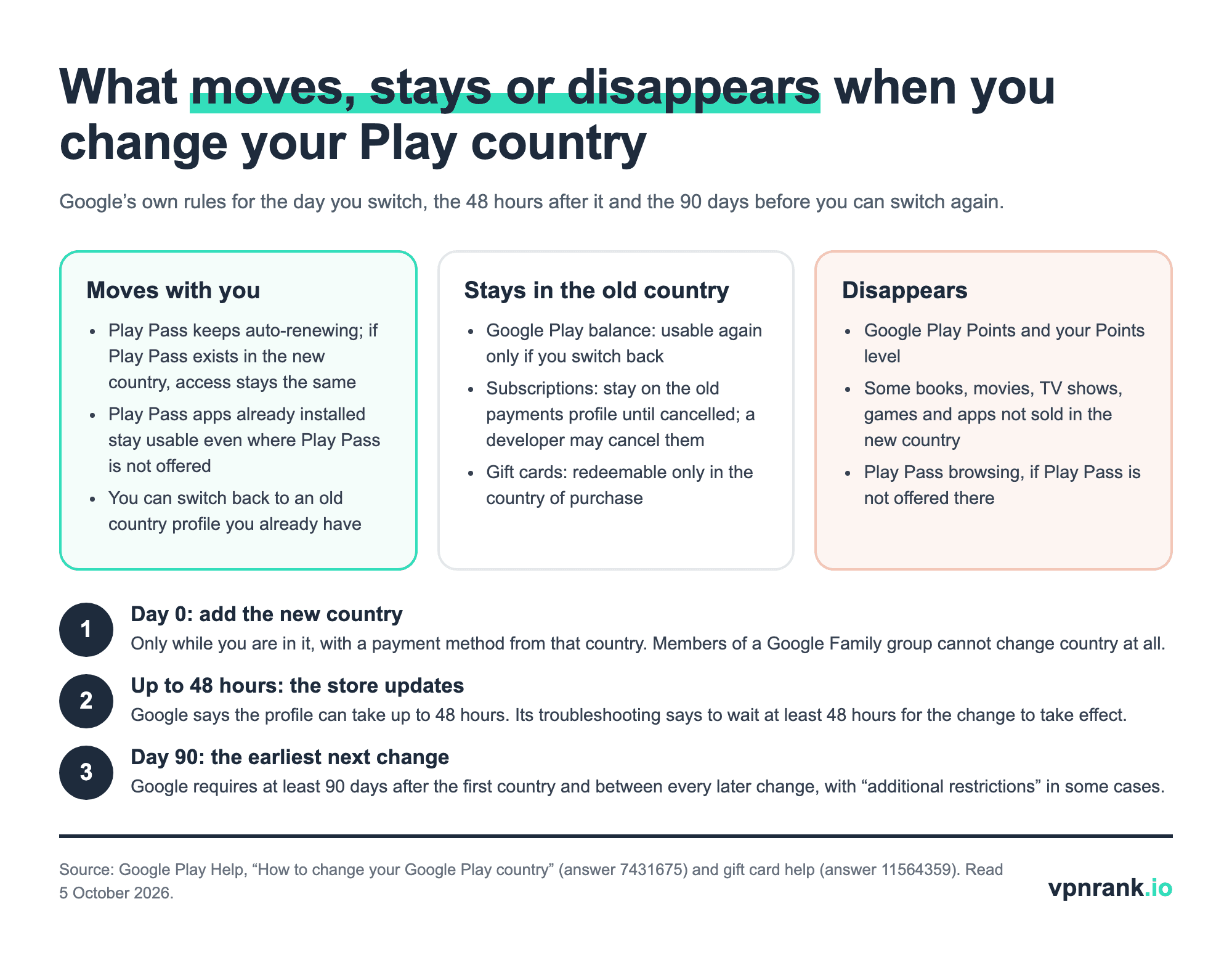
Gift cards are the trap for travellers. Google says a card “can only be redeemed in the country of purchase”, and the error reads “Couldn't redeem this code. This code can only be used in [country/region].” A balance already redeemed has the same limit: “Your Play balance can only be used in [country/region].” Google's gift card help adds that to use Play balance “you must be present in the country where the gift card balance or the promotion was redeemed”, so on a trip a balance purchase may fail until you are home. Spend or redeem before you switch, or keep the old profile and switch back to use it.
Google keeps three separate countries for you, and the Play Store follows only one
Most failed attempts mix up three different settings. The Google Play country decides what the store sells you. The payments profile country is the legal country of your Google Pay billing details. The Google Account region decides which Google company serves you and which terms apply. Each one is set and changed in a different place, and changing one does not change the others.
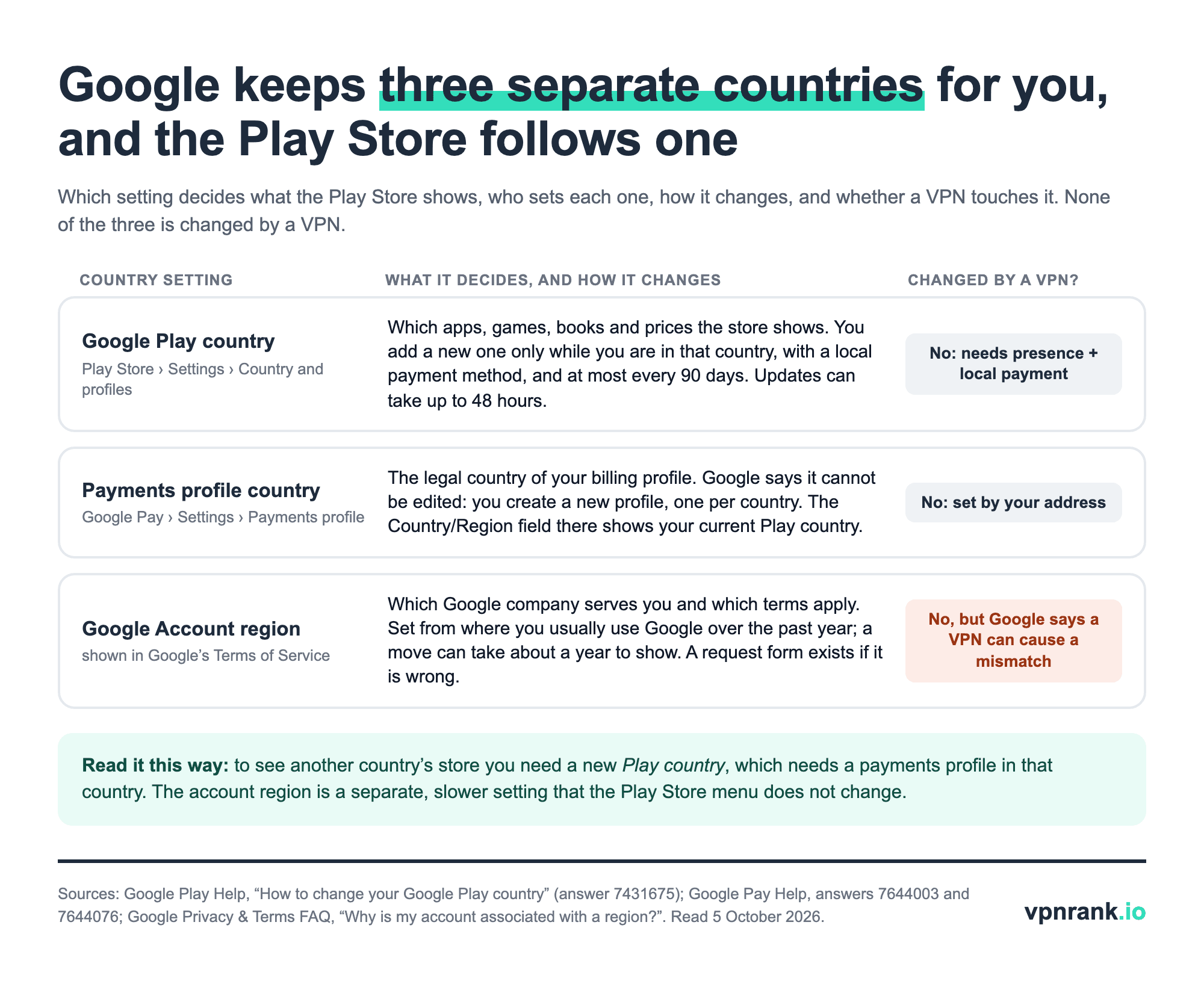
- Google Play country: changed in Country and profiles, as above. Google's developer documentation adds that app availability “is based on the user's Play country (that is, where their account is registered), not their current location”, which is why a traveller still sees the home store.
- Payments profile country: in Google Pay settings, under Payments profile. Google says “You can't change this setting”; if you move, you create a new payments profile for the new country, and you can have only one per country. The Country/Region field there shows your current Play country.
- Google Account region: set from where you created the account and, for accounts at least a year old, from “the region from which you usually access Google services”. Google says frequent travel doesn't generally affect it and a move can take about a year to show. If it is wrong, Google offers a request form.
So the question “how do I change the country in my Google account?” has two answers. For the store, use Country and profiles. For the account region shown in Google's Terms of Service, use Google's country association request form, linked from the Privacy & Terms FAQ question “Why is my account associated with a region?”.
A VPN changes your IP address, not your Google Play country
A VPN (virtual private network) sends your traffic through a server run by the VPN provider, so websites see that server's IP address instead of yours. Google's Play help page never mentions IP addresses or VPNs. It says you must be in the new country and have a payment method from it, and a VPN supplies neither. It also leaves the 90-day limit, the family rule and the payments profile unchanged.
The one Google statement about VPNs and country we found is about the account region, not the Play country: a mismatch with where you live can happen “because you've installed a Virtual Private Network (VPN) to mask your IP address”. The Google Play Terms of Service do not name VPNs, but they forbid attempts to “circumvent, disable or defeat any of the security features or components that protect, obfuscate or otherwise restrict access to” content or Google Play, and allow Google to end access “without refund”. Whether a VPN counts is our reading of that clause, not Google's statement. Among the VPN providers we list, CyberGhost's own guide says the same: a VPN “doesn't change the country associated with your Google Play account”.
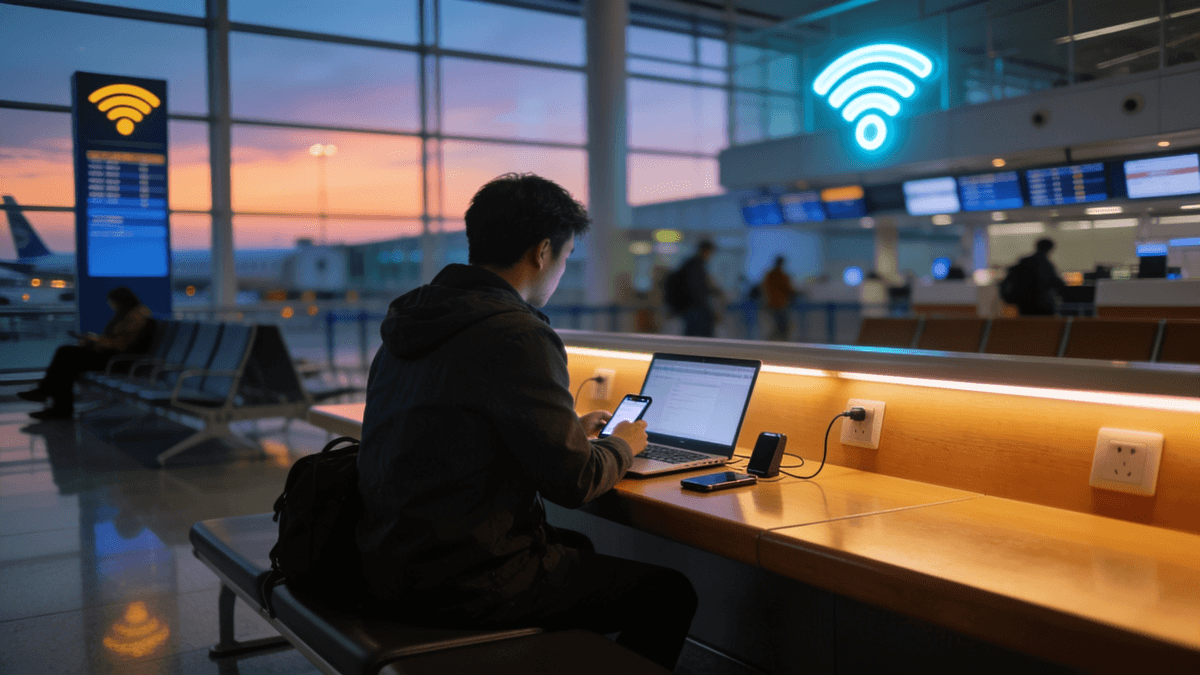
A VPN does help in three situations around Google Play. On hotel, café or airport Wi-Fi it hides your traffic from whoever runs the network, a risk covered in our guide to public Wi-Fi safety; there, pick a server in the country you are actually in, so the location Google sees matches where you are. Where play.google.com itself does not load, it can reach the store, covered in the next section. And when Google Play does not offer a VPN app at all, some providers publish an installer outside the store. To see the address Google receives at any moment, open what is my IP.
Where Google Play itself is blocked, the country menu is the second problem
In a few countries the Play Store does not load reliably, so the Country and profiles menu is never reached. OONI, the Open Observatory of Network Interference, runs volunteer tests of whether sites can be reached from each country. We aggregated its September 2026 tests of play.google.com: interference showed up in most tests from China and about a third of tests from Russia.
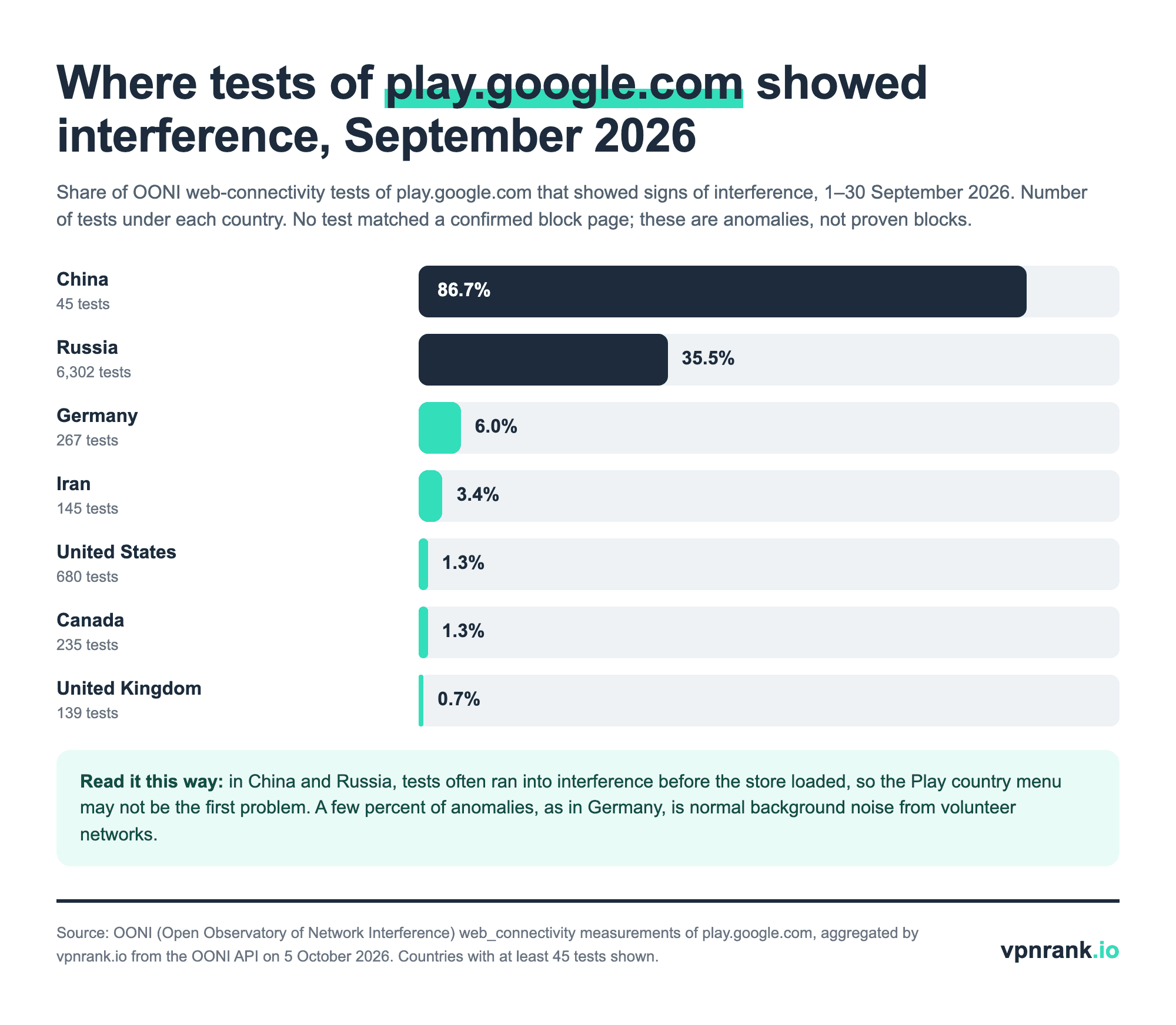
Read the chart with care. None of these tests matched a confirmed block page, so they show interference rather than proof of an official block, and China's figure rests on only 45 tests. Russia's 35.5% comes from 6,302 tests, which makes it the stronger signal. A few percent, as in Germany, is ordinary noise from volunteer networks. For the wider picture by country, see our internet censorship map.
In networks like these, ordinary VPN connections are often blocked too, which is what obfuscation features are for: they disguise the VPN connection as regular web traffic. Install the VPN app before you travel, while Google Play still works, and connect to a server outside the blocking country, ideally your home country, where your Play account already belongs. VPN use is restricted by law in some places, so read our pages on China and Russia first, and follow the rules of any school or workplace network.
If Country and profiles shows no new country, Google lists these causes
Google's help page has a section titled “I can't find the option to add or change my Google Play country”, and it names three reasons first: a change in the last 90 days, not being in a new country, and membership of a Google Family group. The list below follows Google's order, symptom first, and adds the payment and cache steps the same page gives.
- 1No new country appears. Check the date of your last change (90 days), whether you are actually in the new country, and whether you belong to a Google Family group. Any one of them hides the option.
- 2You are in a family group. Leave the group, or, if you are the family manager, delete it. Remember that rejoining a different family is limited to once every 12 months with a paid Google subscription.
- 3The store still shows the old country. Wait. Google says the change can take up to 48 hours. After that, update the Play Store (profile icon, Settings, About, Update Play Store).
- 4Purchases fail with a residence error. The message “Please update your Play account settings so that the selected Play country matches your country of residence” means the Play country and your circumstances disagree. If you are only travelling, Google asks you to contact support rather than change country.
- 5The payment step fails. Open Google Pay settings and check Country/Region under Payments profile. If it is wrong, Google's instruction is to create a new profile for your country; the old one cannot be edited.
- 6Still stuck after a day or two. Clear the Play Store's cache and storage: touch and hold the Play Store icon, App info, Storage & cache, Clear cache, then Clear storage. Google warns this can remove Play Store settings such as parental controls, so set them again afterwards.
One option is missing on purpose: Google does not list creating a new Google Account as a fix, and a second account does not carry your purchases, subscriptions or balance. If none of the steps work, Google's help page offers a contact route for people who are travelling or whose Play country is already correct.
Moving, travelling and browsing another store each need a different answer
The right move depends on why you want another country. Moving house is what the Country and profiles menu is built for. A short trip usually needs nothing at all, because your Play country is your registered country, not your current location. Browsing another store is possible inside the European Economic Area without changing anything. The table pairs each situation with the action and its limit.
| Situation | What to do | Does a VPN help? | Limit to know |
|---|---|---|---|
| Moved to a new country | Add the new country in Country and profiles with a local payment method | No | The old balance and Play Points stay behind |
| On holiday or a work trip | Nothing: the store keeps your home country | Only for privacy on public Wi-Fi | Play balance may only work once you are back; gift cards bought abroad can't be redeemed at home |
| Back home after a move abroad | Switch back to the existing country profile | No | Only if 90 days have passed since the last change |
| Want to browse another EEA country's store | In a browser, sign out of Google Play and pick a country in the footer | No | You can browse but only buy from your own country's store |
| Member of a Google Family group | Leave the group, or the manager deletes it, before changing | No | All members must live in the manager's country |
| In a country where Google Play doesn't load | Install a VPN app beforehand and connect to a server outside that country | Yes, to reach the store | VPN use is restricted by law in some countries |
Which action fits which Google Play country situation. Sources: Google Play Help (7431675, 6317858, 11564359); OONI September 2026 data. Verified October 2026.
Content availability varies more than people expect. Google's own lists, read on 5 October 2026, show movies and TV for purchase on Google Play only in the United States (elsewhere they are on Google TV and YouTube), ebooks in 75 countries, audiobooks in 46 and paid apps in 143. If an app you want is simply not sold in your country, the developer chose that; Google's developer guidance gives the example of a transport app that should be offered worldwide so tourists can install it. For related location settings on other platforms, see our guide on changing location on Facebook Marketplace, and for choosing which server to use on a trip, how to choose a VPN server location.
VPNs that fit this job
A VPN does not change your Play country, so these picks are chosen for the jobs where one helps: public Wi-Fi on a trip, and reaching Google Play from networks that block it or block VPNs. Each one also matters on Android specifically. The full Android ranking is on our best VPN for Android page.
| VPN | Best for | 2-year price | Why | Deal |
|---|---|---|---|---|
| Proton VPN | Free option that installs without Google Play | $2.99/mo30-day refund | Proton VPN says its Android app is open source and also available from F-Droid, an alternative app store, or as an APK install file on GitHub, so it can be installed where Google Play does not load. Proton says Stealth, its protocol for bypassing blocks, works on all plans including Free. | Get dealPrice today |
| ExpressVPN | Step-by-step help for a first sideload | $2.79/mo30-day refund | ExpressVPN's Android setup guide, updated 2 October 2026, gives a Download APK route “if you cannot access the Google Play Store” and explains the “File might be harmful” warning Android shows for any app installed from outside the store. It lists support from Android 7 to Android 16. | Get dealPrice today |
| Surfshark | Older Android phones | $1.78/mo30-day refund | Surfshark's Google Play listing, read on 5 October 2026, requires Android 6.0 or later, where the ExpressVPN, CyberGhost and PIA listings require 7.0 and Proton VPN's 8.0. Its help centre says the app turns on NoBorders automatically when it detects network restrictions. | Get dealPrice today |
Prices are the 2-year plan per month in USD from our VPN Price Index, checked daily.
Need a different use case? See the full Android VPN ranking
Frequently asked questions
Why can't I change the country on Google Play?
Google gives three reasons the option is missing: you changed country in the last 90 days, you are not currently in a new country, or you are a member of a Google Family group. A missing payment method from the new country also stops the change. If the new country appears but the store does not update, wait up to 48 hours before trying cache steps.
How often can you change your Google Play country?
Once every 90 days. Google's help page says you must wait at least 90 days after first setting your Play country and at least 90 days between each later change, and that additional restrictions can apply in some cases. Older guides say once a year; that figure matches Google's separate rule for switching family groups, not the Play country.
How do I change the country on Google Play on an iPhone?
There is no Google Play app for iPhone, so use a browser. Google's instructions for a computer or non-Android device are to go to play.google.com, select the profile icon, open Settings, scroll to Country and profiles, choose the country and add a payment method from it. The same presence, payment and 90-day rules apply.
How do I change the country in my Google account?
The Google Account region is separate from the Play country. Google sets it from where you created the account and, later, from where you usually use Google over the past year, so a move can take about a year to show. If it is wrong, Google's Privacy and Terms FAQ links to a request form to change the region.
Can I use a VPN to change my Google Play country?
Not reliably. Google requires you to be in the new country and to have a payment method from it, and a VPN provides neither. The Play Terms of Service forbid circumventing features that restrict access to content, and Google says a VPN can make your account region disagree with where you live. Use a VPN for privacy or to reach a blocked store.
What happens to my Google Play balance when I change countries?
It stays linked to the old country. Google says you can't use the old balance in the new country, but it remains there and you can use it again if you switch your Play country back. Play Points are different: they are lost when you change country, and your Points level does not carry over.
How do I change region so I can download apps from another country?
Only by changing your Play country, which needs you to be in that country with a local payment method. App availability follows the Play country where your account is registered, not your current location. Inside the European Economic Area you can browse other countries' stores by signing out and using the footer country selector, but you can only buy from your own.
Sources we read for this guide
- How to change your Google Play country, Android tab (Google Play Help)
- How to change your Google Play country, Computer tab (Google Play Help)
- Fix problems redeeming a gift card (Google Play Help)
- About Google Play gift cards: country and currency restrictions (Google Play Help)
- Join or leave a family on Google (Google Play Help)
- Use Google Play Family Library: family member requirements (Google Play Help)
- Google Play content availability by country (Google Play Help)
- Where paid apps are available (Google Play Help)
- Select countries for your app (Play Console Help)
- Manage your payments profile (Google Pay Help)
- Change your payments profile legal or billing address (Google Pay Help)
- Why is my account associated with a region? (Google Privacy & Terms FAQ)
- Google Play Terms of Service
- OONI API: web_connectivity measurements of play.google.com (Open Observatory of Network Interference)
- How to Change Your Country in Google Play Store (CyberGhost Privacy Hub)
- Proton VPN for Android: F-Droid and GitHub APK (Proton VPN)
- Bypass censorship with a VPN: Stealth on all plans (Proton VPN)
- How to set up the ExpressVPN Android app (ExpressVPN Support, updated 2 October 2026)
- Surfshark VPN listing on Google Play (read 5 October 2026)
- How to use Surfshark NoBorders (Surfshark Support)