Privacy Explained
Static vs Dynamic IP Address: What's the Difference?
Which of your addresses is fixed, which one changes and why, how to check yours in two minutes, and when paying for a static IP (from your provider or a VPN) is worth it.

The short answer
A static IP address stays the same until someone changes it; a dynamic IP address is lent to a device by a DHCP server for a lease and can change when the lease runs out. As of September 2026, most home connections get a dynamic public address from the internet provider and dynamic private addresses (192.168.x.x) from the router. Neither is faster. A static address helps only if something must reach you from outside, and if your provider uses carrier-grade NAT, even that first needs a public IPv4 address from the provider.
vpnrank.io is reader-supported: we may earn a commission if you buy through links on this page. This never affects our picks.
Static or dynamic depends on which of your addresses you mean
The static-versus-dynamic question has a separate answer for each address your connection carries. Your laptop's private address comes from your router, the router's outside address comes from your internet provider, and on IPv6 every device also makes up short-lived addresses of its own. Most confusion, including the very common "is 192.168 a static IP?", comes from checking one layer and reading the answer as if it applied to another.
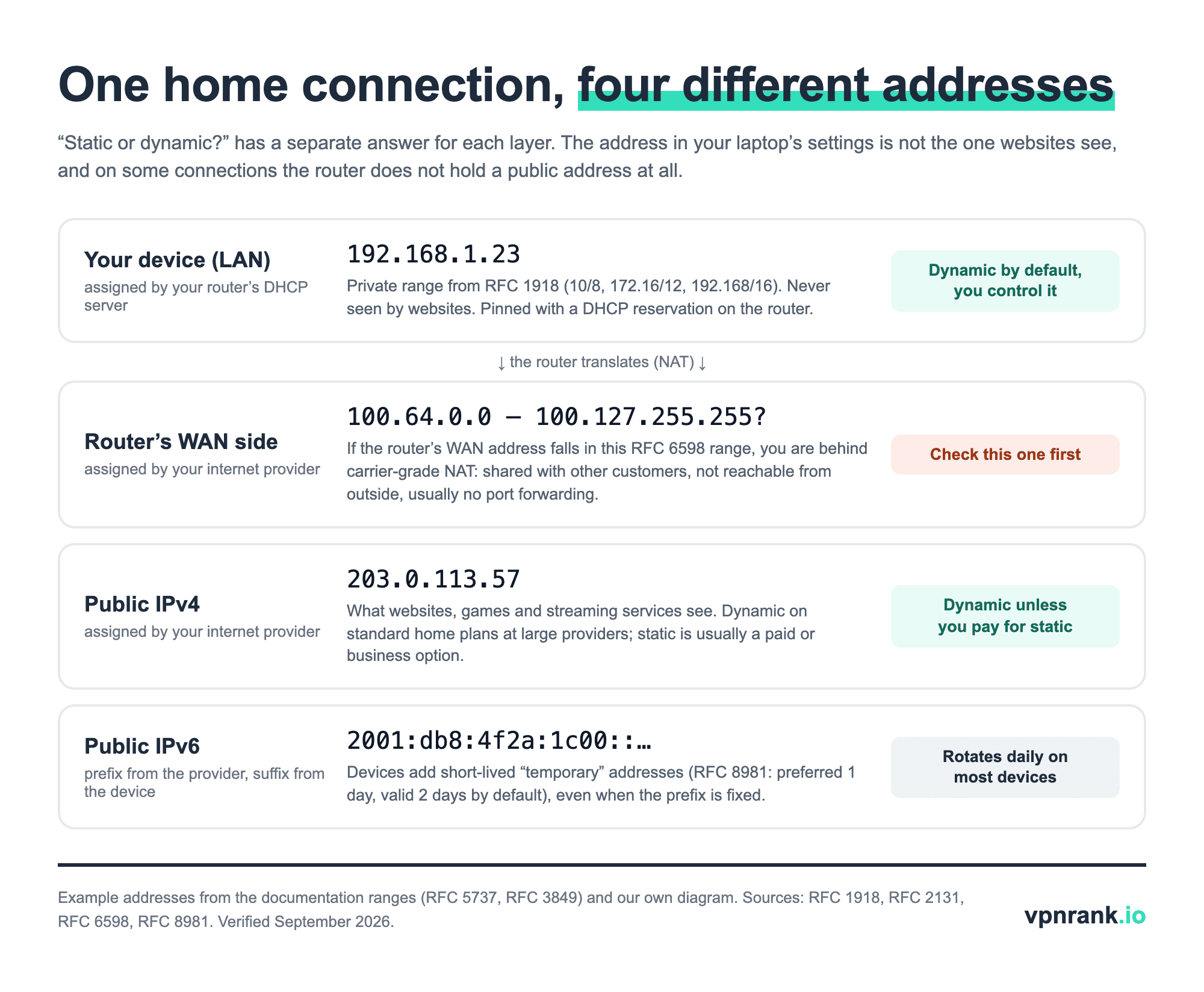
A static address is one that has been fixed on purpose: typed into the device, reserved on the router, or sold to you by the provider. A dynamic address is handed out automatically by DHCP (Dynamic Host Configuration Protocol, the system that lends addresses to devices as they join a network). The private range your router uses, 10.x, 172.16-31.x or 192.168.x under RFC 1918, is never seen by websites, so whether it is static only matters inside your home. The address websites see is the public one, and your provider decides whether that one moves.
A dynamic address is renewed, not redrawn, so it can stay the same for months
Dynamic does not mean random. Under DHCP, defined in RFC 2131, a device borrows an address for a set period called a lease and asks to extend it halfway through. The standard tells the DHCP server to try to return the same address each time the device asks, so a dynamic public IP often looks static for long stretches, then changes after an outage, a long power-off or maintenance on the provider's side.
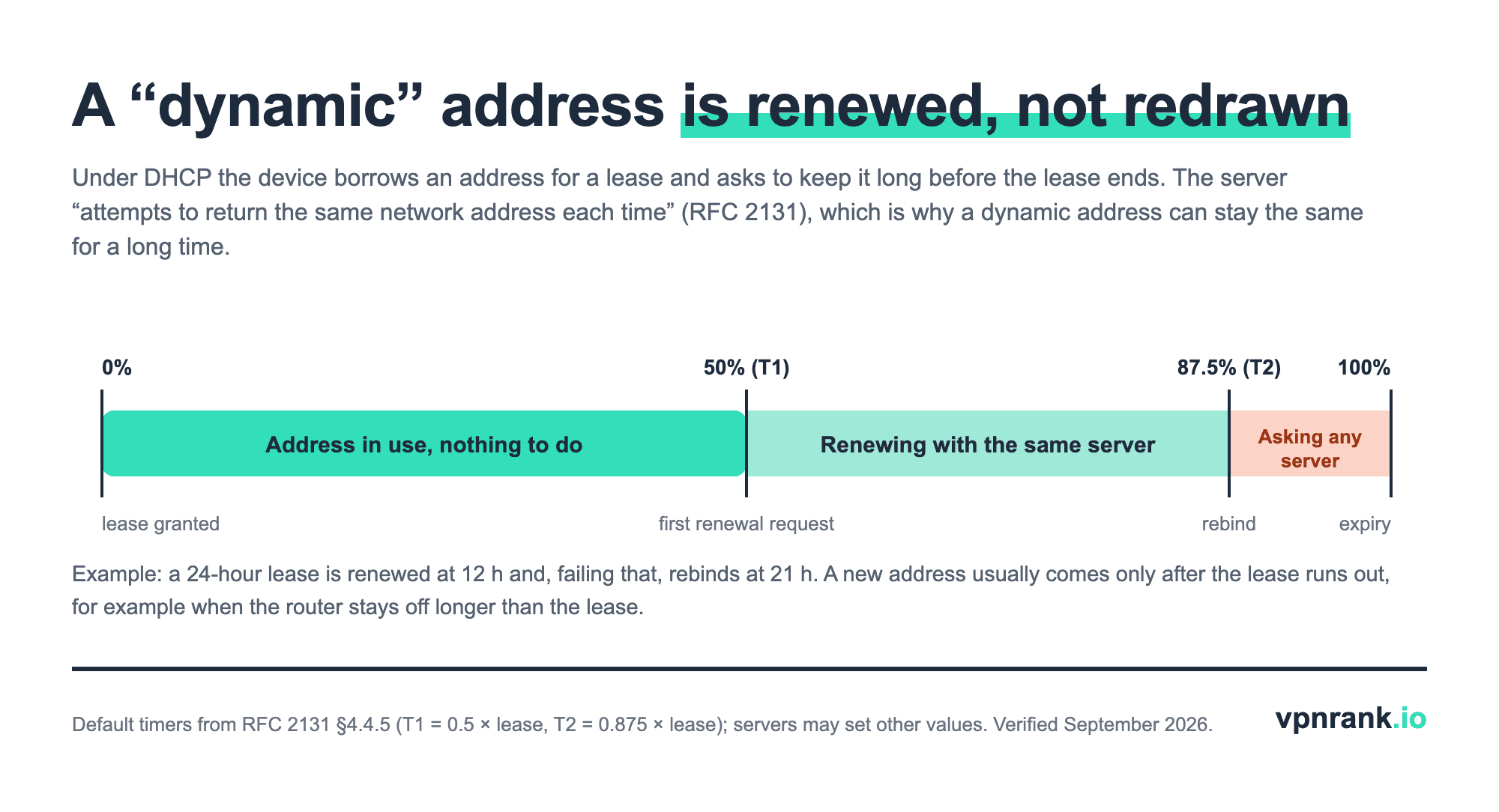
The timers explain the everyday behaviour. With a 24-hour lease the device asks its own DHCP server to renew after 12 hours and, if that server does not answer, asks any server after 21 hours. Only if the lease runs out, typically because the router was switched off for longer than the lease, does the device start from scratch and possibly receive a different address. That is why restarting a router for a minute usually gives you back the same public IP, while leaving it off overnight sometimes does not.
Your router's WAN page, not your laptop's settings, shows what your provider gives you
Checking your computer tells you only how the router treats that computer. To learn whether your public address is static or dynamic you need the router's internet (WAN) status page and a public IP lookup, and comparing the two also reveals carrier-grade NAT, the setup that matters most for gaming and remote access. The whole check takes about two minutes.
- 1Device (private) address, Windows 11: Start > Settings > Network & internet > Wi-Fi > Manage known networks > your network (for a cable: Ethernet > your connection). Next to IP assignment, "Automatic (DHCP)" means dynamic and "Manual" means static (Microsoft Support).
- 2Device (private) address, Mac: Apple menu > System Settings > Network > your connection > Details > TCP/IP. Configure IPv4 shows "Using DHCP", "Using DHCP with manual address" or "Manually"; the Renew DHCP Lease button appears only when DHCP is in use (Apple Support).
- 3Router's internet address: sign in to the router's admin page or app and open the Internet, WAN or Status page. Note the connection type (DHCP or Dynamic IP; PPPoE, a login-based connection some providers use; or Static IP) and the WAN IP address shown there.
- 4Public address: open our What Is My IP tool with any VPN switched off. It shows the IPv4 or IPv6 address websites see.
- 5Compare: if the router's WAN IP matches the public IP, the router holds a real public address. If the WAN IP starts with 100.64 to 100.127, you are behind carrier-grade NAT (the RFC 6598 shared range). If it starts with 10., 172.16-31. or 192.168., there is a second router in front of yours.
| What you find | What it means | Static or dynamic? | What this doesn't prove |
|---|---|---|---|
| Device says "Automatic (DHCP)" / "Using DHCP" | The router lends this device its private address | Dynamic (inside your home) | Nothing about your public address |
| Router WAN type "Static IP" with fields you or the provider filled in | The provider assigned a fixed public address | Static | Only while that plan continues |
| Router WAN type "DHCP" or "PPPoE", WAN IP = public IP | Real public address, leased by the provider | Dynamic | It may still stay the same for months |
| WAN IP in 100.64.0.0-100.127.255.255 | Carrier-grade NAT: the public IP is shared with other customers | Dynamic and shared | Which other customers share it |
| WAN IP in 10.x, 172.16-31.x or 192.168.x | Your router sits behind another router (double NAT) | Depends on the first router | Whether the first router is the provider's CGNAT |
| Public IP starts with a 4-group hex prefix (IPv6) | Your device reached the site over IPv6 | Prefix from the provider; suffix usually rotates | What your IPv4 address is |
Reading your own connection. Address ranges from RFC 1918 and RFC 6598; menu paths from Microsoft Support and Apple Support. Verified September 2026.
A second quick test works when you cannot reach the router: write down the public IP, leave the router unplugged overnight, and check again. A change proves the address is dynamic. No change proves nothing, because a DHCP server tries to hand back the same address.
Static and dynamic IPs differ in reachability and cost, not in speed or safety
The practical difference between a static and a dynamic public IP is whether other people and services can find you at the same address tomorrow. That matters for hosting a server, reaching a home camera or a NAS from outside, or being put on an employer's allowlist. For browsing, streaming and gaming the assignment method changes nothing about speed; speed depends on the line, the route and the server at the other end.
| Question | Static public IP | Dynamic public IP | What this doesn't settle |
|---|---|---|---|
| Who sets it | Provider, fixed on the account | Provider's DHCP server, leased | Whether it is shared (CGNAT) |
| Cost on home plans | Usually a paid add-on or a business plan | Included | Prices vary by provider and are not listed here |
| Reach a home server, camera or NAS from outside | Direct, same address every time | Needs dynamic DNS to follow changes | Neither works behind CGNAT without the provider's help |
| Being allowlisted by a company or bank | Works | Breaks when the address changes | Many services allowlist accounts, not addresses |
| Speed | No difference | No difference | The line and route set speed |
| Tracking by websites | Same address ties your visits together over time | Changes occasionally | Cookies and logins track you regardless of IP |
| Security | Same exposure, easier to target over time | Same exposure, harder to target over time | A firewall and updates matter far more |
Static vs dynamic public IP on a home connection. Sources: RFC 2131, RFC 6598, AT&T Support (static IP blocks). Verified September 2026.
Practical rule:Pay for a static IP only when something outside your home has to find you at a fixed address. If you only browse, stream or game, a dynamic IP does the same job, and a static one just makes your household easier to recognise.
For gaming and port forwarding, carrier-grade NAT matters more than static vs dynamic
Carrier-grade NAT (CGNAT) is the reason many people who ask for a static IP are really fighting something else. With CGNAT the provider gives your router an address from the 100.64.0.0/10 shared range, set aside in RFC 6598 in April 2012, and many customers leave the provider's network through the same public IPv4 address. Nobody outside can open a connection to your router, so port forwarding in the router's menu does nothing.
That is what games report as a strict or moderate NAT type (the console's warning that others cannot connect to it), and what stops hosting a game server, reaching a security camera or seeding torrents to all peers. RFC 7021, the IETF's 2013 assessment of CGNAT, recorded peer-to-peer Xbox gaming and seeding failing behind it in its test network; later console updates improved some games, which the same document notes. The fixes, in order of cost: ask the provider for a public IPv4 address, use IPv6 where the game supports it, or buy a static IP. A VPN dedicated IP does not do the same job, because incoming connections reach the VPN server, not your console or PC.
A dynamic public address, by contrast, is rarely the problem for gaming. Consoles and PCs work out the current address themselves, and the address changing once in a while at most drops a session. See do you need a VPN for gaming for what a VPN changes on ping and on NAT, and our gaming VPN ranking.
A DHCP reservation makes a device static at home; only your provider can fix the public IP
Making an address static takes two different routes depending on the layer. Inside your home you can fix any device's private address yourself, for free, and the router's DHCP reservation is the safer way to do it than typing an address into the device. The public address is the provider's to assign: you can ask for a static one, usually at a price or on a business plan, but no router or device setting creates it.
- 1Reserve on the router (recommended). On TP-Link routers the menu is Advanced > Network > DHCP Server > Address Reservation (Network > DHCP Server on some models): add the device's MAC address and the IP you want. TP-Link's own wording is that the device "will always receive the same IP address each time it connects".
- 2Or set it on the device. Windows: IP assignment > Edit > Manual. Mac: Configure IPv4 > Manually. Choose an address outside the router's DHCP pool, or two devices can end up with the same address.
- 3Turn off address rotation for that network. A reservation is keyed to the Wi-Fi (MAC) address. Apple's private Wi-Fi address can be Off, Fixed or Rotating, and Rotating changes it every two weeks (iPhone: Settings > Wi-Fi > the info button > Private Wi-Fi Address), after which the reservation no longer matches.
- 4Ask the provider for a public static IP. Providers sell these per address or in blocks; AT&T's support page, for example, lists blocks of 8, 16, 32 and 64 addresses, of which 5, 13, 29 and 61 are usable because three addresses per block are reserved.
If you only need to reach home from outside and the router holds a real public address, dynamic DNS is the free alternative: a small service on the router updates a hostname whenever the address changes. It does not help behind carrier-grade NAT, because the address it would publish is shared.
On IPv6 the provider's prefix can be fixed while your device's address still changes daily
IPv6 splits the question in two. The provider hands your router a prefix, the first half of the address, which may be stable or may change like a dynamic IPv4 address. Each device then builds its own second half, and phones and computers add temporary addresses for outgoing connections. RFC 8981, the current standard for them, sets a default preferred lifetime of one day and a valid lifetime of two days, so the IPv6 address websites see normally changes every day by design.
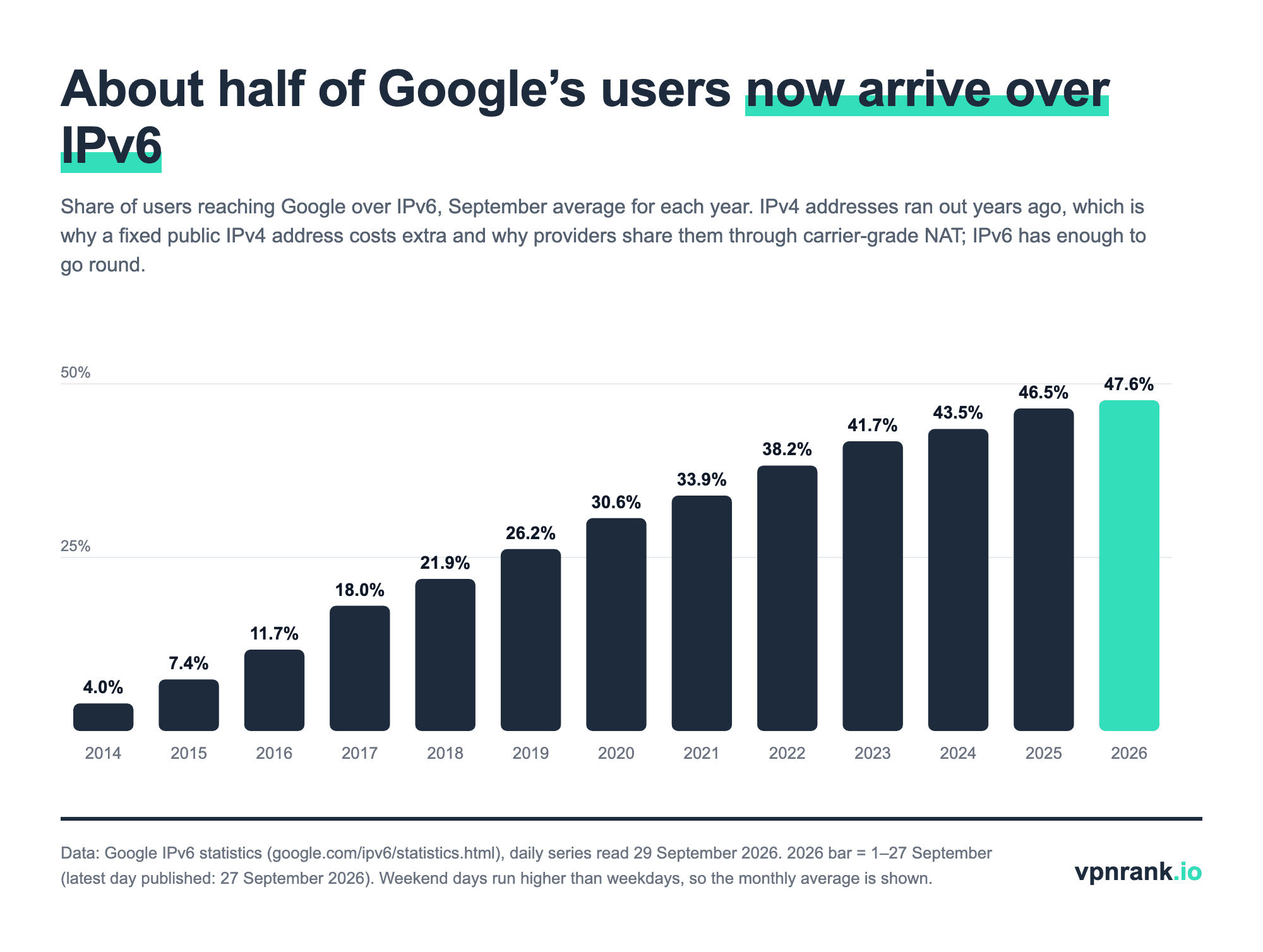
IPv6 matters here because it is where the address shortage ends. Google's statistics put users reaching Google over IPv6 at 47.6% on average for 1-27 September 2026, up from 4.0% in September 2014. IPv4 addresses are the scarce ones, which is why a fixed public IPv4 address costs extra and why providers share them through carrier-grade NAT. If your IP lookup shows an IPv6 address, sites that support IPv6 see that one rather than your IPv4 address.
A VPN replaces your public IP with a shared, fixed or dedicated one
A VPN is the other way to change the public address sites see, and VPN addresses come in the same two flavours. By default, VPN servers give you a shared address that many customers use at once and that changes when you reconnect; that is what makes it hard to link to you. A dedicated IP is a static VPN address sold as an add-on that only you use, useful for allowlists and fewer CAPTCHA checks, at the cost of standing out again.
| Provider | Default VPN address | Dedicated (static) IP | How it is tied to you | Limits stated by the provider |
|---|---|---|---|---|
| NordVPN | Shared with other users on the server | Paid add-on; 31 countries and regions listed, from Atlanta to Auckland | Linked to your account email | Up to 10 devices on OpenVPN, 1 on NordLynx, not on IKEv2; setup up to 3 business days |
| Surfshark | Same IP until you reconnect; optional rotating IP; shared "Static IP" locations | Paid add-on, 1 per account | Your own IP, not reachable by other Surfshark users | Not included in Surfshark bundles |
| Private Internet Access | Shared | Paid add-on in 10 countries, 1 per subscription | Token not linked to your account; PIA cannot recover a lost token | App only, not on routers; not with Apple or Google in-app purchases |
| CyberGhost | Shared | Paid add-on, 1 per account | Token under zero-knowledge encryption; CyberGhost cannot resend a lost token | Up to 7 devices, app only; no remote desktop (RDP) to your device; no obfuscation |
| ExpressVPN | Shared | Included with Express Pro, add-on on Basic and Advanced; 29 locations | Blind tokens separate payment from the IP | May be released if your apps stay offline for a long time |
| IPVanish | Shared, changes each session | Not offered | — | IPVanish says it does not offer static IPs |
| Proton VPN | Shared | Business plans only | Assigned to the organisation | Dedicated IPs listed for 20+ countries on Proton's business page |
VPN address types from each provider's own help centre or product page, read 29 September 2026. Add-on prices vary by storefront and are not listed. Verified September 2026.
Two limits apply to every dedicated IP. First, it does not open ports to your home: CyberGhost's help centre points out that a remote desktop connection to a dedicated IP reaches the VPN server, not your device. Second, it makes you recognisable again, which is the opposite of what a shared VPN address is for. Use one for a specific job, such as a work allowlist, and keep a shared server for everything else. Our dedicated IP glossary entry and the guide to changing your IP address cover the everyday case.
When an address won't behave: the symptom tells you which layer to fix
Most address problems at home come from a mismatch between layers: a device fixed to an address the router also lends out, a reservation that no longer matches a rotating Wi-Fi address, or a port forward on a router that has no public address to forward. Start from the symptom and fix the layer it points to.
- 1"IP address conflict" after setting a static address: the address is inside the router's DHCP pool. Move it outside the pool or use a reservation instead.
- 2A reserved device keeps getting a new local IP: the phone is using a rotating private Wi-Fi address. Set that network to Fixed or Off, then update the reservation with the MAC address now shown.
- 3Port forwarding set up but nothing connects from outside: compare the router's WAN IP with your public IP. A 100.64-100.127 WAN address means CGNAT; ask the provider for a public IPv4 address.
- 4The public IP changed and a remote camera or server disappeared: the address is dynamic. Set up dynamic DNS on the router, or ask for a static IP.
- 5A site or employer allowlist rejects you on the VPN: shared VPN addresses change. Use a dedicated IP, or turn the VPN off for that site with split tunnelling.
- 6Your IP lookup shows an unfamiliar address: it may be your IPv6 address, which rotates by design, or a VPN or iCloud Private Relay that is switched on.
A static public IP is as safe as a dynamic one, but it ties your household to one address
A static public IP is not less secure in itself: the same ports are open or closed, and the same router firewall protects you. What changes is time. A fixed address lets websites, ad networks and anyone scanning the internet associate everything from your household with one number for as long as you keep it, and a service exposed at home stays at a known address. A dynamic address blurs that only slightly, because most providers hand back the same one for long periods.
For privacy, the address is a small part of the picture: cookies, logins and browser fingerprints identify you whether your IP is static or dynamic. Our guide on what the Wi-Fi owner can see and the post on how to hide your IP address go through what a VPN does and does not hide.
VPNs for a fixed or shared address, picked for this job
Chosen for what each provider's own help centre says about dedicated and static addresses, not for speed rankings. Prices shown are the base VPN plan; a dedicated IP costs extra except on ExpressVPN's Express Pro plan. For privacy, stay on a shared server; add a dedicated IP only for a job that needs a fixed address.
| VPN | Best for | 2-year price | Why | Deal |
|---|---|---|---|---|
| NordVPN | Dedicated IP in the most countries | $3.09/mo30-day refund | NordVPN's help centre lists dedicated IP locations in 31 countries and regions, including 11 US cities, and allows the dedicated IP on up to 10 devices at once over OpenVPN. The trade-off, stated at purchase, is that the IP is linked to your account email. | Get dealPrice today |
| Private Internet Access | Dedicated IP not linked to your account | $1.75/mo30-day refund | Private Internet Access issues dedicated IPs as tokens that its help centre says are never related to user IDs on its servers, with 13 US locations among 10 countries. The token is shown once and cannot be recovered, and it works in the app, not on routers. | Get dealPrice today |
| Surfshark | A fixed address without buying an add-on | $1.78/mo30-day refund | Surfshark's static IP locations give everyone connected one shared address that stays the same between connections, included in the plan; its rotating IP feature does the opposite. A personal dedicated IP is a separate purchase, one per account. | Get dealPrice today |
| ExpressVPN | Dedicated IP included on its top plan | $2.79/mo30-day refund | ExpressVPN includes a dedicated IP with its Express Pro plan (an add-on on Basic and Advanced) in 29 locations, and says blind tokens keep payment details apart from the IP assigned. It warns the IP may be released if the apps stay offline for long periods. | Get dealPrice today |
Prices are the 2-year plan per month in USD from our VPN Price Index, checked daily.
Need a different use case? See the full ranking for changing your IP
Frequently asked questions
Is 192.168 a static IP?
Not necessarily. 192.168.x.x is a private range from RFC 1918, used by home routers for devices on your own network; it is never seen by websites. Whether a particular 192.168 address is static depends on your settings: "Automatic (DHCP)" or "Using DHCP" means the router lends it dynamically, while a manual setting or a DHCP reservation on the router makes it static.
How do I change my IP from dynamic to static?
For a device on your home network, create a DHCP reservation on the router (on TP-Link: Advanced > Network > DHCP Server > Address Reservation) or set the address manually on the device, outside the router's DHCP pool. For your public IP, only your internet provider can do it, usually as a paid add-on or on a business plan. A VPN dedicated IP is the alternative when you need a fixed address that sites see.
Is a static IP safe?
It is as safe as a dynamic one against attacks: open ports and your router firewall decide exposure, not the assignment method. The difference is tracking over time. A static public IP links everything from your household to one address for as long as you keep it. Keep the router updated, close ports you do not use, and use a VPN on a shared server when you want sites not to see your home address.
Is a static or dynamic IP better for gaming?
Neither is faster. What affects online gaming is the NAT type: if your provider uses carrier-grade NAT (router WAN address between 100.64 and 100.127), you cannot forward ports and may see a strict NAT type. The fix is a public IPv4 address from the provider, IPv6 where the game supports it, or a static IP; a dynamic public IP on its own is rarely the problem.
Does restarting my router change my IP address?
Usually not. A DHCP server tries to hand the same address back to the same router, and a short restart happens well inside the lease. A longer power-off that lets the lease expire, provider maintenance, or a change of router can bring a new public address. With CGNAT your public address can change without anything happening at home, because it is shared.
Does a VPN give me a static IP?
Not by default. A normal VPN server gives you a shared address that changes when you reconnect. Several providers sell a dedicated IP, a static VPN address only you use, as an add-on; ExpressVPN includes one with its Express Pro plan, and Surfshark also has shared static IP locations. IPVanish does not offer static IPs.
Sources we read for this guide
- RFC 2131: Dynamic Host Configuration Protocol (IETF, March 1997)
- RFC 1918: Address Allocation for Private Internets (IETF, February 1996)
- RFC 6598: IANA-Reserved IPv4 Prefix for Shared Address Space (IETF, April 2012)
- RFC 7021: Assessing the Impact of Carrier-Grade NAT on Network Applications (IETF, September 2013)
- RFC 8981: Temporary Address Extensions for Stateless Address Autoconfiguration in IPv6 (IETF, February 2021)
- IPv6 adoption statistics (Google)
- Change TCP/IP settings (Microsoft Support)
- Change TCP/IP settings on Mac (Apple Support)
- Use private Wi-Fi addresses on Apple devices (Apple Support)
- How to Configure Address Reservation on TP-Link Wireless Router (TP-Link FAQ 182)
- About Static IP Addresses (AT&T Support)
- Dedicated NordVPN IP addresses (NordVPN Help Center)
- How to purchase a dedicated IP address (NordVPN Help Center)
- What is Dedicated IP? (Surfshark Support)
- Will I be given various IPs every time? (Surfshark Support)
- Do You Offer Dedicated IP Addresses? (PIA Helpdesk)
- How to Purchase and Use Dedicated IPs (PIA Helpdesk)
- Dedicated IP FAQ (CyberGhost Support)
- Dedicated IP (ExpressVPN)
- Does IPVanish offer static or dynamic IPs? (IPVanish Support)
- Proton VPN for Business (Proton)