
Best VPN for Students 2026
Prices verified 19 September 2026- Cheapest: TotalVPN at $1.59/mo
- Biggest discount: 88% off (Surfshark)
- No coupon code needed — discounts apply automatically

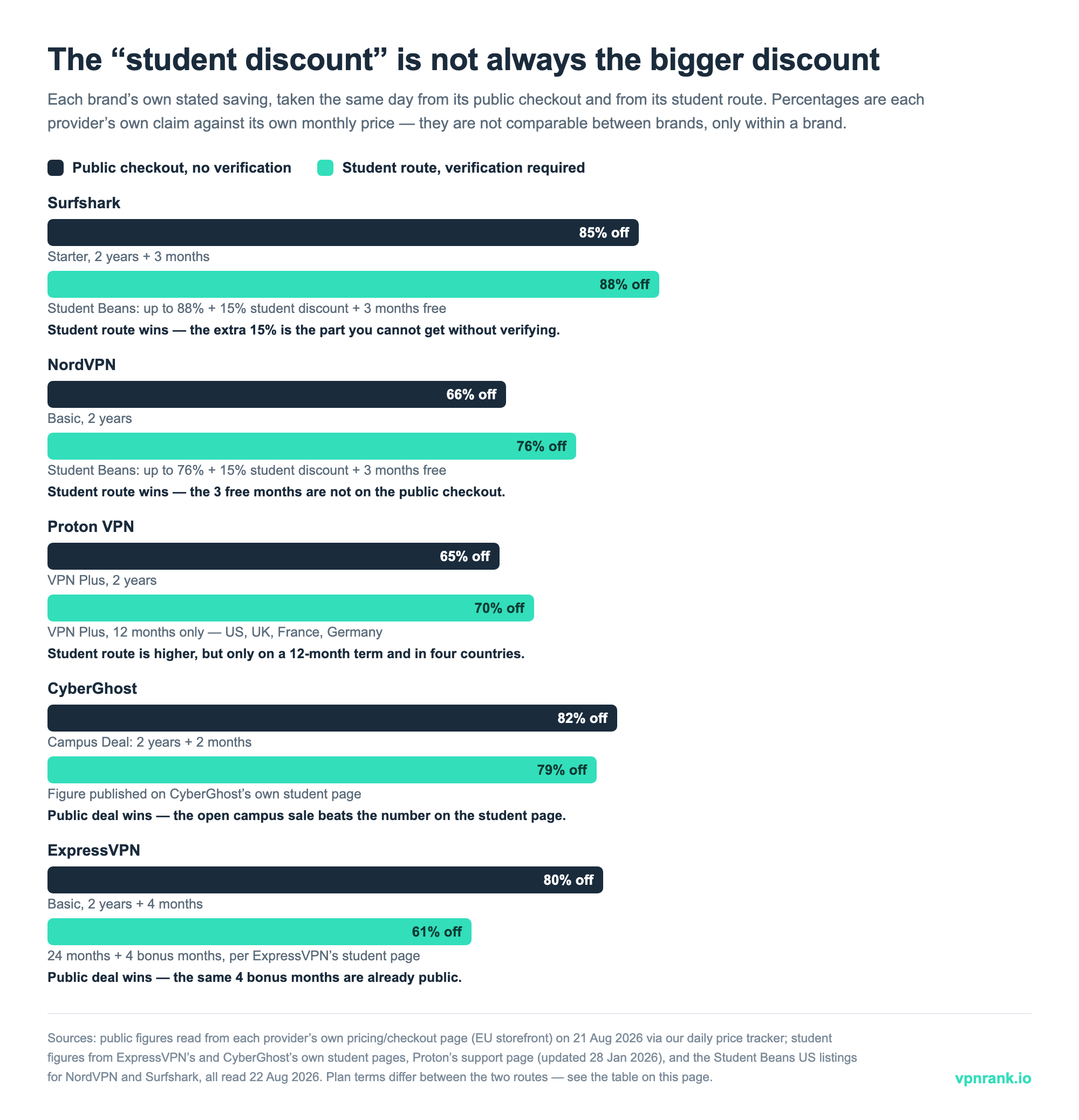
In short: Yes, most major VPNs offer verified student discounts through Student Beans or UNiDAYS, including Surfshark, NordVPN, ExpressVPN, Proton VPN, CyberGhost, PIA, and IPVanish. But we checked both routes on the same day in August 2026, and the student route is not always the cheaper one: CyberGhost's open "campus deal" (82% off) beat the 79% published on its own student page, and ExpressVPN's public 2-year plan already carried the same four bonus months its student page advertises. Where the student route does win, the extra is usually a 15% stack or a few free months, not a separate cheap tier. The cheapest reliable picks for a student budget are PIA, Surfshark, and CyberGhost. Every plan is risk-free with a 30-day money-back guarantee (45 days at CyberGhost), and Proton VPN has the only genuinely safe free tier.
Student discount?
Yes at 7 of 8, via Student Beans / UNiDAYS
Always cheaper?
No — 2 of 7 were beaten by their own public sale
Cheapest
PIA, Surfshark and CyberGhost lead on student value
Devices
Surfshark and PIA allow unlimited simultaneous connections
Prices in USD, verified as of 2026-08-22. Discounts apply on the 2-year plan, billed up front.
A VPN is one of the few subscriptions that's genuinely worth it on a student budget: it secures your laptop and phone on shared cafe and hotel WiFi, lets international students keep streaming and banking from home, and adds privacy on networks you don't control. Almost every major VPN runs a verified student discount through Student Beans or UNiDAYS — so we did the obvious check nobody publishes: we opened each provider's public checkout and its student route on the same day and compared what each one actually offers. In August 2026 the student route was clearly better at three of the seven providers running one, clearly worse at two, and a toss-up at the other two — because several brands are simultaneously running an open "back to campus" sale that anyone can claim without verifying anything. This guide publishes that comparison in full, ranks the cheapest reliable VPNs (PIA, Surfshark, CyberGhost), explains what campus WiFi does and doesn't already protect, warns about the one situation where switching a VPN on locks you out of your own university library, and covers home streaming, free-VPN traps, device setup and splitting costs with roommates. Prices in the live table render from our daily tracker; we cite discount ranges, not fixed numbers. We earn a commission if you subscribe, at no extra cost to you.
Best VPNs for students right now, ranked
| # | VPN | Deal | From | Money-back | |
|---|---|---|---|---|---|
| 1 | ExpressVPN9.9/10 | GET 79% OFF + 4 months FREE | $2.79/mo | 30 days | Get Deal → |
| 2 | IPVanish9.8/10 | GET 83% OFF | $2.19/mo | 30 days | Get Deal → |
| 3 | NordVPN9.7/10 | GET 74% OFF | $3.09/mo | 30 days | Get Deal → |
| 4 | Proton VPN9.6/10 | GET 70% OFF | $2.99/mo | 30 days | Get Deal → |
| 5 | CyberGhost9.5/10 | GET 86% OFF + 2 months FREE | $2.03/mo | 45 days | Get Deal → |
| 6 | TotalVPN9.4/10 | GET 80% OFF | $1.59/mo | 30 days | Get Deal → |
| 7 | Private Internet Access9.3/10 | GET 85% OFF + 2 months FREE | $1.75/mo | 30 days | Get Deal → |
| 8 | Surfshark9.2/10 | GET 88% OFF + 3 months FREE | $1.78/mo | 30 days | Get Deal → |
No coupon code required — each discount applies automatically through the link. Prices verified as of 2026-08-22.
Student route vs public checkout: what each brand offered on the same day
| Provider | Student route (verified) | Public checkout, same day | Is the student route actually cheaper? | What it doesn't automatically prove |
|---|---|---|---|---|
| IPVanish | Own student page: 2-year Essential $1.99/mo, Advanced $2.19/mo | Own pricing page: Essential $2.49/mo, Advanced $3.59/mo | Yes — the only brand publishing a lower student price outright ($0.50-$1.40/mo less) | Both routes renew at the same standard yearly rate ($99.99 Essential / $129.99 Advanced), so the saving covers the intro term only |
| Surfshark | Student Beans US: "Up to 88% off VPN + 15% Student Discount & 3 Months Free" | Starter 2-year: 85% off, €2.49/mo, +3 extra months | Yes, but only by the 15% stack — the 3 free months are already on the public offer | An "up to" percentage is measured against the monthly price, not against the public 2-year price you'd otherwise pay |
| NordVPN | Student Beans US: "Up to 76% off 2-year plans + 15% student discount + 3 free months" | Basic 2-year: 66% off, €3.89/mo. Complete: 73% off, €4.89/mo | Yes — neither the extra 15% nor the 3 free months appeared on the public checkout | Tier names differ (Basic vs Complete), so a percentage gap can be a feature gap rather than a real saving |
| Proton VPN | Proton support page: VPN Plus 70% off, 12-month plan only, students in the US, UK, France and Germany | VPN Plus 2-year: 65% off, €3.49/mo | Depends — a higher percentage, but on a 12-month term and only in four countries | Nothing about Proton's free tier changes; the student offer is a paid-plan discount, not free access |
| PIA | Student Beans US: "$2.69 per month for 2 years + 2 Free Months" | "CAMPUS SALE: 85% OFF" — 3 years + 3 extra months at €1.79/mo | Not on price alone — the public sale is a longer term at a lower monthly rate | The two offers cover different commitment lengths, so compare total first-term cost, not the monthly headline |
| CyberGhost | Own student page headline: 79% off (Student Beans separately lists 84% off and bonus-month offers) | "CAMPUS DEAL - SAVE 82%" — 2 years + 2 months at €2.19/mo | No, not on its own published number — the open campus deal beat the student page | A brand can advertise three different figures at once; the one on the student page is not necessarily its best |
| ExpressVPN | Own student page: 12 months + 4 bonus months (51% saving) or 24 months + 4 bonus months (61%) | Basic 2-year + 4 months: 80% off, €2.49/mo | No — the public 2-year already carried the same 4 bonus months at a larger stated saving | Both routes are the same product; the gap is in how each page frames the saving, not in the service |
| TotalVPN | No student programme published on its own site | Premium: €99/year | No student route to compare | Absence of a published listing isn't proof no offer exists — it just isn't advertised where a student would look |
Public figures read from each provider's own pricing or checkout page on 21 August 2026 by our daily price tracker (EU storefront, EUR); IPVanish's figures come from its own US pages in USD. Student figures read on 22 August 2026 from ExpressVPN's, CyberGhost's and IPVanish's own student pages, Proton's support page (last updated 28 January 2026) and the Student Beans US listings for NordVPN, Surfshark and PIA. Every percentage is the provider's own claim against its own monthly rate, so figures are comparable within a brand, not between brands. Storefronts differ by country — check your own checkout before you commit.
Who can verify, where, and what the offer is tied to
| Provider | Verification platform | Terms published on the brand's own site? | Limits we could verify |
|---|---|---|---|
| Proton VPN | Student Beans | Yes — support page names the discount, the plan and the countries | Students in the US, UK, France or Germany only; high school, college or university; 12-month plan only |
| IPVanish | Student Beans | Yes — student prices are printed on its own page | Applies to the intro term; renews at the standard yearly rate |
| CyberGhost | Student Beans | Yes — headline percentage published on its student page | 45-day money-back applies to long plans; the 1-month plan carries 14 days |
| ExpressVPN | UNiDAYS and Student Beans | Yes — bonus months and savings named on its own student page | 30-day money-back is for new users |
| Surfshark | Student Beans (Grad Beans for graduates) | No percentage published — its page routes you to Student Beans | Graduate offer runs up to 5 years after finishing, per the Grad Beans listing |
| NordVPN | Student Beans | Not verifiable — its site blocked our checks; the Student Beans listing is the readable source | Listing shows separate 2-year and 1-year offers at different percentages |
| PIA | Student Beans | Student page exists but shows the same public "Back to Campus" offer | 30-day money-back is for new or first-time users only |
| TotalVPN | None found | No student page | Sold as a yearly plan; no verified student route to compare |
Verification terms read on 22 August 2026 from each provider's own student page or support documentation, plus the Student Beans US listings. Availability and terms change with each promo cycle — confirm on the platform before you assume you qualify.
Practical rule
Open the provider's normal pricing page in one tab and the student offer in another before you verify anything. If the public page is already running a "campus" or "back to school" sale, the student route has to beat that price, not the undiscounted monthly rate the percentage is measured against — and twice in our August 2026 check, it didn't.
Yes, student discounts are real — but the student price and the best price are often two different things
What most VPNs call a student discount is access to their education store through a verification platform like Student Beans or UNiDAYS, where the price you land on is usually the same deep multi-year promo everyone can get, sometimes with an extra percentage or a few bonus months stacked on top. We verified live student programmes at Surfshark, NordVPN, ExpressVPN, Proton VPN, CyberGhost, Private Internet Access (PIA) and IPVanish; TotalVPN publishes none. The part nobody writes down is what the same brand is charging on its ordinary checkout at that moment. August is exactly when that matters, because several providers run a public back-to-school sale under names like "Campus Deal" and "Campus Sale" — open to anyone, no verification, no student email. When we read both routes on the same day, CyberGhost's public campus deal was advertised at 82% off while its own student page led with 79%, and ExpressVPN's public 2-year plan already included the same four bonus months its student page presents as the student perk, at a larger stated saving. That does not make verification pointless. IPVanish prints a genuinely lower student price on its own page ($1.99/mo against $2.49 on the 2-year Essential plan), and the Student Beans listings for Surfshark and NordVPN both add a 15% stack plus three free months that the public checkout does not show. The rule is simply that "student" is a route to a price, not a guarantee of the lowest one — so check both.
On a student budget the shortlist is short: PIA, Surfshark, CyberGhost
On a student budget, your shortlist is PIA, Surfshark, and CyberGhost, with TotalVPN as a bare-bones budget option. Private Internet Access (PIA) is consistently among the cheapest on a long plan, runs a huge server network, and offers a Student Beans discount (commonly cited around 71% off plus bonus free months) along with unlimited simultaneous connections, so one subscription can cover every device you own. Surfshark is the standout value pick because it also allows unlimited devices, has the verified Student Beans offer with a possible extra stack, and keeps a 30-day money-back guarantee. CyberGhost is worth a look for streaming-heavy students: it is optimised for unblocking, runs a verified student programme (its own page cites around 79% off), and uniquely gives you a 45-day money-back window, the longest in this group. TotalVPN sits at the budget end if you want the lowest sticker price and only basic features. The cheapest headline number is not always the best deal, so weigh price against device limits and the refund window. Because prices change with each promo cycle, check the live table on this page rather than trusting any fixed figure quoted elsewhere, then start with the longest plan your budget allows to unlock the lowest monthly rate.
Students hit more untrusted networks in a week than most people do in a year
Students hit more risky networks than almost anyone: dorm WiFi, library hotspots, the campus cafe, the coffee shop where you write essays, and airport WiFi on the way home. Public and campus WiFi exposes you to packet sniffing, where attackers capture unencrypted data packets traveling over the shared network, and to man-in-the-middle attacks, where a hacker secretly intercepts traffic between your device and the website you are using. Norton documents both as standard public-WiFi threats, and a VPN mitigates them by encrypting your traffic so intercepted packets are unreadable. Campuses also face evil twin attacks, where someone sets up a rogue hotspot that mimics a legitimate campus network name to lure students into connecting through it. Beyond security, there are everyday student reasons: international students use a VPN to keep accessing home-country streaming libraries and online banking while abroad, and to avoid triggering bank fraud flags that can fire when you log in from a foreign IP address. Privacy on monitored networks matters too, since many institutional networks log activity. A VPN will not make you anonymous or exempt you from the rules, but it does encrypt your connection on networks you do not control, which is exactly where students spend most of their browsing time. That combination of security and access is why a VPN earns its place on a tight student budget.
The campus network is usually already encrypted — the coffee shop is the one that isn't
Most VPN marketing aimed at students blurs two very different networks into one scary phrase, "public WiFi". They are not the same thing, and knowing which one you are on tells you how much the VPN is actually doing. The eduroam network that covers most universities worldwide is not an open hotspot. It runs on WPA2-Enterprise or WPA3-Enterprise with 802.1X authentication, which means every device gets its own encryption key rather than a shared password — so another laptop sitting on the same access point cannot simply decrypt what you send, and your credentials travel inside a TLS tunnel to your home institution rather than in the clear. That is a materially stronger starting point than the open, passwordless network at a cafe or an airport, where traffic to the access point is unencrypted and packet sniffing is a genuine risk. So the honest case for a VPN as a student is narrower and more specific than "campus WiFi is dangerous". It covers the open networks you use off campus, the ones you cannot verify, and the fact that eduroam encrypts the hop to the access point but does not hide which sites you visit from the network operator handling your traffic after that. If you want one setting to get this right without thinking about it, turn on auto-connect for untrusted networks and leave your university's own network out of it.
- Open cafe, airport or hotel WiFi: no encryption to the access point. This is the case a VPN was designed for.
- eduroam and similar campus networks: WPA2/WPA3-Enterprise with per-device keys. A VPN adds privacy from the network operator, not basic encryption you were missing.
- Your university's own VPN: a way into internal resources, not a privacy tool for general browsing — and, as below, it does not mix well with a commercial one.
Switching on a commercial VPN can lock you out of your own university library
This is the one genuine downside for students, and almost no VPN guide mentions it. Access to academic journals and databases is usually granted by IP address: the publisher recognises your university's network, or your library's proxy server presents you as coming from it. A commercial VPN replaces your IP address with the VPN server's — which is exactly the identifier that entitlement check reads. Turn the VPN on and the publisher stops seeing a subscribing institution. University IT documentation is blunt about the mechanics. NC State's libraries explain that their campus VPN is split-tunnel: "Only traffic going to an ncsu.edu URL goes through the VPN; all other traffic is routed outside the VPN", so a database like JSTOR still sees your off-campus IP and you have to go in through the library's proxy server anyway. UCSB's library, running a different configuration, tells users to leave the campus VPN client in full-tunnel mode because "Otherwise, it will not work with the library databases". Two institutions, opposite instructions, same underlying point: which IP the publisher sees decides whether you get the PDF. The practical routine is simple. Use your library's own link resolver or proxy, or your university's VPN, for anything academic. Use the commercial VPN for everything else — untrusted networks, home streaming, general privacy. Do not expect the two to run at once; when the paywall appears where it shouldn't, disconnecting the commercial VPN is the first thing to try.
A home-country server keeps your home streaming library working and your bank calm
Geo-restriction works by reading your IP address and inferring your location, then limiting what a streaming service or website will show you. A VPN changes the picture by routing your traffic through a server in another country, so the service sees that server's location instead of yours. For an international student, the practical move is to connect to a VPN server in your home country before opening your home streaming app, which keeps your usual library and login working as if you never left. The same approach helps with home online banking: connecting through a home-country server presents a familiar IP, which can reduce the fraud flags banks sometimes raise on logins from abroad, as Comparitech notes for travelers and students. A few honest caveats: streaming platforms actively work to detect and block VPN traffic, so no provider can promise every service works every day, and you should expect the occasional need to switch servers. CyberGhost is streaming-optimised and a sensible default for this use case, while Surfshark and PIA give you a wide server spread to try. Whatever you pick, choose a provider with a money-back guarantee so you can test your specific services risk-free. Only access content you are entitled to under your own subscriptions, and remember that using a VPN does not override a streaming service's own terms of use.
Using a VPN is legal; whether it is allowed on your campus network is your university's call
Technically, yes, a VPN will usually run on campus WiFi, and using a VPN is generally legal. But whether it is permitted on your university's network is a separate question governed by that institution's acceptable-use policy, and we will be straight with you: this is not a green light to bypass campus restrictions. Many universities run their own approved VPN for accessing internal resources, and some explicitly prohibit third-party VPNs or using a VPN to get around network controls. NordVPN's own guidance makes the same point, and real policies confirm it: NC State's VPN acceptable-use policy, for example, formally regulates VPN access and requires users to comply with institutional computer-use rules. So before you connect a personal VPN on campus, check your university's acceptable-use policy or ask the IT department what is allowed. If your goal is securing your own traffic on shared WiFi, that is the strongest and least controversial reason to use one. If your goal is to bypass restrictions your institution has deliberately put in place, you risk losing network access or facing disciplinary action, and we are not going to encourage that. The responsible framing is simple: a VPN is a privacy and security tool, and on a managed network you use it within the rules that network sets.
A free VPN that is not Proton's is usually paid for with your data
"Free VPN" is tempting on a student budget, but most free apps cost you in ways that matter more than money. The common problems are tight data caps that throttle you mid-essay or mid-stream, logging and selling of your browsing data to make up the revenue they are not charging you, and in the worst cases bundled malware or intrusive ads. Because a VPN sees all your traffic, trusting an unknown free provider with that visibility is a real privacy risk, which is the opposite of why you wanted a VPN in the first place. The one safe exception we recommend is Proton VPN's free tier. Proton offers a genuine, permanent free plan, separate from its student discount, with unlimited data on a limited set of servers, listed openly on its pricing page. That makes it the only free option we are comfortable suggesting for students who truly cannot pay anything. The trade-offs are real: fewer server locations and no streaming optimisation, so it is best for security on public WiFi rather than unblocking home content. If your budget can stretch to a long-term paid plan, the per-month cost after a student discount is often the price of a single coffee, and you get full server access plus a money-back guarantee. But if it is free or nothing, choose Proton's free tier over any random app from the store.
What each provider actually publishes, in its own words
Percentages move with every promo cycle, so what follows is what each brand published where a student would look, on the dates given. Treat them as a snapshot to check against, not as prices to hold anyone to.
- IPVanish: the only provider printing student prices outright on its own page — 2-year Essential at $1.99/mo and Advanced at $2.19/mo, against $2.49 and $3.59 on its public pricing page. Both renew at the standard yearly rate ($99.99 / $129.99). Read 22 August 2026.
- Surfshark: its own student page names no percentage and routes you to Student Beans, which advertises "Up to 88% off VPN + 15% Student Discount & 3 Months Free". Surfshark's page does confirm the 30-day money-back guarantee. Graduates are covered separately through Grad Beans for up to five years after finishing.
- NordVPN: the Student Beans US listing shows "Up to 76% off NordVPN 2-year plans + 15% student discount + 3 free months", plus a separate "Up to 67% off for a 1-year Plan". NordVPN's own site blocked our automated checks, so the listing is the source we can actually quote.
- ExpressVPN: its own student page describes a 12-month plan with four bonus months (51% saving) or 24 months with four bonus months (61%), verified through both UNiDAYS and Student Beans. Its public order page the same week offered the 2-year Basic plan with the same four bonus months at a stated 80% off.
- Proton VPN: Proton's support page, last updated 28 January 2026, lists VPN Plus at 70% off on the 12-month plan only, for students in the US, UK, France or Germany. That is a correction to the 75% figure widely repeated elsewhere, including in an earlier version of this page.
- CyberGhost: its student page leads with 79% off and the 45-day money-back guarantee; the Student Beans listing separately shows an 84% offer and bonus-month promotions. Note the guarantee is 45 days on long plans and 14 days on the 1-month plan.
- PIA: the Student Beans US listing reads "$2.69 per month for 2 years + 2 Free Months". PIA's own student page shows the same public "Back to Campus" offer anyone sees, and its money-back guarantee is documented as being for new or first-time users only.
- TotalVPN: no student programme published on its site; it sells a yearly Premium plan and nothing student-specific.
Verification takes about five minutes, and the eligibility limits are narrower than the marketing suggests
The student discounts above run through verification platforms, most commonly Student Beans, with ExpressVPN also using UNiDAYS. You register on the platform, prove your student status, and then unlock the offer at the VPN's checkout. Proton's support page spells out the three accepted methods, and they are the ones these platforms use generally: sign in to your school or university's learning portal, receive a verification email at your school address, or upload your student ID. The eligibility limits are where assumptions go wrong. Proton states plainly that you must be a high school, college or university student studying in the US, the UK, France or Germany — four countries, confirmed on its own support page as of 28 January 2026, and a hard stop if you study anywhere else. Surfshark's programme extends past graduation through Grad Beans, which its listing covers for up to five years after you finish. Coupon sites sometimes claim NordVPN caps its student deal at ages 18 to 26; that figure is third-party and we could not confirm it on a NordVPN page, so do not treat it as fact either way. Whatever the platform advertises, the provider's own checkout terms are what bind, so read them before you spend time verifying.
Two apps and two settings cover almost every student device
You do not need to be technical to get protected on every device. The general flow is the same across providers: 1) pick a plan and complete any student verification on Student Beans or UNiDAYS, 2) download the official app from the provider's website or your device's app store, 3) sign in with your account, and 4) tap connect, choosing a nearby server for the fastest speeds or a home-country server when you want home content. Install the app on both your laptop and your phone, since those are the two devices that hop between networks most. If you chose Surfshark or PIA, their unlimited simultaneous connections mean a single account covers your laptop, phone, tablet, and even a roommate's device if your plan terms allow it; providers with device caps let you cover several devices but count them, so check the limit. Turn on the kill switch in settings so your traffic is blocked if the VPN drops, which matters on flaky campus WiFi, and enable auto-connect on untrusted networks so you are protected the moment you join a cafe or library hotspot without remembering to tap connect. For phones, allow the VPN profile when the operating system prompts you. If something does not unblock or feels slow, switch to a different server in the same country first; most issues are solved by a server change rather than a settings overhaul. Test everything during your money-back window so you can confirm your specific apps and services work before the refund period closes.
Four things decide it: price, device count, refund window and fit
On a student budget, four factors decide it: price, device count, the refund window, and whether the provider actually does what you need. Start with price, but compare the verified student price against the public long-term deal in our live table, because for several providers the student route lands close to the standard multi-year promo. Next, weigh device count: if you own a laptop, a phone, and a tablet, unlimited-device providers like Surfshark and PIA stretch a single subscription furthest and make splitting with roommates viable where the terms allow. Then prioritise the money-back guarantee, which on a tight budget is what makes the purchase genuinely risk-free; every provider here offers at least 30 days, and CyberGhost gives 45, so you can test thoroughly and walk away for a full refund if it does not deliver. Finally, match the provider to your main use: CyberGhost for streaming-heavy unblocking, Surfshark or PIA for all-round value across many devices, Proton if privacy and a safe free fallback matter most, and TotalVPN only if the absolute lowest sticker price is the deciding factor. Avoid locking into the longest plan until you have confirmed performance within the refund window. A sensible approach is to subscribe to a long plan to get the low monthly rate, test it hard in the first week across campus WiFi and your key apps, and keep the receipt so you can claim the refund if it underwhelms.
The biggest saving is the plan length, not the student code
A few practical moves keep VPN spending genuinely low. First, choose the longest plan you can afford, because the lowest monthly rate almost always comes from a two-year or longer term rather than monthly billing; the trade-off is paying upfront, so use the money-back window to confirm it works before the refund period ends. Second, always run your purchase through student verification on Student Beans or UNiDAYS even if the headline price looks like the public promo, since any extra stack or bonus free months is still money saved over a long term. Third, where the provider's terms of service allow it and the plan permits unlimited or multiple simultaneous connections, split a multi-device plan with roommates so the per-person cost drops sharply; Surfshark and PIA suit this because of their unlimited connections, but check the ToS first since sharing outside the household can violate some agreements. Fourth, time your purchase around major sale periods like back-to-school, Black Friday, and New Year, when the underlying multi-year promos tend to deepen. Fifth, if you genuinely cannot pay, fall back to Proton VPN's free tier for public-WiFi security rather than a risky free app. Finally, set a calendar reminder for your renewal date, because the deep discount usually applies to the first term and renewals can be pricier; checking the live table before you renew, or re-subscribing on a fresh deal, keeps your cost low year after year.
Best VPN for Students 2026 — frequently asked questions
Do VPNs really have a student discount, or is it just the normal deal?
Both, and the split matters. Surfshark, NordVPN, ExpressVPN, Proton VPN, CyberGhost, PIA and IPVanish all run verified programmes through Student Beans or UNiDAYS, but much of the advertised saving is the same deep multi-year promo available to everyone. When we compared both routes on the same day in August 2026, IPVanish published a genuinely lower student price ($1.99/mo vs $2.49), Surfshark and NordVPN added a 15% stack plus free months, while CyberGhost's public campus deal (82% off) beat the 79% on its own student page and ExpressVPN's public plan already included the student page's four bonus months. Check both before you verify.
Will a VPN break my access to university library journals?
It can, and this is the one real downside for students. Publishers and library proxies decide whether you are entitled to a journal by looking at your IP address, and a commercial VPN replaces that IP with the VPN server's. NC State's libraries explain that their split-tunnel campus VPN sends non-campus traffic outside the tunnel, so a database still sees your off-campus IP and you must go through the library proxy; UCSB tells users to keep the campus VPN in full-tunnel mode or the databases will not work. Use your library proxy or your university's VPN for anything academic, and the commercial VPN for everything else.
Is campus WiFi actually as unsafe as VPN ads claim?
Less so than open cafe WiFi. The eduroam network used by most universities runs WPA2-Enterprise or WPA3-Enterprise with 802.1X, so each device gets its own encryption key and another user on the same access point cannot simply decrypt your traffic. Open, passwordless networks at cafes, airports and hotels have no such protection, and that is where a VPN earns its keep. On eduroam a VPN still adds privacy from whoever handles your traffic beyond the access point, but it is not supplying encryption you were otherwise missing.
Which is the cheapest reliable VPN for a student?
PIA is consistently among the cheapest on a long plan and includes unlimited simultaneous connections, so one subscription covers all your devices. Surfshark is the best all-round value with unlimited devices and a verified student offer, and CyberGhost is strong for streaming with the longest refund window. TotalVPN sits at the budget end for the lowest sticker price. Check the live table on this page for today's exact pricing.
Can I use a VPN on my university's campus WiFi?
Technically yes, and using a VPN is generally legal, but whether it is permitted on campus depends on your university's acceptable-use policy. Many universities run their own approved VPN and may prohibit third-party VPNs or using one to bypass network restrictions. Check your institution's acceptable-use policy or ask IT before connecting a personal VPN, and use it to secure your own traffic rather than to break network rules.
Is it safe to use a free VPN as a student?
Most free VPNs are risky: they impose tight data caps, often log and sell your browsing data, and some bundle malware or aggressive ads. Since a VPN sees all your traffic, trusting an unknown free app is a real privacy hazard. The one safe exception is Proton VPN's genuine, permanent free tier, which offers unlimited data on a limited set of servers. It is best for public-WiFi security rather than unblocking home streaming.
How do I unblock my home country's streaming while studying abroad?
Connect to a VPN server located in your home country before opening your home streaming app, so the service sees a home-country IP and shows your usual library. The same trick helps with home online banking and can reduce foreign-IP fraud flags. Streaming services actively block VPN traffic, so no provider works on every service every day; expect to switch servers occasionally, and only access content you are entitled to under your own subscriptions.
Who qualifies for these student VPN discounts?
Student Beans discounts are open to anyone over 16 in full-time education, including university, college, sixth form, and high school, plus apprentices. You register, verify your status through a school portal login, a verification email, or a student ID upload, then unlock a code. Some offers extend to recent graduates, and Proton's discount is currently limited to the US, UK, France, and Germany. Check each provider's specific terms before assuming you qualify.
Are student VPN plans risk-free if I'm on a tight budget?
Largely, yes, because every provider here offers a money-back guarantee. All carry at least a 30-day window, and CyberGhost uniquely offers 45 days. That means you can subscribe to a long plan for the low monthly rate, test it hard across campus WiFi and your key apps in the first week, and claim a full refund if it underperforms. Keep your receipt and test everything before the refund period closes.
Can I split a VPN plan with my roommates to save money?
Often yes, where the provider's terms of service allow it. Surfshark and PIA support unlimited simultaneous connections, which makes sharing across a household practical and cuts the per-person cost sharply. Always read the ToS first, since some agreements restrict use to a single household or account holder. Sharing within rules is a legitimate way to lower the cost; sharing in violation of the terms risks account issues.
How many devices can one student VPN cover?
It depends on the provider. Surfshark and PIA allow unlimited simultaneous connections, so a single account covers your laptop, phone, tablet, and more at once. Other providers cap the number of devices, letting you protect several but counting each one. For students juggling multiple devices, an unlimited-connection plan stretches a single subscription furthest. Check the device limit in the live table before subscribing if you plan to protect a lot of gear.
Related
Sources
- Surfshark official student discount page (Student Beans, 30-day guarantee)
- Surfshark on Student Beans (US)
- NordVPN on Student Beans (US)
- ExpressVPN official blog on student deals (UNiDAYS + Student Beans)
- ExpressVPN on UNiDAYS
- Proton official student offers support page (Proton VPN Plus 75% off, US/UK/FR/DE only)
- Proton VPN pricing page (genuine free tier)
- CyberGhost official student discount page (~79% off, Student Beans, 45-day guarantee)
- Private Internet Access on Student Beans (US)
- IPVanish on Student Beans (US)
- Norton: public Wi-Fi risks (packet sniffing, man-in-the-middle)
- Fordham IT Security: evil twin Wi-Fi attacks on campus
- Comparitech: using a VPN for online banking abroad
- NordVPN: should you use a VPN in school? (legality + acceptable-use policy)
- NC State OIT: VPN acceptable-use policy
- IPVanish official student discount page (student prices published directly)
- IPVanish public pricing page (the non-student comparison)
- ExpressVPN public order page (2-year plan + 4 bonus months)
- CyberGhost public checkout ("Campus Deal" pricing)
- Private Internet Access public checkout ("Campus Sale" pricing)
- Proton VPN pricing page (public VPN Plus rates)
- NordVPN pricing page (public 2-year rates)
- Surfshark pricing page (public 2-year rates)
- NC State University Libraries: why the VPN still needs library authentication (split tunnel)
- UCSB Library: accessing library databases with the VPN (full-tunnel requirement)