How to Watch Sling TV From Abroad: The US-Only Problem, Solved
Sling is licensed for the US and goes dark the moment you cross a border. It checks three things — your IP address, your phone's location and how you pay — and a US VPN server answers only the first. Here's what each check does to you abroad.

vpnrank.io is reader-supported: we may earn a commission if you buy through links in this article. This never affects our rankings.
Sling TV is a US-only streaming service, so when you travel abroad it stops working — the app reports that content is not available at your location, and the sling.com website may not load at all. It geo-blocks by IP address to satisfy its licensing deals. A VPN connected to a US server answers that check and restores your usual login, channels and DVR. It does not answer the two other things Sling looks at: where your phone's GPS says you are, and what you pay with.
This guide was re-checked on 15 September 2026. Sling now sells 1, 3 and 7 Day Passes alongside monthly plans that start at $19.99, and those passes change the travel maths — including one payment rule most guides miss. For the provider side, our best VPN for Sling TV guide ranks the options; this article covers how Sling behaves.
Why Sling TV is locked to the United States
Sling TV isn't being difficult for the sake of it. The service is contractually bound to the United States because its carriage deals with networks like ESPN, Disney, Fox, and NBCUniversal only grant it the right to stream that content inside US borders. The moment your connection appears to originate elsewhere, those rights no longer apply and the app cuts you off.
To enforce that boundary, Sling checks the public IP address your device is using every time you open the app or start a stream. IP addresses map to geographic regions, so a connection from Madrid, Manila, or Mexico City is trivially easy to spot. When Sling sees a non-US IP, it blocks playback rather than risk violating a broadcaster's distribution agreement.
- Where it is sold: the United States, plus Puerto Rico, where Sling runs its own storefront and channel line-up. Sling's own press boilerplate describes its Spanish-language packages as built for "U.S. households".
- What decides access: your IP address, not your nationality or where you signed up — with an extra device-location check on phones and tablets (covered below).
- The restriction is a licensing obligation, not a technical limitation, which is why it applies even to paying, long-time subscribers.
- Sling states plainly that it does not support viewing from outside the US, and some users report accounts being flagged for persistent foreign logins.
If you want the full breakdown of which US services travel and which don't, our can I watch it abroad checker and our roundup of the best VPNs for streaming cover the wider landscape beyond Sling.
Sling checks three things abroad, and a US VPN server answers only one
Most guides describe Sling's block as a single wall. It is closer to three separate checks, and knowing which one stopped you tells you whether a VPN can help at all. The first is the IP address your connection comes from. The second, on phones and tablets, is the location your device reports. The third is how you pay. A US VPN server changes the first and nothing else.
The first check starts earlier than most people expect. When we loaded sling.com from a connection in Italy on 15 September 2026, the website itself did not appear — not the plans page, not the help centre, not the newsroom. Every URL returned the same short Error 403 page, and the string on it is worth recognising because it looks like a broken site rather than a geo-block. That is also why the Sling help articles quoted in this guide are cited from search-result summaries: Sling's own servers would not show them to a non-US connection.
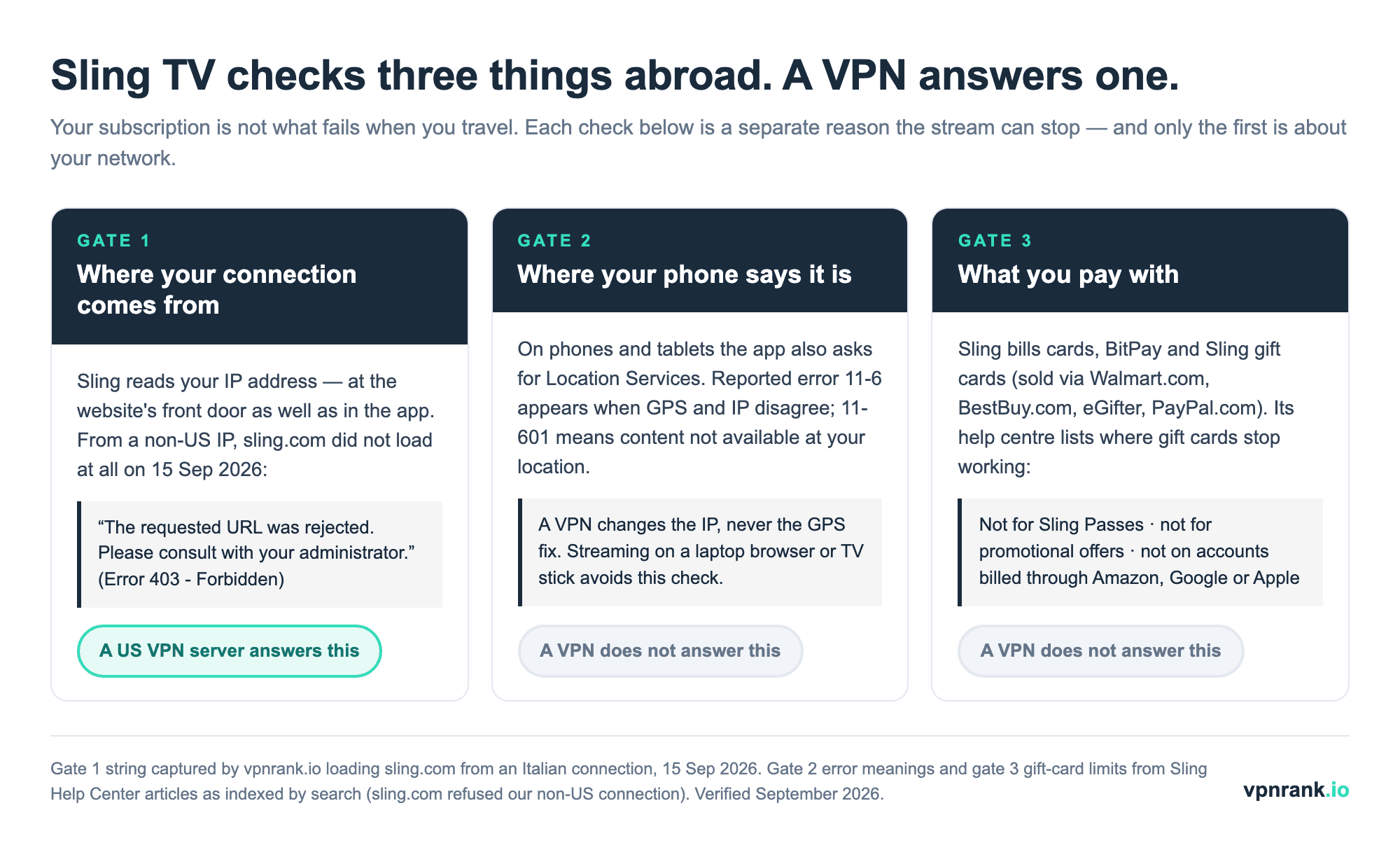
The table below maps each check to what you actually see on screen. Verified September 2026: the website string was captured directly; the app error meanings and payment limits come from Sling Help Center articles as summarised by search, because sling.com refused our connection. The last column says what each observation does not prove, so you can tell a geo-block from a coincidence.
| Check | What Sling looks at | What you see when it fails | Does a US VPN server fix it? | What it doesn't automatically prove |
|---|---|---|---|---|
| Website location | The IP address loading sling.com | "The requested URL was rejected. Please consult with your administrator." (Error 403 - Forbidden) | Yes — the refusal happens before you sign in | The same page can come from Sling's bot filtering, so a 403 on a US server may mean a flagged IP rather than a geo-block |
| Streaming location | The IP address when you press play | Error 11-601: content not available at your location | Yes, if that server's IP is not blocklisted | Sling does not publish which address ranges it blocks; one working US server says nothing about the next |
| Device location (phones, tablets) | Location Services / GPS alongside the IP | Location errors in the 11-6 family, reported when GPS and IP disagree | No — a VPN changes your IP, never your GPS fix | This behaviour is user-reported rather than a documented rule; a laptop browser or streaming stick has no GPS to compare |
| Local channels | The market you appear to be in | Your home ABC, FOX or NBC station missing or swapped | Partly — you get the server city's market, if Sling carries locals there | Sling carries ABC, FOX and NBC only in select markets, so many US cities show no locals at all |
| Payment | Card, BitPay or Sling gift card | A gift card refused for a Pass, a promotion, or an app-store-billed account | No | Sling's help centre lists where gift cards stop working; it does not publish a rule on foreign-issued cards, so card declines are user-reported |
Read the rows top to bottom and the troubleshooting order writes itself. If the website will not even load, you are failing the first check and a US server is the fix. If the website loads but the phone app refuses, suspect the device-location check before you blame the VPN. And if everything plays but checkout fails, no server city will change the outcome — that is the payment check, which we cover in its own section below.
What actually happens to your channels when you leave the country
There's a meaningful difference between traveling inside the US and crossing a border, and Sling behaves very differently in each case. Understanding both scenarios helps you predict exactly what you'll see on screen — and whether the problem you're hitting is geo-blocking or something more mundane like a weak hotel Wi-Fi connection.
Traveling domestically inside the US
Move between US cities and Sling keeps working, but your live local channels can change. Sling only carries local broadcast affiliates in a limited set of markets, and it serves them based on the ZIP code where you physically are. Travel from a supported market into another, and you'll see that new city's local FOX, NBC, or (in some markets) ABC feeds instead of your home ones.
Traveling outside the US
Cross into another country and the picture changes completely. Instead of a channel swap, the whole service goes dark. You'll typically be met with an error telling you the content isn't available in your location, and neither live TV nor on-demand playback will load until Sling once again sees a US IP address.
- 1You open the Sling app on a flight layover or in a foreign hotel and playback fails immediately.
- 2The error references your region or location rather than a billing or password problem.
- 3Nothing about your subscription has actually lapsed — your account is fine, only your apparent location is wrong.
- 4Reconnecting from a US IP address, for example over a US VPN server, brings everything back exactly as it was at home.
How a VPN with a US server brings Sling back
A VPN fixes the one thing Sling objects to: your location. It routes your traffic through a server in a country you choose and hands your device that server's IP address. Pick a US city, and every site and app you use — Sling included — sees a United States connection instead of your real one abroad, so the geo-block never triggers.
The practical flow is short. Install a reputable VPN, sign in, connect to a US server (a city near your real US billing region tends to behave best), then open Sling and press play. Because your traffic is also encrypted, this doubles as protection on the unfamiliar hotel and airport networks you're likely using while traveling.
- Choose a VPN with plenty of US server locations so you can switch if one gets throttled or flagged.
- Connect before launching the Sling app, and fully close and reopen Sling if it loaded on your real location first.
- If playback still refuses, clear the app cache or reinstall so no stale location data lingers.
- Watch for a DNS leak or WebRTC leak, which can quietly expose your true country even while the VPN is on — a good provider blocks both by default.
Speed matters here too, because HD live sports and news are unforgiving of a slow tunnel. It's worth checking a provider's throughput on nearby servers with our VPN speed test results before you rely on it for a full evening of live TV.
When your VPN connects but Sling still won't play
Sometimes you connect to a US server and Sling still shows an error. That doesn't mean the approach has failed; it usually means one specific server has been recognized and blocked, or a small piece of your real location is leaking through. Streaming services and VPNs are in a constant back-and-forth, and a five-minute fix resolves the great majority of these cases.
The most common culprit is a flagged server. Streaming platforms maintain lists of IP address ranges known to belong to VPN data centers, and when too many people funnel through one address it gets added. The fix is simply to disconnect and try a different US city — a provider with a deep US network gives you dozens of alternatives, which is exactly why server count often matters more than raw speed here.
- Flagged server: switch to another US city and reload Sling; rotating through two or three usually lands on a clean IP.
- Stale location cache: if the app opened before the VPN connected, force-close it, confirm the tunnel is active, then reopen — or clear the app cache and reinstall to wipe any lingering location signal.
- DNS or WebRTC leak: run a quick leak test after connecting and prefer a provider that routes DNS through its own servers and blocks WebRTC by default.
- GPS mismatch on mobile: Sling's phone and tablet apps use Location Services, and location errors are reported when the GPS position and the IP address disagree. Switching location access off is not a clean fix either, because Sling's own troubleshooting asks mobile users to allow it.
That last point is why phones and tablets, despite being the easiest devices to install a VPN on, can be the fussiest for Sling abroad. A VPN moves your IP address to the US; it does not move the GPS coordinates your phone reports from a hotel in Lisbon or Bangkok. If the phone app keeps refusing while a laptop browser on the same VPN connection plays normally, you are looking at the device-location check, and the practical answer is to watch on a device without GPS — a laptop, or a streaming stick running a VPN app — rather than cycling through server cities.
Which devices work — and where a VPN is easy or hard
Sling runs on almost everything: Amazon Fire TV, Roku, Apple TV, Android TV and Google TV, Chromecast, Xbox, plus LG and Samsung smart TVs, iOS, and Android phones and tablets. The catch when traveling is that not every one of those devices lets you install a VPN app directly, which shapes how you'll set things up on the road.
- Phones, tablets, and computers take a VPN app natively — the simplest option and ideal for a trip.
- Amazon Fire TV Stick and Android TV boxes can install most major VPN apps straight from their stores, so a travel-friendly streaming stick is a strong companion.
- Roku, Apple TV, smart TVs, and games consoles generally can't run a VPN directly; you route them through a VPN-configured router or a phone hotspot instead.
If you stream mostly on the big screen, it can be worth setting up VPN coverage at the network level. Our guides to the best VPN routers and best VPNs for Android TV explain how to cover devices that have no VPN app of their own, so a Roku or console abroad still sees a US connection.
Sling's Day Passes made short trips cheaper than a month — if you can pay for them
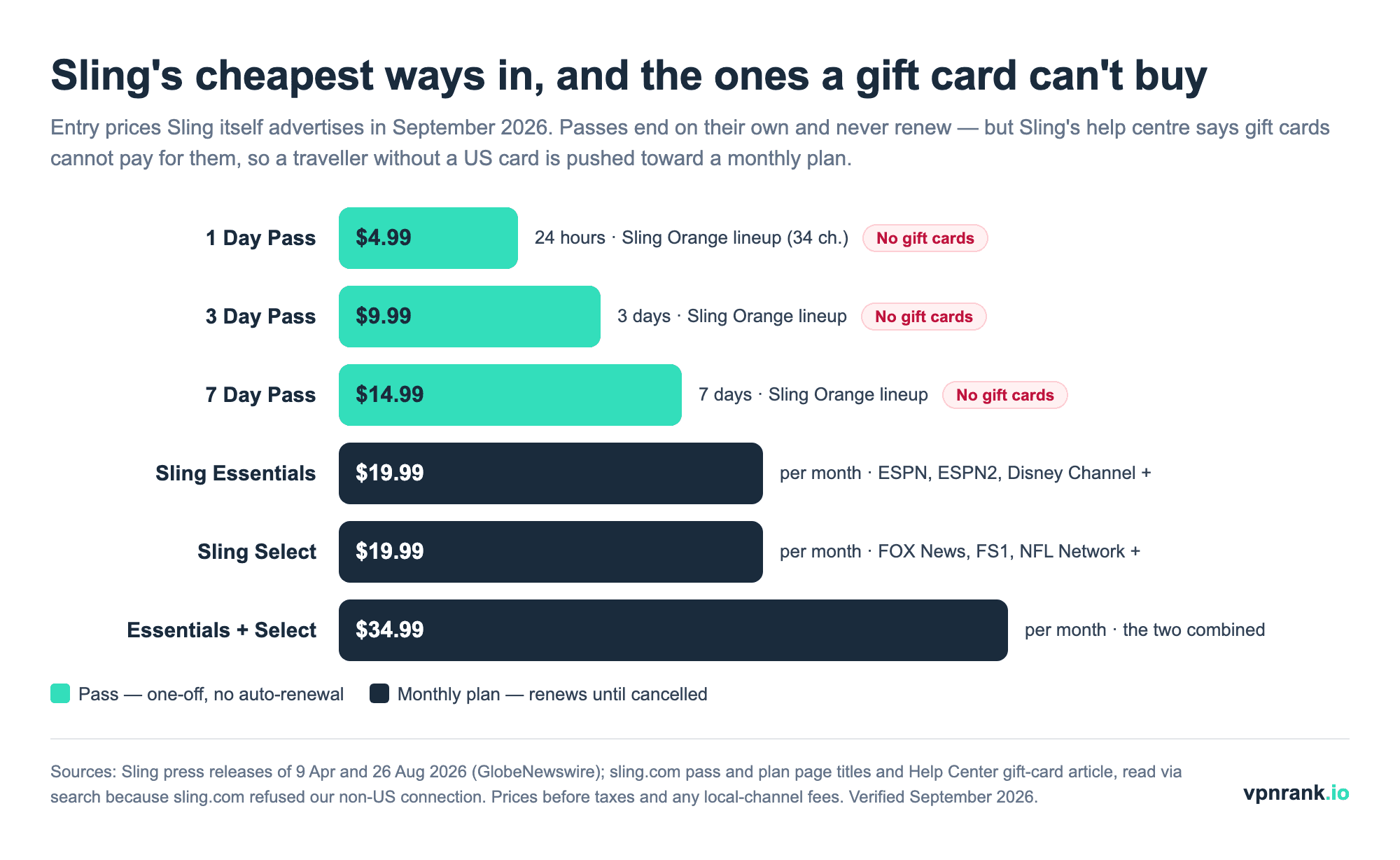
Sling's price list is no longer just Orange and Blue. It now sells 1, 3 and 7 Day Passes that end on their own, two $19.99 monthly plans launched in 2026, and a five-month football plan. For someone travelling, that matters: a week away no longer means paying for a month of live TV. We could not read the checkout on sling.com itself, because the site refused our non-US connection, so every figure below comes from Sling's own press releases on GlobeNewswire or from sling.com page titles and help articles as indexed by search. Prices verified September 2026, before taxes and before any local-channel fee.
| Option | Price (US$) | What you get | Renews? | What the price doesn't tell a traveller |
|---|---|---|---|---|
| 1 Day Pass | $4.99 | 24 hours from activation; the Sling Orange line-up (34 channels, including ESPN, TNT and CNN) | No — ends by itself | Sling gift cards cannot pay for any Pass, so without a card Sling accepts this option is closed to you |
| 3 Day Pass | $9.99 | Three days from activation; same Orange line-up | No | Extra Packs cost $2 on this Pass ($1 on the 1 Day, $3 on the 7 Day) — the headline price is the floor |
| 7 Day Pass | $14.99 | Seven days from activation; same Orange line-up; 50 hours of cloud DVR | No | Cheaper than any monthly plan for a single week, but a VPN has to clear the location check on every stream for all seven days |
| Sling Essentials | $19.99/month | 12 named channels including ESPN, ESPN2, Disney Channel and Freeform; 50 hours of DVR | Yes, monthly | Launched 9 April 2026 as the cheapest way to get ESPN; no FOX News, FS1 or NFL Network |
| Sling Select | $19.99/month | FOX News, FS1, NFL Network, National Geographic and more | Yes, monthly | Covers the news and FOX sports channels Essentials lacks, and nothing from ESPN |
| Essentials + Select | $34.99/month | Both line-ups together | Yes, monthly | Still not Sling Orange or Blue; check the channel you actually follow before assuming the bundle includes it |
| Football Season Pass | From $199.99 | A five-month plan, per Sling's 26 August 2026 release | Fixed term | Sling publishes only a "starting at" price; a five-month term commits you well beyond most trips |
| Unlimited DVR + Replays | +$5/month | Removes the 50-hour DVR cap | Yes, monthly | Recordings live in your US account — useful abroad only while the location check keeps passing |
What we deliberately left out of the table is the price of Sling Orange, Sling Blue and the Orange & Blue combo. Sling now prices those by market: press coverage in January 2026 reported a new local-channel fee on Sling Blue where ABC, FOX or NBC are carried, with the combo rising to $64.99 in those markets, while other coverage still quotes Orange from $45.99 and the combo at $60.99 elsewhere. Sling's own compare-plans page would settle it for your ZIP code, but it would not load for us — so treat any single Orange or Blue price you read, including in older versions of this guide, as a range rather than a fact.
Payment is the check a VPN never touches, and gift cards have limits
Getting the video to play is only half the story; paying for it is the other half. A VPN changes where you appear to be, not what is in your wallet, and Sling's payment options are built around US customers. Its help centre is specific about what it takes and — more usefully for travellers — where its own gift cards stop working.
- What Sling bills: credit and debit cards, Sling gift cards, and cryptocurrency through BitPay, which Sling's help centre limits to ERC-20 coins on the Ethereum network.
- Where gift cards come from: Walmart.com, BestBuy.com, eGifter.com and PayPal.com, according to Sling's gift-card help article. They do not expire.
- Where gift cards don't work: Sling Passes, Sling promotional offers, and any Sling account billed through Amazon, Google or Apple.
- What a VPN can't do: create a US payment method. Card declines for foreign-issued cards are widely reported by users, but Sling does not publish a rule on them, so test your card before you travel rather than after.
- Terms: Sling describes itself as a U.S. provider and sells the service for the US, and there are user reports of accounts being flagged for continuous foreign access — treat travel viewing as occasional rather than a permanent relocation.
Practical ruleSort out payment while you are still in the US. A VPN can make Sling think you are home, but a gift card cannot buy a Day Pass — so if a card Sling accepts isn't already on the account, the cheapest thing a gift card can buy you is a $19.99 monthly plan, not a $4.99 pass.
For the commercial side — which VPNs we actually recommend for US streaming, current prices, and money-back terms — see our best VPNs for streaming guide and compare live pricing on the VPN price index or today's ExpressVPN deal. Sling is rarely the only US service on a traveller's list: the same location check applies to ESPN+ and YouTube TV, and this season's NFL rights are split across several apps, laid out in our NFL 2026 season guide. This article is the how-and-why; those pages are where you pick a provider.
The bottom line for travelers
Sling TV was never designed to follow you across a border, and it checks more than one thing when you try. A US VPN server clears the check that matters most — the IP address — which is what brings back the website, the app and your DVR. It does not change your phone's GPS position, so a laptop or streaming stick is the more reliable screen abroad, and it does not change how you pay, so set up a card Sling accepts before you leave: gift cards won't buy the $4.99 Day Pass. Do those three things and your usual Sling line-up travels with you, within Sling's US-only terms.
Sling is one of many US services that behave this way. If your trip also involves other libraries, our hubs for Netflix, Peacock, and VPNs overall apply the same location-shifting logic to keep the rest of your watchlist working abroad.
Keep reading
Frequently asked questions
Does Sling TV work outside the United States?
No. Sling TV is sold in the United States, with a separate storefront for Puerto Rico. When you travel to another country the app detects your foreign IP address and blocks playback with a location error such as 11-601, and the sling.com website itself may return an Error 403 page reading "The requested URL was rejected. Please consult with your administrator." Nothing loads until your connection appears to come from the US again.
Can I use a VPN to watch Sling TV abroad?
Yes. A VPN routes your traffic through a US server and gives you a US IP address, so Sling sees a domestic connection and lets you stream. Connect to the US server before opening the app, and fully restart Sling if it first loaded on your real location. Choose a provider with many US servers and good speeds for live HD.
Why does Sling TV block viewers outside the US?
It's a licensing obligation, not a technical whim. Sling's carriage deals with networks like ESPN, Disney, Fox, and NBCUniversal only grant US streaming rights. To honor those contracts it checks your IP address and refuses playback from foreign locations, which is why even long-standing paying subscribers are cut off the moment they travel abroad.
Do my Sling TV local channels change when I travel within the US?
They can. Sling carries local broadcast affiliates only in certain markets and serves them based on your physical location. Travel from one supported market to another and you'll see the destination city's local FOX, NBC, or ABC feeds instead of your home ones. The rest of your national channels stay the same throughout the US.
Which devices can run a VPN for Sling TV while traveling?
Phones, tablets, computers, Amazon Fire TV Sticks, and Android TV boxes can install VPN apps directly, making them the easiest travel companions. Roku, Apple TV, smart TVs, and games consoles usually can't run a VPN app, so you route those through a VPN-configured router or a phone hotspot to give them a US connection instead.
Can I pay for Sling TV without a US credit card?
Partly. Sling bills credit and debit cards, BitPay cryptocurrency and Sling gift cards, which its help centre says are sold through Walmart.com, BestBuy.com, eGifter.com and PayPal.com. Gift cards have three limits: they cannot buy Sling Passes, cannot be used on promotional offers, and cannot be applied to accounts billed through Amazon, Google or Apple. Foreign-card declines are widely reported by users, and a VPN does not create a US payment method for you.
Is a Sling Day Pass a good option while travelling abroad?
For a short trip it can be the cheapest option: in September 2026 Sling sold a 1 Day Pass for $4.99, a 3 Day Pass for $9.99 and a 7 Day Pass for $14.99, each with the Sling Orange line-up and no auto-renewal. Two catches abroad: you still need a US IP address for every stream, and Sling gift cards cannot pay for Passes, so you need a card Sling accepts.
Why does sling.com show 'The requested URL was rejected' abroad?
That Error 403 page is what sling.com returned to our non-US connection on 15 September 2026, for the homepage, plans pages and help centre alike. It looks like a broken website, but it is the site refusing the connection before you sign in. Connecting to a US VPN server normally clears it; if it appears on a US server, that server's IP is likely flagged, so switch cities.
Will Sling TV ban my account for using a VPN abroad?
Sling reserves the right to enforce its US-only terms, and there are reports of accounts being flagged for continuous access from outside the country. Occasional viewing while traveling on a US-based subscription is the low-risk approach; treating a VPN as a way to relocate the account permanently overseas is where users have run into trouble.
The best VPNs of 2026, ranked
Now you know how — here are the VPNs we recommend, independently tested and ranked for speed, streaming, privacy and value. Any of them works for everything in this guide.

ExpressVPN Ultra fast & secure. Great for privacy, downloads, and everyday browsing on all your devices. 24/7 live chat support.
ExpressVPN Ultra fast & secure. Great for privacy, downloads, and everyday browsing on all your devices. 24/7 live chat support.

IPVanish Fast speeds with unlimited device connections. Strong no-logs privacy and 24/7 live chat support. Great for families.

IPVanish Fast speeds with unlimited device connections. Strong no-logs privacy and 24/7 live chat support. Great for families.

NordVPN Excellent speeds with one of the largest server networks. Strong security features and easy-to-use apps. 24/7 live chat support.
NordVPN Excellent speeds with one of the largest server networks. Strong security features and easy-to-use apps. 24/7 live chat support.

Proton VPN Swiss-based VPN with strong privacy focus. Audited no-logs policy and open-source apps. Great for privacy-conscious users.
Proton VPN Swiss-based VPN with strong privacy focus. Audited no-logs policy and open-source apps. Great for privacy-conscious users.

CyberGhost Fast speeds and strong privacy tools. Simple apps, automatic WiFi protection, and 24/7 live chat support.
CyberGhost Fast speeds and strong privacy tools. Simple apps, automatic WiFi protection, and 24/7 live chat support.

TotalVPN Affordable VPN with strong privacy and reliable speeds. Easy-to-use apps for all major devices. No-logs policy.
TotalVPN Affordable VPN with strong privacy and reliable speeds. Easy-to-use apps for all major devices. No-logs policy.

Private Internet Access High-speed VPN with a large server network and advanced security settings. Ad blocker included and 24/7 live chat support.
Private Internet Access High-speed VPN with a large server network and advanced security settings. Ad blocker included and 24/7 live chat support.

Surfshark Unlimited device connections at a budget-friendly price. Includes ad blocker and strong privacy tools. Great value for money.
Surfshark Unlimited device connections at a budget-friendly price. Includes ad blocker and strong privacy tools. Great value for money.
Rankings are based on our independent testing methodology. Each guide applies the criteria described on that page, including relevant performance, privacy, product features, and value data. We may earn affiliate commissions from links on this page, which helps fund our testing — this does not influence our rankings.