
How to Watch Stan From Abroad Without Losing Your Catalogue
Stan locks to Australia by licensing, blocks you abroad, and keeps billing — here's what happens to your account and how an Australian VPN server restores your catalogue.

vpnrank.io is reader-supported: we may earn a commission if you buy through links in this article. This never affects our rankings.

Stan is available only in Australia. The moment your phone or laptop connects to a network outside the country, Stan reads your IP address, sees a non-Australian location, and blocks playback — even though your subscription is still active and still being billed. Any titles you downloaded before leaving stop playing too. This guide explains why that happens and how to get your catalogue back.
Stan is fenced to Australia by its licences, not by a technical accident
Stan is an Australian streaming service, and its entire library is licensed for one territory: Australia. The films, series and originals it carries are bought from studios and distributors under contracts that grant Australian rights only. When you cross a border, those rights no longer apply, so Stan is contractually obliged to switch you off. It is a licensing wall, not a technical accident.
Streaming rights are sold country by country. A studio might sell the Australian rights to a title to Stan, the UK rights to a different platform, and the US rights to a third. Each buyer pays for exclusivity in their patch. If Stan streamed the same title to a viewer sitting in London or Los Angeles, it would be handing away content the local rights-holder already paid for — so the geo-fence is a condition of doing business, written into every contract Stan signs.
You can see this in Stan's own wording. Try to open the service overseas and you are met with a plain message to the effect that you are attempting to access Stan from outside Australia and that Stan is licensed to operate within Australia only. That is not an error or an outage — it is the licence talking. The block is deliberate, and it is the same for a two-week holidaymaker as it is for an expat who has moved abroad permanently.
This is the same reason a British service like the BBC iPlayer stays inside the UK and a US service like Peacock stays inside America. Stan simply sits at the Australian end of the same global patchwork. If you want the full picture of which services lock to which countries, our can I watch checker maps it out title by title.
What actually happens to your account overseas
Nothing happens to your account itself — that is the part people get wrong. Your Stan subscription does not pause, downgrade or cancel when you fly out. You keep paying the monthly fee, your watchlist and viewing history stay intact, and your login still works. What changes is one thing only: Stan checks your IP address on every session and refuses to serve video from a non-Australian location.
Here is what a traveller typically runs into:
- Streaming is blocked. Open the app in a hotel in Bali, Bangkok or Berlin and you get a geo-restriction message instead of the play button. Browsing the catalogue may still work; pressing play does not.
- Downloads stop playing. Titles you saved for the flight rely on a periodic licence check. Once you are abroad and the app phones home, that check fails and offline content is locked too.
- Billing continues. Your card is charged on schedule regardless of where you are. You are paying for a service you temporarily cannot use.
- Your data is safe. Nothing is deleted. The instant you land back in Australia and connect to a local network, everything works again as normal.
It is worth stressing that this is purely a location check, not a device or account check. Stan is not flagging your specific phone, banning your login, or noticing that you have travelled — it is simply looking at the IP address your connection presents on each session and asking one question: is this Australian or not? A non-Australian answer stops playback; an Australian answer resumes it. That is the entire logic, and it is why the fix is so clean.
So the problem is narrow and specific: an Australian service, an Australian licence, and a check that reads your location. Solve the location signal and the service behaves exactly as it does at home.
How a VPN with an Australian server restores your catalogue
A VPN routes your connection through a server in a country you choose and gives you that server's IP address. Connect to an Australian server and, as far as Stan is concerned, you are back in Sydney or Melbourne. The geo-check reads an Australian IP, the licensing condition is satisfied, and your normal catalogue loads. Your device could physically be anywhere on Earth.
The mechanism is the same one that works for every geo-locked service — it is how travellers reach Netflix home libraries or catch up on HBO Max from the wrong country. For Stan specifically, three things matter more than raw provider marketing:
- 1Genuine Australian servers. The VPN must offer servers physically in or routed through Australia. No Australian server, no Australian IP, no Stan — and provider coverage in the region varies more than the marketing suggests, which is what our best VPN for Australia guide compares.
- 2Enough speed for HD. Routing traffic across the world adds distance. You want a provider fast enough that Stan streams in HD without buffering — you can sanity-check any connection with our VPN speed test.
- 3Leak protection. If your real location escapes through a DNS leak or a WebRTC leak, Stan sees your true country and blocks you even with the VPN on. Solid leak protection is non-negotiable.
Distance is the quiet variable here. If you are in New Zealand or Singapore, an Australian server is a short hop and speeds barely dip. If you are in Europe or the Americas, your traffic is crossing most of the planet and back, so the raw speed of the provider — and how well it holds a stable connection over long distance — matters much more. This is exactly why a fast, well-provisioned network beats a cheap one with a token Australian location: the second one may connect but stall the moment you press play on anything in HD.
Practical setup is straightforward: install the VPN app on your device, sign in, connect to an Australian server, then open Stan and press play. If a title still will not load, disconnect, switch to a different Australian server and try again — individual servers occasionally get flagged, and rotating usually fixes it. Clearing the app cache or your browser cookies before you reconnect helps too, because a stale location token from before you travelled can override a fresh Australian IP. For a full ranked comparison of providers that reliably hold an Australian IP, see our guide to the best VPNs for streaming.
Travelling and want Stan to work like you never left Australia? A fast VPN with reliable Australian servers restores your full catalogue in a couple of taps.
See our top-ranked VPNs →The tier you travel on decides more than picture quality
Knowing exactly what you pay matters more when you are overseas, because you keep paying it whether or not you can watch. It also decides what you can take with you. We read the four options straight off Stan's own sign-up page rather than from a price tracker, and the entry tier carries a limit that matters far more to a traveller than its ad breaks do. Prices, stream counts and download allowances verified September 2026 from Stan's own storefront. Stan bills in Australian dollars, so what lands on your card abroad also depends on your bank's conversion and any foreign-transaction fee.
| Plan | Price (AUD/month) | Max quality | Streams | Download devices | What the price alone doesn't tell you |
|---|---|---|---|---|---|
| Basic with ads | A$9.99 | HD | 1 | 0 — no downloads at all | The cheapest way to keep an account alive is also the one tier with no offline viewing, on any device, in any country |
| Standard | A$17.99 | HD | 2 | 2 | Ad-free and the first tier where downloading before a flight is even possible |
| Premium | A$23.99 | 4K Ultra HD | 4 | 5 | 4K is the plan's ceiling, not a promise — long-haul VPN routing is usually what limits your actual bitrate |
| Stan Sport add-on | +A$20 | Live sport, ad-free in play | Follows your plan | Follows your plan | It bolts onto any tier, so on Basic with ads it roughly triples the bill for content you still cannot download |
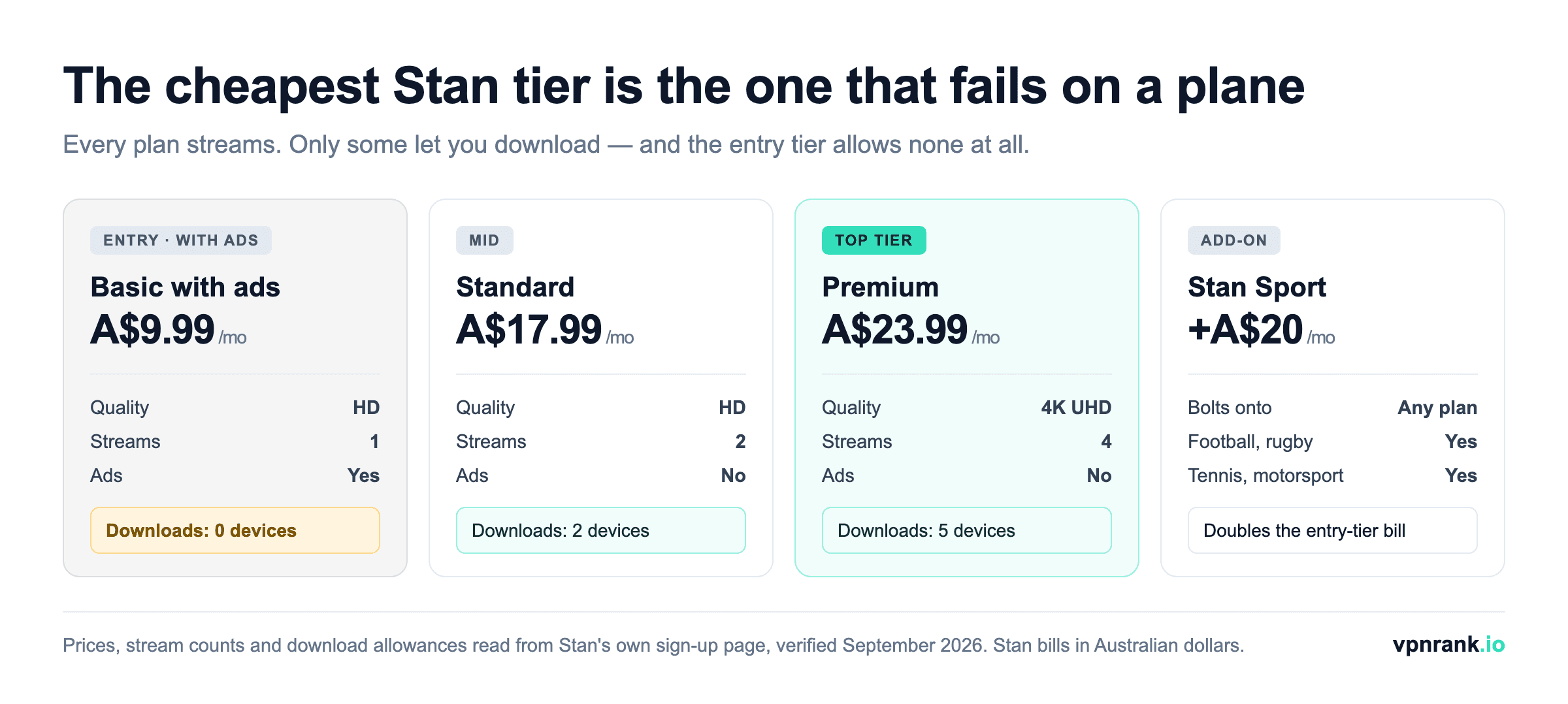
Two travel-relevant readings of that table. First, the cheapest way to keep a live Stan account while you are away long-term is the A$9.99 ad tier — but it buys you a placeholder, not a travel kit. Your watchlist, profiles and viewing history survive on it; offline viewing does not exist on it. If your plan for the flight is to load up a tablet before you leave, that plan requires Standard or Premium, and downgrading to save money in month one is exactly how people discover this at the gate. Second, Stan Sport bolts onto any tier at a flat A$20, so on the entry plan the add-on costs twice the subscription it is attached to — worth checking whether the competition you follow is even in season before you pay for it from another hemisphere.
The catalogue is the reason to bother — and Stan Sport is the part nothing abroad replaces
The reason people go to this trouble is the library: Stan Originals and exclusives that no service in your host country carries, plus the general film and drama catalogue you already pay for. Stan's own browse menu groups it into Originals, Iconic Series, Exclusives, 4K UHD, movies, TV, kids and a pay-per-view section, and that PPV shelf is worth knowing about before you travel — one-off event purchases sit outside your monthly plan entirely. Because the slate rotates monthly, the honest advice is to check the Stan homepage yourself for what has just landed rather than trust any third-party list, this one included: a catalogue snapshot is the fastest-ageing thing anyone can write about a streaming service.
Stan Sport is the harder half to replace. Stan's own sport listing runs to Premier League and UEFA Champions League football, the rugby heartland of Super Rugby Pacific and internationals, Grand Slam tennis including Wimbledon, motorsport, and the Women's Super League — the Optus Sport catalogue now sits inside it. That combination is exactly why expat Australians reach for an Australian VPN server rather than a local subscription in their host country: no single overseas service bundles the same set, so replacing Stan Sport abroad usually means two or three separate subscriptions in your host country and still missing something.
Practical ruleSort your plan before your flight, not your VPN. A VPN restores the country Stan sees; it cannot add a download allowance the tier you are on never included.
Whether a device can run a VPN app is what decides your travel setup
Stan runs on almost everything: iPhones and iPads, Android phones and tablets, laptops via the browser, PlayStation and Xbox consoles, Amazon Fire TV Stick, Apple TV, Android TV and Google TV devices, Chromecast, Fetch and Telstra TV boxes, and compatible smart TVs from Samsung, LG, Sony, Hisense, Panasonic, TCL and Philips. How easily you can add a VPN, though, varies a lot by device — and that determines your travel setup. Here is the whole landscape at a glance:
| Device | Runs Stan? | Takes a VPN app directly? | Best route abroad |
|---|---|---|---|
| iPhone / iPad | Yes | Yes | VPN app on the device |
| Android phone / tablet | Yes | Yes | VPN app on the device |
| Windows / Mac (browser) | Yes | Yes | VPN app on the computer |
| Amazon Fire TV Stick | Yes | Yes | VPN app on the stick — the traveller's pick |
| Apple TV | Yes | Yes (tvOS VPN apps) | Native VPN app, or router |
| Android TV / Google TV | Yes | Yes | VPN app on the TV |
| Samsung / LG / Sony / Hisense smart TVs | Yes | No | VPN on a router or travel router |
| PlayStation 4 / 5 | Yes | No | VPN router, or share a laptop's connection |
| Xbox One / Series X|S | Yes | No | VPN router, or share a laptop's connection |
| Chromecast / Fetch / Telstra TV | Yes | No | VPN on the router |
Devices that take a VPN app directly
Phones, tablets, laptops and Amazon Fire TV Stick all run native VPN apps. This is the simplest case: install the app on the device, connect to Australia, open Stan. A Fire TV Stick is the traveller's secret weapon — it is pocket-sized, so you can pack it, plug it into any hotel TV's HDMI port, and carry your whole setup with you. Note that hotel TVs sometimes lock their HDMI inputs; a cheap portable travel router in your bag gets around that and gives your Fire Stick a friendly network to join.
Devices that do not take a VPN app
Smart TVs (beyond Fire TV), games consoles and older streaming boxes usually cannot install a VPN directly. The fix is to run the VPN one level up, on your router, so every device on the network inherits the Australian IP automatically. Alternatively, an Android TV device accepts VPN apps natively and sidesteps the whole problem. On the road, the pack-a-Fire-Stick approach is almost always less hassle than fighting a hotel TV.
The account admin that costs people a month they could not watch
A few housekeeping points matter before you travel, because they affect what you pay and how smoothly the account behaves while you are away. None of them are dramatic, but overlooking them is how people end up paying for a month they could not watch.
- You keep paying while abroad. Stan bills monthly and does not pause for travel. If you are away for an extended stretch and have no VPN, you are paying for nothing — either sort out access before you go or cancel and resubscribe on return.
- Check which tier you are actually on. As of September 2026 Stan sells three plans — Basic with ads at A$9.99, Standard at A$17.99 and Premium at A$23.99 — and the tier sets stream quality, simultaneous devices and, crucially for travel, your download allowance. Stan itself advertises no lock-in contract and plan changes at any time, so if you are about to spend months away it is worth deliberately choosing the tier that matches how you will watch. Our VPN price index can help you weigh the VPN cost against the subscription you are protecting.
- Download before you fly — but only if your plan allows it. Stan downloads are mobile-only, through the iOS and Android app rather than the desktop site, and the allowance is set by tier: Basic with ads permits zero download devices, Standard permits two and Premium five. Downloads also expire — you generally have 30 days to start a saved title and 48 hours to finish it once you press play — and they still lock abroad once the app rechecks your licence. If you are on the entry tier, grabbing titles for the flight is not an option you have, and no VPN changes that.
- Using a VPN is against Stan's terms of service. VPNs are entirely legal in Australia and in almost every country. However, using one to access Stan from overseas goes against Stan's terms of use. In practice enforcement is light and typically means a temporary block on a flagged server rather than any account action, but it is your call to make with eyes open.
If you would rather compare specific providers head to head rather than read editorial, our commercial rundown of the best streaming VPNs ranks the options on Australian-server reliability and speed, and the wider best VPN hub covers privacy and value beyond streaming.
When it still will not play, the cause is almost never the VPN itself
The connection succeeds, the app opens, and playback still fails. That combination frustrates people into switching provider when the fault usually sits somewhere else entirely. Work through the causes in order of how often they are actually to blame, and treat each fix as diagnostic: what it repairs also tells you what was wrong. The last column is the part most guides leave out — a fix that works does not always prove what you think it proved.
| What you see | Most likely cause | What to try | What a successful fix doesn't automatically prove |
|---|---|---|---|
| Geo-block message with the VPN connected | A flagged Australian server, or your real location leaking through DNS or WebRTC | Switch to a different Australian server; then test for leaks before blaming the provider | That the provider is reliable for Stan — one working server today is a sample of one, not a pattern |
| Catalogue loads, playback fails | A stale location token cached from before you travelled | Clear the app cache, or cookies and site data in the browser, then reconnect and sign in again | That the geo-check passed — a cached session can succeed while a fresh one is still refused |
| Constant buffering in HD | Distance. Your traffic is crossing to Australia and back on every request | Drop to a lower quality to confirm it is bandwidth, not blocking, then retest at peak and off-peak | That your plan supports the quality you were trying — Basic with ads and Standard both cap at HD |
| Downloaded titles will not open | The app's periodic licence recheck failed from a non-Australian network | Connect to an Australian server first, then open the app so the recheck sees an Australian address | That downloads will work next trip — on Basic with ads there is no download entitlement to restore |
| Works on the phone, not the TV | The TV is not on the VPN. Smart TVs and consoles cannot run VPN apps | Move the VPN to the router, or use a device that takes an app natively | That the TV is geo-blocked — an unrouted device is not blocked, it is simply not using the tunnel |
Two of those rows are really the same lesson. A VPN moves one variable — the country your session appears to come from — and every other variable in the chain is untouched. That is why the honest scope of the fix is narrow, and why the failures that survive it cluster so predictably around your plan, your device and your own network rather than around the provider you chose.
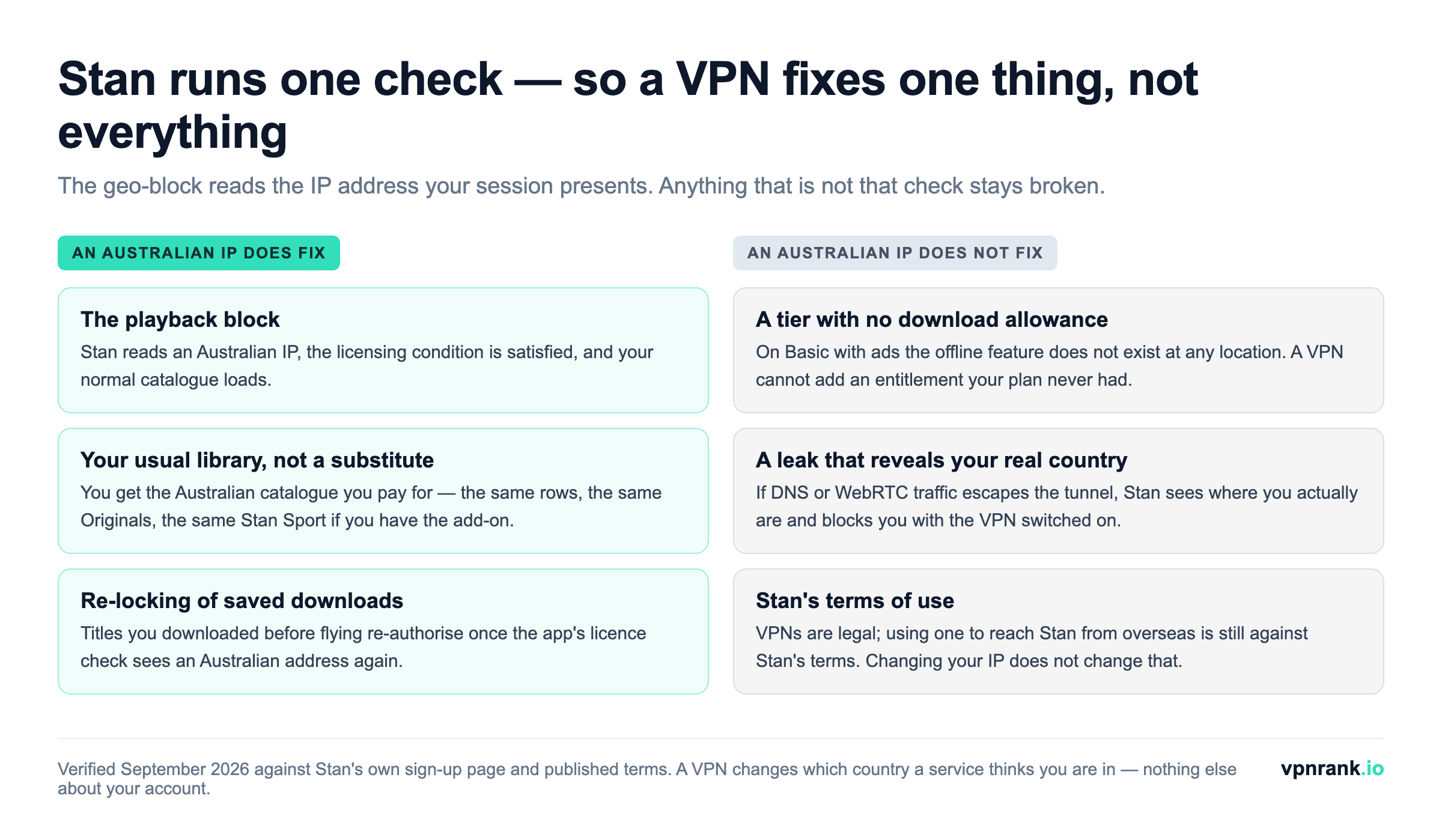
Free VPNs fail on Stan for a structural reason, not a quality one
It is a fair question to ask before paying for anything: can a free VPN do this? For Stan specifically the answer is almost always no, and the reason is worth understanding because it is structural rather than a matter of a free tier being merely slower.
- Australia is rarely in the free server list. Free tiers concentrate their limited capacity in a handful of cheap, high-demand regions. No Australian server means no Australian IP, and no amount of patience changes that.
- Data caps collide with video. Streaming is the most bandwidth-hungry thing a VPN gets asked to do. A monthly free allowance that is generous for browsing is consumed by a couple of episodes.
- Shared addresses get flagged fastest. Free services pack many users onto few IP addresses, which is precisely the pattern streaming services detect first. A free Australian IP is the most likely to already be blocked.
- The business model is the catch. A service with no subscription revenue is monetising something, and with a VPN the only asset on hand is your traffic. That is a poor trade for the sake of a drama series.
The reasonable middle ground is not a free VPN but a paid one used inside its refund window. The major providers sell monthly plans and publish 30-day money-back guarantees, which means a two-week trip can be covered and refunded if the service does not hold an Australian stream — and unlike a free tier, you can test the exact thing you need on the exact route you need it. If you want a genuinely free service for light, non-streaming use, our guide to free VPNs covers what the honest options actually are, and why none of them is a Stan solution.
The bottom line
Stan is Australia-only because its licences are Australia-only, and it enforces that by reading your IP address on every session. Travelling does not touch your account, your watchlist or your billing — it only changes the location Stan sees. A VPN with a genuine, fast Australian server changes that signal back, and your full catalogue returns exactly as it is at home.
Set it up before you leave rather than scrambling in a hotel lobby: install the app, confirm an Australian server holds a stable HD stream, check for leaks, download a couple of titles as a fallback, and pack a Fire TV Stick if you want the big screen. Do that and Stan travels with you — even though, technically, it never left Australia.
Frequently asked questions
Why does Stan stop working the moment I leave Australia?
Stan licenses its entire library for Australia only. Those studio contracts grant Australian streaming rights and nothing else, so Stan is contractually required to check your IP address every session and block playback from any non-Australian location — even for active, paying subscribers. It is a licensing rule, not a fault with your account.
Will my Stan account or watchlist be affected while I travel?
No. Your subscription stays active, your watchlist and viewing history are untouched, and your login keeps working. Billing also continues on schedule. The only thing that changes overseas is that Stan refuses to serve video because it detects a non-Australian IP. Everything returns to normal the instant you reconnect from within Australia.
Can I watch my downloaded Stan shows on a flight or abroad?
Only briefly. Stan downloads are mobile-only and rely on a periodic licence check, and once the app connects to a network outside Australia that check fails, locking your offline titles. Downloading before departure gives you something for the flight itself, but it is not a lasting overseas solution — you'll need an Australian VPN connection once you're abroad.
How does a VPN get Stan working overseas?
A VPN routes your traffic through a server in a country you choose and hands you that server's IP address. Connect to an Australian server and Stan reads an Australian IP, satisfies its licensing check, and loads your normal catalogue. Your device can physically be anywhere; only the location Stan sees has changed.
What should I look for in a VPN for Stan specifically?
Three things: genuine servers in Australia so you actually get an Australian IP; enough speed to hold an HD stream across long distance without buffering; and strong leak protection, because a DNS or WebRTC leak can expose your real country and trigger a block even with the VPN on. Server-switching support helps too, for rotating past any flagged server.
Is it legal to use a VPN to watch Stan from abroad?
VPNs themselves are completely legal in Australia and in nearly every country. However, using one to access Stan from overseas goes against Stan's terms of use. Enforcement in practice is light — usually a temporary block on a flagged server rather than any account penalty — but it's a terms-of-service matter you should weigh up before relying on it.
Which devices can I use to watch Stan while travelling?
Phones, tablets, laptops and Amazon Fire TV Sticks run VPN apps directly, making them the easiest travel options — a Fire Stick even packs into your bag and plugs into any hotel TV. Smart TVs and consoles can't install a VPN, so you'd route it through a router or use an Android TV device that accepts VPN apps natively.
Can I download Stan shows on the cheapest plan before a flight?
No. Read off Stan's own sign-up page in September 2026, Basic with ads at A$9.99 allows zero download devices — the offline feature is not part of that tier at all. Standard at A$17.99 allows two download devices and Premium at A$23.99 allows five. If your travel plan involves loading a tablet before you fly, you need Standard or above, and no VPN can add an entitlement your plan does not include.
Will a free VPN work for Stan?
Almost never, and for structural reasons rather than simple quality. Free tiers rarely include an Australian server at all, which alone rules them out; their data caps are consumed quickly by video; and they pack many users onto few shared IP addresses, which is the pattern streaming services flag first. A paid monthly plan used inside its 30-day money-back window is the more sensible way to test whether a provider holds an Australian stream on your actual route.
Why does Stan still block me when my VPN says it is connected?
Usually one of three things. The Australian server you're on has been flagged, in which case switching to another one fixes it. Your real location is escaping through a DNS or WebRTC leak, so Stan sees your true country despite the tunnel. Or the app is using a location token cached from before you travelled — clearing the app cache, or browser cookies and site data, then reconnecting and signing in again resolves that one.
The best VPNs of 2026, ranked
Now you know how — here are the VPNs we recommend, independently tested and ranked for speed, streaming, privacy and value. Any of them works for everything in this guide.

ExpressVPN Ultra fast & secure. Great for privacy, downloads, and everyday browsing on all your devices. 24/7 live chat support.
ExpressVPN Ultra fast & secure. Great for privacy, downloads, and everyday browsing on all your devices. 24/7 live chat support.

IPVanish Fast speeds with unlimited device connections. Strong no-logs privacy and 24/7 live chat support. Great for families.

IPVanish Fast speeds with unlimited device connections. Strong no-logs privacy and 24/7 live chat support. Great for families.

NordVPN Excellent speeds with one of the largest server networks. Strong security features and easy-to-use apps. 24/7 live chat support.
NordVPN Excellent speeds with one of the largest server networks. Strong security features and easy-to-use apps. 24/7 live chat support.

Proton VPN Swiss-based VPN with strong privacy focus. Audited no-logs policy and open-source apps. Great for privacy-conscious users.
Proton VPN Swiss-based VPN with strong privacy focus. Audited no-logs policy and open-source apps. Great for privacy-conscious users.

CyberGhost Fast speeds and strong privacy tools. Simple apps, automatic WiFi protection, and 24/7 live chat support.
CyberGhost Fast speeds and strong privacy tools. Simple apps, automatic WiFi protection, and 24/7 live chat support.

TotalVPN Affordable VPN with strong privacy and reliable speeds. Easy-to-use apps for all major devices. No-logs policy.
TotalVPN Affordable VPN with strong privacy and reliable speeds. Easy-to-use apps for all major devices. No-logs policy.

Private Internet Access High-speed VPN with a large server network and advanced security settings. Ad blocker included and 24/7 live chat support.
Private Internet Access High-speed VPN with a large server network and advanced security settings. Ad blocker included and 24/7 live chat support.

Surfshark Unlimited device connections at a budget-friendly price. Includes ad blocker and strong privacy tools. Great value for money.
Surfshark Unlimited device connections at a budget-friendly price. Includes ad blocker and strong privacy tools. Great value for money.
Rankings are based on our independent testing methodology. Each guide applies the criteria described on that page, including relevant performance, privacy, product features, and value data. We may earn affiliate commissions from links on this page, which helps fund our testing — this does not influence our rankings.
Related articles

Streaming
How to Watch Kayo Sports From Abroad When You Travel

World Cup 2026
How to Watch the World Cup 2026 in Australia: SBS, Overnight Kick-Offs and the Fan's Survival Guide

Streaming
How to Watch HBO Max From Abroad in 2026: Every Country, Every Price, Every Fix
How-To Guides
How to Watch BBC iPlayer From Abroad: The Complete 2026 Guide
Streaming
How to Watch Paramount+ From Abroad in 2026