How to Watch Crunchyroll From Abroad: Region-Locked Anime, Explained
Crunchyroll shows a different anime catalogue in every country because titles are licensed region by region. Here is why your library changes when you travel — and how to get your home shelf back.

vpnrank.io is reader-supported: we may earn a commission if you buy through links in this article. This never affects our rankings.
If you subscribe to Crunchyroll at home and then travel abroad, the anime you were mid-binge on can suddenly vanish from your library. That is not a glitch. Crunchyroll shows you a different catalogue in every country because anime is licensed region by region, and your app follows wherever your internet connection appears to be.
Why your Crunchyroll library changes when you cross a border
Crunchyroll operates in more than 200 countries and territories, but it is not one global library with a single shared catalogue. Each title is licensed territory by territory, so the shows, dubs, subtitle tracks and even simulcast timing you see are decided by the country your connection resolves to at the moment you press play, not by where you originally signed up.
When you open the app, Crunchyroll reads your IP address, works out which country you are physically in, and serves the catalogue it is contractually allowed to show there. A series that headlined your homepage last week can be missing entirely the moment you land somewhere new. The account is the same; the licensing map underneath it is not. This is the same mechanism that reshapes catalogues across other services covered in our streaming guide.
Three things typically shift when you change countries:
- Which titles exist at all — a show licensed to Crunchyroll in the US may sit on a rival platform in France or Brazil, so it never appears there.
- How fast episodes arrive — the widest simulcast coverage, with new episodes usually within an hour of the Japanese broadcast, is concentrated in the largest markets.
- Which dubs and subtitle languages are attached — localisation tracks are licensed separately, so a dub available in one region can be absent in another.
None of this is Crunchyroll being difficult. The platform absorbed the Funimation catalogue in 2022, which widened its English-dub library enormously, but those dub rights were themselves negotiated per territory. So the very content that makes the service feel complete at home is often the first thing to disappear when your connection resolves somewhere the dub was never sold.
How to tell which catalogue you are actually seeing
Before you assume a show has been pulled forever, it helps to confirm you are simply looking at a different regional shelf rather than a title that has genuinely left the service. The signs are usually easy to read once you know what changes when your connection lands in a new country, and none of them require any technical tools.
A few quick tells that you have switched into a foreign catalogue:
- The homepage reshuffles. Featured rows, seasonal highlights and recommended titles are region-specific, so a completely rearranged home screen after landing somewhere new is the first clue.
- Dubs vanish but subtitles remain. If a show is still there but the English or other dub track has disappeared, that is a localisation-rights gap, not a full delisting.
- Simulcast episodes stall. If the newest episode of a seasonal show has not appeared when you expect it, the local licence may run on a delay rather than the near-instant home-market timing.
The clearest confirmation is simply comparing what you see abroad with what your account shows at home. If the two libraries differ, the culprit is your connection's apparent location, not your subscription, and that is precisely the gap a home-country connection closes.
How the catalogue actually differs country to country
The gap between regions is real and often large. The United States carries the deepest Crunchyroll library and the widest simulcast slate, with the anime catalogue reported at roughly a thousand series. Other markets get a subset of that, and the further you get from the biggest territories, the smaller the shelf tends to be. Here is the rough shape of it.
The United States: the fullest shelf
The US catalogue is the benchmark. It has the most complete back catalogue and the broadest simulcast coverage, meaning most seasonal shows appear there fastest and stay there longest. If a title exists on Crunchyroll anywhere, it most likely exists in the US, which is why American travellers notice the loss most sharply when they go overseas. Much of that depth traces back to the Funimation merger, which folded a huge English-dubbed library into the US service.
Europe: a solid but partial subset
European Crunchyroll libraries generally carry a large share of the US catalogue, but the exact makeup swings by territory because rights are sold country by country. A season streaming freely in Germany might be missing in Spain or Italy, and simulcast timing can differ. It is common, and it comes down to which local distributor holds which title. Subtitle and dub language options also vary, so a French viewer and a Polish viewer can see the same show presented quite differently.
Latin America and Southeast Asia: smaller, more variable
Catalogues in Latin America and Southeast Asia tend to be more selective than the US or major European markets. Some regions have exclusive dubs or subtitle tracks the rest of the world does not get — Latin American Spanish and Portuguese dubs are a good example — but the overall count of available series is usually narrower, again a product of how local licensing was carved up. Crunchyroll has been actively expanding in Asia, including recent pushes into markets such as Taiwan and South Korea, so these catalogues are moving targets that grow season to season.
The country with no Crunchyroll at all: Japan
The strangest quirk is that Crunchyroll does not stream in Japan, the home of anime itself. The service is geo-blocked there because Japanese studios license their titles regionally and Crunchyroll exists to distribute anime outside Japan, not within it. So an anime fan travelling to Tokyo cannot open their home library while standing in the country the shows were made in. It is a licensing decision, not a government ban, and you can still manage your account and subscription from there even though the catalogue itself will not play.
Why some titles are region-locked in the first place
Region-locking on Crunchyroll is almost never about the platform choosing to withhold a show from you. It is about who owns the streaming rights to that specific title in your specific country. A Japanese studio or licensor sells distribution territory by territory, and Crunchyroll can only stream a series where it actually holds the licence for the place your connection appears to be.
That creates a few recurring situations travellers run into:
- 1Another platform holds the local rights. An anime might be on Crunchyroll in most of the world but sit exclusively on a different streaming service in the country you are visiting, so Crunchyroll cannot show it there.
- 2The licence has a delay or a gap. A simulcast may launch in some regions immediately and reach others weeks later, or not at all for that season.
- 3The title was never licensed there. Some series simply were not sold into smaller markets, so they never appear in those catalogues.
Crunchyroll's own help documentation frames unavailable titles this way: availability is governed by regional licensing agreements, and a show missing in your region is one the service is not licensed to stream where you are. That is why the same title can show up, disappear, and reappear as you cross borders — it is the licence, not the catalogue database, doing the gatekeeping. If you are trying to work out whether a specific title travels with you, our can I watch checker is built for exactly that question.
How a VPN restores your home catalogue while travelling
Because Crunchyroll decides your catalogue from your IP address, the fix for a travelling subscriber is to make that IP address appear to be back home. A VPN routes your connection through a server in your home country, so Crunchyroll reads your location as home and serves the catalogue you actually pay for. Your account and password never change.
The practical loop looks like this. You are a paying subscriber in your home country, you fly abroad, and your app switches to the local catalogue and drops the shows you were watching. You connect a VPN to a server back home, reload Crunchyroll, and the interface, simulcast timing, dubs and library you are used to come back. It is the same approach viewers use to keep their Netflix catalogue or a home broadcaster like BBC iPlayer while on the road.
A couple of technical points matter here. Crunchyroll's terms of service ask users not to mask or disguise their location, so the platform does not officially support using a VPN to reach content not licensed in your region — treat it as a way to keep the library you already pay for rather than to unlock foreign catalogues. Speed and reliability also matter: a slow server means buffering during a simulcast you waited weeks for. It is worth confirming your VPN is not leaking your real location through side channels; our explainers on DNS leaks and WebRTC leaks cover how to check. You can measure whether a server is fast enough for HD anime with our VPN speed test.
Devices: what works where
Anime gets watched on everything from a phone on a train to a living-room TV, and not every device makes it equally easy to run a VPN alongside Crunchyroll. Knowing where the friction is saves you a frustrating evening abroad trying to get a smart TV to cooperate with a streaming app.
Here is the practical picture by device type:
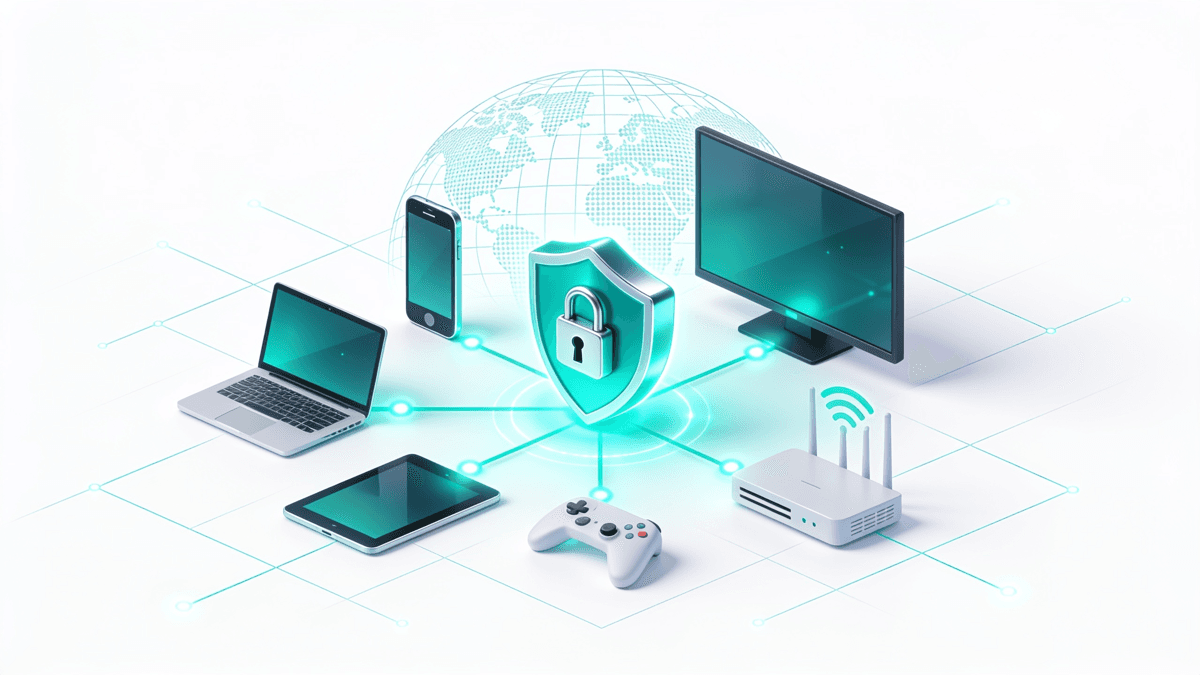
- Phones, tablets and laptops — the simplest case. Install the VPN app, connect to a home server, open Crunchyroll. This is what most travellers use.
- Smart TVs and streaming sticks — Android TV devices can run a VPN app directly; other TV platforms often cannot, which is where a router setup helps.
- Consoles — games consoles have no VPN app, so the connection has to happen upstream at the router or via a shared connection.
- Whole-home coverage — installing the VPN on your router protects every device at once, including ones that can't run VPN software themselves.
One habit saves a lot of grief: connect the VPN first, then open Crunchyroll. Streaming apps cache your location, so if you launch the app before the tunnel is up, you may need to force-close it or clear its data before the home catalogue loads. If you want the couch experience abroad rather than squinting at a phone, our guides to VPNs for Android TV and VPN routers walk through the setups that cover TVs and consoles.
Which plan you are on decides how much of your subscription travels with you
Crunchyroll's tiers are usually described as a price ladder, but the number that matters when you are away from home is the one nobody quotes: how many screens the plan lets you use at the same time. A partner still watching in the living room, a laptop in a hotel room and a phone on a train are three concurrent streams, and the entry-level plan allows exactly one. Travelling is precisely the situation in which a household stops watching from a single address.
The US ladder also moved this year, and it moved in one direction. Here is where the three tiers now sit, what each allows at once, and what the February 2026 announcement changed:
| Plan | US price until March 2026 | US price now | Simultaneous streams | Game Vault |
|---|---|---|---|---|
| Fan | $7.99 / month | $9.99 / month | 1 | No |
| Mega Fan | $11.99 / month | $13.99 / month (or $139.99 / year) | 4 | Yes |
| Ultimate Fan | $15.99 / month | $17.99 / month | 6 | Yes |
Prices verified August 2026 against Crunchyroll's own listing on the US App Store, read on 20 August 2026, and cross-checked against the February 2026 price announcement reported by TheWrap and Nerdist, which put the increase on existing US monthly subscribers from their first billing date after 4 March 2026. The simultaneous-stream figures are Crunchyroll's own published limits — one screen on Fan, four on Mega Fan, six on Ultimate Fan — and the Game Vault tiering is stated in Crunchyroll's app listing, which restricts it to Mega Fan and Ultimate Fan members.
One more change reshapes the travel picture more than the two dollars did: Crunchyroll's free, ad-supported streaming ended on 31 December 2025. From 2026 there is no free tier to fall back on, so every account that can play an episode abroad is a paying one — and that account still shows you whatever catalogue your connection resolves to.
Your home price is not the price you would see abroad
Crunchyroll prices each market separately, which is why the signup screen you land on in another country can look like a bargain or a mistake depending on where you opened it. We read the Mega Fan tier — the only plan named identically on every storefront we checked — straight off Crunchyroll's own listing on eleven national App Stores on 20 August 2026, and converted each one at that day's reference rate.
| Market | Mega Fan, monthly | ≈ USD | Mega Fan, annual | ≈ USD |
|---|---|---|---|---|
| United States | $13.99 | $13.99 | $139.99 | $139.99 |
| Germany | €11.99 | $13.97 | €119.99 | $139.78 |
| Australia | A$14.99 | $10.65 | A$149.99 | $106.59 |
| France | €8.99 | $10.47 | €89.99 | $104.83 |
| Canada | C$13.49 | $9.76 | C$134.99 | $97.63 |
| United Kingdom | £6.99 | $9.50 | £69.99 | $95.11 |
| Mexico | MX$159.00 | $9.37 | MX$1,139.00 | $67.11 |
| Italy | €7.49 | $8.73 | €59.99 | $69.88 |
| Spain | €7.49 | $8.73 | €59.99 | $69.88 |
| Brazil | R$24.90 | $4.80 | R$178.90 | $34.46 |
| India | ₹119 | $1.24 | ₹569 | $5.94 |
Verified 20 August 2026, read from Crunchyroll's own in-app purchase listing on each country's Apple App Store. Dollar figures use the open.er-api.com reference rates published the same day (EUR 0.8584, GBP 0.7359, CAD 1.3827, AUD 1.4072, BRL 5.1908, MXN 16.9720, INR 95.7527 to the dollar) and are there for comparison, not billing: keep the local column as the real number, because only the converted one goes stale with the currency market.
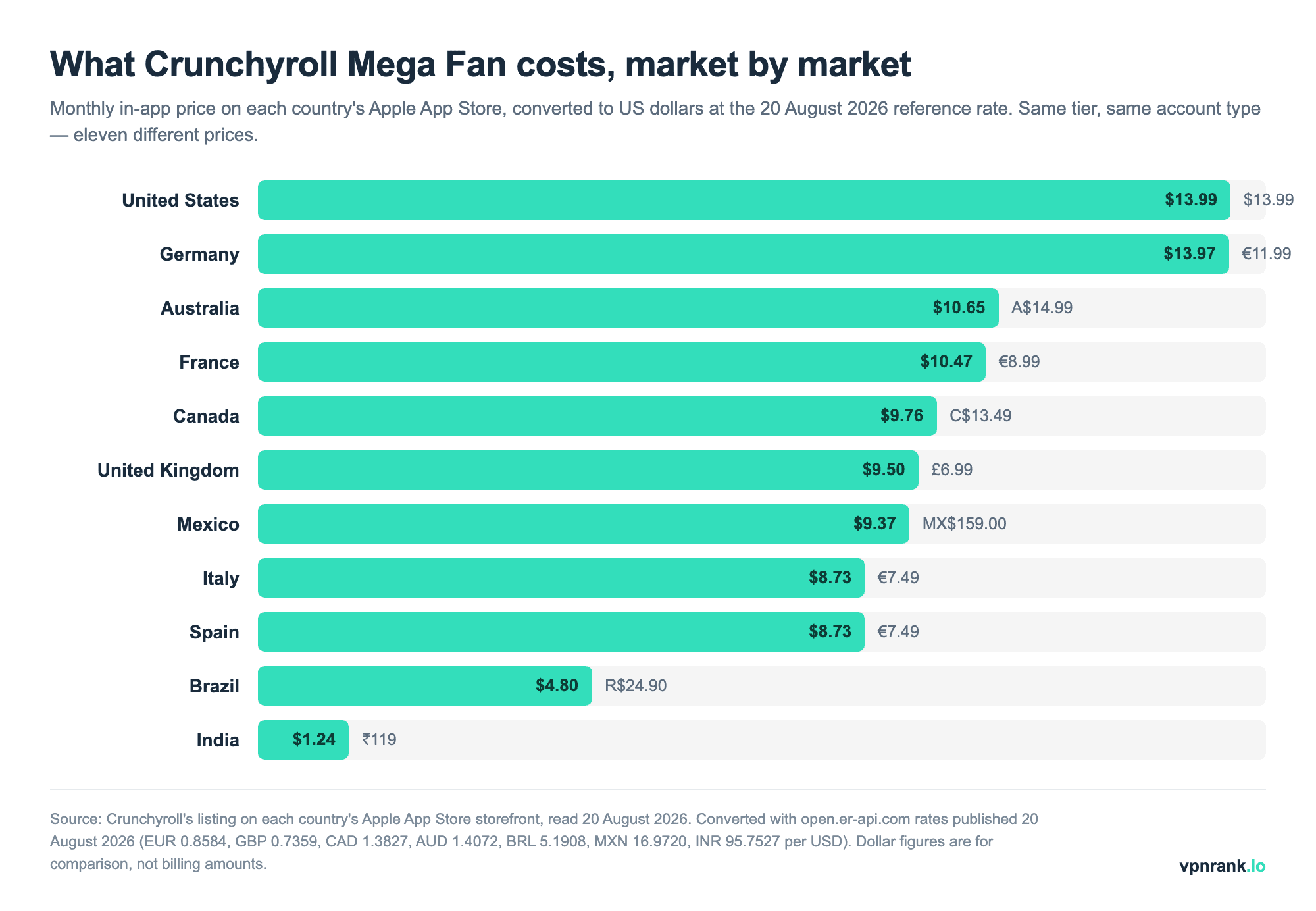
Two things in that table are worth more than the headline gap. The first is that the euro markets do not share a price: Italy and Spain pay €7.49 a month while Germany pays €11.99 for the identical tier, a 60 percent difference inside a single currency, with France in between at €8.99. Currency conversion explains none of it — this is pure market-by-market pricing. The second is the size of the full spread: India's ₹119 works out at roughly $1.24, about an eleventh of the American price, and the annual plans stretch further still, from about $5.94 a year in India to $139.99 in the United States.
That gap is why "just subscribe through a cheaper country" circulates in anime forums, and it is not advice we give. Crunchyroll's terms ask you not to misrepresent where you are, app-store and card billing countries are tied to your real payment details rather than your IP address, and a subscription set up that way can be unwound at any renewal. The reason to run a VPN abroad is narrower and much more defensible: keeping access to the library you already pay for at home. If you want to compare what the VPN itself costs before you travel, our live VPN price index tracks that side of the bill daily.
The countries where there is no Crunchyroll to unlock
Before you plan around a catalogue, it is worth knowing whether the service is distributed where you are going at all. On 20 August 2026 we queried Apple's public app-lookup endpoint once for each of 42 national App Store storefronts and recorded which ones return the Crunchyroll app. Thirty-nine did. Three did not.
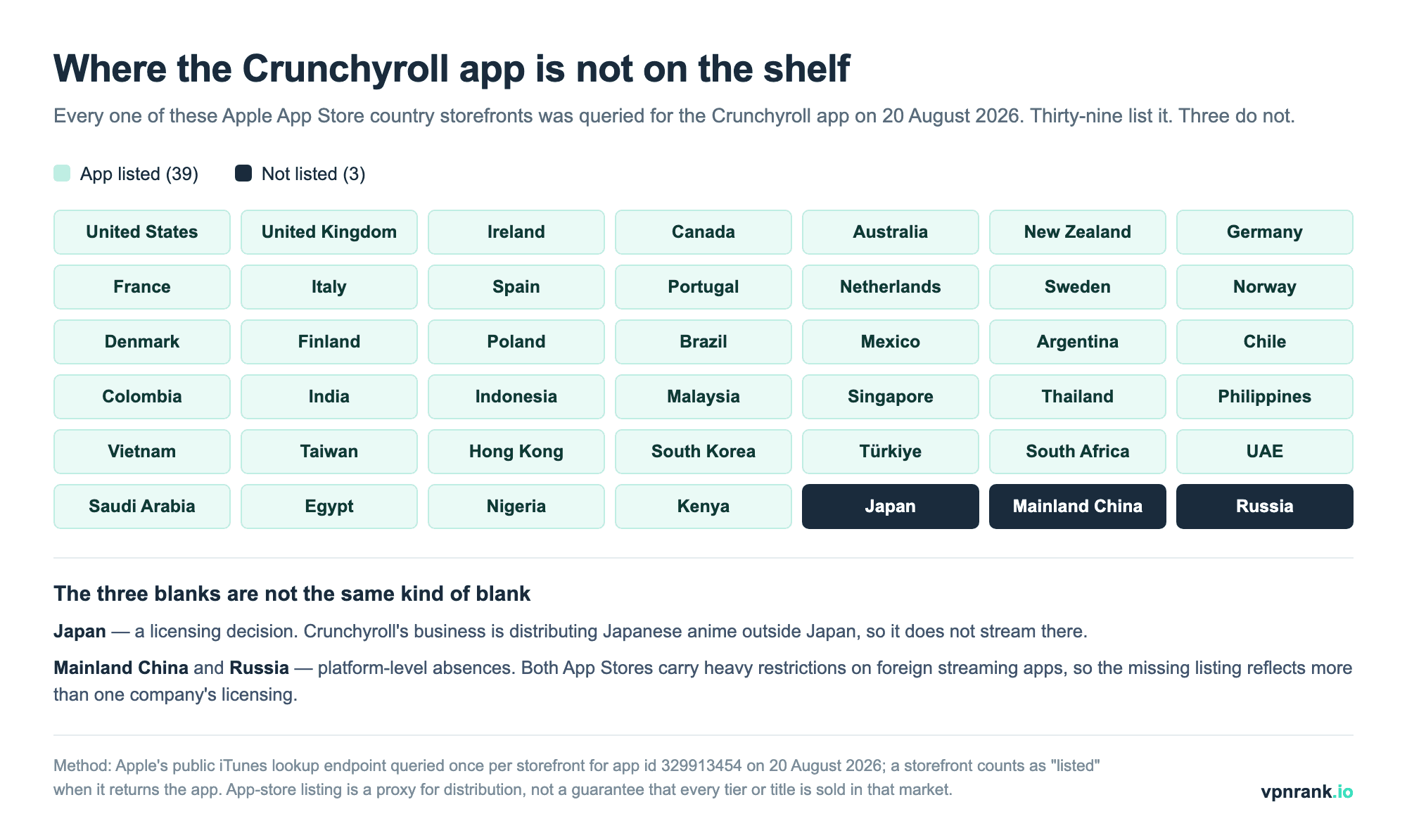
The three blanks are not the same kind of blank, and the difference changes what you should do about them. Japan is a licensing decision: Crunchyroll's business is carrying Japanese anime to the rest of the world, so it does not stream inside the country the anime comes from, and a fan in Tokyo needs a server back home to reach their own shelf — which is the scenario our VPN for Japan guide is built around. Mainland China and Russia are platform-level absences: both storefronts restrict foreign streaming apps broadly, so the missing listing reflects more than one company's licensing, and the practical lesson is to install the app and your VPN before you fly rather than after you land. Our China VPN guide covers that pre-departure checklist in detail.
App-store listing is a proxy for distribution rather than a guarantee — a storefront can carry the app while a given season or dub is still missing from that market's catalogue — but it is a clean way to separate "the catalogue is thinner here" from "the service is not sold here at all", and only the first of those is something a home-country connection fixes.
Account, subscription and price considerations
Streaming your own Crunchyroll account from abroad while you travel is a different thing from account fraud, and it helps to be clear about where you stand. You are a paying subscriber using a service you already pay for; wanting access while temporarily overseas is a reasonable expectation, not a violation of anything unlawful.
A few account realities to keep in mind:
- 1Your subscription follows the account, the catalogue follows the connection. You do not need a new account abroad — you need your connection to resolve to your home country to see your home library.
- 2Prices differ by country, by a lot. Crunchyroll's tiers are priced per market: on 20 August 2026 the same Mega Fan plan ran $13.99 a month in the United States and about $1.24 in India, and even inside the eurozone Germany paid €11.99 against €7.49 in Italy and Spain. The figure you would see signing up abroad is not your home price, as the market-by-market table above shows.
- 3VPN use is not officially supported. Crunchyroll does not endorse using a VPN to reach out-of-region content, so treat it as a tool for keeping the library you already pay for, and pick a provider that stays reliable.
For the full breakdown of which VPNs perform best with anime and streaming platforms, and current pricing, see our commercial best VPN for streaming guide and the live VPN price index. If privacy while streaming abroad is a concern, our privacy-focused VPN guide covers what to look for.
Keep reading
Frequently asked questions
Why does my Crunchyroll library change when I travel abroad?
Crunchyroll reads your IP address, works out which country you are physically in, and serves only the catalogue it is licensed to show there. Anime rights are sold territory by territory, so shows, dubs, subtitle tracks and simulcast timing all shift depending on where your connection appears to be — not on where you originally subscribed.
Which country has the biggest Crunchyroll catalogue?
The United States carries the deepest library and the widest simulcast coverage, with the anime catalogue reported at roughly a thousand series and new episodes usually arriving within about an hour of the Japanese broadcast. European catalogues carry a large but partial share of the US library, while Latin America and Southeast Asia tend to be more selective.
Is Crunchyroll available in Japan?
No. Crunchyroll is geo-blocked in Japan, the home of anime, because Japanese studios license their titles regionally and Crunchyroll exists to distribute anime outside Japan. It is a licensing decision, not a government ban. You can still manage your account and subscription while in Japan, but you cannot stream the catalogue there.
Does a VPN let me watch my home Crunchyroll catalogue while travelling?
Yes. Because Crunchyroll decides your catalogue from your IP address, connecting a VPN to a server in your home country makes the service read your location as home and serve the library you pay for. Your account and password stay the same; only the apparent location of your connection changes.
Is it legal to use a VPN with Crunchyroll?
Streaming your own paid Crunchyroll account from abroad while travelling is not illegal — you are a subscriber using a service you already pay for. However, Crunchyroll's terms ask users not to mask their location, so it does not officially support using a VPN to reach out-of-region content. Treat it as a way to keep your home library rather than to unlock foreign catalogues.
Which devices can I use a VPN with for Crunchyroll?
Phones, tablets and laptops are simplest: install the VPN app, connect to a home server, open Crunchyroll. Android TV devices can run a VPN app directly. Other smart TVs, streaming sticks and consoles usually cannot, so you install the VPN on your router to cover every device on your home network at once.
Do I need a separate Crunchyroll account for each country?
No. Your subscription follows your account, while the catalogue follows your connection. You do not need a new account abroad — you need your connection to resolve to your home country to see your home library. Note that Crunchyroll's subscription prices differ by market, so signing up in another country may not match your home price.
How much does Crunchyroll cost in 2026?
In the United States, Fan is $9.99 a month, Mega Fan $13.99 (or $139.99 a year) and Ultimate Fan $17.99, after a $2 increase that reached existing monthly subscribers from their first billing date after 4 March 2026. Elsewhere the price is set market by market: on 20 August 2026 Mega Fan was £6.99 in the UK, €11.99 in Germany, €7.49 in Italy and Spain, A$14.99 in Australia and ₹119 in India.
Is Crunchyroll still free?
No. Crunchyroll's free, ad-supported streaming ended on 31 December 2025, so from 2026 the service is subscription-only and every account that can play an episode is a paying one. There is no free tier to fall back on if your home catalogue is unavailable where you are.
How many devices can watch Crunchyroll at the same time?
One on the Fan plan, up to four on Mega Fan and up to six on Ultimate Fan. The limit matters more when you travel than at home, because a household spread across two countries — someone streaming in the living room while you watch from a hotel — uses more concurrent streams than the same household on one sofa.
Can I save money by subscribing to Crunchyroll in a cheaper country?
It is not something we recommend. The price gap is real — Mega Fan was about $1.24 a month in India against $13.99 in the United States on 20 August 2026 — but Crunchyroll's terms ask you not to misrepresent your location, and app-store and card billing countries follow your real payment details rather than your IP address, so a subscription set up that way can be unwound at renewal. Use a VPN to keep the library you already pay for, not to buy a cheaper one.
Which countries have no Crunchyroll at all?
We queried 42 national Apple App Store storefronts on 20 August 2026 and the Crunchyroll app was listed in 39 of them. The three exceptions were Japan, mainland China and Russia. Japan is a licensing decision — Crunchyroll distributes Japanese anime outside Japan — while the Chinese and Russian storefronts restrict foreign streaming apps broadly, so install the app before you travel to either.
The best VPNs of 2026, ranked
Now you know how — here are the VPNs we recommend, independently tested and ranked for speed, streaming, privacy and value. Any of them works for everything in this guide.

ExpressVPN Ultra fast & secure. Great for privacy, downloads, and everyday browsing on all your devices. 24/7 live chat support.
ExpressVPN Ultra fast & secure. Great for privacy, downloads, and everyday browsing on all your devices. 24/7 live chat support.

IPVanish Fast speeds with unlimited device connections. Strong no-logs privacy and 24/7 live chat support. Great for families.

IPVanish Fast speeds with unlimited device connections. Strong no-logs privacy and 24/7 live chat support. Great for families.

NordVPN Excellent speeds with one of the largest server networks. Strong security features and easy-to-use apps. 24/7 live chat support.
NordVPN Excellent speeds with one of the largest server networks. Strong security features and easy-to-use apps. 24/7 live chat support.

Proton VPN Swiss-based VPN with strong privacy focus. Audited no-logs policy and open-source apps. Great for privacy-conscious users.
Proton VPN Swiss-based VPN with strong privacy focus. Audited no-logs policy and open-source apps. Great for privacy-conscious users.

CyberGhost Fast speeds and strong privacy tools. Simple apps, automatic WiFi protection, and 24/7 live chat support.
CyberGhost Fast speeds and strong privacy tools. Simple apps, automatic WiFi protection, and 24/7 live chat support.

TotalVPN Affordable VPN with strong privacy and reliable speeds. Easy-to-use apps for all major devices. No-logs policy.
TotalVPN Affordable VPN with strong privacy and reliable speeds. Easy-to-use apps for all major devices. No-logs policy.

Private Internet Access High-speed VPN with a large server network and advanced security settings. Ad blocker included and 24/7 live chat support.
Private Internet Access High-speed VPN with a large server network and advanced security settings. Ad blocker included and 24/7 live chat support.

Surfshark Unlimited device connections at a budget-friendly price. Includes ad blocker and strong privacy tools. Great value for money.
Surfshark Unlimited device connections at a budget-friendly price. Includes ad blocker and strong privacy tools. Great value for money.
Rankings are based on our independent testing methodology. Each guide applies the criteria described on that page, including relevant performance, privacy, product features, and value data. We may earn affiliate commissions from links on this page, which helps fund our testing — this does not influence our rankings.