Watching JioHotstar (formerly Disney+ Hotstar) From Abroad: What Actually Changes When You Leave India
The Indian streaming service you grew up with has a new name, a bigger catalogue, and the same hard border. Here is how it really works when you travel.

vpnrank.io is reader-supported: we may earn a commission if you buy through links in this article. This never affects our rankings.
If you left India this year and opened your old Disney+ Hotstar app, two things happened at once: the name changed to JioHotstar, and most of the catalogue stopped playing. The rebrand is real and permanent; the geo-block is the same border it always was. This guide explains both — what merged, why it is fenced, and how travellers get back in.
First, the name confusion: Disney+ Hotstar is now JioHotstar
The single biggest source of confusion in 2026 is that people are searching for a service that no longer exists under its old name. On 14 February 2025, Disney+ Hotstar and JioCinema merged into one platform called JioHotstar, the streaming arm of a joint venture — JioStar — formed after Reliance and Disney combined their Indian media assets in a roughly $8.5 billion deal that closed in November 2024. If you had a Disney+ Hotstar login, it still works; the branding and app simply moved.
This matters for travellers because guides, help articles and even app-store listings now use three names almost interchangeably. Here is the plain-English version:
- Hotstar — the original 2015 Indian service. The name lives on internationally and in casual speech.
- Disney+ Hotstar — the 2020–2025 era when Disney content was bolted on. This branding is retired in India.
- JioHotstar — the current, merged platform combining the old Hotstar library with JioCinema's catalogue and tech stack.
- JioStar — the parent joint venture, not a consumer app. You do not stream from JioStar; you stream from JioHotstar.
So when older instructions say 'open Disney+ Hotstar,' read it as JioHotstar. Everything below uses the current name.
What the merger actually put inside the catalogue
The merger did more than rename an icon. JioHotstar now bundles content that, in the United States or Europe, is scattered across several separate paid subscriptions. That concentration is exactly why the Indian version feels so valuable to travellers — and why the licensing that fences it is so strict.
The reported library spans more than 300,000 hours across 19 languages and serves a user base of more than 500 million, pulling in premium slates that Western viewers pay for elsewhere:
- HBO / Warner Bros. Discovery — titles such as House of the Dragon, Succession and The Last of Us. In April 2026, HBO Max launched in India exclusively through JioHotstar as a low-cost add-on.
- NBCUniversal / Peacock — sitcoms, dramas and Peacock originals that sit behind a separate wall in the US.
- Paramount+ content — franchise films and Nickelodeon titles.
- Indian cinema and originals — a large Bollywood and regional catalogue in Hindi, Tamil, Telugu, Malayalam, Bengali, Kannada, Marathi and more, alongside a steady slate of new regional originals each year.
If you want the fuller device-and-plan walkthrough rather than this editorial take, our streaming access hub covers the mechanics of unblocking each major service, and you can sanity-check any specific title with our Can I Watch tool.
The annual plan is the only honest JioHotstar price
Before any of the border mechanics matter, it is worth knowing what you are defending. JioHotstar rebuilt its subscription lineup on 28 January 2026, adding monthly billing to every tier for the first time and raising the quarterly and annual prices of the two upper tiers. The headline change is that a monthly subscription now exists at all — and that it costs roughly twice what the same tier costs when you pay for a year.
| Tier | Monthly | 3 months | 12 months | Screens | Picture | Ads | What it doesn't automatically prove |
|---|---|---|---|---|---|---|---|
| Mobile | ₹79 | ₹149 | ₹499 | 1 phone | Standard definition | Ad-supported | It carries live sport, but Hollywood titles sit behind a separate add-on — so a cricket-only viewer and a House of the Dragon viewer are not buying the same thing at this price. |
| Super | ₹149 | ₹349 | ₹1,099 | 2 simultaneous | Full HD 1080p, Dolby Atmos | Ad-supported | Two screens is a household limit, not a per-person one: a relative streaming in India occupies one of them while you are abroad. |
| Premium | ₹299 | ₹699 | ₹2,199 | 4 simultaneous | 4K, Dolby Vision, Dolby Atmos | Ad-free except during live sport and some live programming | "Ad-free" does not extend to the cricket. The most expensive tier still shows advertising during exactly the content most travellers subscribe for. |
Divide those figures by the months they cover and the ladder gets much easier to read. The cheapest way into the platform is ₹41.58 a month, and the most expensive is ₹299 — a 7x spread inside one service:
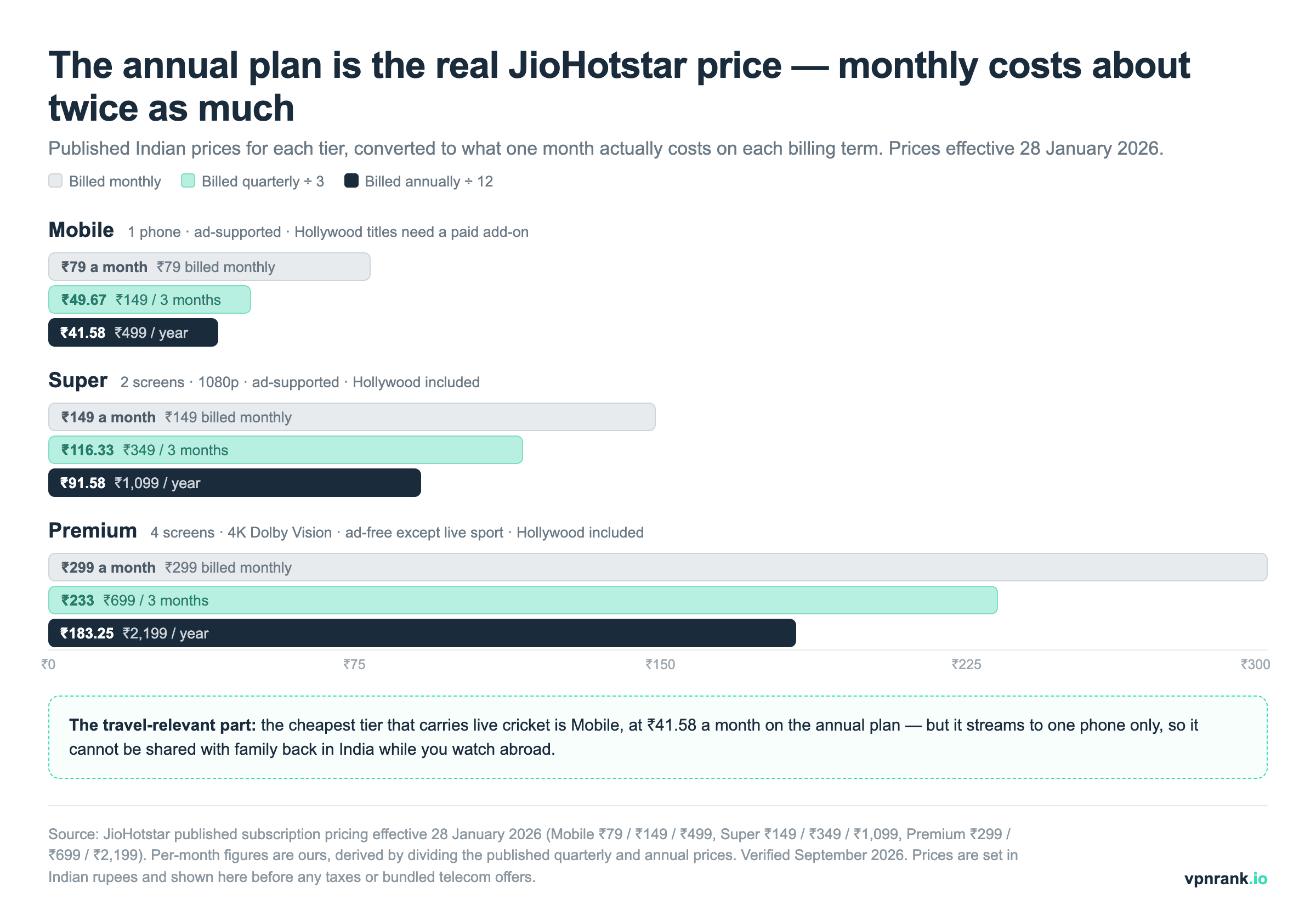
Live cricket sits in the cheapest tier — the screen limit is the catch, not the sport
A persistent misreading of the plan table is that sport is a premium feature. It is not. The entry-level Mobile tier includes the live sports library alongside the Indian catalogue; what it excludes is the Hollywood slate, which needs a paid add-on. So the constraint that actually bites travellers is not the tier's content but its device rule: Mobile streams to one phone at a time, and it is a phone, not a laptop or a hotel-room television. If somebody in India is signed into the same account, one of you is getting logged out mid-over.
The Hollywood add-on is where the April 2026 HBO Max arrangement shows up on your bill. HBO Max launched in India on 15 April 2026 as an exclusive hub inside JioHotstar rather than a standalone app, sold as an add-on from ₹49 a month (₹129 a quarter, ₹399 a year) for Mobile subscribers; Super and Premium include the Hollywood catalogue already. Our HBO Max country-by-country guide covers what that exclusivity means if you are trying to reach an HBO title from outside India, because an Indian add-on is not an HBO Max account anywhere else.
Practical rulePick your JioHotstar tier by how many screens your family needs, not by whether you want sport. Every tier carries the live sport; only the top two carry Hollywood without an add-on, and only the top one is ad-free — and even that one still runs ads during the cricket.
The real reason people panic abroad: live cricket
Films and series can wait. Live cricket cannot, and it is the single most common reason an Indian traveller suddenly needs JioHotstar working in a foreign hotel room. The platform holds the digital broadcast rights that make it, for many fans, non-negotiable during a tournament.
JioHotstar carries the full digital broadcast of the Indian Premier League — it holds the IPL digital rights for the 2023–2027 cycle — along with the Women's Premier League, ICC World Cups, Champions Trophy events and domestic BCCI matches. Sports rights are the tightest-licensed content on the whole platform, which is why live matches are also the first thing to be blocked the moment your connection looks foreign.
That is the crux of the abroad problem: the content you most want to watch live is precisely the content most aggressively geo-fenced. During a marquee series like the IPL final, this is where travellers who ignored the border planning get caught out. If a specific fixture is your priority, our broader sports streaming guide and the dedicated World Cup 2026 coverage map out which service holds which rights in which country.
Why JioHotstar geo-blocks you the second you cross the border
None of this is JioHotstar being difficult for its own sake. The block is a contractual obligation. When a studio or a cricket board licenses content, it sells rights territory by territory — the Indian digital rights to a match or a show are a different, separately-sold product from the US or UK rights. Streaming to the wrong country breaches those deals.
So the platform checks where you are by reading your IP address, the network fingerprint every internet connection carries. An Indian IP gets the full library. A German, Emirati or American IP gets an 'unavailable in your region' message, or a stripped-down catalogue with the sports and premium titles quietly removed. The service is not checking your nationality or your account's country — only the apparent location of your connection at that moment.
A useful mental model is that JioHotstar treats every connection as guilty until proven Indian. The check happens before your account is even considered, which is why some travellers assume their subscription lapsed when in fact the app simply never saw an Indian IP. There is no setting inside the app that overrides this, and contacting support will not lift a territorial licence.
What you see when the block triggers varies by content type, and recognising the pattern saves troubleshooting time. A hard geo-block on live sport usually returns an explicit region error and refuses to start the stream at all. Catalogue titles behave more quietly: the show may simply not appear in search, or its thumbnail loads but playback fails after a few seconds. A stream that starts, plays for thirty seconds, then dies is the classic signature of a location leak rather than a subscription problem.
This is the same territorial logic that fences HBO Max, Peacock and BBC iPlayer — JioHotstar just happens to bundle several of those catalogues under one Indian licence, which makes the border feel especially abrupt when you cross it.
How a VPN restores access — and what it does not do
Because the check is purely about your IP address, the fix is to present an Indian one. A VPN (virtual private network) routes your traffic through a server in a country you choose and hands you that server's IP. Connect to an Indian server and JioHotstar sees an Indian connection, so it serves the full Indian catalogue — cricket included.
The steps are genuinely simple; the honesty about limits matters more:
- 1Install a reputable VPN app on the device you stream from.
- 2Connect to a server located in India.
- 3Open JioHotstar and sign in with your existing account.
- 4If a match or title still will not load, disconnect, switch to a different Indian server and reload.
Two caveats are non-negotiable. First, a VPN changes your location, not your subscription — you still need a valid JioHotstar account, and free content stays free while paid content stays paid. Second, JioHotstar actively detects and blocks VPN traffic, and many providers simply do not get through. This is where cheap or free tools fail: they run a handful of easily-flagged Indian IPs that the platform has already blacklisted. Reliable access comes from providers that maintain large, frequently-rotated Indian server pools, which you can compare on our streaming VPN rankings.
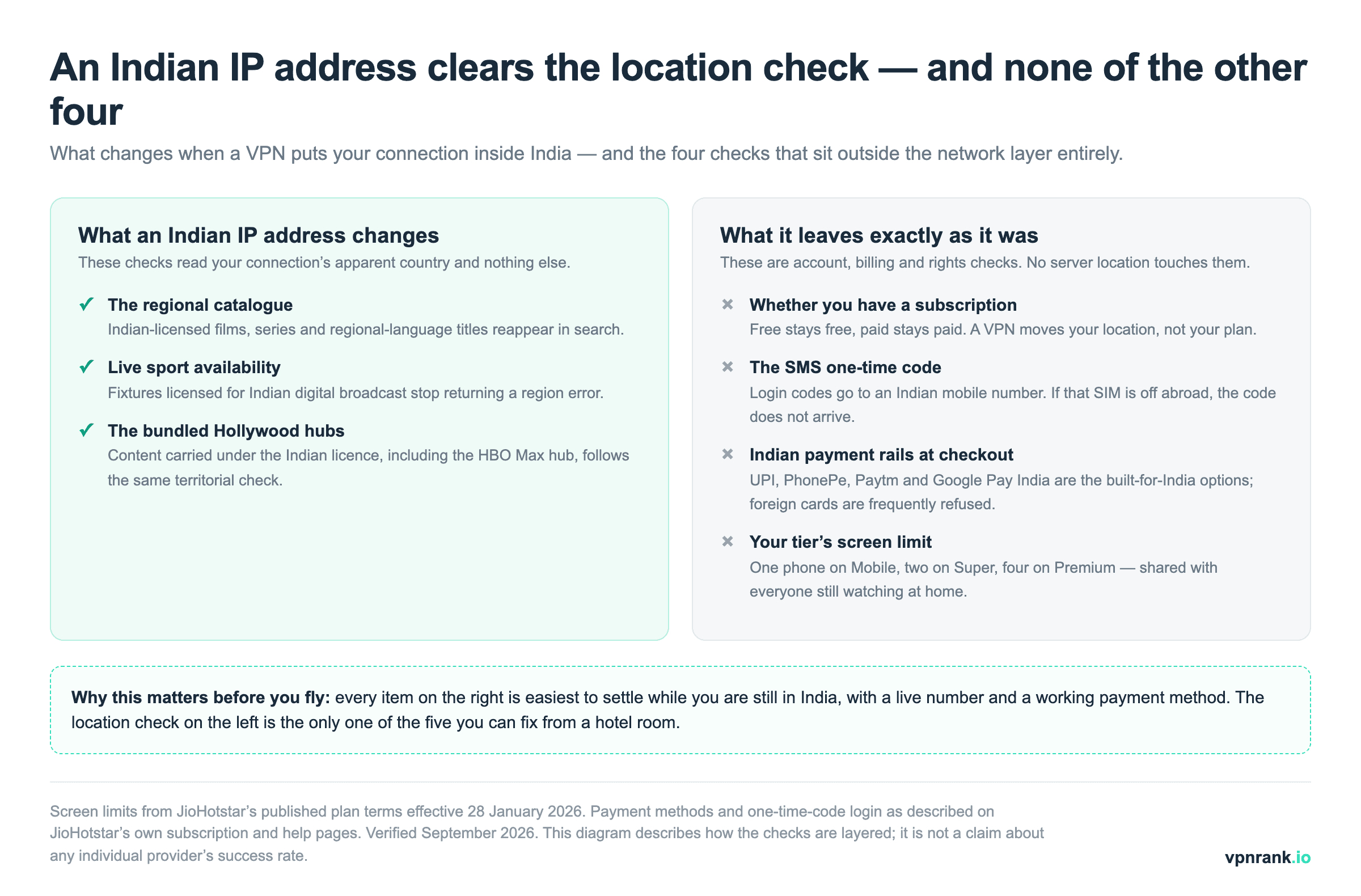
It is worth being precise about how narrow that fix is. JioHotstar puts five separate gates between a traveller and a live match, and only one of them reads your IP address:
| The gate | Where it is checked | Does an Indian server clear it? | What it doesn't automatically prove |
|---|---|---|---|
| Territorial licence | Your connection's apparent country, read from the IP address | Yes | Clearing the country check does not mean the platform failed to recognise the address as a VPN — those are two separate tests, and the second is why one Indian server works where another does not. |
| Subscription status | Your account record | No | Free titles stay free and paid titles stay paid. A working Indian IP on an unsubscribed account still shows you a paywall. |
| Login one-time code | SMS to an Indian mobile number | No | An unreachable Indian SIM blocks a login regardless of how good the connection looks — this is the failure most often misread as "the VPN didn't work". |
| Payment | India-specific rails: UPI, PhonePe, Paytm, Google Pay India | No | A rejected foreign card is a billing-rail decision, not a geo-block, so retrying on a different server changes nothing. |
| Simultaneous screens | Your plan tier: 1, 2 or 4 | No | A stream that drops when a relative in India starts watching is the screen limit doing its job, not the geo-block returning. |
It also helps to understand why free tools fail so predictably. Streaming platforms buy commercial databases that tag known VPN and datacentre IP ranges, and free providers concentrate thousands of users behind a tiny pool of addresses that light up those databases instantly. Paid providers that invest in residential-grade or frequently-cycled Indian IPs are harder to fingerprint, which is the entire practical difference between a stream that holds and one that stalls on the loading spinner. For the wider trade-offs of going cheap, see our take on the limits of a free VPN.
For India-server reliability, ExpressVPN runs a large fleet of Indian IPs that consistently clears JioHotstar's VPN detection — the usual sticking point for cricket streams.
See our top-ranked VPNs →Which devices actually work — and which need a workaround
JioHotstar runs almost everywhere: phones, tablets, laptop browsers, smart TVs, streaming sticks and consoles. The catch abroad is that the VPN has to run on the same device — or the same network — as the app, and not every living-room device lets you install a VPN app directly.
Here is the practical breakdown for a traveller:
- Phones, tablets and laptops — easiest case. Install the VPN app, connect to India, open JioHotstar. Works in a browser or the native app.
- Android TV boxes and Fire TV Stick — most major VPNs have a native app; see our Android TV VPN guide. Sideloading is sometimes needed on older sticks.
- Apple TV, game consoles, smart TVs without VPN support — these cannot run a VPN app directly. The clean fix is a VPN configured on your router, which routes the whole home network through India; our router VPN guide walks through it.
A quick reliability tip on any device: if streams stutter or the block returns, check for a DNS leak or a WebRTC leak — both can quietly reveal your real location even while the VPN appears connected, and both are common causes of a stream that unblocks then abruptly cuts out.
The part guides skip: accounts, Indian numbers and payment
A VPN gets your connection into India, but JioHotstar's sign-up and billing plumbing is built for people physically in India — and that is where travellers hit friction that no VPN can solve. Worth knowing before you rely on it during a trip.
The recurring obstacles:
- OTP verification — login and sign-up verify via a one-time code sent by SMS to an Indian mobile number. If your Indian SIM is switched off abroad, that code may never arrive. Enabling international roaming on the Indian number, or keeping an eSIM active, is the usual fix.
- Indian payment methods — JioHotstar's checkout leans on India-specific rails: UPI, PhonePe, Google Pay India, Paytm and QR-code payments. A foreign card is often rejected.
- Prices are in rupees — after the 28 January 2026 revision, the tiers run from ₹79 a month (Mobile) to ₹299 a month (Premium), or ₹499 and ₹2,199 respectively for a year. Convert before you assume it is expensive; it rarely is. Provider coverage inside India varies more than price does, which our best VPN for India rankings break down server by server.
One more account nuance catches people out: JioHotstar's device and simultaneous-stream limits are tied to your plan tier, so if you share a login with family still in India, streams abroad can bump each other off. Check how many concurrent screens your tier allows before you travel, and if live cricket matters, the higher tiers that permit more devices are worth the small monthly difference so a match abroad does not collide with someone watching at home.
The practical takeaway: set up and, ideally, subscribe to JioHotstar before you leave India, while your number and payment methods work natively. Trying to create an account from scratch abroad is the single hardest version of this task. For a broader look at picking a provider for exactly this kind of licensing-fenced streaming, see our main best VPN rankings, and if speed during live sports is your worry, our VPN speed tests show which providers hold up under HD load.
The bottom line for travellers
JioHotstar is now the single richest Indian streaming service — Hotstar's library, JioCinema's, HBO Max, Peacock content and every major cricket tournament in one place — which is exactly why leaving India feels like losing so much at once. The rebrand did not change the border; it just raised the stakes behind it.
Handled in the right order, though, it is a solved problem: keep your account and Indian number live, subscribe before you fly on the tier whose screen limit matches your household, run a VPN with a strong Indian server pool on a device that supports it, and you carry the full catalogue with you. Our JioHotstar VPN rankings compare the providers on Indian server coverage specifically, and the VPN Price Index shows what each one currently charges. The tools are boring; the cricket is not.
Keep reading
Frequently asked questions
Is Disney+ Hotstar the same as JioHotstar now?
Yes. Disney+ Hotstar and JioCinema merged into JioHotstar on 14 February 2025 following the Reliance–Disney joint venture. The old Disney+ Hotstar branding is retired in India, but existing accounts carry over. If a guide references Disney+ Hotstar, treat it as JioHotstar — same service, new name and app.
Why does JioHotstar stop working the moment I leave India?
Because access is decided by your IP address, which reveals your country. JioHotstar licenses its shows, films and cricket rights territory by territory, so it is contractually required to block or restrict the Indian catalogue outside India. You will see an 'unavailable in your region' message or a stripped-down library missing sports and premium titles.
Can I watch IPL and live cricket on JioHotstar from abroad?
Only if your connection appears to be in India. JioHotstar holds the IPL digital rights through the 2023–2027 cycle plus ICC and BCCI events, and live sport is the most tightly geo-fenced content on the platform. A VPN connected to a reliable Indian server restores it, but you still need a valid JioHotstar account — the VPN changes location, not subscription.
Do I still need a JioHotstar subscription if I use a VPN?
Yes. A VPN only changes your apparent location by giving you an Indian IP address. It does not unlock paid content or create an account for you. Free titles stay free and paid titles stay paid; you must log in with your own JioHotstar account, ideally one set up while you were still in India.
Why do some VPNs fail to unblock JioHotstar?
JioHotstar actively detects and blacklists VPN IP addresses. Free and low-quality providers run a small pool of Indian IPs that the platform has already flagged, so they get blocked. Reliable access comes from providers with large, frequently-rotated Indian server networks. If one server is blocked, switching to another Indian server usually fixes it.
How do I handle the Indian OTP and payment if I'm already abroad?
JioHotstar verifies login via an SMS one-time code to an Indian mobile number and bills through Indian rails like UPI, PhonePe and Paytm. Foreign cards are often rejected and the OTP may not arrive without roaming. The cleanest solution is to subscribe and confirm your account before leaving India, and keep the Indian number reachable via roaming or an eSIM.
Which devices can I use to stream JioHotstar abroad?
Phones, tablets and laptops are easiest — install the VPN app, connect to India and open JioHotstar. Android TV and Fire TV Stick usually support VPN apps directly. Apple TV, consoles and smart TVs without VPN support cannot run a VPN app, so configure the VPN on your router to route the whole home network through India instead.
The best VPNs of 2026, ranked
Now you know how — here are the VPNs we recommend, independently tested and ranked for speed, streaming, privacy and value. Any of them works for everything in this guide.

ExpressVPN Ultra fast & secure. Great for privacy, downloads, and everyday browsing on all your devices. 24/7 live chat support.
ExpressVPN Ultra fast & secure. Great for privacy, downloads, and everyday browsing on all your devices. 24/7 live chat support.

IPVanish Fast speeds with unlimited device connections. Strong no-logs privacy and 24/7 live chat support. Great for families.

IPVanish Fast speeds with unlimited device connections. Strong no-logs privacy and 24/7 live chat support. Great for families.

NordVPN Excellent speeds with one of the largest server networks. Strong security features and easy-to-use apps. 24/7 live chat support.
NordVPN Excellent speeds with one of the largest server networks. Strong security features and easy-to-use apps. 24/7 live chat support.

Proton VPN Swiss-based VPN with strong privacy focus. Audited no-logs policy and open-source apps. Great for privacy-conscious users.
Proton VPN Swiss-based VPN with strong privacy focus. Audited no-logs policy and open-source apps. Great for privacy-conscious users.

CyberGhost Fast speeds and strong privacy tools. Simple apps, automatic WiFi protection, and 24/7 live chat support.
CyberGhost Fast speeds and strong privacy tools. Simple apps, automatic WiFi protection, and 24/7 live chat support.

TotalVPN Affordable VPN with strong privacy and reliable speeds. Easy-to-use apps for all major devices. No-logs policy.
TotalVPN Affordable VPN with strong privacy and reliable speeds. Easy-to-use apps for all major devices. No-logs policy.

Private Internet Access High-speed VPN with a large server network and advanced security settings. Ad blocker included and 24/7 live chat support.
Private Internet Access High-speed VPN with a large server network and advanced security settings. Ad blocker included and 24/7 live chat support.

Surfshark Unlimited device connections at a budget-friendly price. Includes ad blocker and strong privacy tools. Great value for money.
Surfshark Unlimited device connections at a budget-friendly price. Includes ad blocker and strong privacy tools. Great value for money.
Rankings are based on our independent testing methodology. Each guide applies the criteria described on that page, including relevant performance, privacy, product features, and value data. We may earn affiliate commissions from links on this page, which helps fund our testing — this does not influence our rankings.