How to Watch Kayo Sports From Abroad When You Travel
Kayo checks your location before you sign in and names VPNs in its own error messages. Here is what works outside Australia instead, sport by sport, what it costs, and when this summer's events start in your time zone.

vpnrank.io is reader-supported: we may earn a commission if you buy through links in this article. This never affects our rankings.

Kayo Sports works only inside Australia. On 6 October 2026 Kayo's own platform answered our connection from Europe with UNSUPPORTED_COUNTRY before we could even sign in, and the error messages built into its app name VPNs as a reason to stop playback. For travellers the official routes are the sports' own overseas passes: Watch AFL, Watch NRL and SuperView for Supercars, plus each country's cricket broadcaster. This guide shows what Kayo checks, what each of those services costs and where it works, when the summer's big events start in your time zone, and what VPN providers themselves say about Kayo.
Kayo checks your IP address before you sign in, and refuses anywhere outside Australia
Kayo carries more than 50 sports, including every AFL and NRL match, cricket, Formula 1, MotoGP and Supercars, under rights that Foxtel buys for Australia only. The service enforces that at the front door. When we loaded kayosports.com.au from an Italian connection on 6 October 2026, the site served a geo-restriction page instead of the help centre, and the start-up check behind it returned "isAllowed": false with the reason UNSUPPORTED_COUNTRY. Your account and your card are untouched; the service simply declines to serve a location outside its licence.
The same platform file that holds Kayo's on-screen text shows what travellers and VPN users are told. These are Kayo's own strings, read on 6 October 2026; which one you see depends on the error, and some are DAZN templates with Kayo's name inserted:
- Abroad: "Your Kayo Sports account is not available in your current location" and "Sorry, Kayo Sports is not available in your country yet."
- A single blocked video: "Due to legal restrictions, the video you have selected is not available in your current location."
- On a VPN: "We believe you are accessing Kayo Sports using a VPN. Please switch off your VPN and try accessing Kayo Sports again."
- Also on a VPN: "Your VPN connection is blocking Kayo Sports. Please turn your VPN off and try again."
- Travelling: "Some streams aren't available while you're travelling. Try watching another video."
Two more details from the same source matter. Kayo's pay-per-view terms state that an event "cannot be accessed via VPN or proxy services", and Kayo is not available in the "Very Remote" regions of Australia either, so the check is about the rights map, not about citizenship. We could not read the full Kayo Terms of Use from outside Australia, so we quote only what we could see.
Practical rule:Kayo is the wrong app to plan a trip around. For AFL, NRL and Supercars, the official pass sold outside Australia is the one built for where you will be; for cricket, look up the broadcaster in the country you are visiting.
Kayo now belongs to DAZN, but the app and its two plans keep their names
DAZN completed its takeover of the Foxtel Group, which includes Kayo, BINGE and Hubbl, on 2 April 2025, and said the brands would keep their identities. Kayo now runs on DAZN's technology: its website loads DAZN's systems and its help centre has moved to kayosports.com.au/help. On 3 September 2026 Foxtel announced that from 2027 the Fox Sports channels will take the Kayo name: Fox Footy, Fox Cricket and Fox League become Kayo Footy, Kayo Cricket and Kayo League, and the rest become Kayo SPORTS. The app itself is not being renamed.
| Plan | What Kayo says it includes | Monthly price (AUD) | What it doesn't tell you |
|---|---|---|---|
| Kayo Standard | Live sport "in HD" | $29.99 from 5 February 2026, as reported | Price reported by EFTM and TV Blackbox; Kayo's pricing page does not load outside Australia |
| Kayo Premium | "Everything in Kayo Standard, plus 2 streams and 4K quality" | $45.99 from 5 February 2026, up from $40, as reported | Same caveat; Premium rose from $35 to $40 in March 2025 |
Plan descriptions from Kayo's own platform text; prices as reported in January 2026 by EFTM, TV Blackbox and WhistleOut. Read 6 October 2026. Verified October 2026.
Because both plans are billed in Australian dollars to an Australian account, nothing about the subscription changes when you travel. What changes is whether Kayo will serve the stream, which is why the next section matters more than the plan you are on.
AFL, NRL and Supercars each sell an official pass for viewers outside Australia
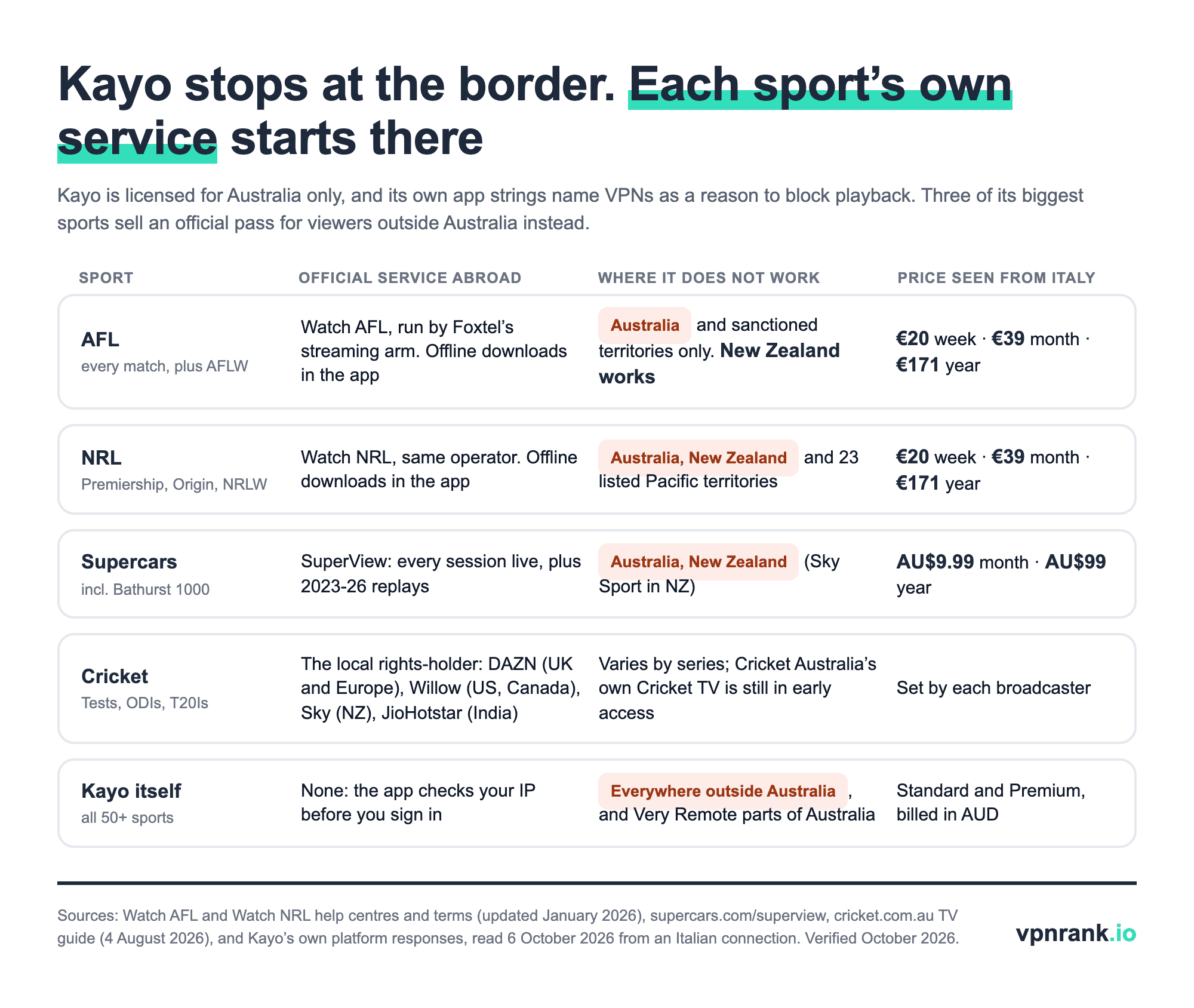
The rights that keep Kayo inside Australia are mirrored by passes sold only outside it. Watch AFL and Watch NRL are run by FOX SPORTS StreamCo, a Foxtel company, so the same group that blocks Kayo abroad sells the overseas product. Watch AFL describes itself as "a geo-location based service which means it's only available outside of Australia", and both services offer offline downloads in their apps.
| Service | What it covers | Where it doesn't work | Price seen from Italy | Caveat |
|---|---|---|---|---|
| Watch AFL | Every Premiership and Finals match, AFLW, the Community Series, the 24/7 FOX FOOTY channel, Brownlow and Draft; live and on demand, no ad-breaks during play | Australia, plus Cuba, Iran, North Korea, Syria, Russia, Belarus and other sanctioned territories. New Zealand is not excluded | €20 a week, €39 a month, €171 for 12 months | Its help page says a VPN or proxy means "we can't tell where you're based and therefore the stream may not be available" |
| Watch NRL | Every Premiership and Finals match, State of Origin, NRLW, selected Tests and the 24/7 FOX LEAGUE channel | Australia, New Zealand and 23 listed Pacific territories including Fiji, Samoa, Tonga and Papua New Guinea | €20 a week, €39 a month, €171 for 12 months | New Zealanders and Pacific viewers watch through local broadcasters instead |
| SuperView | Every Supercars practice, qualifying session and race live, plus replays of the 2023 to 2026 seasons | Australia and New Zealand (Sky Sport carries Supercars in New Zealand) | AU$9.99 a month or AU$99 a year | Priced in Australian dollars on Supercars' own page |
Source: Watch AFL and Watch NRL help centres and terms (updated January 2026) and their home pages; supercars.com/superview. Read 6 October 2026. Verified October 2026.
Both football seasons have finished for 2026: the Brisbane Lions beat Fremantle 96 to 89 in the AFL Grand Final on 26 September, according to the AFL, and the Sydney Roosters beat the Newcastle Knights 19 to 18 in the NRL Grand Final on 4 October, as reported by the ABC. Both passes keep match replays and the 24/7 channels between seasons, so the decision for most travellers now is about next year and about the Supercars and cricket coming up this summer.
Cricket abroad depends on the series, because Australia's summer is sold country by country
Cricket has no single overseas pass yet. In Australia, men's Tests and all women's internationals are shared between Foxtel/Kayo and Seven, while men's one-day and T20 matches are exclusive to Foxtel and Kayo under a rights deal that runs to 2031. Abroad, Cricket Australia sells each series to local broadcasters. For the August 2026 Bangladesh Test series it listed these, and it says the list can change per series:
| Where you are | Broadcaster named by Cricket Australia | What it doesn't settle |
|---|---|---|
| UK, Ireland and Europe | DAZN | Whether the England and New Zealand series this summer go to the same partner |
| United States and Canada | Willow | Same caveat |
| New Zealand | Sky NZ | Same caveat |
| India and South Asia | JioHotstar | Same caveat |
| Middle East and Asia-Pacific | Cricbuzz | Same caveat |
| Pacific | Pacific Aus TV | Same caveat |
| Africa | SuperSport | Same caveat |
| Americas and the Caribbean | Cricket TV, Cricket Australia's own new service | In early access; no price published when we checked |
Source: cricket.com.au TV guide for the Australia v Bangladesh Test series, 4 August 2026, read 6 October 2026. Check the guide Cricket Australia publishes before each series. Verified October 2026.
The big Kayo events this summer start between midnight and dawn in Europe
October to December is motorsport and cricket season on Kayo. The table lists the fixtures we could verify against the organisers' own pages; the A-League is not among them, because from 16 October 2026 it streams on Paramount+ and Network 10, not Kayo.
| Event | Dates | On Kayo | Free in Australia | What it doesn't tell you |
|---|---|---|---|---|
| Bathurst 1000 (Supercars) | 8 to 11 October; race starts Sunday 11 October, 11:30am AEDT | All four days live | Seven and 7plus, Friday to Sunday | Abroad, SuperView carries it (not in Australia or New Zealand) |
| Formula 1, rounds 17 to 23 | Singapore 9 to 11 October to Abu Dhabi 4 to 6 December | Every session, in 4K, without ad-breaks | Only the Australian Grand Prix, on Network 10, which is not in this window | Overseas F1 rights belong to each country's broadcaster |
| Men's ODIs v England | 13, 15 and 18 November (Perth, Adelaide, Hobart) | Exclusive with Foxtel | No | Abroad, depends on the series partner |
| Men's T20Is v England | 21 November to 2 December, five matches | Exclusive with Foxtel | No | Same caveat |
| Tests v New Zealand | 9 December (Perth) to 8 January 2027 (SCG); Boxing Day Test at the MCG | Yes | Seven and 7plus | Same caveat |
| BBL|16 | 12 December 2026 to 26 January 2027; opener in Chennai, India | All matches | 30 regular-season matches and all four finals on Seven and 7plus | The opener is the first BBL match played outside Australia |
Source: supercars.com (5 October 2026), formula1.com 2026 calendar, Foxtel Group F1 release (3 March 2026), cricket.com.au schedule (22 March 2026) and BBL|16 fixture (13 July 2026), aleagues.com.au (16 July 2026). Read 6 October 2026. Verified October 2026.
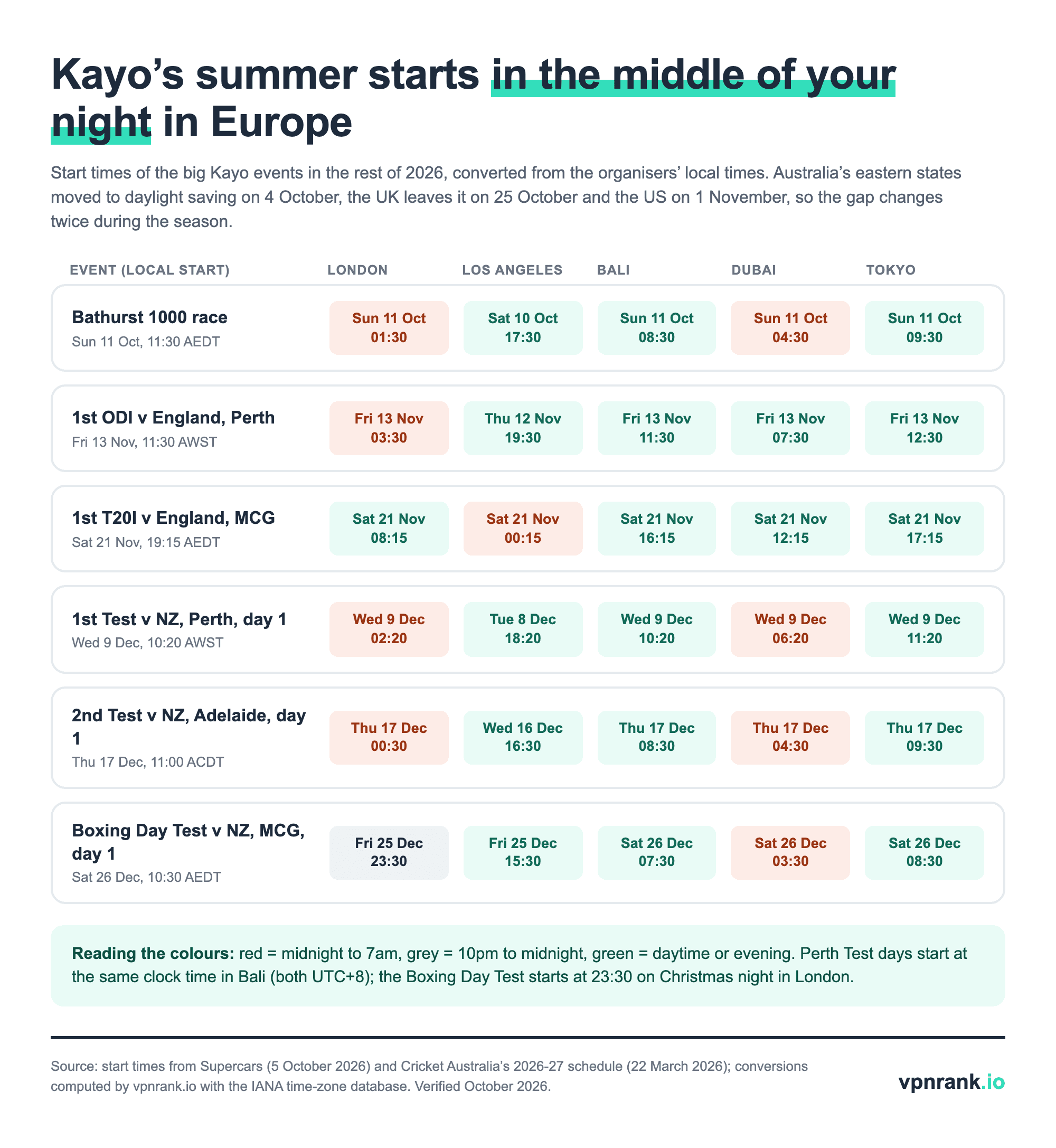
Two consequences for travellers. Perth fixtures start at the same clock time in Bali, because Western Australia and Bali are both on UTC+8, so Bali is the easiest place to watch a Perth Test live. And in Europe the summer is an overnight affair: the Boxing Day Test starts at 23:30 on Christmas night in London, and Adelaide's day one starts half an hour after midnight.
7plus, 9Now, 10 and SBS On Demand are geo-blocked to Australia as well
Several of these events are also free in Australia, but the free apps do not travel any better than Kayo does. Their own help pages are explicit:
- SBS On Demand: "Even if you are an Australian citizen, you cannot access the service while overseas." It offers no offline downloads either.
- 9Now: it "does not have international streaming rights. If you're outside of Australia, you won't be able to watch 9Now until you're back in the country."
- 10: it "is restricted to showing live and catch-up content within Australia and does not have international streaming rights."
- 7plus: its help site did not load from abroad; the main site answered our request from Italy with an HTTP 403 page saying access is blocked from your country.
We cover the SBS case in more detail in our SBS On Demand abroad guide, and Australia's paid entertainment service in Stan abroad.
Only three VPN providers publish a Kayo page, and one admits it may not work at all
Every "watch Kayo abroad" guide recommends connecting to an Australian server. We checked what the nine providers we cover actually say on their own sites, by searching their help centres and their full sitemaps for "Kayo" on 6 October 2026. Read this table as vendor claims, not as test results.
| Provider | Kayo page on its own site | What it says | What it doesn't automatically prove |
|---|---|---|---|
| ExpressVPN | Yes, dedicated (updated May 2026) | "Connect to a server in Australia"; "Yes, ExpressVPN works with Kayo"; adds that it "should not be used as a means of copyright circumvention" | That Kayo's VPN check will not catch it on a given day |
| Proton VPN | Yes, support guide (undated) | "Connect to any server located in Australia"; needs a paid plan | The page is out of date: it still describes Kayo as part of Streamotion and mentions a 7-day free trial |
| PureVPN | Yes, plus about 30 country variants (updated June 2026) | Connect to an Australian server, but performance "may vary, and there might be instances when it does not work at all" | Anything beyond its own caveat |
| CyberGhost | No page; a "Kayo Sports AU" profile in its server list | A streaming-optimised server labelled for Kayo | How that profile performs; its help centre returns nothing for Kayo |
| PIA | No page; Kayo mentioned on sport pages | Use its Australian servers; quotes Kayo at "from $25 per month" with a 7-day trial | Its Kayo prices are out of date against the February 2026 prices |
| NordVPN | No Kayo page found | Nothing about Kayo | Nothing either way |
| Surfshark | No Kayo page found | Nothing about Kayo | Nothing either way |
| IPVanish | No Kayo page found | Nothing about Kayo | Nothing either way |
| TotalVPN | No Kayo page found | Only a general note that geo-restricted access "is subject to the provider's terms and may vary by region" | Nothing either way |
Source: each provider's website, help-centre search and sitemaps, read 6 October 2026. We did not test any provider against Kayo. Verified October 2026.
Set beside Kayo's own app text, which asks users to switch off "proxies, VPNs, or other routing software", the vendor pages describe a contest rather than a feature. Where a VPN does belong on a trip is the public Wi-Fi in airports and hotels, where it encrypts what you send; for that, connect to a server near where you are. Our best VPN for Australia page covers that use.
Using a VPN is legal in Australia, but Kayo's own rules are a separate question
The eSafety Commissioner's Be Connected programme states plainly that "using a VPN is legal in Australia", and describes Australians using one abroad to get around geoblocks and reach sites back home. A parliamentary committee went further in its July 2013 report At what cost? IT pricing and the Australia tax: Recommendation 5 asked the government to amend the Copyright Act to "clarify and secure consumers' rights to circumvent technological protection measures that control geographic market segmentation". That was a recommendation about pricing of software and digital goods, not a change to the law, and it says nothing about sport.
Legal is not the same as permitted by the service. Kayo's pay-per-view terms rule out VPN and proxy access, and Watch AFL's and Watch NRL's terms forbid circumventing their "security-related features". Breaking a service's terms is a contract matter between you and the service, which can end in a blocked stream or a closed account rather than a fine.
Where the nine providers place Australian servers
If you keep a VPN for the trip, these are the Australian cities each provider lists on its own server page. They matter for your Australian banking and work apps, which may flag a login from an unfamiliar country.
| Provider | Australian cities listed | Caveat |
|---|---|---|
| ExpressVPN | Adelaide, Brisbane, Melbourne, Perth, Sydney, Sydney-2, Woolloomooloo | Two separate Sydney-area locations |
| NordVPN | Adelaide, Brisbane, Melbourne, Perth, Sydney | |
| Surfshark | Adelaide, Brisbane, Melbourne, Perth, Sydney | |
| Proton VPN | Adelaide, Brisbane, Melbourne, Perth, Sydney | Australian servers are on paid plans only; the free plan has none |
| PIA | Adelaide, Brisbane, Melbourne, Perth, Sydney, plus an "Australia Streaming Optimized" location | |
| IPVanish | Adelaide, Brisbane, Melbourne, Perth, Sydney | |
| CyberGhost | Brisbane, Melbourne, Sydney | Three cities, 217 servers listed |
| PureVPN | Brisbane, Melbourne, Perth, Sydney | |
| TotalVPN | Australia listed, no cities named | Its pages give conflicting country counts |
Source: each provider's own server-location page, read 6 October 2026. Verified October 2026.
When Kayo won't play on a trip: what you see and what to do
| What you see | What it means | What to do | What it doesn't automatically prove |
|---|---|---|---|
| "Your Kayo Sports account is not available in your current location" | Kayo has placed you outside Australia | Use Watch AFL, Watch NRL, SuperView or the local cricket broadcaster | That your subscription has been cancelled |
| "We believe you are accessing Kayo Sports using a VPN" | Kayo has flagged your connection as a VPN or proxy, even inside Australia | Switch the VPN off; if you have none, Kayo says to contact your internet provider | That you did something unlawful |
| "Some streams aren't available while you're travelling" | A specific stream is restricted for travellers | Try another video, or wait until you are back | That every stream is blocked |
| Watch AFL or Watch NRL refuses to play | Its help page says a VPN or proxy hides where you are | Turn off any VPN; the passes need a non-Australian location | That the pass is broken |
| Watch NRL won't sell to you in New Zealand or Fiji | Those countries are excluded in its terms | Use the local broadcaster | That you can buy Watch AFL there instead for NRL |
| 7plus or 9Now shows a country block | Free-to-air apps are Australia-only | Wait until you are home, or use the overseas pass for that sport | That Kayo would work instead |
Error wording from Kayo's platform text and the services' help pages, read 6 October 2026. Verified October 2026.
The bottom line for travelling Australians
Kayo stays at home, and it tells you so in its own words. Before you fly, decide by sport: Watch AFL and Watch NRL for the football codes (New Zealand is the trap for NRL fans), SuperView for Bathurst and the rest of Supercars, and the local rights-holder for the cricket. Your Kayo subscription will be waiting when you land back in Australia.
Keep reading
Frequently asked questions
Does Kayo work overseas?
No. Kayo is licensed for Australia only and checks your IP address before sign-in; from outside Australia its platform returns UNSUPPORTED_COUNTRY and its messages include "Your Kayo Sports account is not available in your current location". The official alternatives abroad are Watch AFL, Watch NRL, SuperView for Supercars and each country's cricket broadcaster.
Can I watch Kayo in New Zealand?
No, Kayo is Australia-only. For AFL, Watch AFL does work in New Zealand. For NRL, Watch NRL excludes New Zealand and 23 Pacific territories, so New Zealanders use local broadcasters; Supercars are on Sky Sport in New Zealand.
Is it legal to use a VPN with Kayo?
Using a VPN is legal in Australia, according to the eSafety Commissioner. Kayo's own rules are separate: its pay-per-view terms say events cannot be accessed via VPN or proxy services, and its app shows messages asking you to switch a VPN off. Breaching a service's terms can lead to a blocked stream or account action rather than a legal penalty.
How much does Kayo cost in 2026?
From 5 February 2026, Kayo Standard is reported at AU$29.99 a month (one stream, HD) and Kayo Premium at AU$45.99 (two streams, 4K), up from $40. These figures come from EFTM and TV Blackbox, because Kayo's pricing page does not load outside Australia.
Who owns Kayo now?
DAZN, which completed its takeover of the Foxtel Group, including Kayo, BINGE and Hubbl, on 2 April 2025. Kayo kept its name, and from 2027 the Fox Sports channels will be renamed Kayo Footy, Kayo Cricket, Kayo League and Kayo SPORTS.
How can I watch the Boxing Day Test abroad?
Through the broadcaster Cricket Australia names for the country you are in, such as DAZN in the UK and Europe or Willow in the US and Canada for recent series. Check Cricket Australia's TV guide before the series. The Test starts at 10:30am AEDT on 26 December, which is 23:30 on Christmas night in London.
Is the A-League on Kayo?
No. The 2026-27 A-League season, which starts on 16 October 2026, streams on Paramount+ with selected matches free on Network 10.
The best VPNs of 2026, ranked
Now you know how — here are the VPNs we recommend, independently tested and ranked for speed, streaming, privacy and value. Any of them works for everything in this guide.

ExpressVPN Ultra fast & secure. Great for privacy, downloads, and everyday browsing on all your devices. 24/7 live chat support.
ExpressVPN Ultra fast & secure. Great for privacy, downloads, and everyday browsing on all your devices. 24/7 live chat support.

IPVanish Fast speeds with unlimited device connections. Strong no-logs privacy and 24/7 live chat support. Great for families.

IPVanish Fast speeds with unlimited device connections. Strong no-logs privacy and 24/7 live chat support. Great for families.

NordVPN Excellent speeds with one of the largest server networks. Strong security features and easy-to-use apps. 24/7 live chat support.
NordVPN Excellent speeds with one of the largest server networks. Strong security features and easy-to-use apps. 24/7 live chat support.

Proton VPN Swiss-based VPN with strong privacy focus. Audited no-logs policy and open-source apps. Great for privacy-conscious users.
Proton VPN Swiss-based VPN with strong privacy focus. Audited no-logs policy and open-source apps. Great for privacy-conscious users.

CyberGhost Fast speeds and strong privacy tools. Simple apps, automatic WiFi protection, and 24/7 live chat support.
CyberGhost Fast speeds and strong privacy tools. Simple apps, automatic WiFi protection, and 24/7 live chat support.

TotalVPN Affordable VPN with strong privacy and reliable speeds. Easy-to-use apps for all major devices. No-logs policy.
TotalVPN Affordable VPN with strong privacy and reliable speeds. Easy-to-use apps for all major devices. No-logs policy.

Private Internet Access High-speed VPN with a large server network and advanced security settings. Ad blocker included and 24/7 live chat support.
Private Internet Access High-speed VPN with a large server network and advanced security settings. Ad blocker included and 24/7 live chat support.

Surfshark Unlimited device connections at a budget-friendly price. Includes ad blocker and strong privacy tools. Great value for money.
Surfshark Unlimited device connections at a budget-friendly price. Includes ad blocker and strong privacy tools. Great value for money.
Rankings are based on our independent testing methodology. Each guide applies the criteria described on that page, including relevant performance, privacy, product features, and value data. We may earn affiliate commissions from links on this page, which helps fund our testing — this does not influence our rankings.