
What Is a VPN Kill Switch? How It Works and Why It Actually Matters
The quiet feature that decides whether a dropped connection stays private or leaks your real IP to the whole internet

vpnrank.io is reader-supported: we may earn a commission if you buy through links in this article. This never affects our rankings.
A VPN kill switch is a safety mechanism that blocks all internet traffic the instant your encrypted tunnel drops, so your device never falls back to your exposed connection without you noticing. It exists because VPN tunnels do occasionally fail, and those failures are exactly when your real IP address would otherwise leak. Checked against the providers' own help centres in September 2026: ExpressVPN, PIA, Proton VPN and Surfshark each document a strict mode that keeps blocking even after you disconnect on purpose, and on Android the strongest version is the operating system's own Block connections without VPN setting rather than anything inside a VPN app.
Why VPN connections drop in the first place
People imagine a VPN as an always-on wall, but in practice the tunnel is a live connection that can and does break. It flickers when you move between Wi-Fi networks, when your phone sleeps and wakes, when a server reboots, or when your ISP briefly hiccups. Each of these moments is a small window of exposure.
The problem is that your operating system is designed to keep you online at all costs. When the VPN tunnel disappears, the OS does not politely wait — it immediately reroutes your traffic through your normal, unprotected connection. For a few seconds, or a few minutes if you have walked away from the screen, everything you do travels under your real IP address.
- Network switching — moving from home Wi-Fi to mobile data, or between Wi-Fi access points, forces the tunnel to re-establish.
- Sleep and wake cycles — laptops and phones drop the connection on standby and race to reconnect on wake.
- Server-side events — the VPN server you are on can reboot, rebalance load, or hit maintenance.
- Signal and congestion — weak signal, throttling, or a saturated network can time the tunnel out.
None of these are edge cases. On a typical day of mobile use, a tunnel may re-establish dozens of times. A kill switch is what makes those transitions safe instead of silent leaks. If you want the ground-level mechanics of how the tunnel itself is built, our VPN privacy guide walks through encryption and protocols.
How a kill switch actually works
Under the hood, a kill switch is a set of firewall rules that watch the VPN's virtual network interface. The rule is blunt and effective: allow traffic out through the VPN tunnel interface, and block everything else. When the tunnel interface is healthy, packets flow. When it vanishes, there is no permitted path out, so traffic simply stops.
That distinction — a default-deny rule enforced at the network layer rather than a script that reacts after the fact — is what separates a real kill switch from a marketing checkbox. A well-built kill switch does not need to detect the drop and then scramble to react. The block is already in place; losing the tunnel just means nothing satisfies the allow rule anymore.
- 1You connect, and the client installs firewall rules that only permit traffic over the VPN interface.
- 2Traffic flows normally through the encrypted tunnel.
- 3The tunnel drops for any reason, and the VPN interface disappears.
- 4No other route is permitted, so all internet traffic is blocked instantly.
- 5When the tunnel re-establishes, the interface returns and traffic resumes automatically.
There is a subtlety that trips up weaker implementations: DNS. If the client blocks general traffic but lets your device fall back to your ISP's DNS resolver, your browsing hostnames still leak even while the rest is blocked. That is why a good kill switch and solid DNS handling go together — see our explainer on the DNS leak for how that specific gap opens up.
IPv6 is the other quiet failure mode. A kill switch built only around IPv4 rules can leave the IPv6 stack unmanaged, so if your network hands out an IPv6 address, packets can slip out over that path while IPv4 sits neatly blocked. The strongest implementations either route IPv6 through the tunnel too or disable it outright while connected; a checkbox that only guards IPv4 is protecting half the door.
App-level vs system-level: the difference that matters
Not all kill switches protect the same amount of your device, and the label matters enormously. There are two broad designs, and most consumer VPNs ship the weaker one by default. Understanding which you have is the single most important thing in this article.
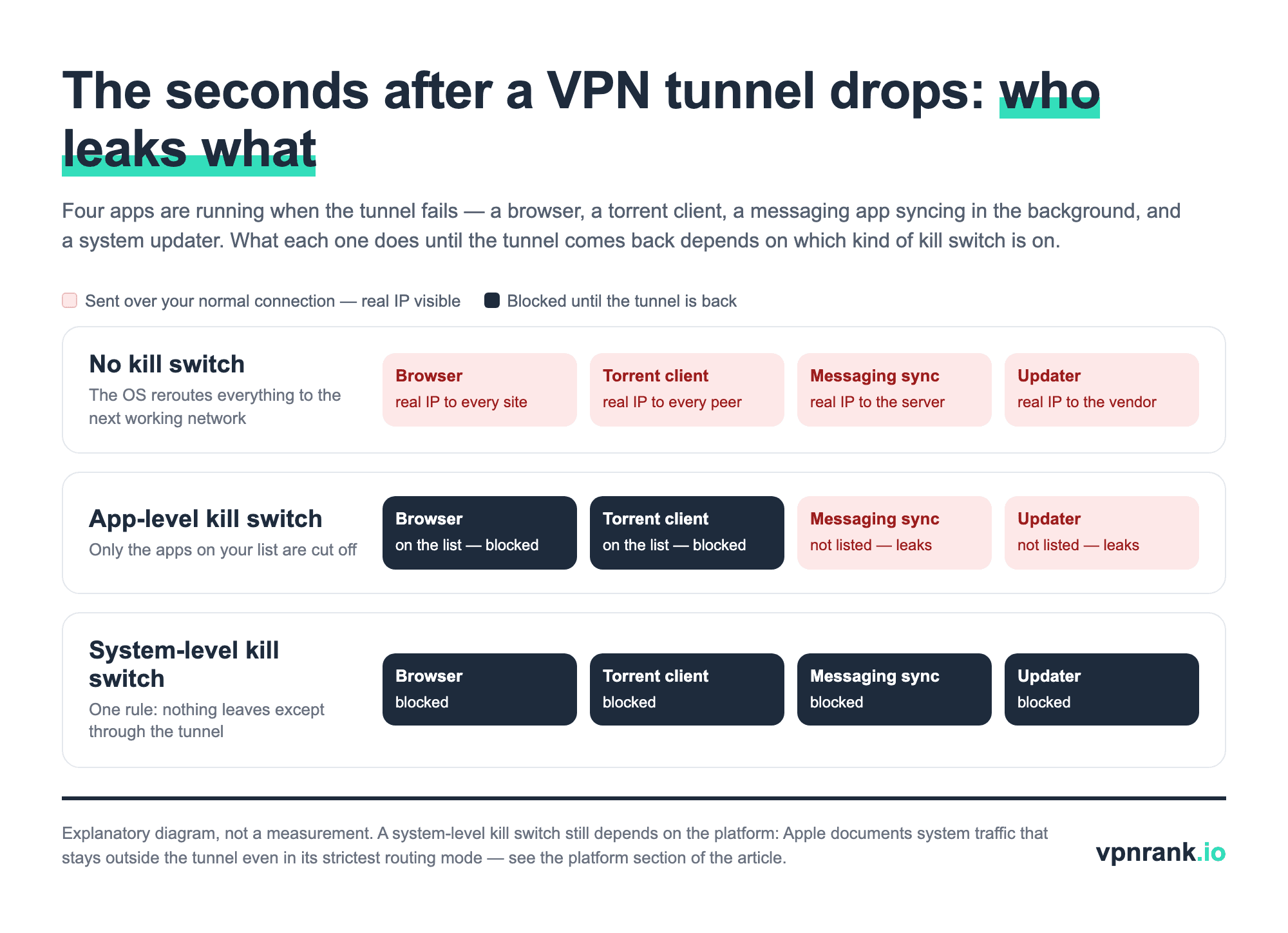
App-level (selective) kill switch
An app-level kill switch only cuts traffic for a chosen list of applications — typically your browser or a torrent client. If the tunnel drops, those named apps lose connectivity, but everything else on the device keeps talking to the internet through your real connection. It is convenient, and it is enough for many casual users, but it is also a partial shield.
- Pro: other apps stay online, so a dropped tunnel does not disrupt your whole device.
- Con: anything not on the list — background sync, updaters, messaging apps — leaks freely during a drop.
- Best for: users whose threat model is 'don't let this one browser or download expose me.'
System-level (network-wide) kill switch
A system-level kill switch enforces a device-wide rule: no traffic leaves through any interface except the VPN tunnel. If the tunnel is down, the entire device is offline until it comes back. The rule lives in the OS and holds regardless of which app is running, which is exactly why it is the safer default for anyone who treats a leak as unacceptable.
Security researchers broadly agree that system-level is the stronger design, and it is what we recommend for privacy-sensitive users. It removes the guesswork about which apps are covered — the answer is all of them. If you are choosing a provider mainly on this feature, our editor-reviewed best VPN rankings flag which services ship a proper system-wide implementation.
When a kill switch actually saves you
A kill switch is not theatre for the paranoid. There are concrete, everyday situations where the difference between having one and not having one is the difference between staying private and quietly broadcasting your identity. Here is where it earns its place.
- 1Torrenting and P2P — a swarm sees the IP of every peer. If the tunnel drops mid-download without a kill switch, your real IP is exposed to everyone in that swarm.
- 2Journalists, activists, and researchers — anyone whose safety depends on not linking activity to their identity cannot afford a single unprotected packet.
- 3Public Wi-Fi — on an untrusted café or airport network, a silent drop puts you straight back onto the open network you were trying to shield from.
- 4Unattended sessions — long downloads, backups, or a machine left running overnight can leak for hours if the tunnel drops and nothing stops the traffic.
- 5Region-locked access — a drop can briefly reveal your true location, which is enough for some services to flag or block the session.
For torrenting specifically, the kill switch is necessary but not sufficient. Proton VPN's own BitTorrent guide tells users to also bind the torrent client to the VPN's network interface, and warns that choosing the wrong interface can expose your real IP even with the kill switch on — binding means the client simply has no route out if the tunnel is gone. Surfshark lists file sharing as a reason to use its kill switch for the same reason: peers in a swarm see every IP that connects. Our torrenting guide covers the rest of the setup.
That last point is worth nuance. If you use a VPN mainly to watch content while travelling — checking whether a match or show is available from where you are on our can-I-watch tool, or setting up for streaming — a drop is usually an inconvenience rather than a danger. But for privacy-critical use, it is the whole ballgame.
Want a system-level kill switch that holds even if the app crashes or the device restarts? ExpressVPN's Network Lock — now called the Internet Kill Switch — is one of the most thoroughly tested implementations available.
See our top-ranked VPNs →How to test your kill switch in five minutes
A kill switch that fails silently is worse than none at all, because it hands you false confidence. The good news is you can verify yours in a few minutes with nothing but the VPN app, a browser, and an IP-checking page. The critical detail: do not just click 'disconnect,' because that lets the app manage a graceful handoff and masks failures.
- 1Connect to your VPN and confirm your public IP shows the VPN server's address in a browser.
- 2Leave that IP-check page open in a tab.
- 3Now simulate a real crash — force-quit the VPN process from Task Manager or Activity Monitor, rather than using the in-app disconnect button.
- 4Immediately refresh the IP page. If the kill switch works, the page should fail to load or error out entirely.
- 5If instead your real IP appears, the kill switch is not doing its job.
For a deeper check, repeat the test while running a DNS leak test and a WebRTC check, because the kill switch alone does not cover every leak vector. A browser can still expose your address through WebRTC even while a VPN is active, and DNS requests can slip out to your ISP's resolver. You can also sanity-check tunnel health and routing with our VPN speed test before you rely on the connection. If you would rather not force-quit processes, our browser-based kill switch test watches your public IP while you cut the Wi-Fi for a few seconds and reports whether anything got through.
The mobile catch: always-on VPN and reconnection gaps
Phones are where kill switches are most needed and most fragile. Mobile devices constantly switch between Wi-Fi and cellular, sleep aggressively to save battery, and wake background apps before the tunnel has re-established. Those reconnection windows are the classic leak moment, and app-level protection often does not cover them well.
Android offers a built-in defence worth knowing about. In the system network settings, 'Always-on VPN' plus 'Block connections without VPN' enforces a system-level rule outside the VPN app entirely, so even if the app crashes, traffic stays blocked. Many providers layer their own permanent kill switch on top of this.
- Enable OS-level always-on — on Android, combine the app's kill switch with the system 'Block connections without VPN' setting for belt-and-braces coverage.
- Prefer a 'strict' or 'permanent' mode — several providers distinguish a soft mode (blocks only on unexpected drops) from a strict mode (blocks whenever you are not connected, including on purpose).
- Mind iOS quirks — on iPhone the strongest option is an Apple routing flag the VPN app turns on for you (ExpressVPN calls its version the Advanced Kill Switch, Proton VPN has an Advanced kill switch in beta), and even that leaves some Apple system traffic outside the tunnel, as the next section explains.
If you route a whole household or want protection on devices that cannot run a VPN app, a kill switch at the router level or on an Android TV box changes the calculation — the tunnel and its fail-safe cover every device behind them at once. It also sidesteps the mobile reconnection problem entirely, because the fail-safe lives on the router rather than on a battery-managed phone that keeps suspending its own apps.
Which providers implement it well
The feature is common, but the quality varies. What separates a strong kill switch from a checkbox is whether it is truly system-level, whether it survives an app crash or reboot, and whether it closes the DNS and reconnection gaps. A few implementations are consistently well regarded in independent testing.
“Well regarded in testing” has a specific meaning here. Reviewers deliberately break the tunnel — killing the VPN process, pulling the network, forcing a reboot mid-session — and then watch an IP and DNS monitor for even a single leaked packet during the gap before the block re-arms. The implementations that pass are the ones where the firewall rule is installed before the tunnel comes up and torn down only after it is safely re-established, leaving no unguarded window.
- ExpressVPN — Internet Kill Switch (formerly Network Lock): a system-level kill switch, on by default on desktop, Android phones and iOS, with an “Enable at all times” mode on Windows, Mac and Linux that blocks all access even after you disconnect manually. On iPhone it comes as a Standard and an Advanced Kill Switch.
- NordVPN: offers a system-wide Internet Kill Switch plus an App Kill Switch on Windows (both off by default there); on iOS and the App Store Mac app the kill switch is on by default and not shown as a setting, while the Mac app downloaded from NordVPN's site closes the apps you choose instead of blocking the whole system.
- Surfshark: ships a Soft mode (blocks only on unexpected drops) and a Strict mode that acts as a permanent safeguard whenever you are not connected.
The label 'kill switch' on a feature list tells you little on its own — a permanent, system-level mode that survives a crash is what you are actually looking for. For the full editorial breakdown of which services get this right alongside speed, price, and privacy, see our best VPN guide, and use the VPN price index to check what the strong options actually cost right now.
Every provider names and scopes its kill switch differently — check yours against this table
The same checkbox hides very different behaviour. Some providers switch the kill switch on by default, some leave it off; some have a strict mode only on desktop; and on Android several hand the job to the operating system entirely. The table below is built only from each provider's own help centre, read in September 2026 — cells the provider does not document are marked as such rather than guessed.
| VPN | What it is called | Where the strict (always-block) mode exists | Android | What the label doesn't tell you |
|---|---|---|---|---|
| ExpressVPN | Internet Kill Switch (formerly Network Lock); iOS: Standard / Advanced | Windows, Mac, Linux (“Enable at all times”) | In-app switch (Android 7.0+) plus OS lockdown | iOS Advanced still does not block after a manual disconnect; off by default on Android TV |
| NordVPN | Internet Kill Switch + App Kill Switch | Linux (blocks after manual disconnect) | System-wide in-app (Android 8.0+) | Off by default on Windows; the website Mac app only closes chosen apps |
| Surfshark | Kill Switch: Soft / Strict | Strict mode (platforms not listed) | In-app toggle | Help centre does not say which platforms get Strict |
| PIA | VPN Kill Switch + Advanced Kill Switch | Windows, macOS (works even with the app closed) | Uses Android's own settings | On by default on Windows; the iOS switch does not block after a manual disconnect |
| Proton VPN | Kill switch + Advanced kill switch | Windows, Linux, iOS/iPadOS (beta) | Uses Android's own settings | Not available on Android 7.x or older; Apple-service DNS can still bypass on iOS and macOS |
| CyberGhost | Automatic Kill-Switch; macOS: Leak Protection | None documented | Not documented | Turns off when you disconnect on purpose; mobile behaviour not documented |
| IPVanish | Kill Switch; Android OS Kill Switch | Windows adds “Block LAN Traffic” | Uses Android's own settings (Android 8+) | Split-tunnelled apps are blocked too on Android |
Sources: each provider's help centre and feature pages, read 28 September 2026 (links in the text). TotalVPN is not listed: its homepage mentions a kill switch but its help centre documents no such setting. Verified September 2026.
Two patterns stand out. First, “on by default” is the exception you have to check for, not the rule — NordVPN's Windows app ships with both switches off. Second, the providers that rely on Android's own lockdown (PIA, Proton VPN, IPVanish) are not weaker on Android; they are pointing you to the one control that keeps working even if their app crashes. The Android menu path is Settings → Network & internet → VPN → the gear next to your VPN → Always-on VPN and Block connections without VPN, per Google's Android help; Samsung puts it under Connections → More connection settings → VPN.
Even the strictest kill switch leaves some traffic outside the tunnel — the platforms say so themselves
A kill switch is a routing rule, and each operating system reserves some traffic for itself. On iPhone, iPad and Mac, the strongest option available to a VPN app is Apple's includeAllNetworks setting (iOS 14 and macOS 10.15 onward). Apple's documentation says the system still keeps DHCP, captive-portal sign-in traffic, VoLTE calling and traffic to a paired Apple Watch outside the tunnel, and two further settings leave push notifications and Wi-Fi Calling, SMS/MMS and Visual Voicemail outside by default.
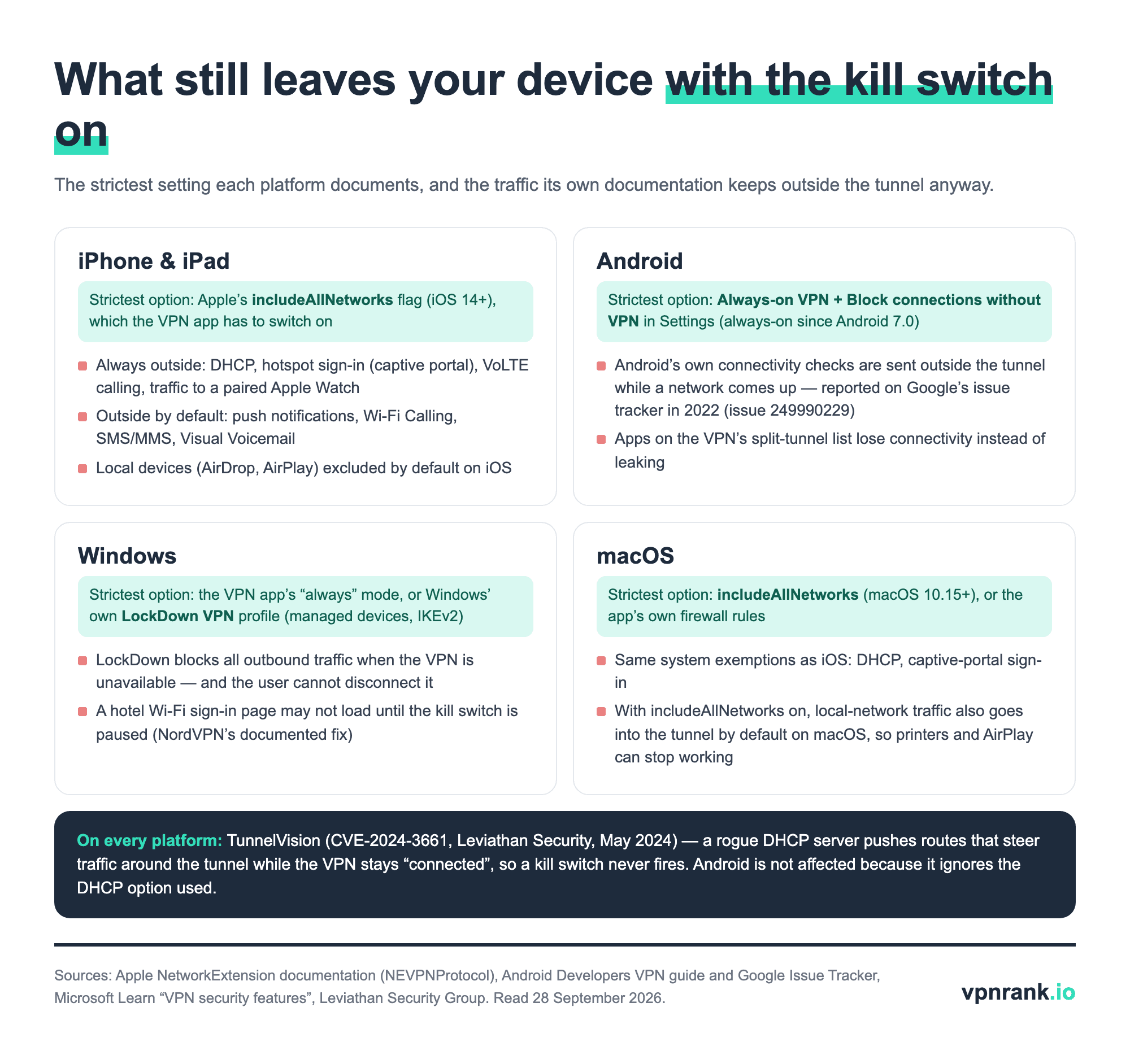
This is not new. Proton VPN disclosed in March 2020 that iOS left connections opened before the VPN started outside the tunnel, and security writer Michael Horowitz reported in 2022 that Apple answered his leak report with “The behavior you are seeing is expected”. As of September 2026, Proton's own kill switch page still warns that some DNS requests from Apple services can bypass the VPN on iOS and macOS with the kill switch on.
Android has its own footnote. Google's VPN guide says lockdown blocks any traffic that doesn't use the VPN, but issue 249990229 on Google's tracker, opened in September 2022, reports that Android's own connectivity checks are sent outside the tunnel while a network comes up. And one attack beats kill switches on every platform except Android: TunnelVision (CVE-2024-3661), in which a rogue DHCP server on the same Wi-Fi pushes routes that steer traffic around the tunnel while the VPN stays connected, so nothing triggers the block.
Practical ruletreat the kill switch as protection against your own tunnel failing, not against the network you are on. Turn on the strictest mode your platform offers — on Android that is the system's Block connections without VPN — and on hostile Wi-Fi add the things a kill switch cannot do: DNS leak protection, WebRTC off in the browser, and a torrent client bound to the VPN interface.
When the kill switch cuts you off, the fix is usually one setting — symptom by symptom
Most kill-switch complaints are the feature doing its job in a situation you did not expect. These are the fixes the providers themselves publish, matched to the symptom.
| Symptom | Most likely cause | Official fix | Source |
|---|---|---|---|
| No internet after disconnecting the VPN (Windows) | Strict mode is on (ExpressVPN “Enable at all times”, Proton Advanced, Surfshark Strict) | Switch the kill switch back to its standard mode, or reconnect. ExpressVPN also suggests resetting each adapter's DNS to automatic | ExpressVPN, Proton VPN |
| No internet on iPhone after disconnecting | ExpressVPN's Advanced Kill Switch blocks while disconnected | Profile → Internet Kill Switch → Standard Kill Switch | ExpressVPN |
| No internet on Linux after disconnecting | Kill-switch firewall rules left in place | nordvpn set killswitch 0, nordvpn disconnect, then reboot | NordVPN |
| No internet on a Mac after quitting the app | Network settings left pointing at the tunnel | Network settings → Wi-Fi → Advanced → TCP/IP: IPv4 “Using DHCP”, IPv6 “Automatically” | IPVanish |
| Hotel or airport Wi-Fi sign-in page won't load | The captive portal needs a connection before the VPN can start | Turn off auto-connect and the kill switch, sign in to the Wi-Fi, reconnect, turn the kill switch back on | NordVPN |
| Printer, NAS or Chromecast unreachable | Local traffic is being forced into the tunnel | Allow LAN access: ExpressVPN “Allow access to devices on local network”, PIA “Allow LAN Traffic”, NordVPN turn off “Stay invisible on LAN” | ExpressVPN, PIA |
| AirDrop, AirPlay or CarPlay broken on iPhone | Strict routing also captures local-network traffic | ExpressVPN: switch Advanced to Standard; Surfshark: turn off “Invisible on LAN” on trusted networks | ExpressVPN, Surfshark |
| Apps you excluded with split tunnelling lose internet too | The kill switch takes priority over split tunnelling | Expected behaviour on NordVPN and IPVanish (Android); Proton says the two are incompatible on most platforms except Windows | NordVPN |
Fixes as published in each provider's help centre, read 28 September 2026. Verified September 2026.
The LAN rows come with a caution worth repeating from our split tunnelling explainer: allowing local-network access is fine at home, but on hotel and café Wi-Fi the “local network” is everyone on the hotspot. Re-enable the stricter setting before you travel, and re-run the kill switch test after changing any of these options.
A kill switch will not make a mediocre VPN trustworthy, and it does not replace DNS, IPv6, or WebRTC leak protection — those are separate defences that have to be right too. But as a single feature, it is the one that decides whether an inevitable dropped connection stays a non-event or becomes the exact moment you were trying to avoid. Turn it on, set it to the strictest mode you can tolerate, and spend five minutes proving it works.
Frequently asked questions
Do I really need a kill switch if my VPN is reliable?
Reliability is not the point — even the best VPN tunnels drop when you switch networks, wake a device, or hit server maintenance. The kill switch protects those brief transition windows, which happen many times a day. If your privacy depends on never exposing your real IP, you need one; if you only stream casually, it matters less.
What is the difference between app-level and system-level kill switches?
An app-level kill switch only cuts traffic for a chosen list of apps, like your browser or torrent client, while everything else stays online during a drop. A system-level kill switch blocks all traffic on the entire device except through the VPN tunnel. System-level is stronger and recommended for anyone who treats a leak as unacceptable.
How do I test whether my kill switch actually works?
Connect to the VPN, confirm your IP shows the server address, then force-quit the VPN process from your task manager rather than clicking disconnect. Immediately refresh an IP-check page. If it fails to load, the kill switch works; if your real IP appears, it does not. Repeat with a DNS and WebRTC leak test for full coverage.
Does a kill switch stop DNS and WebRTC leaks too?
Not by itself. A kill switch blocks traffic when the tunnel drops, but DNS requests can still fall back to your ISP's resolver, and browsers can expose your real IP through WebRTC even while the VPN is active. Those are separate protections, so you need a provider that handles DNS in-tunnel and a browser configured against WebRTC leaks.
Why should I force-quit the app instead of pressing disconnect when testing?
The in-app disconnect button triggers a graceful, managed shutdown that the client can handle cleanly, so it can hide whether the kill switch would actually fire in a real failure. Force-killing the process simulates a genuine crash — which is what happens when a tunnel really drops — and that is the only way to test the fail-safe honestly.
How do kill switches work differently on phones?
Mobile devices switch networks and sleep constantly, creating frequent reconnection windows where leaks happen. On Android, enabling the system 'Always-on VPN' with 'Block connections without VPN' enforces protection even if the app crashes. iOS is more restrictive, so brief reconnection leaks are harder to fully eliminate. Use a provider's strict or permanent mode where available.
How important is a kill switch when torrenting?
It is the feature that matters most for torrenting, because every peer in a swarm sees the IP address of each connection — a tunnel drop without a kill switch hands your real IP to all of them. It is still not enough on its own: Proton VPN's own guide also tells users to bind the torrent client to the VPN interface, so the client has no route out at all if the tunnel disappears.
Why do I have no internet after turning my VPN off?
Almost always because a strict kill-switch mode is on — ExpressVPN's “Enable at all times”, Proton's Advanced kill switch, Surfshark's Strict mode or Android's Block connections without VPN all block traffic whenever the VPN is off, by design. Switch the kill switch to its standard mode or reconnect. On a Mac or Linux machine where the app has been closed, the providers' fix is to reset the network settings to automatic or clear the leftover firewall rules.
Will a kill switch slow down my internet?
No. A kill switch is a set of firewall rules that only act when the tunnel drops — while your VPN is connected and healthy, it does nothing and has no measurable impact on speed. Any slowdown you notice comes from the VPN encryption and server distance, not from the kill switch itself.
The best VPNs of 2026, ranked
Now you know how — here are the VPNs we recommend, independently tested and ranked for speed, streaming, privacy and value. Any of them works for everything in this guide.

ExpressVPN Ultra fast & secure. Great for privacy, downloads, and everyday browsing on all your devices. 24/7 live chat support.
ExpressVPN Ultra fast & secure. Great for privacy, downloads, and everyday browsing on all your devices. 24/7 live chat support.

IPVanish Fast speeds with unlimited device connections. Strong no-logs privacy and 24/7 live chat support. Great for families.

IPVanish Fast speeds with unlimited device connections. Strong no-logs privacy and 24/7 live chat support. Great for families.

NordVPN Excellent speeds with one of the largest server networks. Strong security features and easy-to-use apps. 24/7 live chat support.
NordVPN Excellent speeds with one of the largest server networks. Strong security features and easy-to-use apps. 24/7 live chat support.

Proton VPN Swiss-based VPN with strong privacy focus. Audited no-logs policy and open-source apps. Great for privacy-conscious users.
Proton VPN Swiss-based VPN with strong privacy focus. Audited no-logs policy and open-source apps. Great for privacy-conscious users.

CyberGhost Fast speeds and strong privacy tools. Simple apps, automatic WiFi protection, and 24/7 live chat support.
CyberGhost Fast speeds and strong privacy tools. Simple apps, automatic WiFi protection, and 24/7 live chat support.

TotalVPN Affordable VPN with strong privacy and reliable speeds. Easy-to-use apps for all major devices. No-logs policy.
TotalVPN Affordable VPN with strong privacy and reliable speeds. Easy-to-use apps for all major devices. No-logs policy.

Private Internet Access High-speed VPN with a large server network and advanced security settings. Ad blocker included and 24/7 live chat support.
Private Internet Access High-speed VPN with a large server network and advanced security settings. Ad blocker included and 24/7 live chat support.

Surfshark Unlimited device connections at a budget-friendly price. Includes ad blocker and strong privacy tools. Great value for money.
Surfshark Unlimited device connections at a budget-friendly price. Includes ad blocker and strong privacy tools. Great value for money.
Rankings are based on our independent testing methodology. Each guide applies the criteria described on that page, including relevant performance, privacy, product features, and value data. We may earn affiliate commissions from links on this page, which helps fund our testing — this does not influence our rankings.
Related articles

How-To Guides
How to Test If Your VPN Is Actually Working: IP, DNS, WebRTC and Kill-Switch Checks
Privacy & Security
VPN Split Tunneling, Explained: Route Some Traffic, Keep the Rest Local
How-To Guides
Is It Safe to Torrent With a VPN? A Plain-English Guide to P2P, Kill Switches and No-Logs

Privacy & Security
Is Public Wi-Fi Actually Dangerous? The Real Risks, Explained