VPN Split Tunneling, Explained: Route Some Traffic, Keep the Rest Local
How the feature works, the everyday problems it solves, and which providers actually offer it on your operating system.

vpnrank.io is reader-supported: we may earn a commission if you buy through links in this article. This never affects our rankings.
VPN split tunneling lets you send some of your traffic through the encrypted VPN tunnel while other apps or websites connect directly to the internet. Instead of an all-or-nothing switch, you choose what gets protected and what stays local, keeping speed and access where the tunnel would only get in the way.
What split tunneling actually is
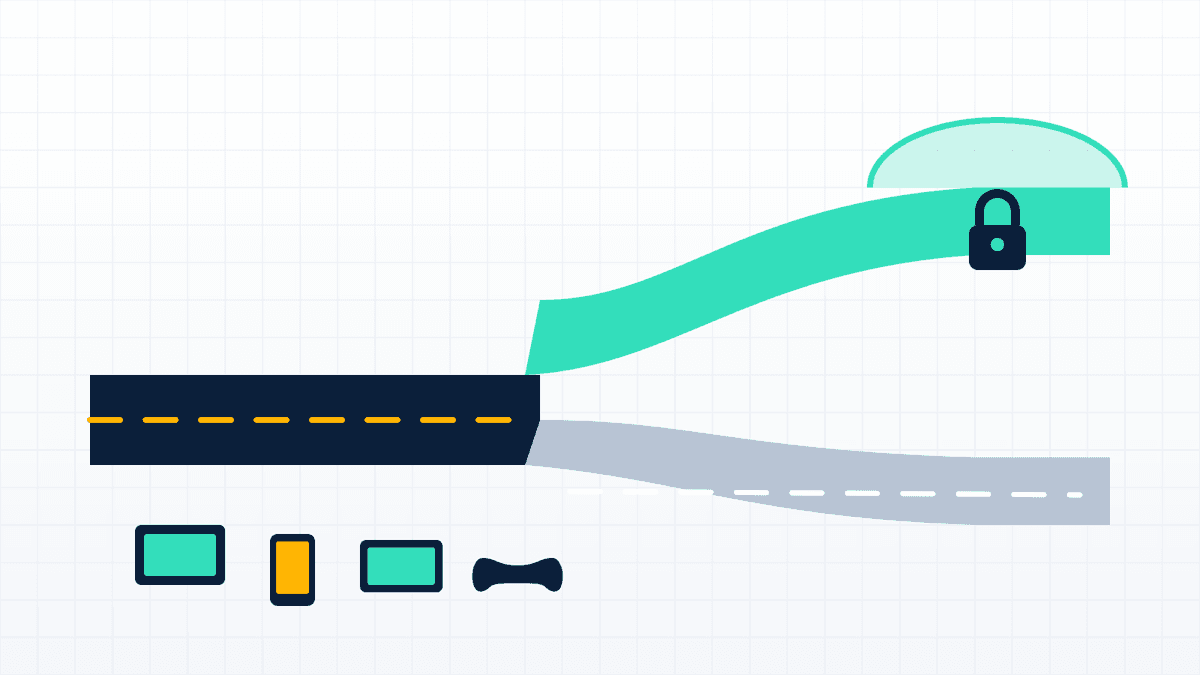
Without split tunneling, a VPN is a blunt instrument: flip it on and every packet your device sends is wrapped in encryption and routed through a remote server. Split tunneling breaks that monolith apart. It lets your VPN app inspect where each stream of traffic is headed and decide, per app or per destination, whether it belongs in the secure tunnel or on the open road.
Think of your connection as a highway with a checkpoint. Most traffic gets waved into the armored tunnel that hides your IP address and location. But traffic you have flagged as low-risk or latency-sensitive is waved straight through, reaching the internet over your normal ISP connection at full speed. The two paths run side by side, and you set the rules.
- App-based rules: choose which installed applications use the VPN and which bypass it entirely.
- URL or domain rules: some providers let you exclude specific websites in a browser extension rather than whole apps.
- IP and subnet rules: advanced clients let you route or exclude specific IP addresses and subnet ranges, useful for reaching devices on your home network.
How it works under the hood
When you enable a VPN, your operating system's routing table normally points all outbound traffic at a virtual network adapter created by the VPN app. Split tunneling changes those routing rules selectively, so packets from excluded apps or destinations skip the virtual adapter and use your default gateway instead. Nothing about the encrypted tunnel weakens; the excluded traffic simply never enters it.
On most desktops the VPN client maintains a list of process names or destination IPs and hooks into the operating system's networking layer to steer each packet accordingly. The precise mechanism differs by platform, which is exactly why the same VPN brand can offer rich split tunneling on Windows and a stripped-down version, or none at all, on macOS. We get to those caveats below.
Two ways to split: inclusive vs. inverse
Split tunneling comes in two flavours, and the difference matters for both security and convenience. The default posture you pick determines what happens to any app you have not explicitly named in your rules, which is usually the majority of your traffic. Vendors sometimes label these inclusive versus exclusive, or split-include versus split-exclude, but the behaviour is the same.
- 1Inclusive (route only selected apps): everything bypasses the VPN by default, and only the apps you list are pushed through the tunnel. Fast and minimal, but anything you forget to add stays unencrypted.
- 2Inverse (exclude selected apps): everything goes through the VPN by default, and only the apps or sites you list are allowed to bypass it. This is the safer default because new or forgotten apps are protected automatically.
Inverse split tunneling, sometimes called reverse or exclusive split tunneling, is generally the better choice for privacy-minded users. You get the security of a full VPN connection while carving out narrow exceptions for the handful of things that genuinely need to bypass it, such as a banking site that blocks foreign IPs or a printer on your local network.
Real problems split tunneling solves
Split tunneling is not a party trick; it fixes concrete daily friction. The common thread is that a full-tunnel VPN sometimes breaks something local or slows something down, and split tunneling lets you keep the protection while removing the friction, one exception at a time.
Keep banking and local services working
Banks and payment apps often flag logins from a foreign IP address as fraud, locking your account or triggering endless verification. With split tunneling you can route your banking app directly through your real local connection while everything else stays inside the VPN; our VPN and online banking guide lists which providers support that on each platform. The same trick keeps region-locked government portals, local news, and food-delivery apps behaving normally.
Stream a foreign catalog without losing home access
This is where a lot of people first meet the feature. You can point your streaming app at a VPN server abroad to watch a foreign library while your browser, smart-home apps, and local services keep using your home connection. If you are weighing this against a full-tunnel setup, our editorial guides on VPNs for streaming and watching Netflix libraries go deeper, and Can I Watch checks what is actually available where you are.
Sports fans lean on the same setup during big broadcasts. You can keep a match streaming through a server in the broadcaster's country while local banking and messaging apps stay direct, which is handy for anyone following the 2026 World Cup or other live sports from abroad.
Gaming, printers, and smart-home devices
Online games are latency-sensitive, and routing them through a distant VPN server adds lag. Excluding your game or launcher from the tunnel keeps ping low while the rest of your machine stays protected. The same logic applies to hardware on your local network.
- Printers and NAS drives: a full tunnel can hide LAN devices from your computer; excluding local subnets restores access to printers, network storage, and scanners.
- Smart-home hubs: cameras, speakers, and IoT controllers often expect a direct local connection to pair and stream.
- Low-latency gaming: route the game direct while chat, downloads, or a browser stay in the tunnel.
If you would rather protect every device at the network level instead of per app, a VPN on your router or an Android TV box is the complementary approach, and our main best VPN rankings weigh both.
Want a VPN with mature split tunneling across desktop and mobile? See why ExpressVPN ranks near the top of our list.
See our top-ranked VPNs →Which providers support it, and where
Support for split tunneling is uneven, and the honest answer to "does my VPN have it?" is "on some of your devices, maybe." The feature is nearly universal on Windows and Android, patchier on macOS, and rare on iOS. Here is where the major providers stand as of mid-2026, though apps update often, so confirm against the provider before you buy.
- ExpressVPN: has offered app and website split tunneling on Windows for years, plus Linux and Android; split tunneling has returned to macOS (Big Sur 11 and later), though at the time of writing it ships in the beta of ExpressVPN's rebuilt Qt-based desktop app rather than the App Store build.
- NordVPN: app-level split tunneling on Windows, Android, and Android TV; on macOS the app does not offer true app-level split tunneling on modern versions, and iOS has none, but a browser-extension "Exclude from VPN" option can carve out specific websites.
- Surfshark: its Bypasser feature covers Windows, Android, macOS, and, since its iOS launch in late 2024, iPhone and iPad, making it one of the broadest for mobile users.
- Proton VPN: full split tunneling on Windows and Android, with macOS support still flagged as experimental; on Linux it is limited to the official Fedora and Ubuntu apps, and there is no iOS support.
- Private Internet Access: long offered it on Windows, Linux, and Android, and re-released a macOS version in 2024 after Apple's framework changes.
If deciding between providers, our VPN price index tracks live pricing and our speed tests show which ones stay fast when the tunnel is doing the heavy lifting.
The operating-system caveats nobody mentions
The single biggest reason split tunneling is inconsistent comes down to how each operating system lets apps touch the network. What is trivial on Windows can be technically hard or outright blocked on macOS and iOS, and providers rarely spell this out on the pricing page.
Why macOS is the hard case
With macOS Big Sur in November 2020, Apple removed the older Network Kernel Extension APIs in favour of a more restrictive Network Extension framework. That change improved system stability and security but broke the traditional way VPNs implemented per-app routing. For a stretch, many providers simply dropped split tunneling on Mac.
Some have since rebuilt it on the newer framework, which is why you see providers re-releasing or reintroducing the feature rather than having offered it continuously. If macOS split tunneling is a must-have, verify it works on your specific macOS version and app build, not just that the provider lists Mac support somewhere.
iOS, Linux, and the fine print
- iOS: historically absent because of platform restrictions, though Surfshark's 2024 launch showed it is possible; most rivals still do not offer it on iPhone or iPad.
- Linux: often limited to specific distributions or package formats rather than every install method, so a Flatpak or Debian build may lack what the official Ubuntu or Fedora app has.
- Excluded traffic is unencrypted: anything you route outside the tunnel is visible to your ISP and exposed to whatever risks a raw connection carries, so choose exclusions deliberately.
That last point is worth repeating: split tunneling trades a slice of privacy for convenience. Traffic you push outside the tunnel is not protected, so keep sensitive activity inside it. If you are configuring this for privacy reasons, our guide to the most private VPNs pairs well with a conservative, inverse-split setup.
Split tunneling and leaks
Because split tunneling deliberately sends some traffic outside the encrypted path, it is worth understanding how it interacts with the leaks a VPN is meant to prevent. A misconfigured setup, or a browser that ignores your rules, can expose more than you intended, which is why testing after setup matters.
- DNS requests: if excluded apps use your ISP's resolver, those lookups are visible; check our explainer on the DNS leak to understand the risk.
- WebRTC: browsers can reveal your real IP through WebRTC even when a VPN is active, independent of split tunneling rules.
- Verify after setup: run a leak test with your rules enabled to confirm the right traffic is, and is not, going through the tunnel.
Should you use it?
For most people the answer is: only if a full tunnel is breaking something. If your VPN works fine with everything routed through it, leave split tunneling off; the simplest configuration is also the safest. Reach for it when a specific app misbehaves or a specific device on your network goes dark.
When you do enable it, prefer inverse split tunneling, exclude the narrowest possible set of apps, and re-test for leaks. If you only need it for the occasional stream or match, a free VPN rarely offers the feature, and even when it does the speed caps undercut the point, so a mature paid provider is usually the better call.
Frequently asked questions
Is split tunneling safe to use?
It is safe as long as you understand the trade-off. Any traffic you route outside the VPN tunnel is unencrypted and visible to your ISP, so it carries the same risks as no VPN at all. The feature itself does not weaken the tunnel; the risk comes only from what you deliberately exclude. Keep sensitive activity inside the tunnel and exclude narrowly.
What is the difference between split tunneling and inverse split tunneling?
With standard inclusive split tunneling, traffic bypasses the VPN by default and only the apps you select are routed through it. Inverse split tunneling, also called exclusive mode, flips the default: everything goes through the VPN, and only the apps or sites you name are allowed to bypass it. Inverse is generally safer because anything you forget to configure stays protected automatically.
Does split tunneling slow down my internet?
It can actually speed things up. Traffic routed outside the tunnel skips VPN encryption and the detour to a remote server, so it reaches the internet at your normal connection speed. That is why people exclude latency-sensitive apps like online games or large local downloads while keeping privacy-sensitive traffic encrypted inside the tunnel.
Why does my VPN not have split tunneling on Mac?
Apple changed its networking frameworks with macOS Big Sur in November 2020, removing the older kernel-extension APIs that VPNs used for per-app routing. This broke split tunneling for many providers on Mac. Some have since rebuilt the feature on Apple's newer Network Extension framework, so availability depends on both the provider and your macOS version and app build.
Can I use split tunneling on iPhone or iPad?
Rarely. iOS platform restrictions long prevented split tunneling, and most providers still do not offer it on iPhone or iPad. Surfshark's Bypasser feature launched on iOS in late 2024, proving it is technically possible, but it remains the exception rather than the rule among major VPNs as of 2026.
Can split tunneling help me access local devices like printers?
Yes. A full VPN tunnel can hide devices on your local network, cutting you off from printers, network storage, and smart-home hubs. Excluding your local subnet, or the relevant apps, from the tunnel restores direct access to those devices while keeping the rest of your traffic encrypted through the VPN.
Which VPNs support split tunneling on the most platforms?
Support is broadest on Windows and Android across nearly all major providers. Surfshark stands out for covering iOS as well, while ExpressVPN and Private Internet Access have brought the feature back to macOS through newer app builds. Always confirm against the provider's current app, since support changes with updates.
The best VPNs of 2026, ranked
Now you know how — here are the VPNs we recommend, independently tested and ranked for speed, streaming, privacy and value. Any of them works for everything in this guide.

ExpressVPN Ultra fast & secure. Great for privacy, downloads, and everyday browsing on all your devices. 24/7 live chat support.
ExpressVPN Ultra fast & secure. Great for privacy, downloads, and everyday browsing on all your devices. 24/7 live chat support.

IPVanish Fast speeds with unlimited device connections. Strong no-logs privacy and 24/7 live chat support. Great for families.

IPVanish Fast speeds with unlimited device connections. Strong no-logs privacy and 24/7 live chat support. Great for families.

NordVPN Excellent speeds with one of the largest server networks. Strong security features and easy-to-use apps. 24/7 live chat support.
NordVPN Excellent speeds with one of the largest server networks. Strong security features and easy-to-use apps. 24/7 live chat support.

Proton VPN Swiss-based VPN with strong privacy focus. Audited no-logs policy and open-source apps. Great for privacy-conscious users.
Proton VPN Swiss-based VPN with strong privacy focus. Audited no-logs policy and open-source apps. Great for privacy-conscious users.

CyberGhost Fast speeds and strong privacy tools. Simple apps, automatic WiFi protection, and 24/7 live chat support.
CyberGhost Fast speeds and strong privacy tools. Simple apps, automatic WiFi protection, and 24/7 live chat support.

TotalVPN Affordable VPN with strong privacy and reliable speeds. Easy-to-use apps for all major devices. No-logs policy.
TotalVPN Affordable VPN with strong privacy and reliable speeds. Easy-to-use apps for all major devices. No-logs policy.

Private Internet Access High-speed VPN with a large server network and advanced security settings. Ad blocker included and 24/7 live chat support.
Private Internet Access High-speed VPN with a large server network and advanced security settings. Ad blocker included and 24/7 live chat support.

Surfshark Unlimited device connections at a budget-friendly price. Includes ad blocker and strong privacy tools. Great value for money.
Surfshark Unlimited device connections at a budget-friendly price. Includes ad blocker and strong privacy tools. Great value for money.
Rankings are based on our independent testing methodology. Each guide applies the criteria described on that page, including relevant performance, privacy, product features, and value data. We may earn affiliate commissions from links on this page, which helps fund our testing — this does not influence our rankings.