VPN vs Antivirus: What Each Actually Protects, and Why You Probably Need Both
One guards your connection, the other guards your device. They solve different problems, and neither makes the other redundant.

vpnrank.io is reader-supported: we may earn a commission if you buy through links in this article. This never affects our rankings.
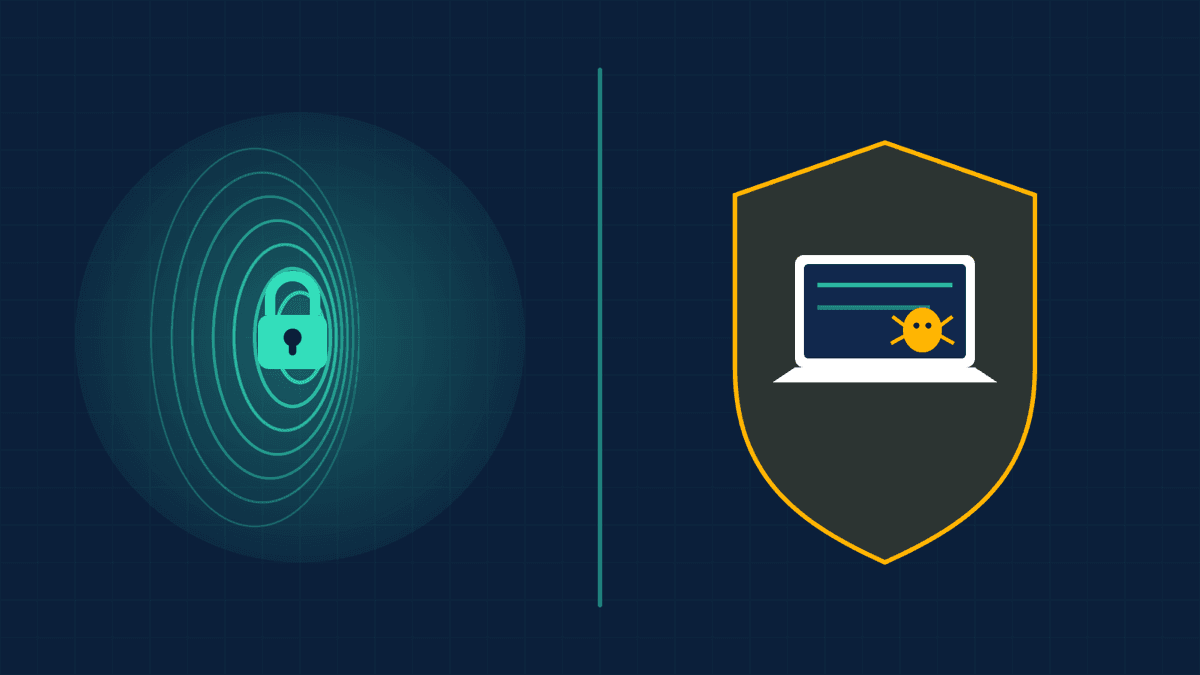
A VPN and antivirus are not rivals, and choosing between them is the wrong question. A VPN encrypts your internet connection and hides your IP address at the network layer; antivirus scans files and processes for malware at the device layer. They defend different things, so for full coverage most people want both.
They protect different layers of your digital life
The clearest way to understand these two tools is to picture where they sit. Your data has to travel across a network to reach the internet, and it also has to live on a device. A VPN protects the journey. Antivirus protects the destination. That single distinction explains almost everything about why one can never replace the other.
When you open a website, two very different risks appear at the same moment. First, someone on the same network, or your internet provider, might try to watch or intercept the traffic in transit. Second, the site or a download might try to plant something harmful on your computer. These are separate problems that call for separate defenses:
- A VPN works at the network level. It builds an encrypted tunnel between your device and a remote server, so anyone snooping on the connection sees scrambled data instead of your activity.
- Antivirus works at the device level. It watches files, apps, downloads and running processes, then quarantines or removes anything that matches known malware or behaves maliciously.
- Because they operate on different layers, they do not overlap. A VPN cannot scan a file, and an antivirus has no idea what your ISP can see.
Think of it like a car. A VPN is the tinted windows and the armored route you drive; it keeps outsiders from seeing or grabbing you on the road. Antivirus is the alarm and the mechanic that catches a problem inside the vehicle. Both matter, and neither does the other's job. The reason the confusion persists is that both are sold under the same "security" banner, often by the same companies, so shoppers assume buying one crosses the whole task off the list. It does not, and the sections below show exactly why.
What a VPN actually protects you from
A VPN is fundamentally a privacy and connection-security tool. Its job is to make your traffic unreadable to anyone between you and the VPN server, and to replace your real IP address with the server's. That produces a specific, well-defined set of protections, and it is important to be honest about where they begin and end.
Concretely, a good VPN helps against:
- Snooping on untrusted Wi-Fi. On hotel, cafe or airport networks, an attacker on the same network can try to intercept unencrypted traffic, spin up an "evil twin" hotspot, or hijack a captive portal. VPN encryption closes those windows.
- ISP and network tracking. Your internet provider can log the sites you visit and, in many countries, sell or hand over that data. A VPN hides your destinations from them.
- IP-based tracking and profiling. Masking your IP makes it harder for sites and ad networks to tie activity back to your location and identity.
- Geographic restrictions. By routing through a server elsewhere, a VPN lets you access services as if you were in that region, which is why it matters for travel and streaming.
It is worth being precise about the Wi-Fi case, because it is the most misunderstood. As of 2026 the overwhelming majority of web traffic already travels over HTTPS, so a stranger on the cafe network usually cannot simply pluck your banking password out of the air the way they could a decade ago. What HTTPS does not hide is the metadata around that traffic: the domain names you look up, the IP addresses you connect to, and the timing and volume of your activity. A VPN wraps that metadata in its own tunnel too, which is the layer it genuinely adds on top of HTTPS. So the honest pitch for a VPN on public Wi-Fi is not "otherwise everyone sees your passwords," but "it closes the metadata and network-trickery gaps that HTTPS leaves open."
The geographic-access point is where a VPN shines for everyday use rather than pure security. If you travel and want your home streaming library, our best VPNs for streaming guide and the Can I Watch checker cover it, and there are service-specific breakdowns for Netflix and BBC iPlayer. For the privacy side specifically, our most private VPNs guide ranks providers on no-logs audits and jurisdiction.
What a VPN does not do is just as important: it will not stop malware from installing, it will not catch a phishing page, and it will not clean an already-infected machine. Encryption protects the pipe, not what you choose to pull through it. If you download and run a malicious file over a VPN, it arrives on your disk perfectly intact, just encrypted in transit on the way there.
What antivirus actually protects you from
Antivirus, now often marketed as endpoint or threat protection, lives on your device and hunts for malicious software. Where a VPN is indifferent to what you download, antivirus is entirely focused on it: scanning files, monitoring behavior, and blocking or removing threats before they can do damage on the machine itself.
A modern antivirus or security suite typically defends against:
- Malware and viruses. Trojans, worms, spyware and classic viruses hidden in downloads or attachments.
- Ransomware. Software that encrypts your files and demands payment; good suites include behavior-based ransomware shields.
- Malicious downloads and infected attachments. Real-time scanning catches threats as files land on disk.
- Some phishing and dangerous sites. Many suites include web-reputation filters that warn you before you load a known scam page.
Modern engines do this two ways at once. Signature-based detection matches files against a database of known threats, while behavior-based (heuristic) detection watches what a program actually does, so it can flag a brand-new strain that no signature exists for yet. That second layer is why a good suite can catch some zero-day malware, though independent labs consistently show it is the hardest category for any product, free or paid, to stop reliably.
Crucially, antivirus can also remediate. If something already slipped through, it can find, quarantine and remove the infection. A VPN has no such capability. But antivirus is equally blind on the other side of the fence: it does nothing to encrypt your traffic, hide your IP, or stop your ISP or a Wi-Fi eavesdropper from seeing where you go. Point an antivirus at your network privacy and it simply has no answer, because that was never its job.
VPN vs antivirus, threat by threat
The fastest way to internalize the difference is to run real threats past both tools and ask which one, if either, responds. Notice how rarely they answer the same question, and how often a scenario needs the tool people assume they can skip. This is the core of the argument for defense in depth.
- 1Someone on hotel Wi-Fi tries to intercept your login. VPN protects. Antivirus does nothing.
- 2You download a file laced with ransomware. Antivirus protects. VPN does nothing.
- 3Your ISP is logging and selling your browsing history. VPN protects. Antivirus does nothing.
- 4You click a realistic phishing link and enter your password. Antivirus may warn you via web filtering; a VPN cannot help at all.
- 5A site tries to profile you by your IP address. VPN protects. Antivirus does nothing.
- 6A worm tries to spread from an infected USB stick. Antivirus protects. VPN does nothing.
Six common scenarios, and there is almost no overlap. That is the whole case in miniature: the tools are complementary, not interchangeable. The one row where both even appear, the phishing link, is also the one where neither fully saves you, which is a preview of a point later in this article: technology narrows the gaps, but the person at the keyboard still decides most outcomes. The mistake is treating the two tools as substitutes and then being surprised when the one you skipped was the one you needed.
So do you actually need both?
For most people in 2026 the honest answer is yes, but the nuance matters. Security professionals call the principle defense in depth: layering controls so that when one fails, another still stands. Because a VPN and antivirus cover non-overlapping risks, running both closes gaps that either alone would leave wide open.
That said, your real risk depends on how you use your devices. A useful way to decide:
- You travel, use public Wi-Fi, or care about ISP tracking? A VPN earns its place. Device malware protection alone leaves your connection exposed.
- You download software, open attachments, or share a family PC? Antivirus is non-negotiable. Encryption does nothing against a malicious installer.
- You do both, which is nearly everyone? Run both. They cost little relative to the loss they prevent, and they never fight each other.
There is no technical conflict in running them side by side, either. A VPN operates on outbound and inbound network traffic; an antivirus operates on files and processes. They occupy different parts of the system, so unlike running two competing antivirus engines at once, which genuinely can clash, a VPN plus one antivirus is a clean, supported combination on every major platform.
If the connection-privacy layer is the gap you want to close first, ExpressVPN pairs audited no-logs privacy with strong speeds across servers worldwide, so your traffic stays encrypted on any network you join.
See our top-ranked VPNs →Once you have decided you want the VPN layer, choosing a provider is its own exercise. Our best VPN overall rankings weigh privacy, speed and price together, the VPN Price Index tracks live pricing so you do not overpay, and the VPN speed tests show which services hold up under real load.
Free defenders, bundles, and the gaps that remain
Not every layer costs money, and the landscape has shifted. On Windows, the built-in Microsoft Defender has become a genuinely capable antivirus, earning perfect protection, performance and usability scores in independent AV-TEST evaluations and an Advanced+ rating from AV-Comparatives in early 2026. For a careful user who keeps their system updated, it covers the malware layer surprisingly well on its own.
But free and built-in tools leave real gaps you should plan around:
- Microsoft Defender includes a firewall, SmartScreen web filtering and controlled-folder-access ransomware protection, yet its web and phishing protection is strongest inside the Edge browser, so Chrome and Firefox users get noticeably less coverage.
- It ships with no VPN, so the entire network-privacy layer is simply absent; that is a separate purchase or a separate free tool.
- Free VPNs exist but come with trade-offs in speed, data caps and, in the worst cases, questionable data handling, which we cover in the best free VPN guide.
Some VPN providers now bundle threat protection into their apps, blocking known malicious domains, ads and trackers at the DNS level and, in the more advanced tiers, scanning downloads. That is a convenient extra layer, but it is not a full replacement for a dedicated antivirus that can scan files already on disk and remove an active infection. The industry framing is a useful shorthand: bundled protection stops you from reaching bad places, while an antivirus stops bad things that are already on your machine. Treat bundled protection as a bonus on top of, not a substitute for, real endpoint security.
One more nuance worth knowing: even a VPN can leak the very information it is meant to hide if it is poorly built. Misconfigured connections can expose your real IP through a DNS leak or a WebRTC leak, which is why choosing a tested, reputable provider matters as much as running one at all. A cheap or free VPN that leaks is arguably worse than none, because it sells you a false sense of security.
The two tools are a floor, not a ceiling
Running a VPN and antivirus together is a strong baseline, but neither addresses the single biggest weakness in most people's security: the human at the keyboard. Phishing and social engineering succeed by convincing you to hand over access, and no encryption or scanner reliably stops a good con. A few habits carry more weight than any single app.
To round out real protection, pair your tools with:
- A password manager and unique passwords, so one breached site does not cascade into all your accounts.
- Two-factor authentication on email, banking and anything important, which blocks most credential theft even after a leak.
- Prompt software updates, since unpatched apps and operating systems are among the most exploited entry points.
- Healthy skepticism toward urgent messages, unexpected attachments and login pages reached by clicking a link rather than typing the address yourself.
Notice how these habits plug the exact hole the earlier threat table exposed. The one scenario where both a VPN and antivirus came up short, a convincing phishing page you willingly log into, is precisely the one that two-factor authentication and a healthy pause defuse. That is defense in depth working as intended: where a technical layer runs out, a behavioral one takes over.
None of these replace a VPN or antivirus; they surround them. Security in 2026 is not a single product you buy but a stack of overlapping habits and tools that together make you a far harder target than the person next to you on the same coffee-shop network. Attackers, like water, flow toward the easiest path, and the whole point of layering is to make sure you are never it.
Frequently asked questions
Is a VPN or antivirus more important?
Neither is universally more important because they solve different problems. If your main risk is malware from downloads and attachments, antivirus matters most. If you use public Wi-Fi or worry about tracking, a VPN matters most. Most people face both risks, so the practical answer is to run both rather than rank them.
Does a VPN protect me from viruses and malware?
No. A VPN encrypts your connection and hides your IP address, but it cannot detect, block or remove malware. If you download an infected file or run a malicious installer, the VPN does nothing to stop it. Some VPN apps now block known malicious domains, but that is not a substitute for a real antivirus that scans files on your device.
Can antivirus replace a VPN?
No. Antivirus protects your device by scanning for malicious software, but it does nothing to your internet connection. It cannot encrypt your traffic, hide your IP address, or stop your ISP or a Wi-Fi eavesdropper from seeing where you go. The privacy and connection-security layer that a VPN provides is simply outside what antivirus does.
Do I need both a VPN and antivirus in 2026?
For most people, yes. They cover non-overlapping risks: antivirus guards your device against malware, while a VPN secures your connection and privacy. Running both follows the defense-in-depth principle, so a gap in one is still covered by the other. If you only ever browse on a trusted home network and never download anything, you might lean on one, but that describes very few people.
Is Windows Defender enough on its own?
For the malware layer, Microsoft Defender is now genuinely capable and scores well in independent 2026 lab tests, so many careful users do not need extra antivirus. However, it includes no VPN, so your connection-privacy layer is still missing, and its phishing protection is strongest only in the Edge browser. Defender covers device malware well, not network privacy.
Will using a VPN and antivirus together slow my computer down?
Both can add a small amount of overhead, but on modern hardware it is usually unnoticeable. A VPN may slightly reduce internet speed because traffic is encrypted and rerouted, and antivirus uses some system resources during scans. Reputable products are optimized to minimize this, and the protection they provide far outweighs the modest performance cost for nearly all users.
Can I run a VPN and antivirus at the same time?
Yes, and it is the recommended setup. A VPN works on your network traffic while an antivirus works on files and processes, so they operate in different parts of the system and do not conflict. The only combination to avoid is running two separate antivirus engines at once, which can clash. One antivirus plus a VPN is a clean, supported pairing.
The best VPNs of 2026, ranked
Now you know how — here are the VPNs we recommend, independently tested and ranked for speed, streaming, privacy and value. Any of them works for everything in this guide.

ExpressVPN Ultra fast & secure. Great for privacy, downloads, and everyday browsing on all your devices. 24/7 live chat support.
ExpressVPN Ultra fast & secure. Great for privacy, downloads, and everyday browsing on all your devices. 24/7 live chat support.

IPVanish Fast speeds with unlimited device connections. Strong no-logs privacy and 24/7 live chat support. Great for families.

IPVanish Fast speeds with unlimited device connections. Strong no-logs privacy and 24/7 live chat support. Great for families.

NordVPN Excellent speeds with one of the largest server networks. Strong security features and easy-to-use apps. 24/7 live chat support.
NordVPN Excellent speeds with one of the largest server networks. Strong security features and easy-to-use apps. 24/7 live chat support.

Proton VPN Swiss-based VPN with strong privacy focus. Audited no-logs policy and open-source apps. Great for privacy-conscious users.
Proton VPN Swiss-based VPN with strong privacy focus. Audited no-logs policy and open-source apps. Great for privacy-conscious users.

CyberGhost Fast speeds and strong privacy tools. Simple apps, automatic WiFi protection, and 24/7 live chat support.
CyberGhost Fast speeds and strong privacy tools. Simple apps, automatic WiFi protection, and 24/7 live chat support.

TotalVPN Affordable VPN with strong privacy and reliable speeds. Easy-to-use apps for all major devices. No-logs policy.
TotalVPN Affordable VPN with strong privacy and reliable speeds. Easy-to-use apps for all major devices. No-logs policy.

Private Internet Access High-speed VPN with a large server network and advanced security settings. Ad blocker included and 24/7 live chat support.
Private Internet Access High-speed VPN with a large server network and advanced security settings. Ad blocker included and 24/7 live chat support.

Surfshark Unlimited device connections at a budget-friendly price. Includes ad blocker and strong privacy tools. Great value for money.
Surfshark Unlimited device connections at a budget-friendly price. Includes ad blocker and strong privacy tools. Great value for money.
Rankings are based on our independent testing methodology. Each guide applies the criteria described on that page, including relevant performance, privacy, product features, and value data. We may earn affiliate commissions from links on this page, which helps fund our testing — this does not influence our rankings.