VPN vs Tor: How Each Works and When to Use Which
Two privacy tools, two very different threat models. Here is how onion routing and encrypted tunnels actually differ on speed, anonymity and everyday trade-offs.

vpnrank.io is reader-supported: we may earn a commission if you buy through links in this article. This never affects our rankings.
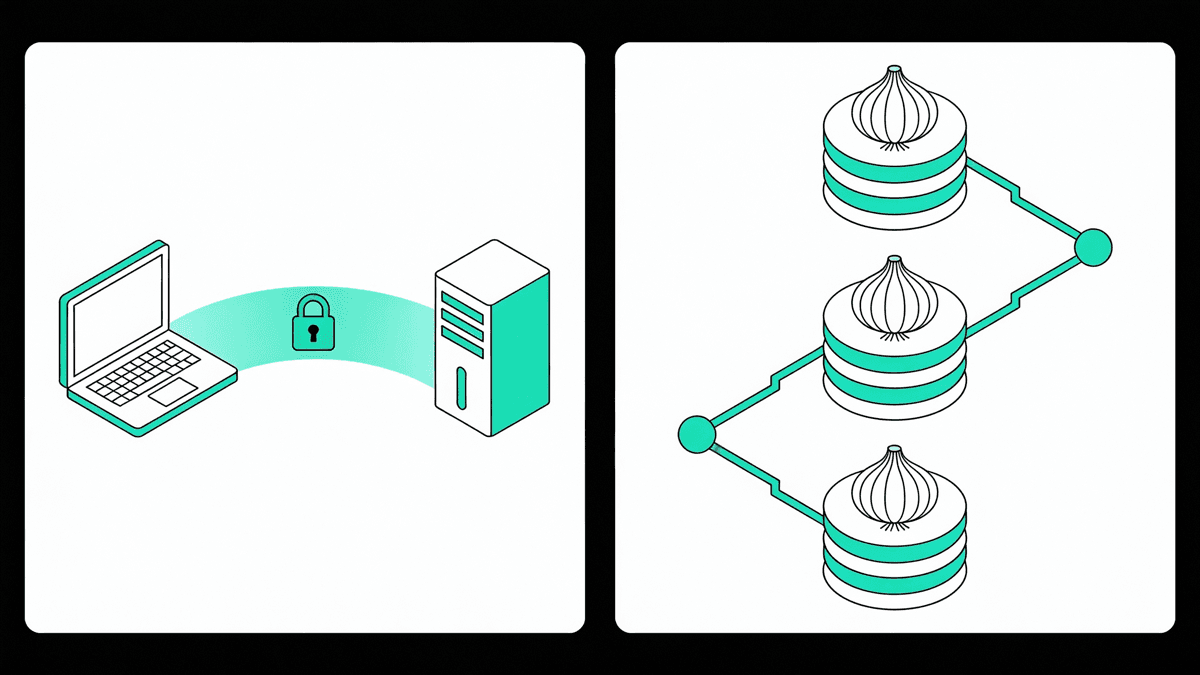
A VPN and Tor both hide your IP address, but they are built for different jobs. A VPN routes all your traffic through one encrypted server you choose; Tor bounces it through three volunteer relays so no single one knows both who you are and where you are going. That structural difference decides everything else — speed, anonymity and which tool actually fits your threat.
How a VPN actually works
A VPN creates a single encrypted tunnel between your device and a server the provider operates. Everything you send is wrapped in encryption before it leaves your machine, travels to that one server, and exits onto the open internet wearing the server's IP address instead of yours. The provider sits in the middle of that tunnel by design.
Because there is only one hop, the overhead is small. A good VPN adds a modest latency penalty and can still deliver hundreds of megabits per second on a fast line — close enough to your native speed that streaming, calls and large downloads feel normal. You can also pick where the exit server sits, which is why a VPN doubles as a way to change your apparent region.
The catch is trust. Your ISP can no longer see which sites you visit, but the VPN provider now can — it knows your real IP and your destination. You are not eliminating a middleman so much as swapping your ISP for a company you have chosen and, ideally, whose no-logs claims have been independently audited. If you want the deeper version of this argument, our guide on whether a VPN makes you anonymous unpacks exactly what a tunnel does and does not hide.
That trust is not something you have to take on faith. The credible providers now commission independent audits of their no-logs claims, publish transparency reports listing government data requests, and run their servers in RAM-only mode so nothing survives a reboot or a seizure. None of that makes a VPN anonymous in Tor's sense — the company still sits in your path — but it does turn an abstract promise into something you can actually scrutinise before you hand over your browsing.
How Tor and onion routing work
Tor takes the opposite approach. Instead of one trusted server, it sends your traffic through three randomly selected volunteer relays and wraps it in layers of encryption — one per relay — which is where the name "onion routing" comes from. Each relay peels off exactly one layer, learning only where to pass the packet next, never the whole path.
The three relays each play a distinct role, and the design is deliberately compartmentalised so that no single machine ever sees both your identity and your destination at the same time.
- Guard (entry) node: sees your real IP but not the site you are visiting. Tor reuses the same small set of guards for months to reduce certain attacks.
- Middle relay: knows only that traffic came from the guard and goes to the exit. It sees neither your IP nor your destination.
- Exit node: sees the destination and the final decrypted request, but not your real IP.
That split is the whole point: an observer would need to control or watch both the guard and the exit at once to link you to your activity. It is what gives Tor genuine structural anonymity that no single-hop VPN can match. It also costs you dearly in speed — bouncing across three volunteer machines scattered around the world introduces heavy latency, and typical Tor throughput sits in the low single-digit megabits, which is why the Tor Browser feels sluggish and is a poor fit for streaming or downloads.
Tor also does something a VPN simply cannot: it hosts .onion services, sites that live entirely inside the network and never touch a public exit node at all. For those addresses the traffic stays encrypted end to end and the exit-node weakness never enters the picture, which is why sensitive resources — from newsrooms' secure drop-boxes to the network's own documentation — often publish an onion address alongside their normal one. It is a reminder that Tor is a whole ecosystem, not just a slower way to change your IP.
Speed and everyday usability
This is the least ambiguous difference. A VPN is fast enough to disappear into your daily routine; Tor is not, and it was never meant to be. The gap is not marginal — it is the difference between watching 4K video and waiting for a text-heavy page to finish loading. That single fact quietly settles most people's choice before privacy even enters the conversation.
- VPN: small latency hit, hundreds of Mbps achievable, fine for streaming, gaming, calls and big downloads.
- Tor: heavy latency from three global hops, throughput often in the low single-digit Mbps, unusable for streaming and painful for anything real-time.
- Region control: a VPN lets you choose a country; Tor's exit is random and often triggers captchas or outright blocks on mainstream sites.
There is a structural reason Tor cannot simply get faster the way a VPN provider can. Its capacity comes from volunteers donating bandwidth, exit relays are the scarcest and most legally exposed part of that pool, and every user is sharing it — so the network is perpetually demand-heavy at the exit. A commercial VPN, by contrast, buys and provisions its own high-capacity servers precisely to keep speeds up. That is why the gap is not a temporary shortcoming you can tune away; it is baked into how each system is funded and built.
If your goal is watching a library from another country rather than resisting surveillance, that is a VPN job, not a Tor job — and it is worth being honest about which one you actually have. Our streaming VPN guide and the broader best VPN overview cover that use case directly, and you can sanity-check raw performance with our VPN speed test.
Anonymity and threat models: the real difference
Speed is the obvious contrast; the threat model is the one that matters. A VPN gives you privacy from your ISP and local network but concentrates trust in one company. Tor gives you anonymity from any single observer on the network but distributes trust across strangers. Choosing well means naming who you are actually hiding from.
A VPN protects you well against a specific, common set of adversaries: an ISP selling browsing data, a landlord or employer running the Wi-Fi, or an attacker on public networks trying to snoop on unencrypted traffic. What a VPN does not give you is anonymity from the provider itself — structurally, it knows exactly who you are. Our VPN privacy guide goes deep on how to evaluate that trust, from audited no-logs policies to jurisdiction and RAM-only infrastructure.
Tor is built for a harsher threat model: journalists, activists, researchers and people in hostile or heavily censored environments who need to keep no single party from linking their identity to their activity. It achieves that by refusing to trust any one relay. But it introduces its own weak point — the exit node. The link between the exit and the destination is not encrypted by Tor itself, so a malicious exit can watch or tamper with any non-HTTPS traffic passing through it. This is not theoretical: in early 2021 a single actor was found to control over a fifth of Tor's exit capacity, running attacks like stripping HTTPS to intercept and redirect data.
That is why HTTPS matters even more on Tor than elsewhere, and why the two tools solve genuinely different problems. A VPN reduces the number of parties who can watch you to one you have vetted. Tor removes any single party's ability to see the whole picture, at the cost of exposing your traffic at the exit and slowing everything to a crawl.
For everyday privacy — encrypting travel Wi-Fi, keeping your ISP out of your browsing, or reaching a home service abroad — a fast, independently audited no-logs VPN is the practical choice.
See our top-ranked VPNs →Can you combine Tor and a VPN?
Yes, and there are two ways to stack them — but the order changes what you protect and what you expose. Most people who combine the tools want to hide the fact that they use Tor at all, or to shield the Tor network from a hostile local network. That points to one configuration far more often than the other.
Tor over VPN (connect to the VPN first)
You connect to your VPN, then open Tor. Your ISP sees only an encrypted VPN connection, not that you are using Tor, and the Tor guard node sees the VPN's IP rather than your real one. This is the more common and generally safer stack, especially where Tor use itself is monitored or blocked.
- Hides Tor use from your ISP and from anyone watching your local network.
- Keeps your real IP away from the guard node — Tor sees the VPN instead.
- Trade-off: the VPN knows your real IP and that you are heading into Tor, and Tor remains the speed bottleneck.
VPN over Tor (route Tor through the VPN)
Here traffic enters Tor first and exits through a VPN, so the outside world sees the VPN's IP and the VPN never learns your real address — only the Tor exit's. It reduces captchas and site bans, but it is fiddly, exposes your destinations to the VPN at the exit, and only works cleanly with TCP-based tunnels since Tor does not carry UDP traffic.
For the overwhelming majority of people, neither stack is worth the complexity. The combinations exist for narrow, high-stakes situations. If your actual need is speed, region access or keeping your ISP out of your business, a single well-chosen VPN does the job without the headaches — you can even run it at the network level on a router or Android TV device.
So which should you use?
The honest answer is that they are not really competitors — they answer different questions. Pick based on who you are hiding from and what you are willing to sacrifice in speed and convenience. For most everyday privacy goals, a reputable VPN wins on the balance of protection and usability; Tor earns its place when anonymity is non-negotiable.
- 1Choose a VPN for streaming and region access, securing public or travel Wi-Fi, keeping your ISP out of your browsing, remote work, and general day-to-day privacy at full speed.
- 2Choose Tor when you need genuine anonymity from any single observer — sensitive research, activism, journalism, or high-censorship environments — and can accept slow speeds and blocked sites.
- 3Combine them (Tor over VPN) only in narrow cases where you must hide Tor use itself from your ISP or a hostile local network.
Whichever you pick, the fundamentals of good hygiene still apply: keep software updated, prefer HTTPS everywhere, and if you go the VPN route, verify the no-logs claims with an independent audit and check for leaks. Our explainers on DNS leaks and WebRTC leaks cover the two most common ways a VPN can quietly betray your real IP even when it looks like it is working.
Frequently asked questions
Is Tor safer than a VPN?
It depends on your threat. Tor offers stronger structural anonymity because no single relay knows both your identity and destination, which matters for activists or journalists. A VPN is safer against everyday risks like ISP tracking or snooping on public Wi-Fi, and is far faster. They protect against different adversaries, so "safer" has no single answer.
Can I use Tor without a VPN?
Yes. Tor works entirely on its own and needs no VPN to function. Adding a VPN only changes specific things — mainly hiding your Tor use from your ISP or keeping your real IP away from the entry node. For many users, plain Tor with the official Tor Browser is enough, provided they stick to HTTPS sites and follow standard safety guidance.
Why is Tor so slow compared to a VPN?
Tor routes your traffic through three volunteer-run relays scattered across the world, each adding latency, and those relays share limited bandwidth among many users. A VPN uses a single optimized server, so overhead is small. The result is a dramatic gap — VPNs can reach hundreds of megabits per second while Tor typically manages low single-digit speeds, making it poor for streaming or downloads.
What is a malicious Tor exit node?
An exit node is the final relay that connects Tor traffic to the open internet, and that last hop is not encrypted by Tor itself. A malicious operator can run one to watch or tamper with any non-HTTPS traffic passing through — stripping encryption or injecting content. It's a real risk: in 2021 a single actor briefly controlled over a fifth of exit capacity. Using HTTPS mitigates most of it.
Should I use Tor over VPN or VPN over Tor?
Tor over VPN — connecting to the VPN first, then opening Tor — is the more common and generally safer stack. It hides your Tor use from your ISP and keeps your real IP from the entry node. VPN over Tor is fiddly, exposes destinations to the VPN, and only suits narrow cases. Most people need neither; a single VPN handles everyday privacy.
Does a VPN make me anonymous like Tor does?
No. A VPN hides your IP and activity from your ISP and local network, but the provider itself can see your real IP and destination, so you are trusting one company rather than becoming anonymous. Tor distributes that trust so no single party sees the whole path. If true anonymity is the goal, a VPN alone is not the right tool.
The best VPNs of 2026, ranked
Now you know how — here are the VPNs we recommend, independently tested and ranked for speed, streaming, privacy and value. Any of them works for everything in this guide.

ExpressVPN Ultra fast & secure. Great for privacy, downloads, and everyday browsing on all your devices. 24/7 live chat support.
ExpressVPN Ultra fast & secure. Great for privacy, downloads, and everyday browsing on all your devices. 24/7 live chat support.

IPVanish Fast speeds with unlimited device connections. Strong no-logs privacy and 24/7 live chat support. Great for families.

IPVanish Fast speeds with unlimited device connections. Strong no-logs privacy and 24/7 live chat support. Great for families.

NordVPN Excellent speeds with one of the largest server networks. Strong security features and easy-to-use apps. 24/7 live chat support.
NordVPN Excellent speeds with one of the largest server networks. Strong security features and easy-to-use apps. 24/7 live chat support.

Proton VPN Swiss-based VPN with strong privacy focus. Audited no-logs policy and open-source apps. Great for privacy-conscious users.
Proton VPN Swiss-based VPN with strong privacy focus. Audited no-logs policy and open-source apps. Great for privacy-conscious users.

CyberGhost Fast speeds and strong privacy tools. Simple apps, automatic WiFi protection, and 24/7 live chat support.
CyberGhost Fast speeds and strong privacy tools. Simple apps, automatic WiFi protection, and 24/7 live chat support.

TotalVPN Affordable VPN with strong privacy and reliable speeds. Easy-to-use apps for all major devices. No-logs policy.
TotalVPN Affordable VPN with strong privacy and reliable speeds. Easy-to-use apps for all major devices. No-logs policy.

Private Internet Access High-speed VPN with a large server network and advanced security settings. Ad blocker included and 24/7 live chat support.
Private Internet Access High-speed VPN with a large server network and advanced security settings. Ad blocker included and 24/7 live chat support.

Surfshark Unlimited device connections at a budget-friendly price. Includes ad blocker and strong privacy tools. Great value for money.
Surfshark Unlimited device connections at a budget-friendly price. Includes ad blocker and strong privacy tools. Great value for money.
Rankings are based on our independent testing methodology. Each guide applies the criteria described on that page, including relevant performance, privacy, product features, and value data. We may earn affiliate commissions from links on this page, which helps fund our testing — this does not influence our rankings.