Privacy Explained
What Can Someone Do With Your IP Address?
What a stranger can really learn or do with the address, what only your internet provider can, and the five-minute fix if someone has it.

The short answer
Someone who has your IP address can look up your approximate city and your internet provider, and can send junk traffic at the address to knock your connection offline (a DDoS attack). As of October 2026 that is the realistic list: an IP address does not contain your name, street address, files or passwords, and only your internet provider can link it to you, normally after a legal request. If someone threatens you with it, switch the router off for 5 to 10 minutes to try for a new address. A VPN hides the address before the fact; it does not undo an attack on an address already known.
vpnrank.io is reader-supported: we may earn a commission if you buy through links on this page. This never affects our picks.
Someone with your IP address can find your city and provider, not your name
An IP address is the number your internet provider lends your connection so that replies know where to go. Anyone who has it can paste it into a free lookup and read a country, a region, usually a city, and the name of the provider that owns the address. The lookup does not return a person, a street or a device, because that information is not stored anywhere a stranger can query.
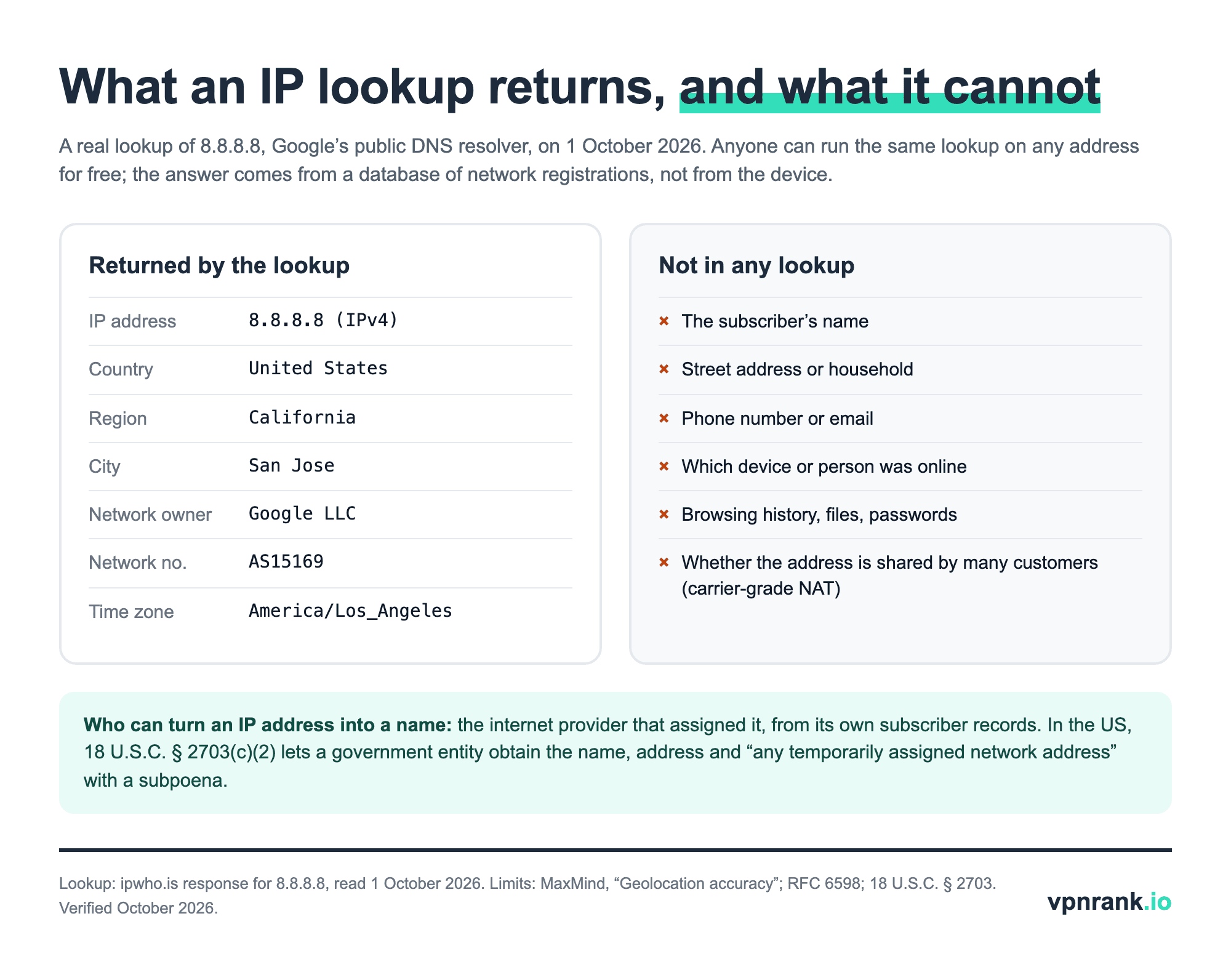
The card above is a real lookup, run on 1 October 2026 for 8.8.8.8, the address of Google's public DNS service. The card shows the fields that describe the connection: the address type, country, region, city, the owning network (Google LLC), its network number (AS15169) and a time zone. The full response also carries a postal code and a pair of coordinates, which are the database's estimate for the network and not a reading from any device. Nothing in it names a person. You can run the same query on your own address with our IP address lookup, or see which address websites currently receive from you with what is my IP.
Sometimes the address is not even yours alone. Mobile carriers and some home providers place customers behind carrier-grade NAT, a system that lets a whole group of subscribers share one public address of the older, four-number kind (IPv4); RFC 6598 reserved the 100.64.0.0/10 block for exactly that purpose in April 2012. On such a connection the address a stranger holds points at a shared gateway, and an unrequested connection aimed at it has no single household to land on, although a flood can still slow the shared gateway.
Practical rule:An IP address tells a stranger roughly where your connection is and who provides it. It tells nobody who you are; only the provider's own records do that, and those are released through legal process, not through a lookup site.
IP geolocation gets the city right about two times in three
The location shown for an IP address is an estimate from a commercial database, not a GPS reading. MaxMind, one of the best-known suppliers of such databases, publishes its own accuracy figures for its GeoIP products: 99.8% at country level, about 80% at state level for addresses in the United States, and 66% for the city, counted as correct when the true location is within 50 km.
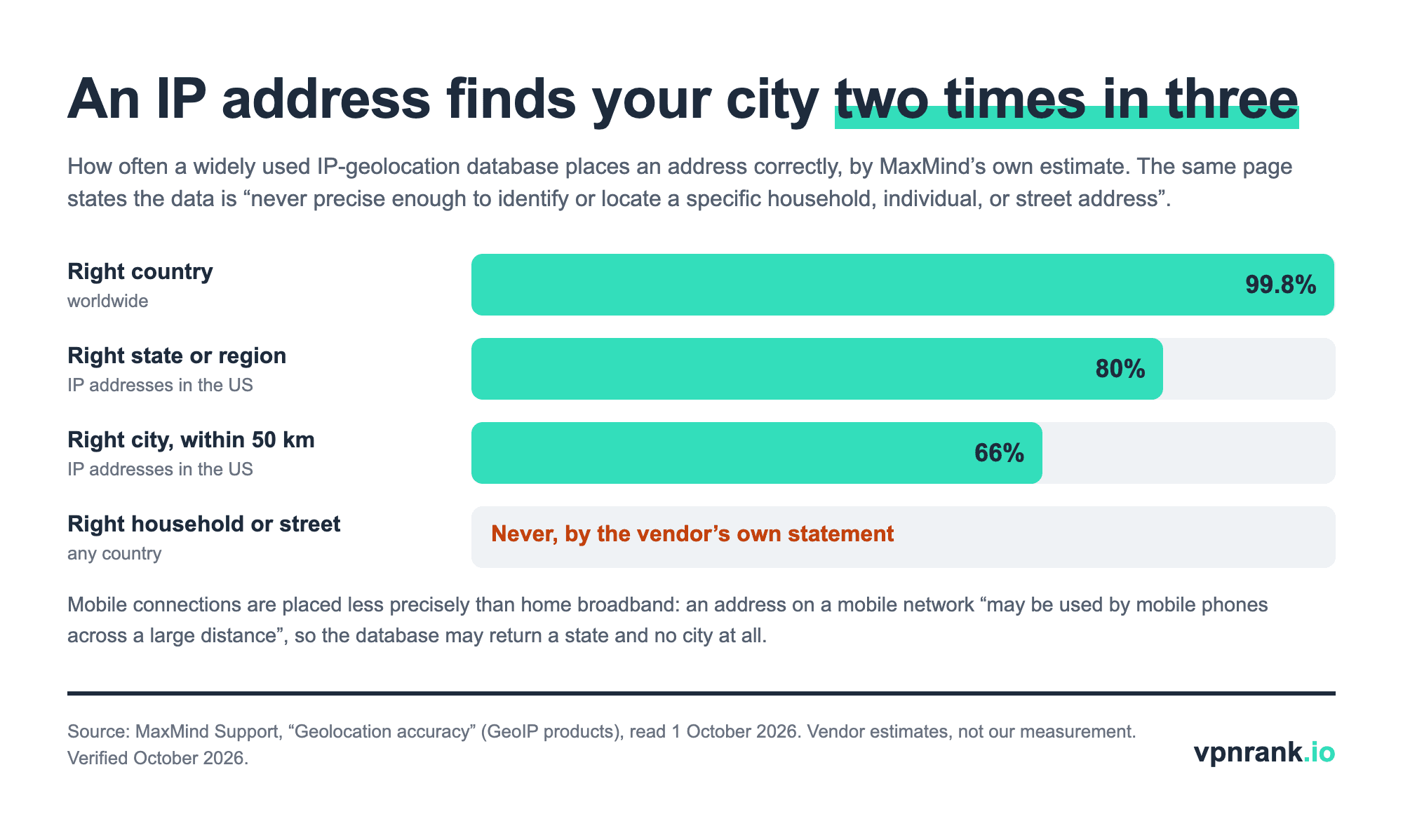
So even for addresses in the United States the city is wrong one time in three, and 50 km is a generous target to begin with. MaxMind's support page goes further and states that GeoIP data “is never precise enough to identify or locate a specific household, individual, or street address”. Each result also carries an accuracy radius; the example on MaxMind's own page is a set of coordinates with a radius of 100 km, meaning the real location is probably somewhere inside a circle 200 km wide.
Phones on mobile data are placed worse than home broadband. MaxMind explains that an address on a mobile network “may be used by mobile phones across a large distance”, and that when it cannot be specific it returns only the country and state with no city at all. The coordinates a lookup prints are the centre of an estimate. A message that quotes your town back at you proves the sender ran a lookup, not that they know where you live.
Websites, email senders and some call apps already see your IP address
Your IP address is not a secret you can keep, because nothing online works without handing it over. Every website, game server and app you connect to receives it with each request, in the same way a letter carries a return address. What varies is whether other users, and not only the service itself, get to see it, and that depends on how each app routes its traffic.
| What you do | Who receives your IP address | Official setting that hides it | What the setting doesn't cover |
|---|---|---|---|
| Open a website or click any link | The server that hosts the page, plus embedded ad and analytics services | None in the browser itself | A link sent to you by a stranger shows your address to whoever runs that link's server |
| Download or share a file over BitTorrent | Every other peer sharing that file; the tracker hands each peer a list of the others' IP addresses and ports | None: peers have to connect to each other directly | Anyone can join the same swarm and read the list |
| Open an email in Gmail | Google's servers; images are loaded through Google | On by default: senders “can't use image loading to get information about your computer or location” | Links you click inside the message |
| Open an email in Apple Mail | The sender's image server, unless protection is on | Settings > Apps > Mail > Privacy Protection > Protect Mail Activity | Apple states it “does not extend to links or email attachments” |
| One-to-one WhatsApp call | The person you call, when the call connects directly | Settings > Privacy > Advanced > Protect IP address in calls | WhatsApp warns call quality may be reduced |
| WhatsApp group call | WhatsApp's servers only | Nothing to change: group calls are always relayed | The setting above is still needed for one-to-one calls |
| Discord voice, video or text | Discord's servers only | Nothing to change: all traffic is routed through Discord's servers | Links other users post in chat lead to servers they may control |
| Console party chat through third-party apps | Possibly other players in the session | Xbox advises avoiding apps that “can expose your IP to others in your session” | Xbox states it cannot prevent attacks at the IP level |
Who receives your IP address, by activity, and the official setting that hides it. Sources: Gmail Help, Apple iPhone User Guide, WhatsApp Help Center, Engineering at Meta, Discord engineering blog, Xbox Support, BitTorrent.org. Verified October 2026.
The WhatsApp row is the least obvious. Meta's engineering team explains that in a direct call the two phones “need to know each other's IP addresses so that call data packets can be delivered to the correct device”, so by default the person you call can see yours. Turning on Protect IP address in calls relays every call through WhatsApp's servers instead, and WhatsApp says relayed calls stay end-to-end encrypted. Discord made the opposite design choice from the start: its engineers wrote that routing all traffic through Discord servers ensures “your IP address is never leaked” to other users.
The first row is the simplest way for a stranger to get an address. A link is a request to a server, and whoever controls that server logs the address of everyone who opens it. No setting in a browser prevents this, which is why the address should be treated as something strangers can get, and the useful question becomes what they can do with it. Browsers can also disclose addresses during video calls; our WebRTC leak test shows what yours reveals.
The realistic attack is a DDoS that knocks your connection offline for minutes
The one thing a hostile stranger can do with an IP address alone is flood it. In a DDoS (distributed denial-of-service) attack, many machines send junk traffic to one address until the line is full and nothing else gets through. Xbox Support describes the usual motive in gaming as retaliation when a match does not go the attacker's way, and says such attacks are illegal in most regions.
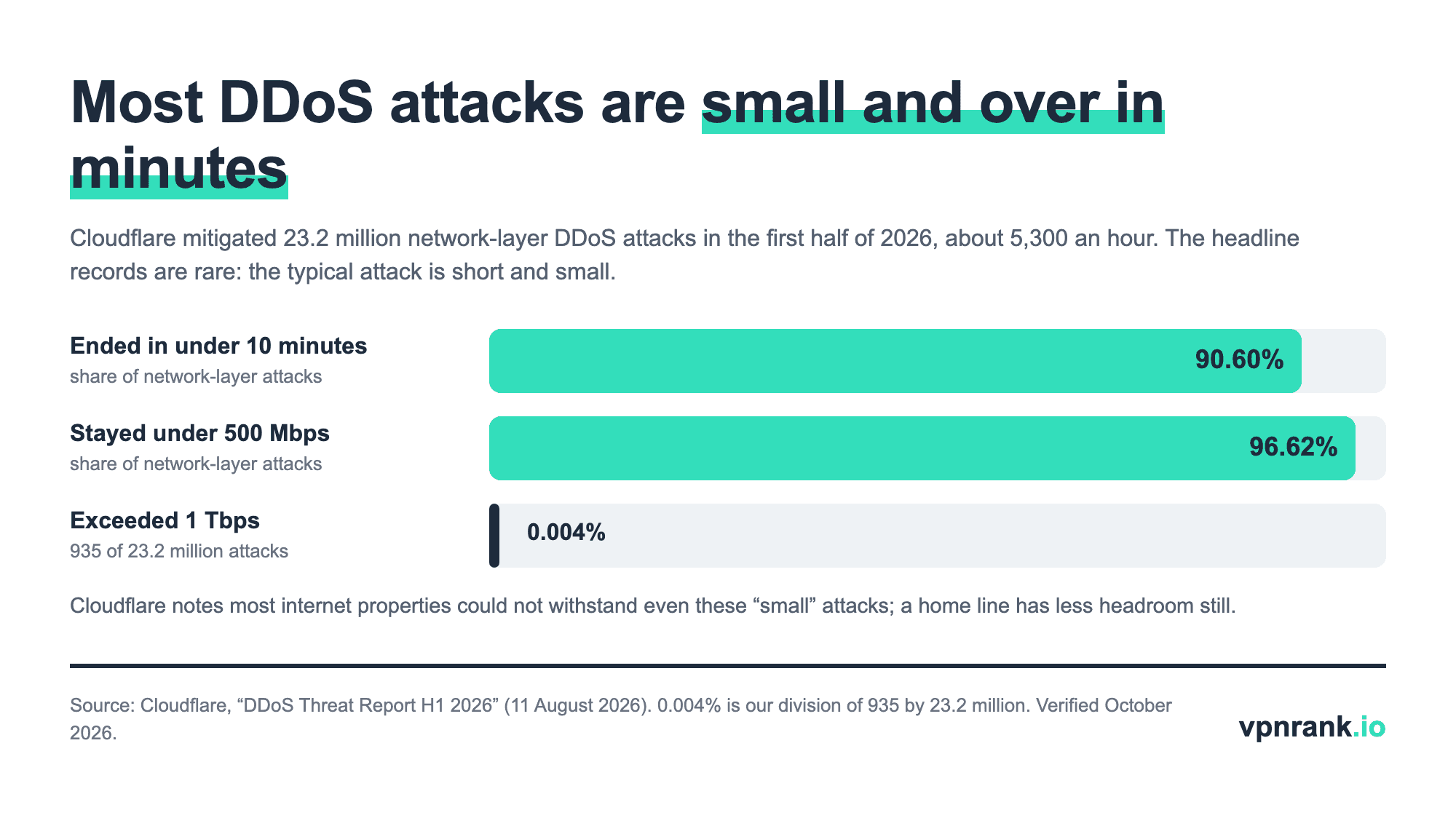
The numbers explain why this is a nuisance more than a catastrophe. Cloudflare's report for the first half of 2026 counted 23.2 million network-layer attacks (floods of raw traffic aimed at an address), roughly 5,300 an hour, and found that 90.60% ended in under 10 minutes and 96.62% stayed under 500 Mbps. Only 935 exceeded 1 Tbps, which is a million Mbps. Those figures count attacks on the networks Cloudflare protects, not on home lines, and small is relative: Cloudflare adds that most internet properties “wouldn't be able to withstand even those small attacks”. A home connection has less spare capacity still, so a flood can take the household offline while it lasts; it does not damage devices or reach anything stored on them.
Attackers rarely own the machines involved. They rent them from “booter” or “stresser” websites, which is why threats tend to sound like “I'm going to boot you offline”, one of the phrases Xbox lists as a warning sign. Those services are a police target: Europol reported that in the week of 13 April 2026, Operation PowerOFF saw 21 countries send more than 75,000 warning emails and letters to identified users, make 4 arrests and take down 53 domains, working from seized databases holding over 3 million user accounts. Paying for an attack leaves a record.
Knowing your IP address does not let hackers into your devices
An IP address is a destination, not a key. To get into a device, an attacker needs something listening at that address that accepts a connection: a service left open to the internet, a router admin page with its factory password, or malware already on the machine. A home router blocks unrequested inbound connections unless someone, or some feature, has opened a path through it.
What an attacker can do is probe. A port scan knocks on each numbered “door” of an address to see whether any service answers, and the internet is scanned this way constantly whether or not anyone has singled you out. The defence is to make sure nothing answers that should not. The US Cybersecurity and Infrastructure Security Agency (CISA) lists the router settings that matter in its home network guidance:
- 1Change the router's administrator password. CISA's wording: do it “to help protect it from an attack using default credentials”.
- 2Turn off remote management. This is the feature that lets the admin page be reached from the internet; CISA says to turn it off “to guard against unauthorized individuals accessing and changing your router's configuration”.
- 3Disable UPnP unless you need it. Universal Plug and Play lets devices open inbound ports on their own. CISA: “disable UPnP unless you have a specific need for it”.
- 4Update the firmware. Check the manufacturer's site for the latest version, since an old router with a known flaw is the case where an address alone can be enough.
- 5Leave the built-in firewall on. CISA notes that most wireless routers come with a configurable network firewall.
With those five in place, a scan of your address should find nothing of yours to talk to. The exception is anything you exposed on purpose, such as a game server, a camera or remote desktop reached through port forwarding; each of those is a door you opened and needs its own password and updates. If your connection sits behind carrier-grade NAT, unrequested inbound connections do not reach your router at all, a side effect explained in our guide to static and dynamic IP addresses.
Nobody can use your IP address from a distance unless your own device lets them
A common fear is that a stranger will commit a crime “from” your IP address and leave you to answer for it. Knowing the number does not allow that. Replies to any connection go back to the real address holder, so an outsider who merely fakes your address as the sender never receives the answers and cannot log in, browse or download anything as you.
The way it does happen is from the inside. The FBI's public service announcement of 12 March 2026, “Evading Residential Proxy Networks”, describes how home devices get enrolled as relays for other people's traffic: free VPN services that enrol users' devices without obtaining their consent, pirated software carrying malware, and TV streaming devices that arrive with malware already installed. Once a device is a relay, the FBI says, its IP address “can be used by threat actors to mask their online illegal activity, making the consumer appear responsible”.
The other inside route is your Wi-Fi: anyone connected to your network goes out to the internet under your address, which is the practical reason to keep a strong Wi-Fi password and a separate guest network. The FBI's protective advice is plain: avoid TV streaming devices that claim to provide free sports, shows and movies, exercise caution before downloading free VPN apps, do not install pirated software, use official app stores and keep devices updated. None of it involves hiding the IP address, because the address was never the weak point.
Only your internet provider can link an IP address to your name
The record that connects an IP address to a customer exists in one place: the provider that assigned it, which logs which subscriber held which address at which time. A private person cannot get that record by asking. It is released through legal process: to authorities in criminal cases, and to a plaintiff holding a court order in lawsuits over file sharing. Services you log in to also see your address next to your account, but a stranger cannot query them.
In the United States the rule is in the Stored Communications Act. Under 18 U.S.C. § 2703(c)(2), a provider must give a government entity holding a subpoena a subscriber's name, address, session times and durations, length and type of service, means of payment, and the “subscriber number or identity, including any temporarily assigned network address”. Paragraph (c)(3) adds that the government “is not required to provide notice to a subscriber or customer”. Paragraph (c)(2) itself names administrative, grand jury and trial subpoenas as sufficient for this list, so no search warrant is needed for it.
In the European Union the same link is what makes an IP address personal data. In Breyer v Germany (case C-582/14, 19 October 2016) the Court of Justice ruled that a dynamic IP address logged by a website is personal data for that website's operator where it has “the legal means which enable it to identify the data subject with additional data which the internet service provider has”. The reasoning matches the US statute: the address alone identifies nobody; the address plus the provider's records does.
If someone has your IP address, restart the router and report any threats
For most people the correct response to “someone has my IP” is nothing, because every site visited today has it too. Act when there is a threat attached, or when the connection actually drops during a game or call. The steps below come from Xbox Support's DoS guidance and work for any home connection, console or not.
- 1Note your current address. Open what is my IP and write the number down so you can tell whether it changes.
- 2Power the router and modem off for 5 to 10 minutes. Xbox Support says a complete reset “requires turning off the power to your networking equipment for 5 to 10 minutes”, which increases the likelihood of getting a new IP address the attacker does not have.
- 3Check the address again. If it is different, the old one is no longer yours and the problem is over.
- 4If it did not change, call your internet provider. Say you believe you are being attacked and ask for a new address. Xbox notes the provider may also have more information about where the attack came from.
- 5Report the person on the platform. On Xbox, report the voice or text message that carried the threat, then mute or block the profile. Xbox Support agents cannot identify an attacker, so the report is about enforcement, not tracing.
- 6Contact local law enforcement if you feel your personal safety is at risk. That is the warning at the top of Xbox's own page, and it applies when a threat mentions your home, family or workplace.
Then close the route the address leaked through. If it came from a call, turn on Protect IP address in calls in WhatsApp. If it came from a voice app used alongside a game, switch to a chat service that relays traffic through its own servers. If it came from a link, there is nothing to fix on your device; the address was all the link could collect. A new address plus a closed leak puts the other person back to knowing nothing.
A VPN replaces the address others see, which helps before an attack and not after
A VPN (virtual private network) sends your traffic through the provider's server, so websites, game servers and call partners see the server's IP address in place of yours. Xbox Support lists using a VPN among its measures to avoid DoS attacks for that reason. A flood aimed at that address goes to the VPN provider's server, not to your home line.
The limits are worth knowing before paying. A VPN switched on after someone already has your real address does nothing about that address; the router restart above does. A VPN app does not run on an Xbox or PlayStation, so a console is covered only when the VPN runs on the router, or when the console shares a computer's connection. The VPN provider now sees what your internet provider used to see, and websites still recognise you through logins and cookies. If the app's connection drops, traffic can return to your real address unless a kill switch blocks it, which you can verify with our kill switch test.
For choosing a server, pick the nearest one: the goal is a different address, and distance only adds delay, which matters in games (more in do you need a VPN for gaming). Some apps can also swap the server address on a timer, so an address someone noted during one session is no longer in use in the next. The free alternatives each cover less. A browser proxy changes the address for one browser only, and mobile data swaps your home address for the carrier's. Our guide to hiding your IP address compares the methods, is my VPN working confirms the swap, and the VPN Price Index shows what each provider charges today.
VPNs that fit this job
Keeping your home IP address away from strangers needs four different things depending on the device and the risk: a free option, cover for consoles, an address that keeps changing, and a block on leaks when the tunnel drops. One provider from our list fits each; the wider comparison is on our gaming VPN ranking.
| VPN | Best for | 2-year price | Why | Deal |
|---|---|---|---|---|
| Proton VPN | Free cover on one phone or laptop | $2.99/mo30-day refund | Proton VPN's free plan has no data limit and shows no ads, according to Proton's free-plan page (checked October 2026). It covers one device at a time, which is enough to keep a home address out of calls and links on that device at no cost. Proton says the free plan is supported by paying users. | Get dealPrice today |
| ExpressVPN | Consoles and other devices without VPN apps | $2.79/mo30-day refund | ExpressVPN's router page says a VPN on the router protects “every device using your Wi-Fi”, including devices that “don't support VPN apps”. That is the route for an Xbox or PlayStation, which cannot install a VPN app. | Get dealPrice today |
| Surfshark | An address that changes by itself on a Mac | $1.78/mo30-day refund | Surfshark's help centre says its Rotating IP feature for macOS changes your IP address every 5 minutes within your selected city, country or region, or globally, so an address captured in one session soon stops being yours. It does not work with Dedicated IP, Static IP or Multi-Hop servers. | Get dealPrice today |
| NordVPN | Blocking leaks when the VPN drops | $3.09/mo30-day refund | NordVPN's help centre says its kill switch on iOS is enabled by default and disables system-wide internet access if the VPN connection breaks. On Windows the Internet Kill Switch cuts off the internet connection when the app is disconnected from NordVPN's servers; check in the app's settings that it is switched on. | Get dealPrice today |
Prices are the 2-year plan per month in USD from our VPN Price Index, checked daily.
Need a different use case? See the full gaming VPN ranking
Frequently asked questions
Is it okay to give out my IP address?
It is low risk but not useful, so there is rarely a reason to. Every website and app you use already receives your IP address, and all it gives a stranger is an approximate city and your provider's name. The one real downside is that a hostile person could flood the address to disrupt your connection. Share it with a support agent or a friend hosting a game server if needed; do not post it publicly next to your name.
How do I check if my IP address is being monitored?
You cannot see who has looked up your IP address, because lookups query a public database and never touch your connection. What you can check is your own side: run a lookup on your address to see what it shows, review your router's list of connected devices for anything you do not recognise, and remove free VPN or streaming apps you do not trust, since the FBI warns those can turn a device into a relay for other people's traffic.
How long does it take to get a new IP address after restarting the router?
Xbox Support recommends leaving the networking equipment powered off for 5 to 10 minutes, which increases the likelihood of a new address but does not guarantee one. Providers lend addresses for a set lease period and tend to hand the same address back if the equipment returns before the lease ends. If the address is unchanged after 10 minutes, leave the equipment off for longer or ask the provider to assign a new one.
Does my IP address change when I switch to mobile data or another Wi-Fi?
Yes. The public IP address belongs to the network, not to the phone or laptop. On home Wi-Fi the address is the one your internet provider lent to your router; on mobile data it is one of the carrier's, frequently shared with many other customers at once; on a café network it is the café's. Someone holding your home address learns nothing about you once the device is on a different network.
Can a website or game ban my IP address?
Yes. Because every service receives your IP address with each request, it can refuse requests from that address, which is how IP bans and country blocks work. A ban on an address follows the address, not the person: it lifts if your provider gives you a different one, and it can catch someone else who later receives your old address or shares it with you behind carrier-grade NAT. Account bans are separate and unaffected.
Does incognito mode hide my IP address?
No. Incognito or private browsing only stops the browser from keeping history, cookies and form entries on your own device after the window closes. Each request still leaves from the same connection, so websites, your internet provider and anyone running the network see the same IP address as in a normal window. Changing the address that sites see takes a VPN, a proxy or a different network.
Sources we read for this guide
- Geolocation accuracy (MaxMind Support)
- RFC 6598: IANA-Reserved IPv4 Prefix for Shared Address Space (IETF, April 2012)
- 18 U.S.C. § 2703: Required disclosure of customer communications or records (Legal Information Institute, Cornell Law School)
- Judgment in Case C-582/14, Breyer v Bundesrepublik Deutschland (Court of Justice of the European Union, 19 October 2016)
- DoS and DDoS attacks on Xbox (Xbox Support)
- DDoS Threat Report H1 2026 (Cloudflare, 11 August 2026)
- Europol-supported global operation targets over 75 000 users engaged in DDoS attacks (Europol, 16 April 2026)
- Evading Residential Proxy Networks, PSA I-031226 (FBI Internet Crime Complaint Center, 12 March 2026)
- Home Network Security (CISA)
- How to protect your IP address on WhatsApp calls (WhatsApp Help Center)
- Enhancing the security of WhatsApp calls (Engineering at Meta, 8 November 2023)
- How Discord Handles Two and Half Million Concurrent Voice Users using WebRTC (Discord, 10 September 2018)
- Choose whether to show images (Gmail Help)
- Use Mail Privacy Protection on iPhone (Apple iPhone User Guide)
- BEP 3: The BitTorrent Protocol Specification (BitTorrent.org)
- ipwho.is lookup response for 8.8.8.8 (read 1 October 2026)
- Proton VPN free plan (Proton)
- VPN for routers (ExpressVPN)
- Surfshark Rotating IP feature for macOS (Surfshark Support)
- NordVPN Kill Switch: how does it work (NordVPN Help Center)